RealSpeed
- By
RealSpeed shows your real movement speed on the Character panel, right next to its Speed stat. The game's own Speed line only counts the speed rating on your gear; RealSpeed shows how fast you actually run.
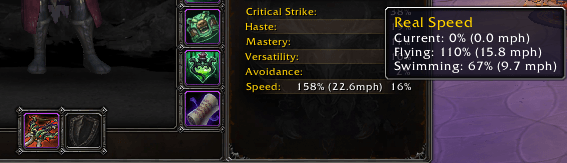
Default UI Tooltip
Description
RealSpeed
RealSpeed shows your real movement speed on the Character panel, right next to its Speed stat. The game's own Speed line only counts the speed rating on your gear; RealSpeed shows how fast you actually run.
What it does:
Your real run speed. Your total run speed sits beside the Speed stat, as a percentage and in miles per hour. It's always your run speed, so the number doesn't change with what you happen to be doing when you look.
Current, flying and swimming speed. Hover the number for your current speed, plus your flying and swimming speed when you have them.
Nothing running in the background. RealSpeed only works while the Character panel is open.
Commands
- /rs (or /realspeed) - list all slash commands.
- /rs toggle - show or hide the speed.
Notes
- Works with Blizzard's Character panel and EllesmereUI's.
- Blizzard's panel is never changed; the number is drawn beside it.
Known limitations
- If the Speed stat isn't showing on your Character panel, the number has nothing to sit next to and doesn't show either.
- Where the game hides your speed from addons, the number doesn't show until it's readable again.
- On EllesmereUI's Character panel, a client language where its Speed label differs from Blizzard's shows no number.
Compatibility
- Retail (12.1.5).
- No dependencies and no embedded libraries.
Reporting a problem
Describe what you did and what happened, with a screenshot if it's visual, and include the output of /rs diag and any Lua error text.
RealSpeed Team