BossPanel
- By
Boss mechanics from the Adventure Guide, shown inline in your dungeon tracker.
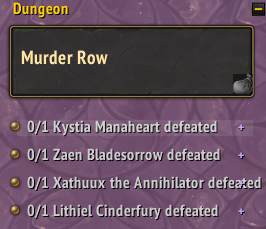
Boss Panel before any bosses are selected. Plus icons on each boss name. Loot bag on bottom right corner of dungeon name banner.
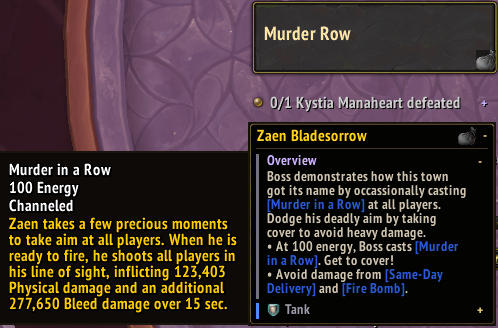
Tool tip functionality is enabled for all abilities, just hover over their names.
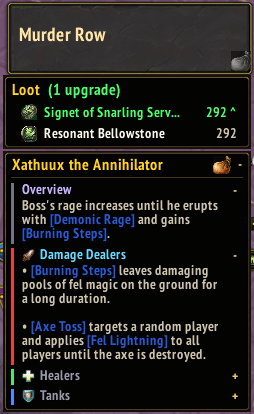
Click the loot icon next to any specific boss name to see their available loot for your spec. ilvl upgrades at the top.
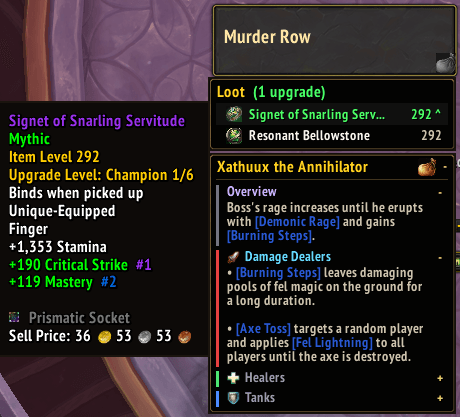
Hover over any item in the boss loot list to see the tooltip.
Description
BossPanel puts the Adventure Guide where you need it. Every boss line in your dungeon
tracker gets a button. Click it and that boss's mechanics open in place, so you never have to stop
to open the journal mid-run.
Everything shown is read from the game's own Encounter Journal at runtime. The addon
bundles no boss data of its own, which means new dungeons work the day a patch lands
without waiting for an addon update, and all text appears in your own language.
What it does
- Boss mechanics open inline in the objective tracker.
- Click another boss to switch, click the header to close.
- Targeting a boss opens its section automatically, and it closes when the boss dies.
- Your role's advice opens expanded. The other two roles are collapsed as single lines, one click away.
- Advice repeated identically under all three roles is lifted into the Overview and shown once, so the panel stays short.
- Ability names in the text have tooltips, and can be clicked to pin that ability's full description to the bottom of the panel.
- Deadly and Important abilities are colour coded and carry the Adventure Guide's warning icons.
- A loot bag icon can be clicked to list what gear can drop for your current spec, sorted with upgrades against your equipped gear marked first.
- In a Mythic Keystone, the loot bag shows all possible end of dungeon loot for your spec, and item levels reflect your key level.
Commands
- /bp - lists everything.
- /bp target - auto-open when you target a boss
- /bp below - expand under the whole tracker instead of on the boss line
- /bp abilities - list every ability instead of role sections only
- /bp skin blizzard or /bp skin minimal
- /bp rows N, /bp width N, /bp scale N - Replace N with a numeric value to adjust sizes
- /bp reset restore defaults
- /bp diag for bug reports
Known limitations
- Older dungeons often have few flagged sections in the journal, so their panel content will be light.
- Raids are not supported yet. Coming soon™
Compatibility
- Retail only, built against patch 12.1.
- No dependencies and no embedded libraries.
- BossPanel does not replace or reskin the objective tracker, so it works alongside tracker addons.
- Boss content belongs to Blizzard and is read from the in-game Encounter Journal.
BossPanel Team