PrimeNamePlates
- By
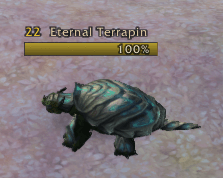
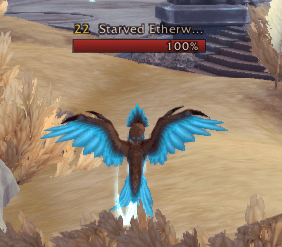
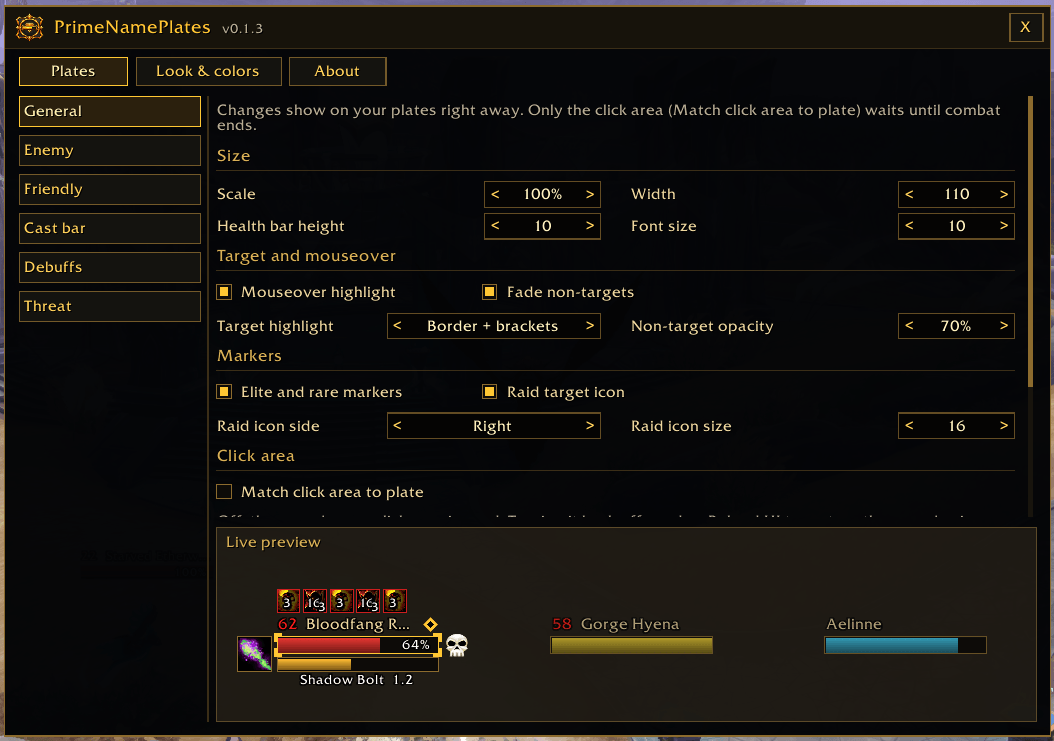
Prime-styled "Gilded Card" nameplates for WoW Forever and WoW retail: class and reaction colors, cast bars, your debuffs, threat colors and elite, rare and boss markers. Part of the Prime suite.
Description
💬 Join the PrimeSuite Discord for support, bug reports, feature requests and update news:
👉 https://discord.gg/Vb9aSb7E4Y
Part of PrimeSuite: PrimeBars, PrimeChat, PrimeMinimap, PrimeQuestTracker, PrimeTooltip, PrimeBags, PrimeMeter, PrimeUnitFrames and PrimeNamePlates all share one look and work together.
🆕 Latest update - v0.1.18
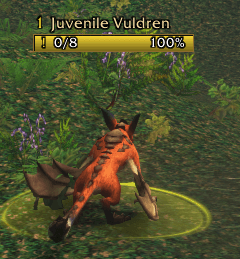
- Fixed: In a group, mobs for your own quests showed only a "!" without your progress. The count (like 1/7) shows again.
- Note: Party members' quests stay hidden by default, so you only see the mobs you need. Turn on Party members' quests under Plates > Enemy to see theirs too.
Full version history is in the Files tab (click a file to see its changelog).
PrimeNamePlates
PrimeNamePlates replaces the game's nameplates over enemies, NPCs and players with compact Prime-style "Gilded Card" plates: a dark card, thin gold border and gradient health bar. One download works on both WoW Forever (Interface 16001) and WoW retail (Midnight).
Works with PrimeUnitFrames
PrimeNamePlates works fine on its own. Its colors and Options layout match PrimeUnitFrames, so your plates and unit frames look and behave the same way.
Features
- Colors that make sense: players use their class color, NPCs use reaction colors (red hostile, yellow neutral, green friendly), and tapped mobs turn gray. A neutral mob turns red while it's fighting you and goes back to yellow after combat.
- Name and level: level is colored by difficulty, with ?? for skull levels
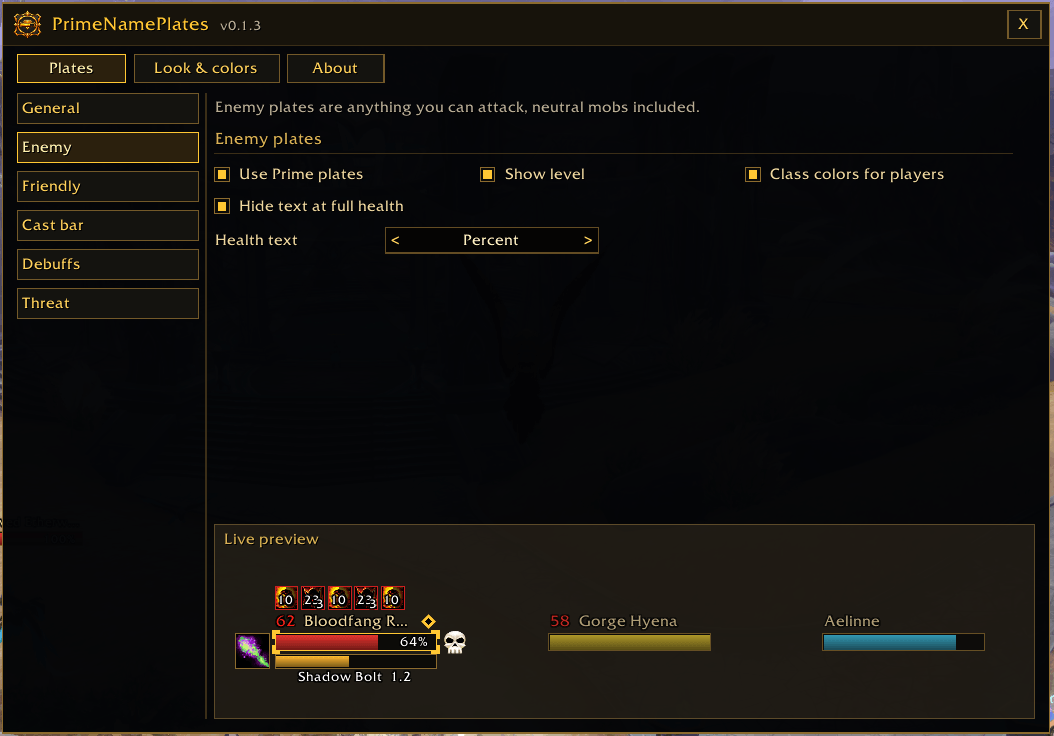
- Health text: off, percent, current, or current + percent, hidden at full health by default
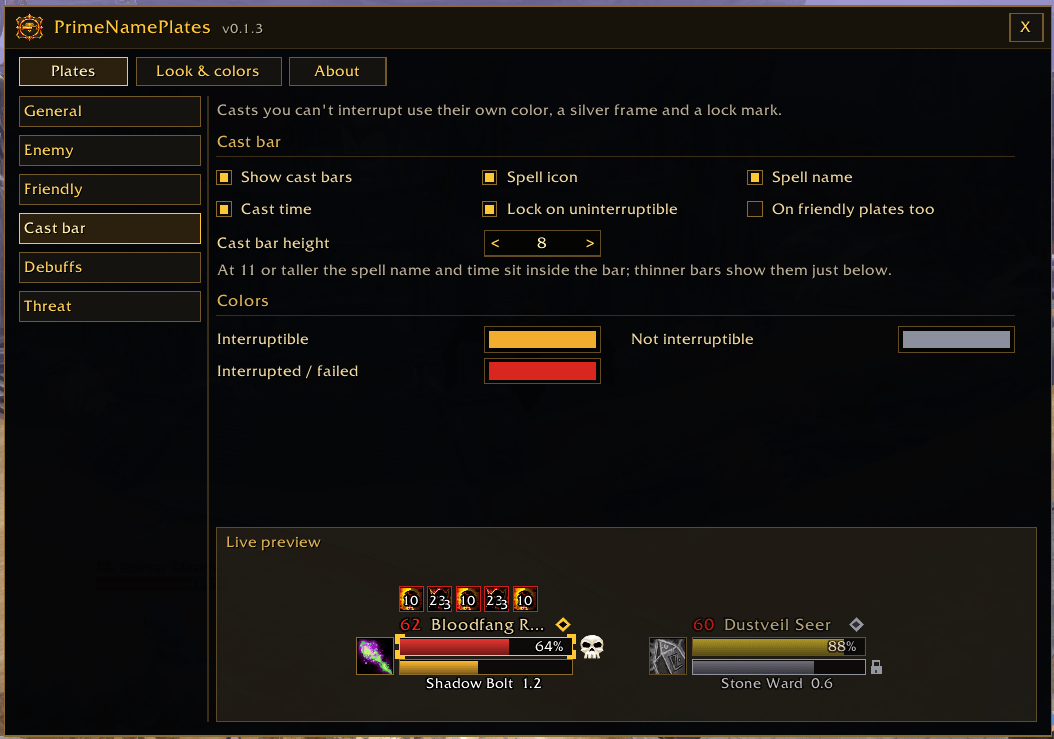
- Cast bars: spell icon, name and time. Interruptible and uninterruptible casts get their own colors, and casts you can't interrupt also get a silver frame and a lock mark. Interrupted or failed casts flash red.
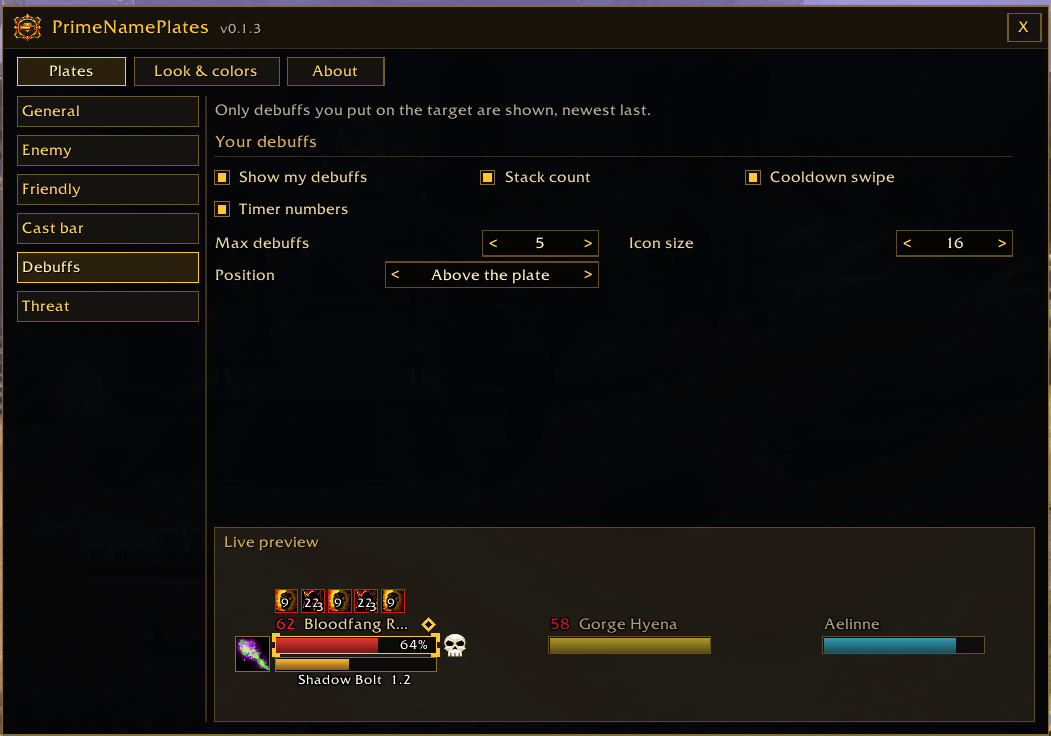
- Your debuffs and crowd control: your debuffs (like Rend) show in a row above the name, and crowd control (like a stun) sits just right of the bar.
- Retail: Prime's own icons, showing only your debuffs, with cooldown swipe, stack count and timers. Set the count, size and whether they show above or below the plate.
- WoW Forever: the game doesn't share enemy debuffs with addons, so the plates show the game's own debuff icons (with the game's timers), moved into the Prime layout. They follow your icon size and position settings.
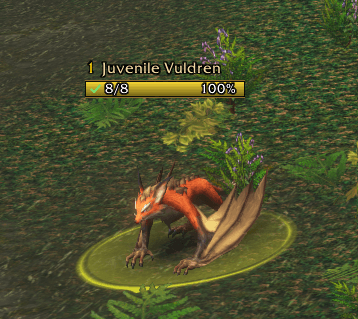
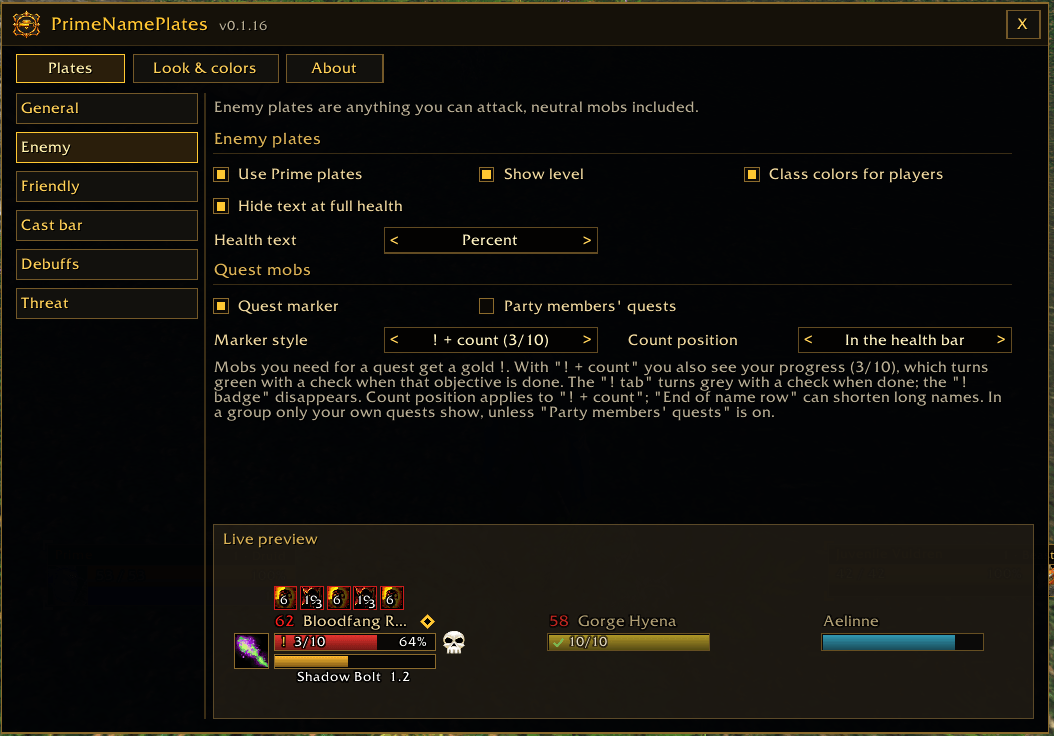
- Quest mobs: mobs you need for a quest get a gold ! with your progress (like
! 3/10) right in the health bar. When that objective is done, it turns into a green check (✓ 8/8).- Three marker styles: ! + count (default), ! badge before the level, or a ! tab on the bar
- Five spots for the count: in the health bar (default), end of the name row, in front of the bar, after the bar, or above the plate
- Works for kill and collect quests. In a group, only your own quests are marked; turn on Party members' quests to see theirs too.
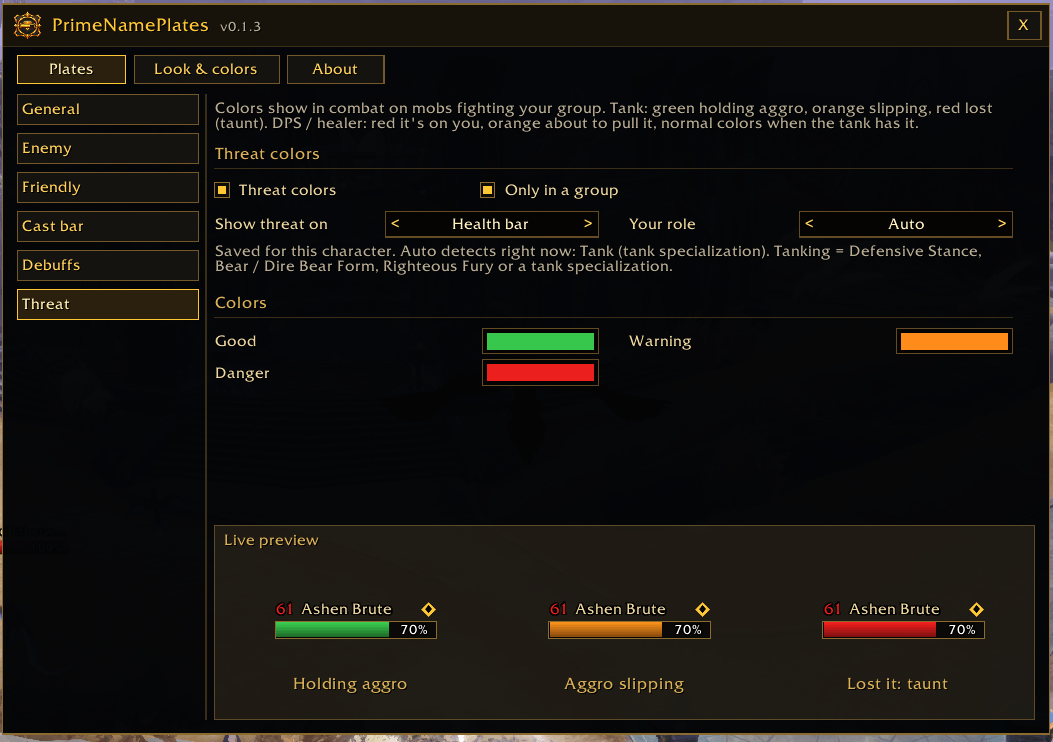
- Threat colors: in combat, on mobs fighting your group:
- Tank: green = holding aggro, orange = someone is catching up, red = lost it
- DPS / healer: red = it's on you, orange = about to pull it, normal colors = the tank has it
- Shown on the health bar or the border only. Your role is detected automatically or set by hand per character.
- Markers: elite (gold diamond), rare (silver), rare elite (gold + silver) and boss (skull), plus your raid target icon
- Highlights: bright gold border and corner brackets on your target, a mouseover highlight, and other plates fade while you have a target
- Click area: optionally match the clickable area to the Prime plate, so clicks between plates in a pack land on the right mob
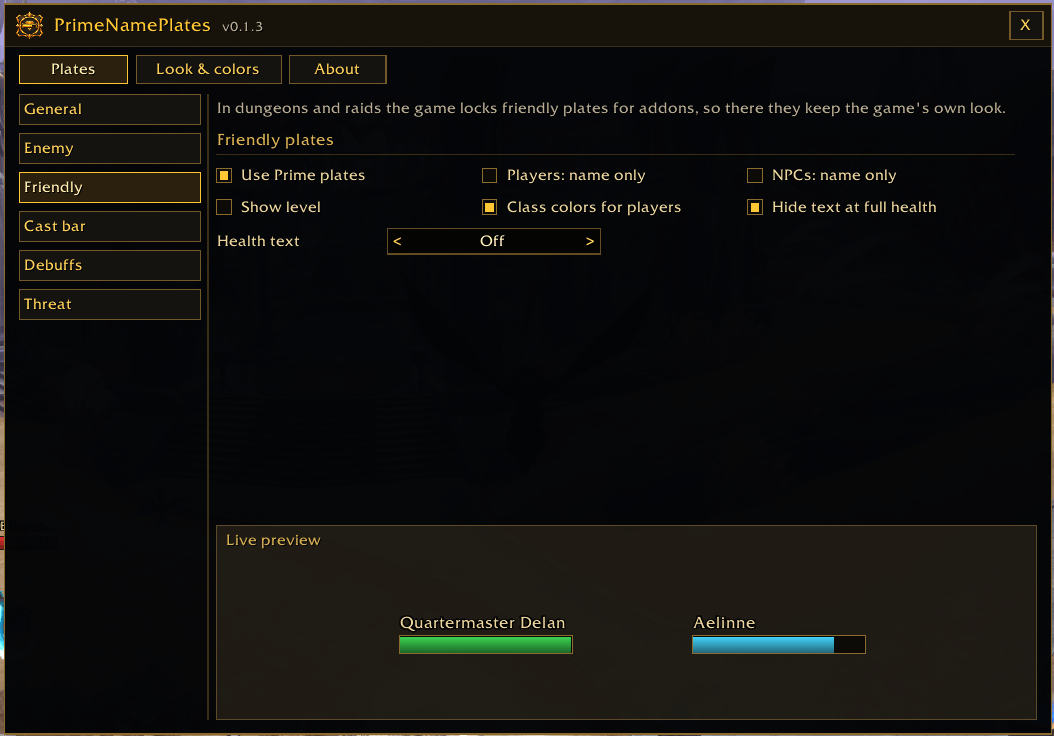
- Enemy and Friendly settings: set each separately. Friendly players and NPCs can be "name only", and either side can be switched back to the game's look at any time, with no reload.
- Live preview: the Options window redraws on every change
- Quick access from a minimap button
The Prime Suite (optional)
PrimeNamePlates works on its own. These separate addons are designed to match it, and you can install any of them or none:
- PrimeBars
- PrimeChat
- PrimeMinimap
- PrimeQuestTracker
- PrimeTooltip
- PrimeBags
- PrimeMeter
- PrimeUnitFrames
Getting started
- Install the addon and log in. Your nameplates are replaced straight away.
- Type
/pnp(or right-click the minimap button) to open Options. - Set your health text, cast bar, debuffs and colors under Plates and Look & colors.
- Quest markers are on by default. Change the style, the count position or party quests under Plates > Enemy > Quest mobs.
- Tanks: your role is detected automatically. To set it by hand, use Plates > Threat or
/pnp role tank.
Which units get nameplates (V and Shift+V)
The game decides which units get a nameplate. PrimeNamePlates restyles every plate the game shows, but it never adds or removes plates.
- V (enemy plates): units you can attack. That includes red mobs, enemy players, and yellow neutral mobs you can attack, such as wolves and boars.
- Shift+V (friendly plates): friendly players only. By default, friendly NPCs like guards, vendors and quest givers don't get plates. Yellow NPCs you can't attack don't get plates either.
Optional: show friendly NPC plates. If you'd like plates on friendly NPCs too, type this in chat:
/console nameplateShowFriendlyNPCs 1
Use /console nameplateShowFriendlyNPCs 0 to turn it back off. This is a game setting, so it may not be available on every client. If nothing changes, your client doesn't offer friendly NPC plates.
Commands
/pnp(or/primenameplates) - open the options/pnp role auto|tank|dps- set the threat role for this character/pnp minimap- show or hide the minimap button/pnp reset- reset all settings (asks first)/pnp about- open the About page/pnp help- list the commands/pnp debug- show your client, flavor and what it supports (include this in bug reports)/pnp auras- show what the game reports for your target's debuffs (include this in debuff bug reports)
Notes
- Your personal plate, and plates the game locks for addons (friendly plates in dungeons and raids), keep the game's own look.
- WoW Forever doesn't let addons read enemy debuffs, so on Forever the plates show the game's own debuff icons. They keep the game's look; the count, stack and timer settings apply to retail's Prime icons.
- Quest markers read the same quest lines the game shows in the mob's tooltip. On retail the game can hide those in dungeons or combat; the marker then keeps its last state.
- Plate changes apply right away, even in combat. Only "Match click area to plate" (off by default) waits for combat to end, and turning it back off needs a Reload UI.
- In combat the game may hide exact health numbers from addons. The bars stay correct and the text shows what the game allows, usually percent.
- Nameplates aren't movable frames, so PrimeNamePlates doesn't use the PrimeBars Layout Editor.
- Settings are account-wide and kept through updates. The threat role is the only per-character setting.
- This is an early release. If you report a bug, please say what you were doing and include any error text and your
/pnp debugoutput.
Created by PrimeCraze
Discord: https://discord.gg/Vb9aSb7E4Y
PrimeNamePlates Team