nugsCastBars
- By
Cast bars for you, your target, your focus, your pet and up to five bosses — one addon, one look, and the same controls on every bar.
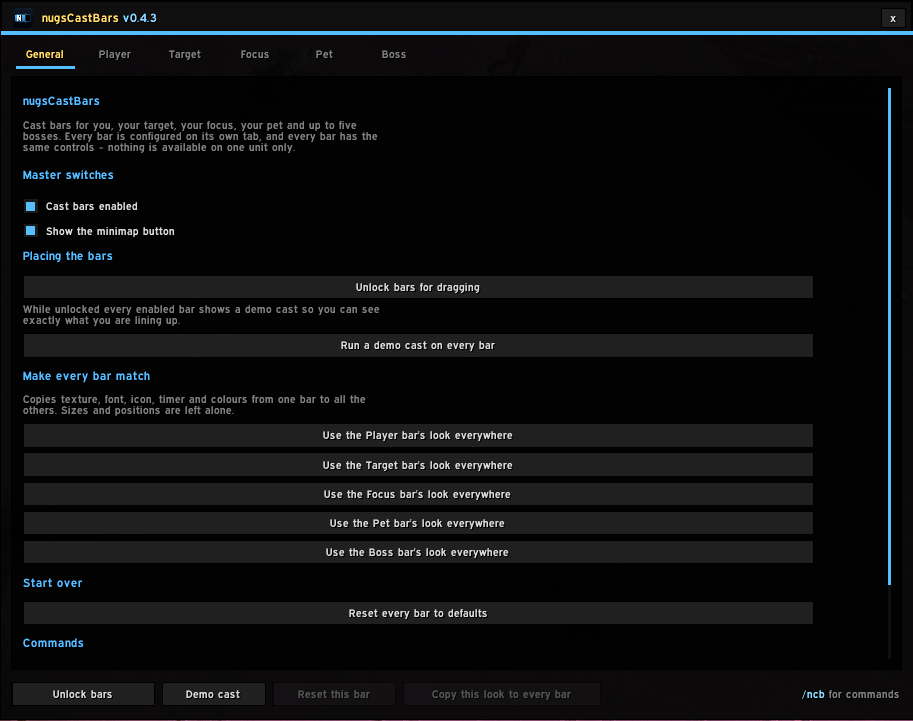
image222.png
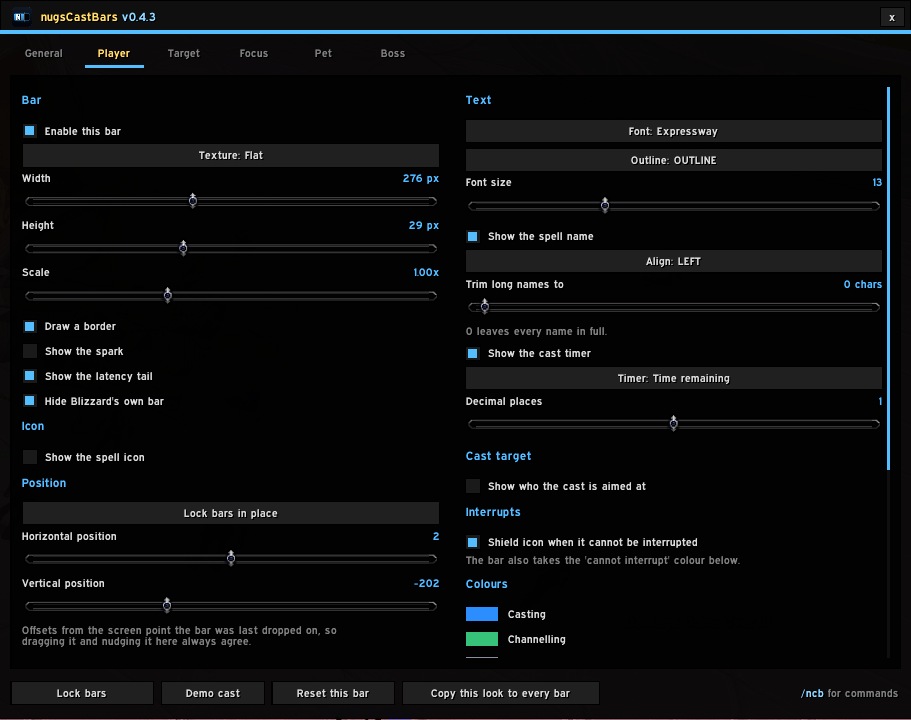
image4.png
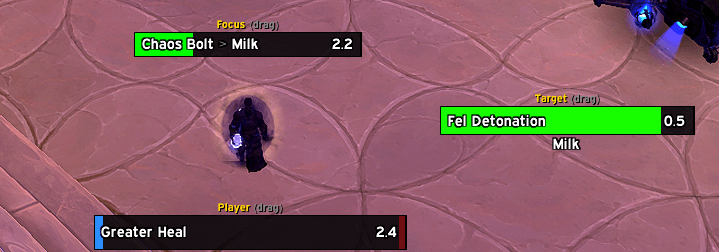
image3.png
Description
Cast bars for you, your target, your focus, your pet and up to five bosses — one addon, one look, and the same controls on every bar.
Built because asTargetCastbar had the right idea and stopped short: target and focus only, and almost nothing you could change. Everything here is in the options window instead of in the source file.
Open the options with /ncast, or from the nugsSuite launcher.
Every setting, on every bar
Each of these is per bar, so your own cast bar can look nothing like the boss bars if that is what you want.
| Bar | texture (LibSharedMedia aware), width, height, scale, border, spark |
| Icon | on or off, left or right, cropped or full, gap to the bar |
| Text | font, outline, size, spell name with alignment and optional trimming |
| Timer | remaining, elapsed, or elapsed / total, to 0–2 decimals |
| Cast target | who the cast is aimed at — inline, below the bar, or off to the right |
| Interrupts | its own bar colour, and a shield when a cast cannot be interrupted |
| Colours | casting, channelling, uninterruptible, finished, interrupted, background, border, text |
| Finishing | how long a finished bar holds, and how long it takes to fade |
| Blizzard | switch off the stock bar for that unit |
Boss bars additionally get a stacking direction and the gap between them. Boss 1 is the bar you drag; the rest follow it.
The cast target
The feature this addon was built around, and it works the way the game does: the target is read once, when the cast starts, because that is the moment a spell locks on. Re-reading it every frame would show you where the boss is looking now, not where the spell is going to land.
Class-coloured by default, and red when the cast is on you.
For your own casts
- The latency tail — the slice at the end of your cast that has already left your client, so starting the next one inside it costs you nothing.
- Empowered casts get a divider at each stage boundary.
- Interrupt announcements — landing one is worth hearing about. Chat, on screen, both or neither, with your own sound cue.
Your own sound files
Point the interrupt cue at any .ogg or .mp3 in any addon folder. Paste the path, press Test — it plays immediately if the path is right, and says what is wrong if it is not, rather than failing silently mid-pull. Name it and it joins the cue list.
Cues are shared with the other nugs addons, so one added in nugsCooldownPulse shows up here too.
What 12.0 means for this, honestly
On Midnight a target's cast returns entirely secret data — name, icon, start, end, spell id, all of it. A secret value can be drawn on screen but never measured or compared, so a bar cannot always be filled from the client's own timer.
Rather than guess, each bar reports which of four states it is in, and /ncast diag will tell you:
timed | no timer API, but readable times | the same bar, from our own maths |
secret | no timer API and secret times | an accurate bar, but no numbers |
guessed | this spell has been watched finish before | bar and timer from the remembered length, marked ? |
unknown | nothing to go on | a sweep, and no number at all |
One thing really is gone: which stage of an empowered cast is currently held is no longer knowable by anyone. The pips mark the boundaries; nothing tracks the current one.
Placing the bars
/ncast unlock, or the button in the options. The settings window gets out of the way and leaves a small bar with Lock and Demo cast on it, then comes back exactly where it was when you lock. Every enabled bar shows a demo cast while unlocked so there is something to aim at.
Commands
/ncast                 open the options window
/ncast unlock | lock   place the bars
/ncast test            a demo cast on every bar
/ncast diag            which state each bar is in and why
Notes
- LibSharedMedia is used if another addon has loaded it, and is never required. Without it you get the stock textures and fonts.
- Profiles — save your settings under a name and load them on any character. They live in the account-wide saved variables, so there is nothing to copy.
- Settings windows close and anchors lock when a fight starts, because an unlocked bar is showing a preview cast and preview data during a real pull cannot be told apart from the real thing.
- Recommended alongside nugsSuite, never required. No external libraries and no dependencies of any kind.
The nugsCastBars Team