nugsBuffAlerts
- By
Text and icon alerts for buffs and procs, placed wherever you want them on screen.
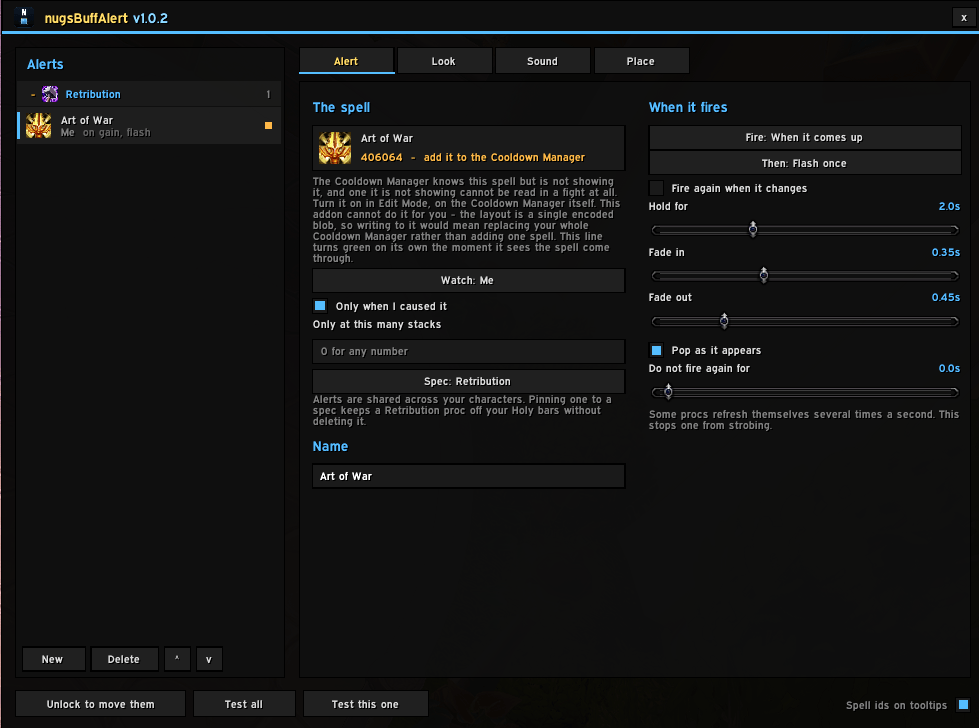
nba.png
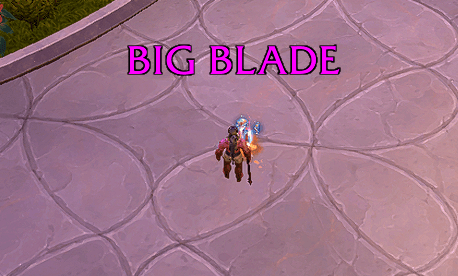
nba2.png
Description
Tells you the moment a buff or proc comes up — as a line of text, an icon, or both, wherever you put it on screen.
One alert is one spell. It watches a single aura on a single unit and, when that aura appears, says so where you told it to. No filters to learn, no groups, no rows that grow and shrink: an alert has a position and a look, and that is all.
Open the options with /nba, or from the nugsSuite launcher.
What an alert is
- Text, icon, or both. The words are yours; leave them empty and it uses the spell's name. Font, size, outline, colour, shadow and uppercase are per alert, so the one you must not miss can look nothing like the rest.
- Flash or hold. A flash is a moment — it fades in, sits, and leaves on its own. A hold stays for exactly as long as the buff is up, with an optional countdown swipe and stack count.
- Three triggers: when a buff comes up, when it drops off, or the whole time it is missing — the last one being the reminder that you forgot to press something.
- Only at a number of stacks. Set the count you care about and everything below it counts as the buff not being up, so the alert fires when it reaches the number and drops when it falls back under.
- Fire again when it changes, for a buff that never actually drops off — one you spend stacks of without spending all of them. There is no gain to fire on, because it never left.
- A sound, or speech. Any file you like, or have the alert read out through the game's own text to speech. A spoken word does not have to be learned the way a sound effect does, and it carries when the alert is somewhere you are not looking.
It tells you what will not work
This is the part worth reading, and the reason this addon exists in this shape.
Since Midnight, the game hides aura data from addons during combat, encounters, keystones and rated PvP — and whether your spell is hidden depends on the spell. An addon that pretends otherwise works perfectly at a target dummy and silently shows nothing on a pull.
So every alert is marked with what will happen in a raid, in words, before you rely on it:
| Mark | What it means |
|---|---|
| reads everywhere | The game answers about this spell in combat. It just works. |
| reads via Cooldown Manager | Confirmed: this spell has come through Blizzard's Cooldown Manager, so it reads in a fight. |
| add it to the Cooldown Manager | The game knows the spell but the Cooldown Manager is not showing it — and one it is not showing cannot be read at all. |
| out of combat only | The game will not answer during a fight, and there is no bridge for it. |
| another spell shares this name | It cannot be told apart from something else, so nothing will answer about it. Pick the buff off yourself instead. |
The mark corrects itself the moment the addon sees the spell come through, so fixing one is visible feedback rather than a leap of faith.
Nothing fires on a guess. "Is this buff up" has three answers, not two — yes, no, and not allowed to know — and every trigger stands down on the third. A missing-buff warning that treated "cannot tell" as "not up" would sit on your screen for an entire fight.
Finding the right spell
The number printed for an ability on a website is usually not the number its buff carries, and building an alert on the wrong one is the most common way to end up with a proc that never fires.
- The spell picker offers Blizzard's own tracked list for your spec — not a guess about what your class procs, but the game's list, with buffs first.
- Or pick from what is actually on you right now, which is the only way to be certain of an id.
- Spell ids on tooltips, on by default. Hovering a buff on your own frame answers the question without leaving the game.
Where it goes
Every alert carries its own anchor and offset, so put them where you actually look. Unlock, drag them into place, lock again — the settings window gets out of its own way while you do it and comes back when you are done.
Alerts are shared across your characters and can be pinned to a spec, so a Retribution proc does not need deleting to play Holy. The list is grouped by spec and folds up, with anything belonging to a class you are not playing dimmed rather than hidden.
Nice to know
- Reads auras three ways — the direct lookup, Blizzard's Cooldown Manager, and a full scan out of combat — and says which one answered when you ask.
/nba spell <id>says whether one spell can be tracked and how./nba bridgeand/nba stacksanswer the two questions behind almost every "why is this not firing".- LibSharedMedia fonts and sounds if you have it.
- Part of the nugs suite — one minimap button and shared profile strings if you run more than one, and completely standalone if you do not.
12.1
The aura overhaul in Curse of Ula'tek removes the enumeration this kind of addon usually depends on. Nothing that fires an alert during a fight here goes through it.
The nugsBuffAlerts Team