MyLevelJourney
- By
Your leveling travel log: XP per hour, time to next level, and how long every level took you.
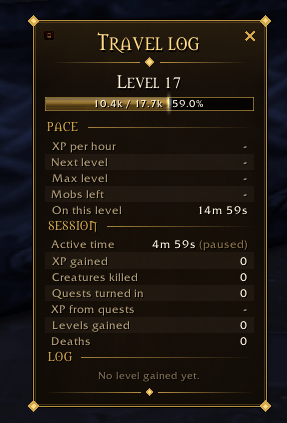
image_2026-09-20_174149694.png
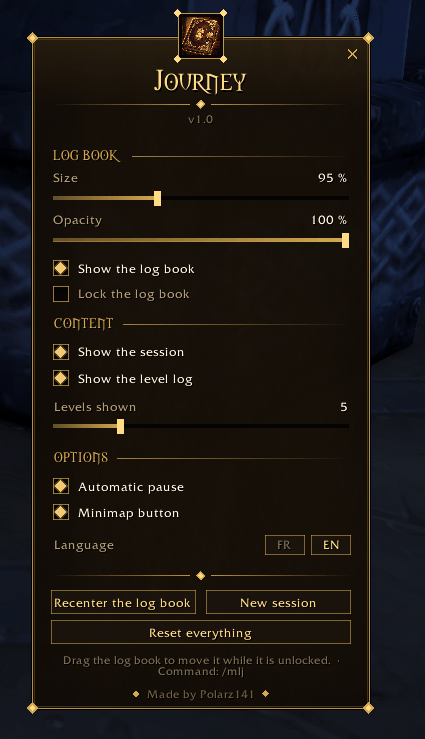
image_2026-09-20_174158633.png
Description
MyLevelJourney
The travel log of your leveling.
An XP bar tells you where you are. MyLevelJourney tells you how fast you are getting there — and keeps the whole story of the run.
A dark leather and gold panel, gothic ornaments, readable at a glance over any scene. No libraries, no dependencies, and nothing running while the panel is closed.
Pace — what your run looks like right now
- XP per hour, computed on active time only
- Time until your next level, and a projection all the way to max level
- Mobs left, based on the XP of your last kill
- Time already spent on the level you are standing on
Session — what you did since you logged in
- Active time, XP gained, creatures killed, quests turned in
- Share of your XP that came from quests instead of grinding — nobody else shows you this
- Levels gained, and deaths
Travel log — the story of the run
- Every level you gained, with how long it took. Hover a line and it tells you the zone you were standing in and the exact date you got it.
- Personal records — the best time any of your characters ever did on that level, shown under the log. You always know whether this run is beating the last one.
- A chat line on every level up: "Level 24 reached in 41m 20s", and a shout when you break a record.
Built to stay out of the way
- The timer pauses after 5 minutes without XP, so an afk break never wrecks your XP per hour
- Size and opacity sliders — a discreet corner note, or a full panel
- A padlock on the frame so you never drag it by accident, and a close cross right there
- Pick your blocks — pace only, pace and session, or the whole log, and how many levels to list
- Settings that stick — everything survives a reload and a relog, even with the Forever beta bug that resets other addons
Getting around
Minimap button — left click shows or hides the log book, right click opens the options, drag to move it around the minimap. Or type /mlj.
| Command | What it does |
|---|---|
/mlj |
Options |
/mlj show |
Show or hide the log book |
/mlj reset |
Start a new session |
Available in English and French, switched in one click.
Works beautifully next to MyXPBar Forever — the bar tells you where you are, the log book tells you how fast you are getting there.
Made by Polarz141. Bug reports and ideas are welcome.
MyLevelJourney — Français
Le carnet de route de ton leveling.
Une barre d’XP te dit où tu en es. MyLevelJourney te dit à quelle vitesse tu y vas — et garde toute l’histoire de la run.
Un panneau cuir sombre et or, ornements gothiques, lisible d’un coup d’œil par-dessus n’importe quel décor. Aucune bibliothèque, aucune dépendance, et rien ne tourne quand le carnet est fermé.
Allure — où tu en es, maintenant
- XP par heure, calculée uniquement sur le temps actif
- Temps avant le prochain niveau, et une projection jusqu’au niveau max
- Mobs restants, d’après l’XP de ton dernier kill
- Temps déjà passé sur le niveau où tu te trouves
Session — ce que tu as fait depuis la connexion
- Temps actif, XP gagnée, créatures tuées, quêtes rendues
- Part de ton XP qui vient des quêtes plutôt que du farm — personne d’autre ne te montre ça
- Niveaux gagnés, et morts
Carnet de route — l’histoire de la run
- Chaque niveau gagné, avec sa durée. Survole une ligne : elle te donne la zone où tu étais et la date exacte.
- Records personnels — le meilleur temps réalisé par n’importe lequel de tes persos sur ce niveau, affiché sous le carnet. Tu sais en permanence si cette run bat la précédente.
- Une ligne dans le chat à chaque niveau : « Niveau 24 atteint en 41m 20s », et une annonce quand tu bats un record.
Pensé pour ne pas encombrer l’écran
- Le chrono se met en pause après 5 minutes sans XP : une pause ne fausse plus ton XP par heure
- Sliders de taille et d’opacité — une note discrète dans un coin, ou un vrai panneau
- Un cadenas sur le cadre pour ne jamais le déplacer par erreur, et une croix juste à côté
- Tu choisis les blocs — l’allure seule, l’allure et la session, ou le carnet complet, et le nombre de niveaux listés
- Des réglages qui tiennent — tout survit au /reload et au relog, même avec le bug de la bêta Forever qui réinitialise les autres addons
Pour s’en servir
Bouton minimap — clic gauche affiche ou masque le carnet, clic droit ouvre les options, glisser pour le déplacer autour de la minimap. Ou tape /mlj.
| Commande | Ce qu’elle fait |
|---|---|
/mlj |
Les options |
/mlj show |
Affiche ou masque le carnet |
/mlj reset |
Démarre une nouvelle session |
Disponible en français et en anglais, changeable en un clic.
À utiliser avec MyXPBar Forever — la barre te dit où tu en es, le carnet te dit à quelle vitesse tu y vas.
Fait par Polarz141. Les retours de bugs et les idées sont les bienvenus.
MyLevelJourney Team