ForeverVoice
- By
Proximity voice chat for your guild or your party in World of Warcraft: Forever.
2-window-in-voice.png

1-window.png
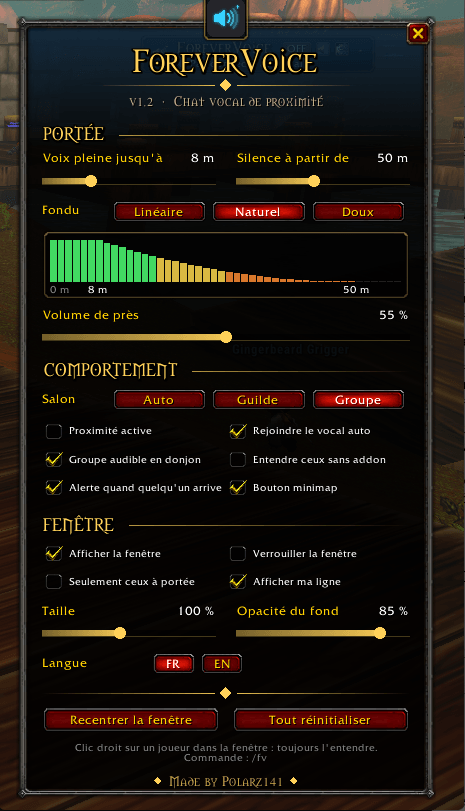
image_2026-09-22_165841255.png
Description
ForeverVoice
Proximity voice chat for your guild or your party in World of Warcraft: Forever.
Walk into a zone, cross a guildmate on the road, and just talk to them. Questing with friends? Same thing with your party. ForeverVoice turns Blizzard's built-in voice chat into proximity voice: you hear the players close to you, their voice fades as they walk away, and they go silent once they are out of range.
Guild or party: you choose
| Mode | Voice channel | Best for |
|---|---|---|
| Guild | Your guild's voice channel | Crossing guildmates anywhere in the world |
| Party | Your party or raid voice channel, joined as soon as the group forms | Questing, dungeons and raids with your group, guild or not |
| Auto | The guild, else the party | Default setting |
Switch in one click in the options, or type /fv join guild or /fv join group. If you are already in voice, you move to the new channel right away.
No external program, no Discord, no server to host. ForeverVoice uses the game's own voice chat. No libraries, no dependencies.
How it works
- ForeverVoice joins the voice channel you picked: your guild, your party, or Auto (the guild, else the party).
- Every player with the addon shares their position with the guild and the party through a small hidden addon message.
- Your addon sets the volume of each player based on their distance: full voice up close, a smooth fade, then silence.
Everyone needs the addon. A player without ForeverVoice doesn't share their position, and hears the whole channel at normal volume. Ask your guild and your friends to install it!
Features
- Proximity volume: full voice up to a distance you choose, then a fade (linear, natural or smooth), silence past the maximum range. A live graph shows the curve.
- Volume up close: set how loud full voice is (default 50%), so nobody saturates when standing right next to you.
- "X is in voice range" alert: a sound and a message when a guildmate or party member comes within earshot.
- Group audible in dungeons: positions are hidden in dungeons and battlegrounds, so your group stays audible there.
- Always hear someone: right-click a player in the window to hear them at any distance, for example a friend or a raid leader.
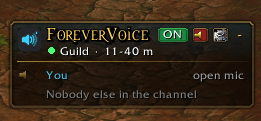
- Voice window: who is talking, how far each player is, how loud you hear them, and your own line with your push-to-talk key.
- Minimap button with the list of players in range and a halo while someone talks.
- Join and leave voice in one click.
- English and French, switched in one click.
- Settings that stick, even with the Forever beta bug that resets addon settings.
- Safe: only volumes are changed, never the Blizzard mute. Everyone is put back to full volume when you turn it off, leave voice or log out.
Options menu
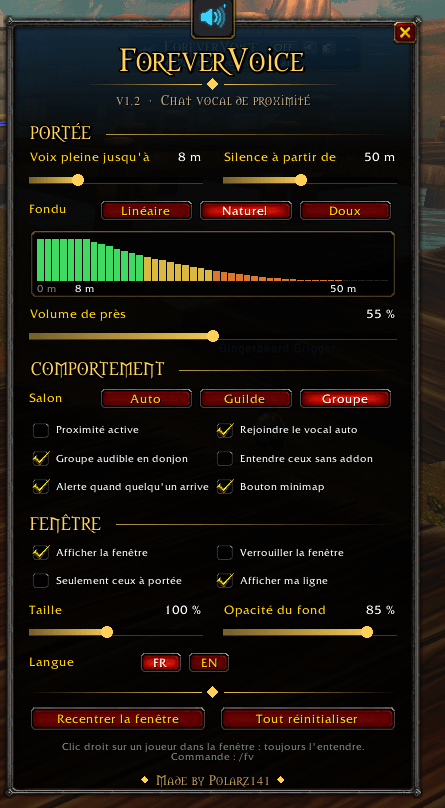
Open it from the minimap button or with /fv options. Every change is applied live.
| Section | What you can change |
|---|---|
| Range | Full voice distance (0-30 yd), silent distance (10-100 yd), fade curve with a live graph, volume up close |
| Behavior | Voice channel (Auto, Guild, Group), proximity on / off, auto-join voice, group audible in dungeons, hear players without the addon, in-range alert, minimap button |
| Window | Show, lock, only players in range, your own line, size, background opacity |
Controls
| Minimap button | Effect |
|---|---|
| Left-click | Options menu |
| Right-click | Proximity on / off |
| Middle-click | Join / leave voice |
| Shift + click | Show / hide the window |
| Drag | Move the button around the minimap |
| Command | Description |
|---|---|
/fv |
Show / hide the window |
/fv options |
Open the options menu |
/fv on / /fv off |
Proximity on / off |
/fv join / /fv leave |
Join / leave voice |
/fv join guild / /fv join group |
Switch to guild or group voice |
/fv range 40 8 |
Silent from 40 yards, full voice up to 8 yards |
/fv debug |
Status, for bug reports |
Installation
- Extract the ForeverVoice folder into
World of Warcraft\<Forever folder>\Interface\AddOns. - In the game settings, turn on Voice Chat and set your microphone and talk mode (push-to-talk or open mic).
- Restart the game and log in: ForeverVoice joins guild voice by itself.
Note about settings
Because of a Forever beta bug, addon settings are not read back after a relog. ForeverVoice keeps a backup in one account macro named ForeverVoice. Keep it: it does nothing when clicked, and it is recreated if deleted.
Compatibility
- World of Warcraft: Forever: 1.60.x (Interface 16001)
- Blizzard voice chat must be enabled in the game settings.
Support
ForeverVoice is free, and it stays free and complete. If it made your
bars nicer and you feel like saying thanks, you can leave a tip here:Entirely optional.
Français
Chat vocal de proximité pour ta guilde ou ton groupe sur WoW Forever. Tu croises un membre de ta guilde, ou tu joues avec ton groupe : tu leur parles directement. Plus un joueur s'éloigne, moins tu l'entends, puis il devient muet hors de portée. ForeverVoice utilise le vocal intégré de Blizzard, sans logiciel externe.
- Guilde ou groupe, au choix : Guilde, Groupe ou Auto (la guilde, sinon le groupe), en un clic dans les options.
- Tout le monde doit avoir l'addon pour que la proximité fonctionne.
- Volume de près réglable, pour que personne ne sature quand il est collé à toi.
- Bouton minimap ou
/fvpour tout régler. Le menu est entièrement disponible en français (bouton FR). - Clic droit sur un joueur dans la fenêtre : tu l'entends toujours, peu importe la distance.
- Une alerte te prévient quand un membre de ta guilde ou de ton groupe arrive à portée de voix.
Made by Polarz141
ForeverVoice Team