MyXPBar Forever
- By
A clean, customizable XP bar with 6 styles, smooth fill, rested XP, mobs-to-level estimate and an in-game options menu.

image_2026-09-18_153658333.png

image_2026-09-18_153708324.png
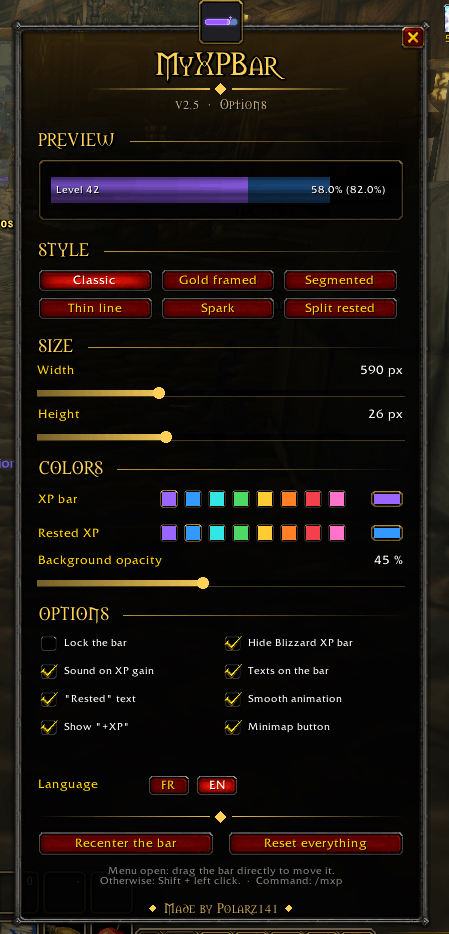
image_2026-09-20_151131838.png

image_2026-09-20_151222908.png

image_2026-09-20_151203275.png
Description
MyXPBar Forever
A clean, lightweight and fully customizable XP bar that replaces the default Blizzard one.
Inspired by the popular Luxthos WeakAuras look, MyXPBar gives you a sleek purple experience bar with rested XP, a mobs-to-level estimate and a beautiful in-game options menu, with no libraries and no dependencies.
✨ Features
- ✅ Replaces the Blizzard XP bar: the default bar is hidden automatically and comes back at max level (for reputation, honor...).
- ✅ Rested XP overlay: a translucent blue layer shows exactly how far your rested XP will take you.
- ✅ Mobs-to-level estimate: shows how many kills you still need, based on your last XP gain.
- ✅ Detailed stats: level, current / max XP, percentage and projected percentage with rested XP.
- ✅ Audio feedback: a subtle sound on every XP gain (can be turned off).
- ✅ Smart hiding: the bar disappears automatically when you reach max level.
- ✅ English & French: switch language in one click, right from the options menu.
- ✅ 6 bar styles: classic, gold framed, segmented, thin line, spark and split rested. Switch in one click, with a live preview.
- ✅ Smooth and alive: the bar slides to its new value, a floating "+245 XP" rises on every gain, and the bar flashes on level up (both can be turned off).
- ✅ Settings that stick: position, size, colors and options are kept after a reload or a relog, even with the Forever beta bug that resets other addons.
- ✅ Lightweight: a single small addon, no libraries, no dependencies.
🎨 Options Menu
Open it from the minimap button or with /mxp. The menu is built in the World of Warcraft style — stone frame, gold ornaments, gothic titles — and every change is applied live, with a preview right in the menu.
- Style: classic, gold framed, segmented, thin line, spark, split rested
- Size: width (200 to 1400 px) and height (8 to 60 px)
- Colors: 8 quick colors or the full color wheel, for both the XP bar and the rested XP
- Background opacity
- Toggles: lock the bar, hide the Blizzard XP bar, sound on XP gain, texts on the bar, rested text, minimap button
- Recenter the bar or reset everything in one click
Your settings are saved per account, and kept after a reload or a relog.
🖱️ How to Use
- Install the addon and log in: the bar appears at the bottom-center of your screen.
- Move it: hold Shift + left-click and drag it (or just drag it while the options menu is open).
- Left-click the minimap button to open the options.
- Right-click the minimap button to lock / unlock the bar.
- Drag the minimap button to move it around the minimap.
⌨️ Slash Commands
| Command | Description |
|---|---|
/mxp |
Open / close the options menu |
/myxpbar |
Same as /mxp |
/mxp debug |
Check the settings backup (if your settings ever reset) |
🧩 Compatibility
- World of Warcraft: Forever (1.60.x, Interface 16001)
🇫🇷 Version française
MyXPBar remplace la barre d'XP de Blizzard par une barre violette épurée, avec l'XP de repos, une estimation du nombre de mobs restants et un menu d'options complet (taille, couleurs, opacité...). Le menu s'ouvre depuis le bouton de la minimap ou avec /mxp, et la langue se change en un clic (FR | EN).
💬 Feedback
Found a bug or have an idea? Leave a comment. Feedback is always welcome!
Made by Polarz141
The MyXPBar Forever Team