MinimapIconBar
- By
Collects loose minimap buttons into one movable, action-bar-style row. De-circled, skinnable (Masque/ElvUI), with optional Omnium Folio capture.
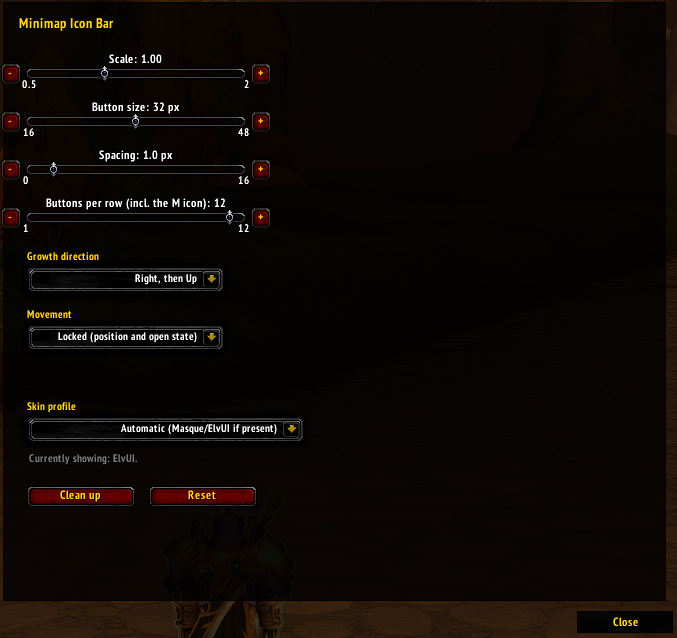
Options Menu

Default skin

elvui skin
Description
Minimap Icon Bar
Collects the loose addon buttons scattered around your minimap into one movable, action-bar-style row — de-circled, squared off, and skinnable.
What it does
Most addons drop a round button onto the edge of your minimap. Get a few addons and the minimap is ringed with them. Minimap Icon Bar gathers those buttons off the minimap and lays them out in a single tidy bar that looks and scales like a standard action bar.
A bag-style toggle button (the "M") is the first slot. Click it to open or close the row, right-click for options, and drag it to move the whole bar. The row grows in whichever direction you choose, and the M stays put as it grows or shrinks.
Features
- One-click collect/expand from a movable toggle button.
- Action-bar look by default — round minimap borders are stripped and the icon is squared into a HUD slot. Masque and ElvUI skinning supported and selectable per profile.
- Configurable layout: button size, spacing, whole-bar scale, buttons-per-row, and growth direction (right/left × up/down).
- Drag-to-reorder icons; order saved per profile.
- Lock in place: shift-click the M to freeze position + open state.
- Per-character profiles plus named profiles shareable across alts.
- Automatic pickup of buttons as addons are enabled.
- Omnium Folio button (12.0.7): optionally pull in Blizzard's expansion landing-page / Omnium Folio button too — opt-in under Blizzard buttons (off by default). Its orb is tinted to your class colour, and it's sized, slotted, skinned, and draggable like the rest of the row.
- Combat-safe and addon-compartment integrated.
Slash commands
Type /mib to open options, or /mib with no argument in chat to see the
full command list (toggle, scale, size, spacing, perrow, growth, move,
skin, profile, cleanup, reset).
Compatibility
WoW Midnight. No required dependencies; Masque and ElvUI are optional and used only for skinning if present.
MinimapIconBar Team