DontRelease
- By
Prevent accidental release on raid wipes with a configurable warning frame, alert sounds and click or hold to dismiss options.
MainWindow.png
Options.png
Description
DontRelease
Stop releasing on the first wipe. Wait for the battle res.
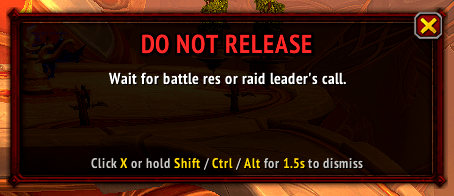
A movable, recolorable, scalable warning frame that appears over the standard death dialog whenever a raid wipe is detected. The message defaults to "DO NOT RELEASE" with "Wait for battle res or raid leader's call." underneath. Both lines, the color, the size, and the position are configurable.
While the warning is up, the Enter key on the death popup is disabled — the popup's default-button keyboard accelerator is suppressed for as long as the warning is visible, so a reflexive Enter (or a press-Enter-to-clear-chat keystroke) won't release you. Normal behavior restores the instant the warning is dismissed.
The "wipe" is detected by counting dead raid members against a threshold
you set (default 3), plus an immediate trigger on the ENCOUNTER_END
event when an encounter ends in failure. Single deaths don't pop the
warning. While you're dead, the addon polls once per second so a wipe
that develops ten seconds after your own death still triggers the
warning (and trash-pull wipes, which have no ENCOUNTER_END to
backstop, get caught too). The frame auto-hides the instant a battle
res request arrives, and can be configured to suppress itself entirely
when a self-res is available (Soulstone, Shaman Reincarnation).
Why it's not just a "press X to release" reminder
Two layers of protection:
Enter is dead while the warning is up. Most popup-dismiss workflows in WoW are "press Enter for the default action" — and the default action on the death popup is "Release Spirit." DontRelease flips that off whenever the warning is visible, so the single most common accidental-release input (a reflex Enter, or an Enter-to-clear-chat after a focus-stolen edit box) just doesn't work. The accelerator is restored the moment the warning is dismissed.
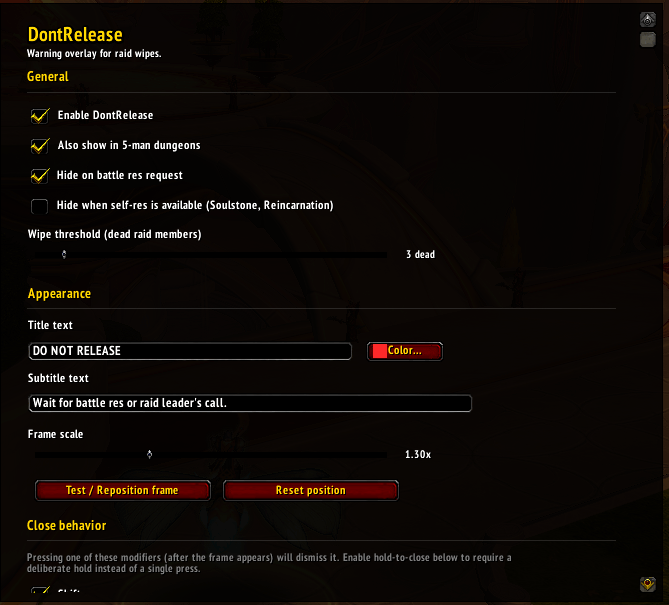
Optional hold-to-dismiss on the warning itself. Enable "hold to close" and you must hold Shift / Ctrl / Alt for a configurable duration (default 1.5s) — with a visible gold progress bar at the bottom of the frame — to dismiss the warning. That's enough friction to prevent accidental dismissal while still being single-keystroke fast when you actually want to release.
What's bundled
- 3 Blizzard alarm sounds (Alarm 1 / 2 / 3)
- 7 custom .ogg sounds
- All routable through Master / SFX / Music / Ambience / Dialog volume channels so the sound follows whichever in-game volume slider the user already cares about.
- Configurable color picker (wheel, RGB, hex)
- Scale slider 0.5x – 3.0x
- Wipe-threshold slider 1 – 30 dead raiders
- Hold-to-close with adjustable 0.5 – 5.0 second hold duration
- Suppression of the warning when self-res is available (Soulstone / Reincarnation) — optional
Slash commands
/dnr opens options. /dnr help lists every subcommand (toggle, scale,
threshold, sound, lock / unlock, reset, status). /dontrelease works as a
full-name alternative.
DontRelease Team