McAwesome Questing
- By
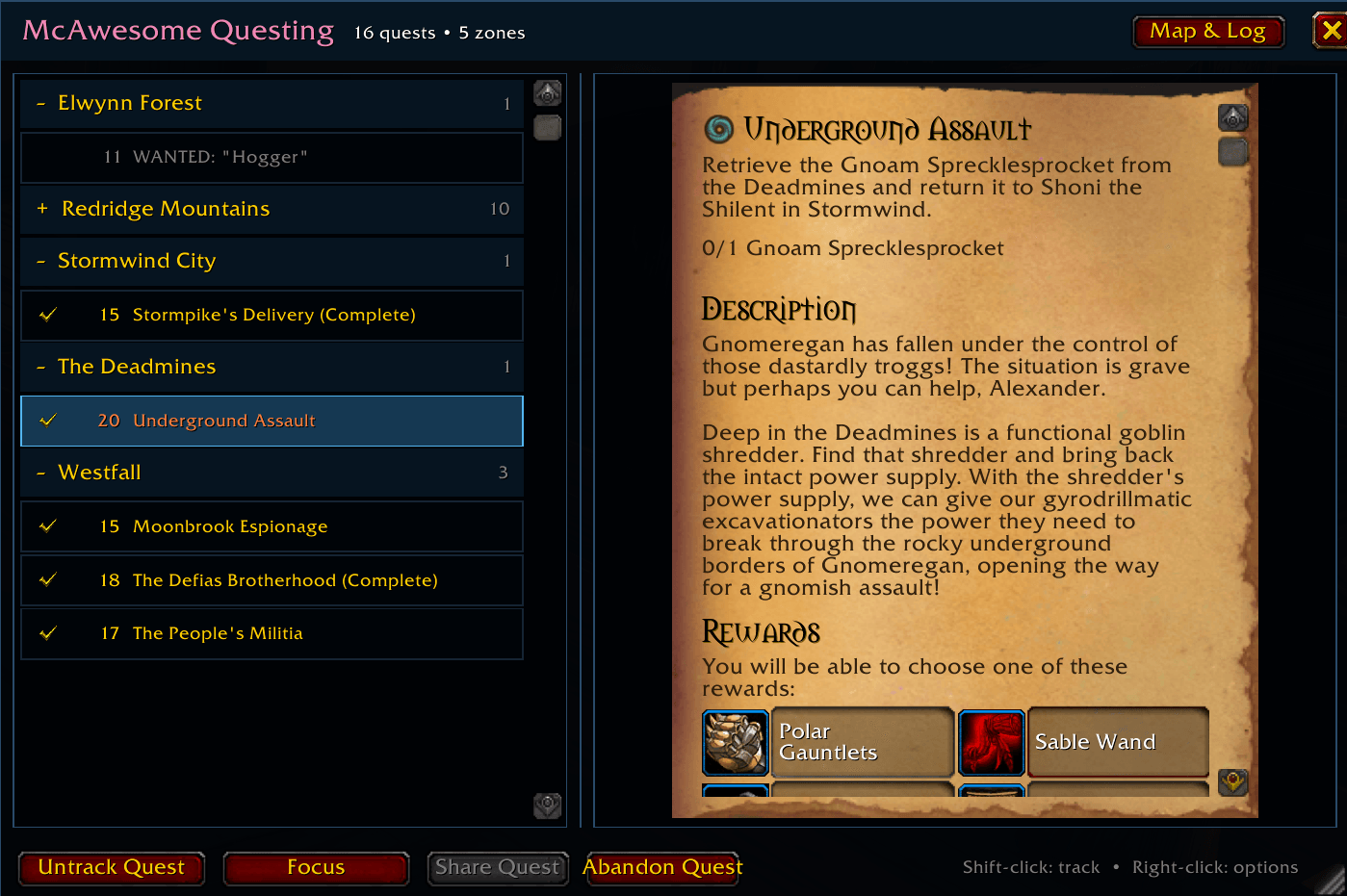
McAwesome Questing is a movable, resizable World of Warcraft quest journal and objective tracker. It keeps Blizzard's familiar quest pages and actions while organizing quests by zone and giving the on-screen tracker more useful controls.
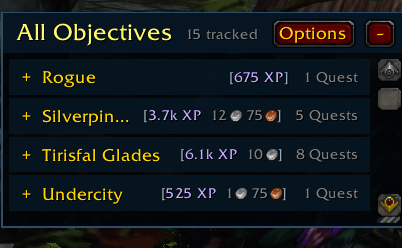
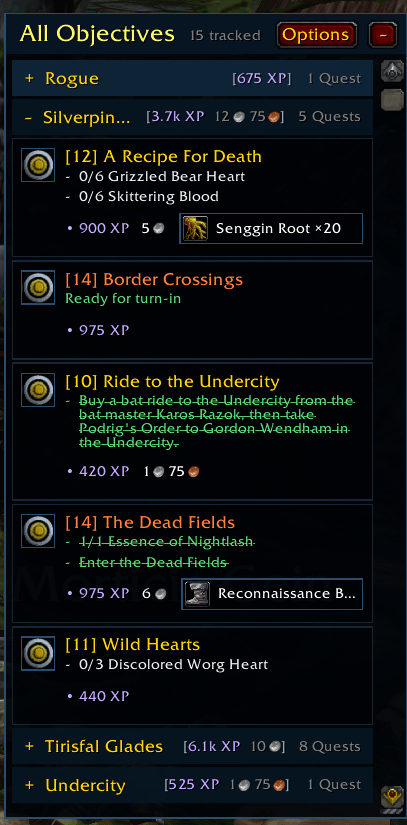
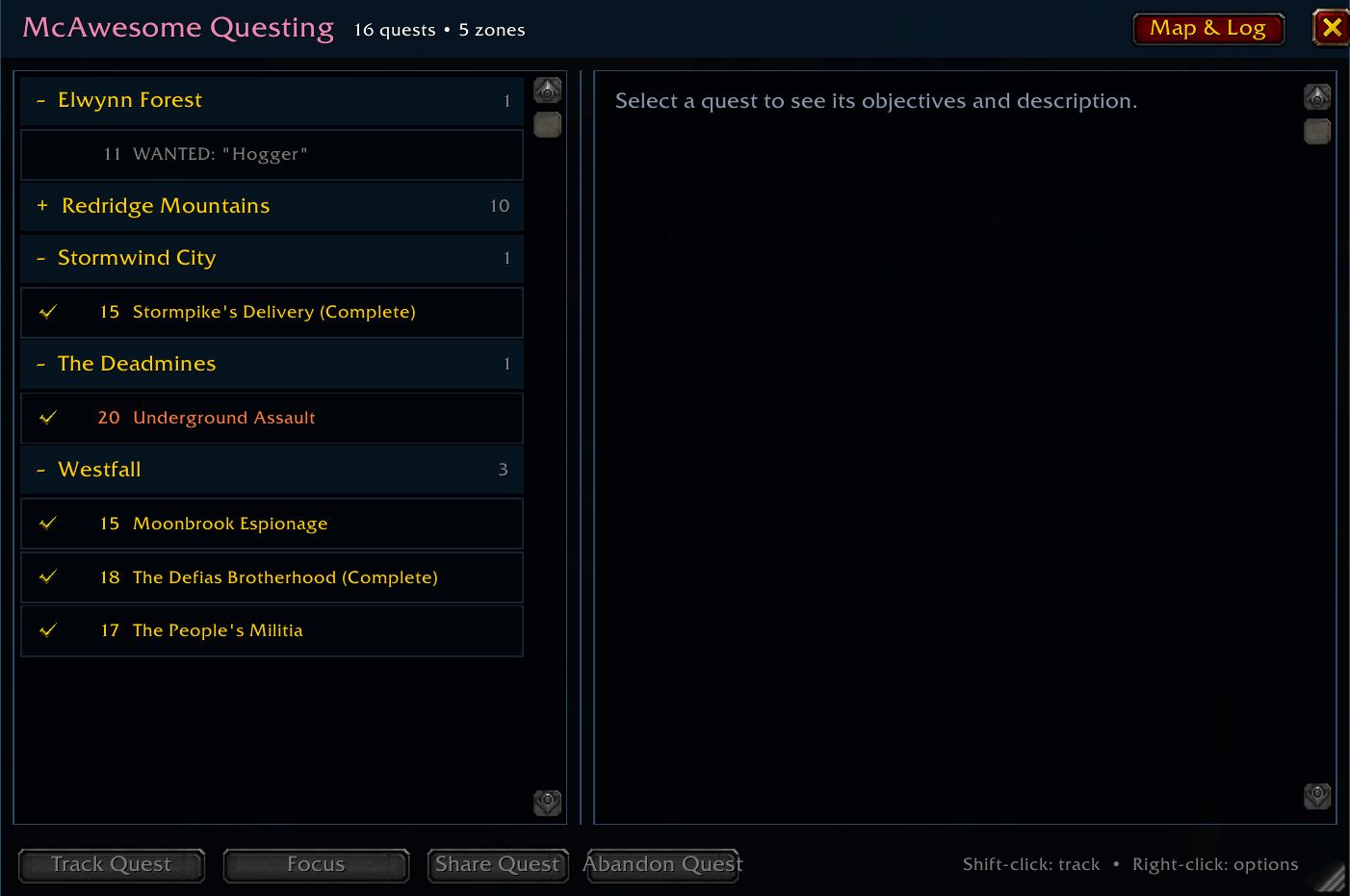
Screenshot 2026-09-29 181209.png
Screenshot 2026-09-29 181215.png
Screenshot 2026-09-29 181230.png

Screenshot 2026-09-29 182153.png
Description
McAwesome Questing
A movable, resizable quest journal and objective tracker that keeps Blizzard's familiar quest pages while organizing your quests by zone.
McAwesome Questing replaces the standard quest-log workflow and objective tracker with compact, configurable windows. Tracking remains synchronized with Blizzard's quest watch list, world map, and standard quest actions.
Features
- Groups quests by source zone and sorts them alphabetically.
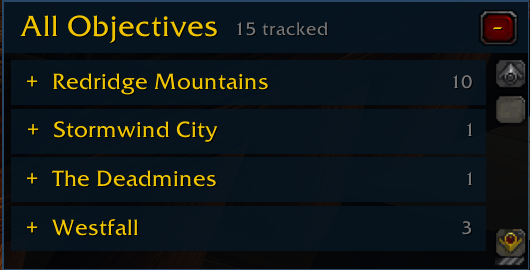
- Replaces the standard objective tracker with the movable All Objectives window.
- Collapsible zones automatically shrink and expand a locked tracker downward from its fixed top edge, up to the visible height of the Options panel, then use the scrollbar.
- Collapsing or expanding All Objectives keeps its locked top-left position fixed.
- An optional Hide while in combat setting hides both addon gameplay windows during combat and restores only those that were visible beforehand.
- Optional quest automation accepts the currently opened quest or every quest offered by an NPC, and turns in completed quests that do not require a reward choice.
- Quest-use items appear as compact, indented icon-and-name rows beneath their objectives in All Objectives; click anywhere on the row to use the item or hover for its native tooltip. On Forever, Blizzard's transparent native quest-item control supplies the protected click behavior while McAwesome owns the visible presentation.
- Optional Show rewards adds a quiet third line beneath each tracked quest with below-max-level experience, money, a hoverable guaranteed item, or the compact label Item choice only when that quest actually offers selectable rewards.
- With Show rewards enabled, each zone header totals the experience and money available from its currently tracked quests in brackets, followed by an explicit
QuestorQuestscount. - All Objectives performs bounded follow-up refreshes after quest-log and watch changes so delayed client objective data appears without opening the journal.
- Shows tracked-versus-total zone counts and provides Track All and Untrack All zone actions.
- Links quests from either addon window into the active Blizzard or McAwesome Chats input.
- Opens quests through Blizzard's native parchment renderer, including objectives, descriptions, rewards, and quest-specific themes.
- Uses Blizzard quest-difficulty colors for quest names and levels.
- Provides Track, Untrack, Focus, Share, Abandon, and map-target actions.
- Crosses out completed objectives and shows party quest progress on hover.
- Saves window positions, sizes, opacity, scale, lock state, and collapsed zones per character.
- Imports transferable layout and appearance settings from another character without changing quest progress or tracked goals.
Configuration
Click Options in either addon window, run /maq options, or open Settings → AddOns → McAwesome Questing.
Addon window titles and configuration headings follow the current character's class color.
You can configure:
- Blizzard quest-log and objective-tracker replacement.
- All Objectives visibility and window locking.
- Hide while in combat, disabled by default, with selective restoration of only the addon windows that were visible before combat.
- Automatic quest acceptance, scoped to the currently opened quest or every quest currently offered by the quest giver.
- Automatic turn-in for completed quests with no selectable reward; reward-choice quests always remain manual.
- Independent journal and tracker scale from 75% to 135%.
- Quest-list and objective text size from 80% to 140%.
- Independent journal and tracker opacity from 20% to 100%.
- Reset to defaults with confirmation.
Select Import from Character to open a companion panel beside Options. Character profiles appear as <Character Name> <Realm Name> - <Game Version>. After you select a compatible source, Import selected copies window sizes and positions, scale, opacity, lock state, combat visibility, quest-automation preferences, layout, replacement and visibility preferences, and collapsed zone sections. Imported geometry is clamped to the current screen, and the addon windows and option controls synchronize immediately. Protected changes requested during combat apply after combat ends.
The importer never copies quest completion or progress, Blizzard's watched-quest list, focused or selected quests, tracked goals, scans, or caches. Stale profiles are labeled, incompatible profiles are disabled, and corrupt entries are ignored safely.
Blizzard's parchment keeps Blizzard's native quest fonts. Use Journal scale to enlarge the complete parchment page.
Quest automation
All quest automation is disabled by default. Enable Automatically accept quests, then leave Accept all available quests unchecked to accept only the quest offer you open. Enable the second option to process every quest currently visible in the quest giver's available-quest list, one at a time, including lists whose quest data finishes loading just after the NPC window opens. Automatically accepted quests are added to Blizzard's watch list so they appear in All Objectives; you can still untrack them afterward. The addon does not navigate unrelated gossip choices or accept shared-quest confirmation dialogs.
Enable Automatically turn in quests to open completed quests directly from an NPC's quest list, advance their completion dialogs, and claim quests with no selectable reward. If one or more reward choices are displayed, the quest remains open so you can choose manually.
Linking quests in chat
Activate the chat input for the destination channel—for General, type /1 and leave the input open—then Shift+Left Click a quest in either the journal or All Objectives. The addon inserts a clickable quest link at the cursor in Blizzard chat or McAwesome Chats. Use Ctrl+Left Click when you want to track or untrack the quest instead.
Controls
| Action | Result |
|---|---|
| Click a quest in All Objectives | Open that quest in the journal |
| Click the same quest again | Close the journal |
| Shift+Left Click a quest while a Blizzard or McAwesome Chats input is active | Insert a clickable quest link into the message |
| Ctrl+Left Click a quest | Track or untrack that quest |
| Click a zone heading | Collapse or expand the zone |
| Right-click a quest | Open quest actions |
| Right-click a zone heading | Track or untrack every quest in that zone |
| Click the target icon | Set or clear the map/minimap quest target |
| Hover a quest while grouped | Show party members' quest progress |
| Click Options | Open or close configuration |
| Press Escape in configuration | Close the import companion first, then Options |
Slash commands
| Command | Action |
|---|---|
/maq or /maq toggle |
Toggle the quest journal |
/maq options |
Open configuration |
/maq tracker or /maq objectives |
Toggle All Objectives |
/maq lock / /maq unlock |
Lock or unlock both windows |
/maq alpha 20-100 |
Set journal opacity |
/maq scale 75-135 |
Set journal scale |
/maq blizzard |
Toggle the Blizzard quest-log binding replacement |
/maq reset |
Restore defaults |
Installation
Install McAwesome Questing with the CurseForge app and restart World of Warcraft or run /reload.
For manual installation, extract the release and place the inner McAwesomeQuesting folder in World of Warcraft/.../Interface/AddOns. The final path should end with Interface/AddOns/McAwesomeQuesting/McAwesomeQuesting.toc.
Supported game versions
McAwesome Questing supports WoW Forever/Camelot 1.60.1.
McAwesome Questing Team