McAwesome Maps
- By
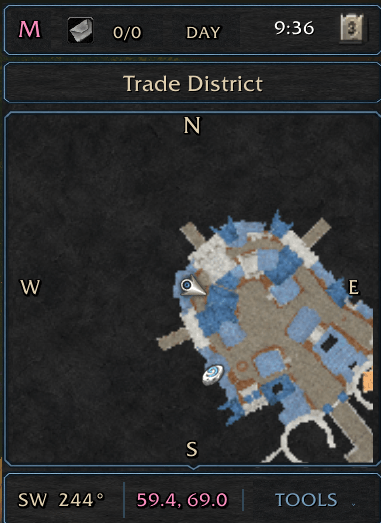
A square, information-rich WoW minimap with live coordinates, an accurate compass, an integrated zone and clock header, and a collapsible button tray for Blizzard and addon controls.
Screenshot 2026-10-03 093639.png
Screenshot 2026-10-03 093650.png
Description
McAwesome Maps
Join the McAwesome Addons community on Discord for support, feedback, and updates.
CurseForge summary
A square WoW minimap with compass, social bars, a control tray, and API-sourced flight points on the main world map.
A square, information-rich minimap with a live compass and a collapsible home for all those minimap buttons.
Designed for World of Warcraft: Forever, McAwesome Maps reshapes Blizzard's minimap into a compact tactical display while keeping the familiar game systems underneath. Native map pins, tracking, tooltips, clicks, the clock, calendar, and zone display continue to work—they are simply organized into a cleaner McAwesome-styled frame.
Put every corner to work
The standard circular mask leaves valuable space unused. McAwesome Maps converts the minimap into a true square so roads, objectives, gathering nodes, party markers, and nearby points of interest remain visible in the corners.
The complete minimap cluster is treated as one interface:
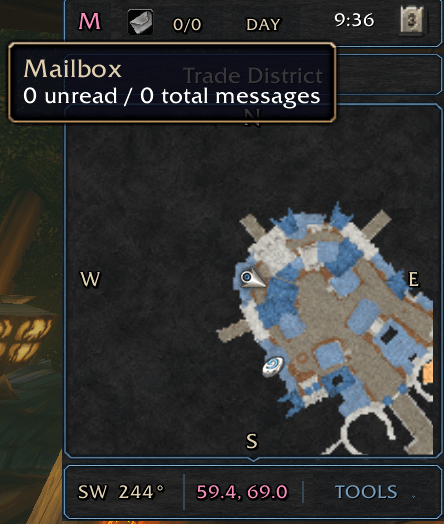
- A class-colored M badge, mailbox icon with unread/total counts, centered day/night state, clock, and calendar share a compact borderless utility row
- A dedicated social row shows combined character and Battle.net friends online/total plus guild members online/total when guilded
- Selecting FRIENDS opens Blizzard Contacts; selecting GUILD opens Guild & Communities
- Blizzard's full zone or subzone name is centered in a clean McAwesome-owned bar below the social row, while the transparent native control continues to provide its familiar click, tooltip, and map-opening behavior
- The clock and calendar remain available and clickable
- Coordinates and precise heading share a compact footer directly on the map
- A live compass surrounds the map edge
- Minimap controls move into an organized tray below the map
- Live Herbs and Ore indicators show profession-tracking status at a glance
- A borderless TOOLS control is integrated into the navigation footer and opens the tray directly downward
- Charcoal cartographer textures, chamfered slate-blue chrome, aligned frame widths, and warm parchment labels create a restrained map-first style
- The live minimap and the narrow surround beneath its outer frame share the same charcoal Cartographer grain
- The oversized day/night orb becomes a compact realm-time header indicator
The mailbox indicator shows exact unread/total counts once Blizzard has loaded the inbox and remembers the last confirmed count separately for each character across reloads and logins. Before that character's first mailbox check it displays ?/? rather than inventing unavailable counts, while still highlighting when the game reports new mail.
The full map layout is rebuilt after Alt-Z restores the UI, including delayed passes after Blizzard finishes its layout work. The saved position is also guarded against Blizzard reanchoring the minimap cluster.
Know exactly where you are headed
McAwesome Maps places compact N, S, E, and W markers around the map. A unified footer puts the eight-way heading, exact degrees, and live coordinates on one horizontal plane. The display responds correctly whether the minimap is configured as north-up or rotates with the player.
Live zone coordinates appear at the bottom of the map to two decimal places, such as 33.42, 66.47, in an expanded footer field that keeps the value clear beside the heading and Tools control. In instances where Blizzard intentionally restricts position or facing information, the addon displays an honest unavailable value instead of reporting an incorrect location.
Hold Shift and left-click the coordinate readout to insert its current value into the active chat input, or open chat with the coordinates already entered.
See the flight network at a glance
McAwesome Maps adds every flight point Blizzard exposes for the selected main-world-map zone. All nodes use the same normal icon treatment, and mouseover shows the localized flight-point name. The overlay uses its own display-only pins, leaving Blizzard's protected flight-point controls and map interactions untouched.
The Show flight points option controls the layer. It uses C_TaxiMap.GetTaxiNodesForMap directly and never depends on another addon or a bundled coordinate database. Because World of Warcraft: Forever does not expose reliable discovery state on these map results, McAwesome Maps intentionally does not claim which points the character has learned. When the game withholds taxi data, the addon shows nothing rather than guessing. Boat and airship routes remain omitted unless Blizzard supplies a dependable destination API.
Tame the button swarm
Supported Blizzard and LibDBIcon minimap controls, plus other named icon buttons created directly on the minimap rim, are collected into adaptive rows beneath the map. This includes buttons such as Arc Auras while leaving unnamed map pins on the terrain layer. Leftover circular minimap-border chrome is removed so compact tool icons do not carry oversized gold rings. Blizzard's mail and crafting-order indicators remain in their native indicator container because their event handlers depend on it.
Select TOOLS in the navigation footer to unfold the textured control tray downward or collapse it when you want a minimal display. Profession tracking is stacked on the left and native tool icons flow on the right without extra frames. Hidden or empty Blizzard containers do not reserve space. Game-controlled indicators such as mail or queue status retain their normal visibility behavior.
The top of the tray shows HERBS and ORE with bright active or muted inactive styling. Blizzard's original tracking control remains in the tray for changing those choices.
Move the complete minimap
Type /mam and turn off Lock minimap position, then drag the M badge in the minimap header. The badge is the drag handle—the map surface keeps its normal click, ping, and zoom behavior. The header, map, Tools tab, and expanded tray move together. Lock the position again when you are finished.
Keep Blizzard working
McAwesome Maps changes presentation without replacing the underlying minimap:
- Normal minimap clicks and tooltips remain available
- Blizzard tracking and map pins continue to work
- Mouse-wheel zoom is supported
- Zone, clock, and calendar controls keep their normal actions
- Protected layout changes wait until combat ends
- Optional Hide while in combat behavior is disabled by default; it hides McAwesome's map chrome, readouts, compass, and tools, then selectively restores the enhancements that were visible beforehand while Blizzard's native minimap remains available
- Display preferences are saved between sessions
- The complete minimap cluster can be moved by dragging the M badge and locked in place afterward
- A dedicated McAwesome Configurator tab provides live size, position, visibility, button-layout, and world-map flight-point controls
McAwesome Configurator is required and is installed automatically by the CurseForge app. Type /mam, /mac maps, or select McAwesome Maps in Blizzard AddOns Settings to open the Maps tab.
Import settings from another character
Use Configurator's General tab for family-wide or selective import. Sources appear as <Character Full Name> [<Realm>] [<Game Version>] - <#> addons. Choose Review Import, leave Maps checked by default or select only it, then choose Import Checked Addons. Maps copies portable placement, size, scale, opacity, lock state, control layout, display visibility, flight-point visibility, and combat hiding. Mailbox counts and live Herbs/Ore tracking state remain character-specific; unchecked addons remain unchanged and protected changes wait until combat ends.
Commands
/mam— Open the Maps tab in McAwesome Configurator/mam help— Show command help/mam buttons— Show or hide the button tray/mam coords— Show or hide coordinates/mam compass— Show or hide the compass and heading/mam refresh— Redetect and arrange minimap buttons/mam reset— Restore defaults and reload the UI
Compatibility
McAwesome Maps is built specifically for World of Warcraft: Forever 1.60.1 (interface 16001). Other World of Warcraft game clients are not supported.
McAwesome Maps Team