Max Warrior Suite
- By
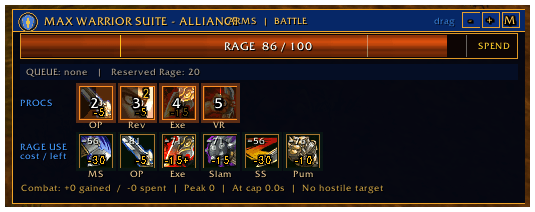
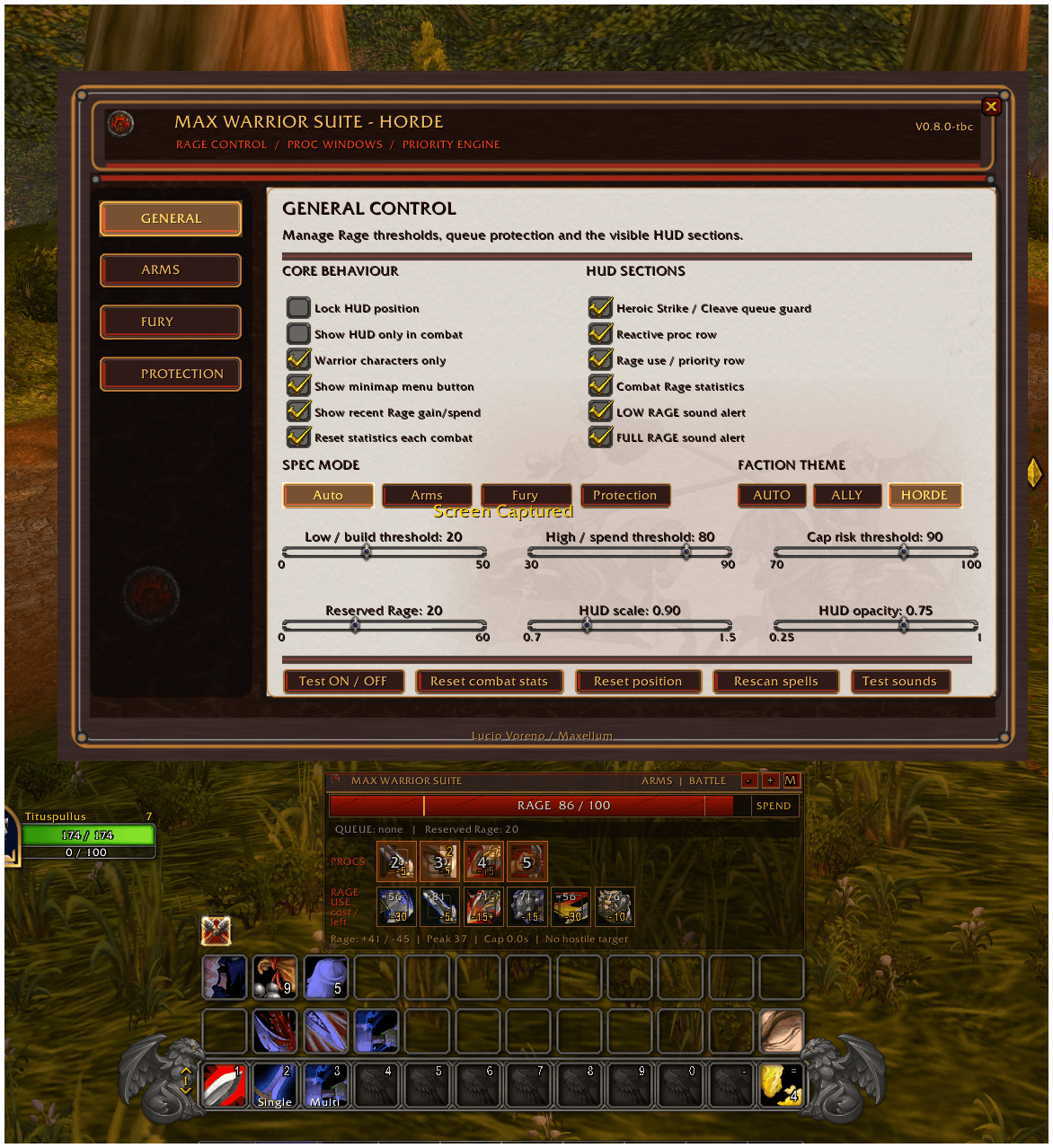
Max Warrior Suite is a complete combat HUD for Arms, Fury and Protection. Track Rage, procs, queued attacks, priorities and key abilities, with faction themes, configurable thresholds, minimap controls, and distinct Low/Full Rage sound alerts anytime.
MWS.jpeg
Screenshot 2026-07-14 170018.png
MWS_Horde.png
MWS2.jpeg
MWS1.jpeg
Description
Max Warrior Suite TBC
A complete Rage-control, combat-assistance and character-planning suite for Warriors in World of Warcraft Classic: The Burning Crusade.
Max Warrior Suite TBC is designed to provide a Warrior with clear, immediate and configurable information without replacing the player's judgment or action bars.
The addon monitors Rage, reactive combat opportunities, queued attacks, specialization priorities, active talents, equipment-based statistics and configurable alerts. It helps the player understand when to build Rage, when to spend it, when to preserve a reserve and when a proc or combat condition deserves immediate attention.
Max Warrior Suite does not automate protected combat actions. It analyzes the current situation and presents the relevant information through a modular HUD and a detailed configuration interface.
Rage Control
The Rage system is the core of Max Warrior Suite.
The addon tracks the current Rage value and divides its behavior into practical combat states:
- BUILD
- CONTROL
- SPEND
- CAP RISK
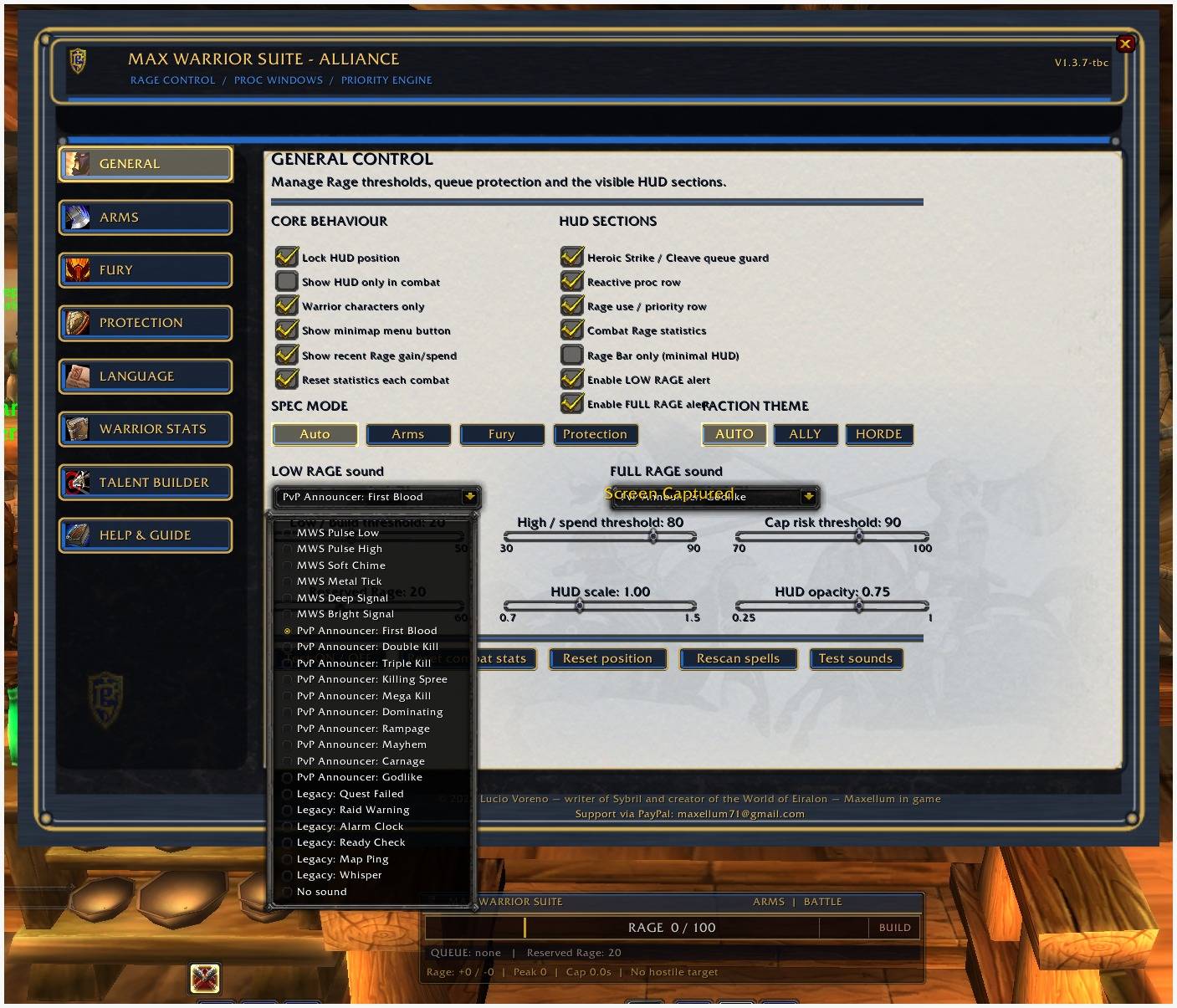
The player can configure:
- LOW RAGE threshold
- HIGH RAGE threshold
- Rage cap-risk threshold
- Reserved Rage
- Visual and audio alerts
- Combat-only visibility
The HUD also displays recent Rage gains and expenditures, helping the player understand how quickly Rage is being generated or consumed.
Heroic Strike and Cleave Queue Guard
Max Warrior Suite detects when Heroic Strike or Cleave is queued for the next weapon swing.
The Queue Guard warns the player when the queued attack may consume Rage needed for a higher-priority ability or reduce the configured Rage reserve.
This system is particularly useful when controlling Rage during:
- Boss encounters
- Tanking
- Dual-wield combat
- High-Rage phases
- Low-Rage recovery
- Execute phases
Reactive Combat Windows
The addon tracks important reactive opportunities available to the Warrior, including abilities such as:
- Overpower
- Revenge
- Victory Rush
- Execute
The exact ability and talent names are always obtained from the installed WoW client, so they remain in the language selected for the game.
Reactive windows are presented visually without casting the ability automatically.
Specialization Support
Max Warrior Suite supports all three Warrior specializations.
Arms
The Arms section manages:
- Arms-specific ability tracking
- Overpower and reactive windows
- Mortal Strike priorities
- Execute-phase behavior
- Rage conservation
- Offensive proc tracking
The Arms priority engine focuses on controlled Rage use, weapon-based damage and reactive opportunities.
Fury
The Fury section manages:
- Dual-wield priorities
- Sustained-damage abilities
- Bloodthirst and Whirlwind management
- Buff and proc monitoring
- Rage-spending control
- Heroic Strike and Cleave usage
The Fury engine helps prevent excessive Rage expenditure while maintaining pressure and reliable ability availability.
Protection
The Protection section manages:
- Tanking priorities
- Revenge windows
- Defensive abilities
- Threat-oriented Rage usage
- Shield-based abilities
- Reserved Rage protection
- Critical tanking statistics
The Protection engine is designed to help the player maintain control without sacrificing defensive resources merely to force additional damage or threat.
Automatic and Manual Specialization Modes
The addon can automatically detect the active talent distribution and select the most appropriate specialization mode.
The player can also force:
- Arms
- Fury
- Protection
Manual selection is useful for hybrid builds, experimental talent distributions or specialized encounter setups.
Priority and Rage-Use Row
The priority row shows the abilities currently considered most relevant by the selected specialization engine.
For each ability, the addon can display:
- Ability icon
- Rage cost
- Current affordability
- Cooldown state
- Estimated Rage remaining after use
- Current priority
The system is informational. The player remains responsible for activating every ability.
Proc and Buff Tracking
Max Warrior Suite tracks relevant TBC Warrior effects, active buffs and reactive combat conditions.
The HUD can be configured to show or hide:
- Reactive proc row
- Rage-use priority row
- Queue Guard
- Combat Rage statistics
- Additional HUD information
Each section can be enabled independently.
Minimal HUD Mode
Players who prefer a cleaner interface can enable:
Rage Bar only (minimal HUD)
This mode hides:
- Spell priority rows
- Reactive proc rows
- Queue Guard details
- Combat statistics
- Auxiliary HUD controls
Only the movable Rage bar remains visible.
The minimap button can remain enabled so the configuration menu is always accessible.
Audio Alerts
LOW RAGE and FULL RAGE can use independent sound alerts.
The audio configuration includes:
- Separate LOW RAGE sound selection
- Separate FULL RAGE sound selection
- Sound preview
- Independent alert activation
- No Sound option
- Original MWS interface sounds
- Bundled PvP announcer sounds
The original MWS alerts are designed not to resemble common in-game event sounds, reducing confusion during combat.
Included PvP announcer sounds include:
- First Blood
- Double Kill
- Triple Kill
- Killing Spree
- Mega Kill
- Dominating
- Rampage
- Mayhem
- Carnage
- Godlike
The audio files are included directly in Max Warrior Suite. No external Max SCT installation is required.
Alliance and Horde Themes
The interface includes dedicated visual themes for:
- Alliance
- Horde
- Automatic faction detection
The selected theme affects the HUD, menu borders, headers, buttons and decorative elements.
The functional information remains identical for both factions.
Complete Configuration Menu
Max Warrior Suite includes a parchment-style configuration interface divided into dedicated pages:
- General
- Arms
- Fury
- Protection
- Language
- Warrior Stats
- Talent Builder
- Help & Guide
The menu can be opened through the minimap button or slash commands.
Language Selection
The addon interface supports:
- English
- Italiano
- Français
- Español
The language can be changed from the dedicated Language page by clicking the corresponding flag.
All addon-controlled text is localized, including:
- Menu titles
- Instructions
- Buttons
- Checkboxes
- Sliders
- Status messages
- Warrior Stats
- Talent Builder controls
- Confirmation messages
- Help & Guide content
Spell names, ability names, talent names and native talent descriptions remain in the language supplied by the installed WoW client.
Live Warrior Statistics
The Warrior Stats page reads the current values exposed by the WoW client.
The calculations reflect:
- Equipped items
- Active talents
- Racial bonuses
- Active buffs
- Current character modifiers
- Weapon changes
- Armor changes
Displayed values include:
- Strength
- Agility
- Stamina
- Attack Power
- Melee Hit Rating
- Effective Hit percentage
- Remaining Hit to the selected reference cap
- Critical Strike
- Haste Rating and percentage
- Expertise Rating
- Main-hand Expertise
- Off-hand Expertise
- Defense
- Remaining Defense to the tank reference value
- Armor
- Dodge
- Parry
- Block
- Combined avoidance estimate
- Talent points spent in each tree
The page also includes practical TBC reference information divided by specialization.
These values are intended as guidance and do not replace encounter-specific gearing decisions.
Talent Builder
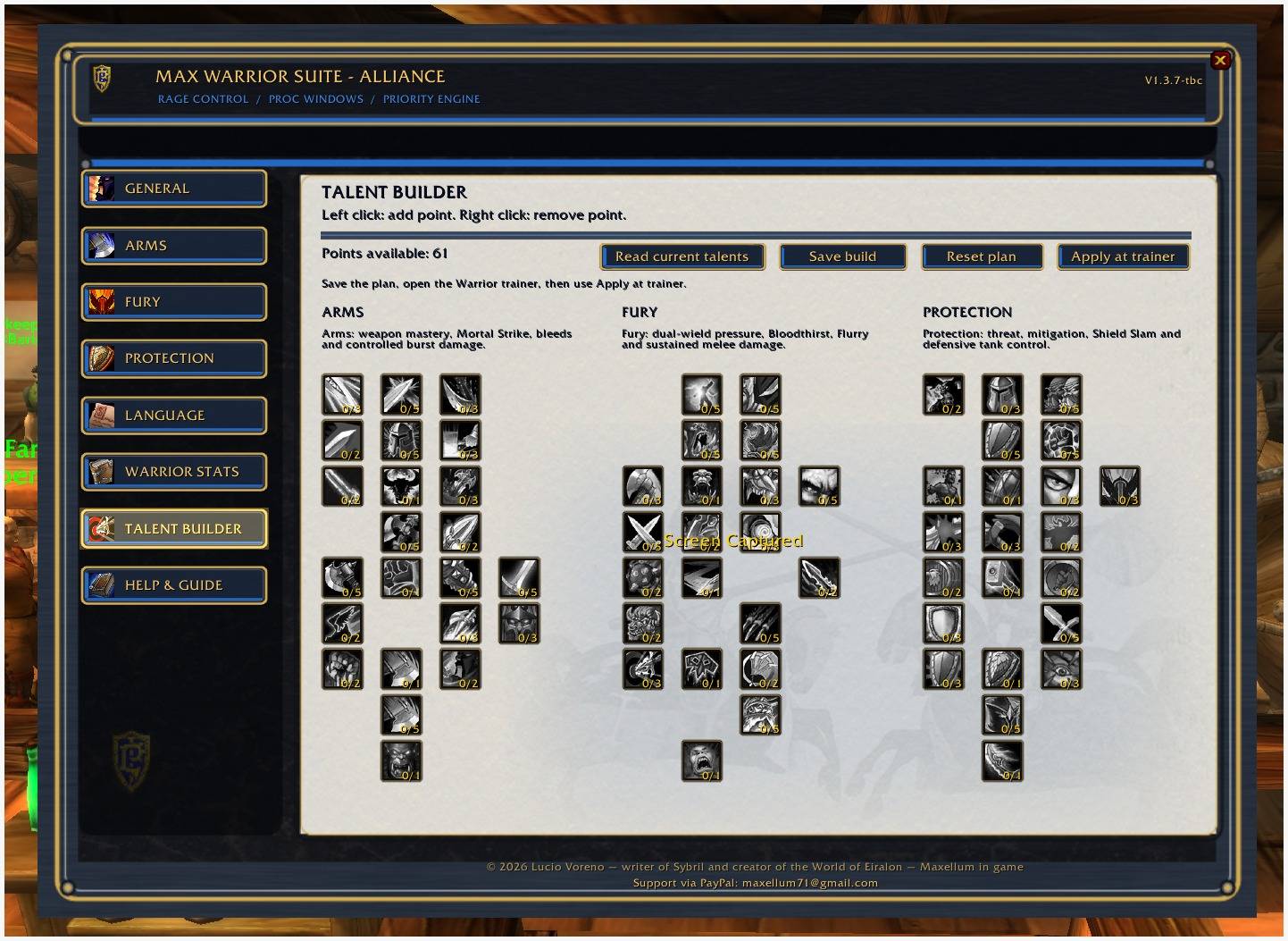
Max Warrior Suite includes an integrated Warrior Talent Builder.
The builder reads the Warrior talent trees directly from the installed TBC client.
Features include:
- Arms, Fury and Protection talent trees
- Native talent icons
- Native talent names
- Native talent descriptions
- Left click to add a planned point
- Right click to remove a planned point
- Tier validation
- Maximum-rank validation
- Available-point counter
- Current-talent import
- Build reset
- Build saving
- Planned-build application from the Warrior trainer
Applying a Saved Talent Build
To apply a planned build:
- Open the Talent Builder.
- Create the desired talent distribution.
- Click Save build.
- Visit a Warrior trainer.
- Open the trainer window.
- Click Apply at trainer.
- Confirm the operation.
The addon checks:
- Available talent points
- Current talent ranks
- Planned talent ranks
- Conflicting existing talents
- Tier requirements
- Maximum talent ranks
If the current character has talents that must be removed to match the saved plan, the addon asks the player to reset the talents at the trainer first.
Max Warrior Suite cannot bypass Blizzard's protected-action rules and cannot spend talent points without the required player interaction.
Help & Guide
The integrated Help & Guide provides a scrollable explanation of the addon.
It covers:
- Rage thresholds
- Reserved Rage
- Queue Guard
- HUD positioning
- HUD locking
- Combat-only visibility
- Arms configuration
- Fury configuration
- Protection configuration
- Language selection
- Warrior Stats
- Talent Builder
- Audio alerts
- Minimal HUD
- Safe build application
The guide can be navigated with the vertical scrollbar or mouse wheel.
Combat Statistics
During combat, Max Warrior Suite can track:
- Rage gained
- Rage spent
- Peak Rage
- Time spent near or at the Rage cap
These values help identify wasted Rage, excessive spending and inefficient resource management.
Minimap Button
- Left Click: open the configuration menu.
- Right Click: toggle combat-only HUD visibility.
- Drag: reposition the button around the minimap.
Slash Commands
/mws/warriorsuite/maxwarrior/mws lock/mws unlock/mws test/mws soundtest/mws reset/mws combat/mws mapbutton/mws auto/mws arms/mws fury/mws protection/mws theme auto/mws theme alliance/mws theme horde/mws help
Important Information
- Max Warrior Suite is an assistance and information addon.
- It does not automate protected combat actions.
- It does not replace action bars.
- It does not cast abilities automatically.
- Spell and talent names are supplied by the installed WoW client.
- Character statistics depend on the values exposed by the TBC client API.
- Talent application requires the Warrior trainer and direct player confirmation.
Author
© 2026 Lucio Voreno — writer of Sybril and creator of the World of Eiralon.
Author: Lucio Voreno / Maxellum in game
Support via PayPal: maxellum71@gmail.com
All rights reserved.
Max Warrior Suite Team