Max Mage Suite
- By
A modular Mage HUD with mana alerts, buff and cooldown tracking, Polymorph timer, group click-buffing, live stats, talent planning, and fully movable, individually resizable frames.

Logo.jpeg
MMS_4.jpeg
MMS_3.jpeg
MMS_2.jpeg
MMS_7.jpeg
Description
Max Mage Suite
Max Mage Suite is a modular information and control HUD designed for Mages in World of Warcraft: The Burning Crusade Classic.
It combines Mana monitoring, configurable alerts, spell and buff tracking, Polymorph control, interactive group buff management, live character statistics, and talent planning in a single customizable interface.
Every major module can be moved and resized independently, allowing the player to build a clean layout suited to solo play, dungeons, raids, battlegrounds, or PvP.
Main Features
- Modular Mage HUD
- Independent movable frames
- Individual frame resizing
- Configurable Mana thresholds
- Low Mana sound alerts
- Major cooldown tracking
- Personal buff monitoring
- Interactive group buff matrix
- Polymorph timer and duration bar
- Live Mage statistics
- Talent build planner
- Alliance and Horde interface themes
- Four supported interface languages
- Test Mode for layout configuration
- Minimap button and slash commands
Mana Monitor
The Mana module displays:
- Current Mana
- Maximum Mana
- Current Mana percentage
- Configurable Low Mana threshold
- Configurable High Mana threshold
The Mana bar changes appearance according to its current state:
- Normal Mana
- Low Mana
- High Mana
A configurable sound alert can play when Mana falls below the selected Low Mana threshold.
The alert activates once when the threshold is crossed and automatically resets after Mana rises again.
Mana Sound Alerts
The Alerts & Sounds page allows you to:
- Enable or disable the Low Mana warning
- Select the preferred sound effect
- Test the selected sound directly from the menu
Available sound profiles include:
- Arcane ping
- Soft bell
- Alarm
- Ready-check sound
This allows the player to react to low Mana without constantly watching the resource bar.
Cooldown Tracking
Max Mage Suite can display the remaining cooldown of important Mage and racial abilities.
Default tracked cooldowns include:
- Ice Block
- Icy Veins
- Cold Snap
- Berserking
Additional optional cooldowns include:
- Evocation
- Arcane Power
- Presence of Mind
- Combustion
Each cooldown icon shows:
- Spell icon
- Remaining cooldown
- Ready status
- Desaturated state while unavailable
Cooldown icons can be displayed in a compact row or released and moved individually.
Personal Buff Tracking
The personal buff module monitors selected Mage buffs and displays:
- Active state
- Missing state
- Remaining duration
- Spell icon
- Duration overlay
Personal buff icons can be grouped into one compact frame or positioned separately on the screen.
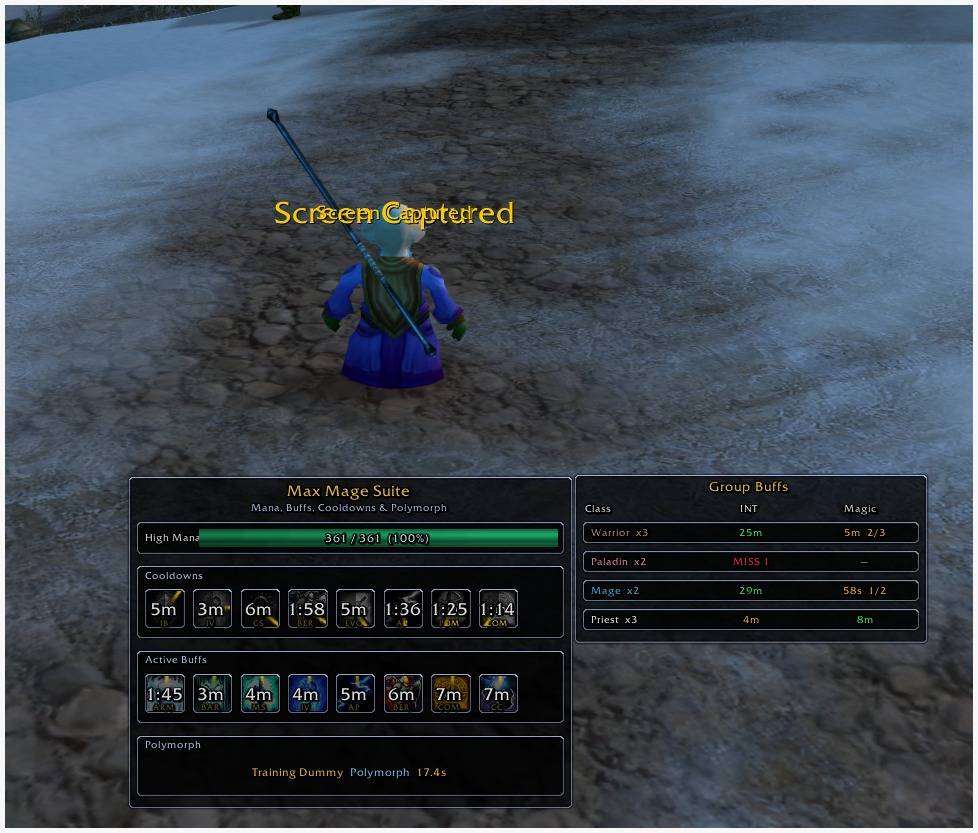
Interactive Group Buff Matrix
The Group Buff Matrix organizes party and raid members by class and reports the current group buff status.
The matrix displays:
- Member count for each class
- Arcane Intellect or Arcane Brilliance coverage
- Amplify Magic or Dampen Magic coverage
- Number of members missing a buff
- Shortest remaining buff duration in each class group
Group Click-Buff Controls
The Group Buff Matrix includes secure click controls.
INT Column
- Left click casts Arcane Intellect on the next member of that class who needs the buff.
- Right click casts Arcane Brilliance for the group.
Repeated left clicks automatically move to the next valid member requiring Arcane Intellect.
MAGIC Column
- Left click casts Amplify Magic.
- Right click casts Dampen Magic.
Each click performs one player-initiated spell action. The addon does not automate repeated casting.
The tooltip reports the next selected target and the spell assigned to each mouse button.
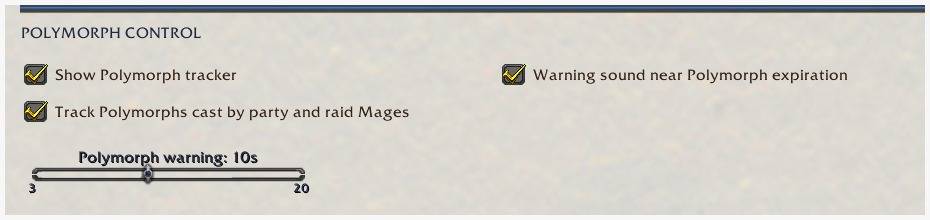
Polymorph Tracker
The Polymorph module tracks the controlled enemy even after changing target.
It displays:
- Target name
- Polymorph spell name
- Remaining duration
- Animated duration bar
- Expiration warning state
The duration bar starts full and progressively empties as Polymorph approaches expiration.
The tracker uses the target GUID and combat-log information to preserve the timer after changing target. When the affected enemy becomes your target, focus, or mouseover, available aura data is used to correct the estimated duration.
The tracker ends immediately when Polymorph:
- Expires
- Is removed
- Is dispelled
- Is broken by damage
- Is replaced
- Ends because the target dies
The bar changes to a warning color during the final configurable seconds.
Live Mage Statistics
The Mage Stats page reads current character values from equipment, talents, buffs, and active modifiers.
Displayed statistics include:
- Intellect
- Stamina
- Spirit
- Current and maximum Mana
- Armor
- Arcane spell damage
- Fire spell damage
- Frost spell damage
- Bonus healing
- Spell Hit
- Spell Hit rating
- Distance from the base raid boss hit target
- Arcane critical strike chance
- Fire critical strike chance
- Frost critical strike chance
- Spell Haste
- Haste rating
- Spell Penetration
- Mana regeneration
- Resilience
- Talent points spent in each tree
- Dominant talent specialization
The statistics page also includes separate Arcane, Fire, and Frost guidance panels with general stat priorities and specialization notes.
Talent Builder
The integrated Talent Builder allows the player to plan a complete Mage talent build.
Available talent trees:
- Arcane
- Fire
- Frost
Controls:
- Left click adds a planned talent rank.
- Right click removes a planned talent rank.
- Read Current Talents imports the active character build.
- Save Build stores the current plan.
- Reset Plan clears the planned allocation.
- Apply at Trainer prepares the saved build for use at the Mage trainer.
The planner displays:
- Current rank
- Planned rank
- Points available
- Points spent in each tree
- Tier requirements
- Previous-tier requirements
- Talent tooltips
- Saved build status
Talent application remains subject to the normal game rules, available points, trainer requirements, and protected-action restrictions.
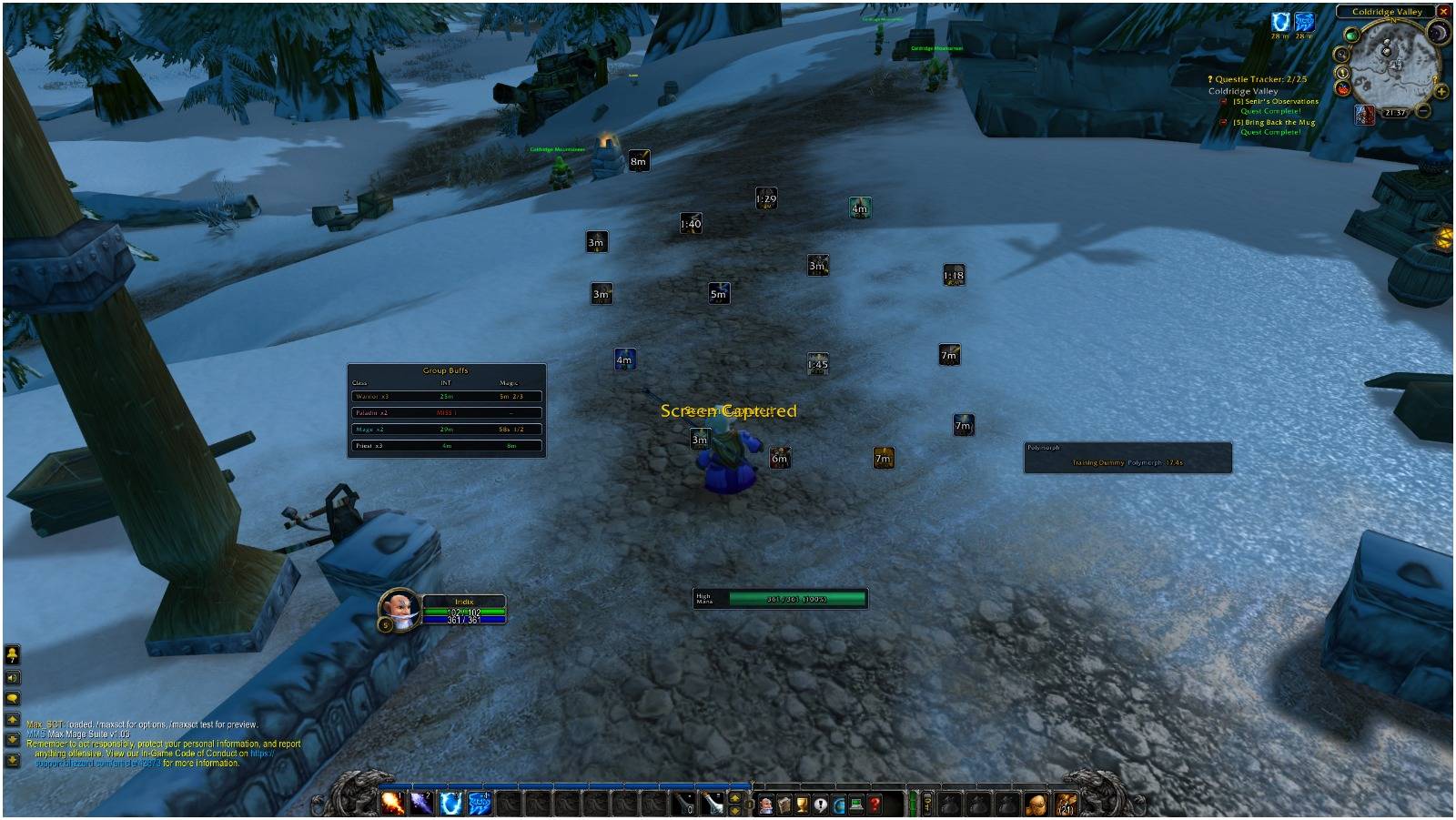
Fully Modular Layout
The following modules can be moved separately:
- Mana
- Cooldowns
- Active Buffs
- Polymorph
- Group Buffs
Cooldown and personal buff icons can also be released from their parent rows and positioned individually.
Each position is saved independently.
Individual Frame Resizing
When the interface is unlocked, every main module displays a resize handle in its lower-right corner.
Each frame can be resized independently between its configured minimum and maximum limits.
Individual size settings are saved separately for:
- Mana
- Cooldowns
- Active Buffs
- Polymorph
- Group Buffs
The global HUD scale remains available and works together with each module’s individual size.
Reset Positions restores both the ordered default placement and the default module sizes.
Layout Grid
A full-screen 32-pixel diagnostic grid is available for visual alignment.
The grid is a reference only.
Dragging does not automatically snap, pull, or reposition frames. Modules remain exactly where they are released.
Use the grid to compare spacing and alignment while keeping complete control over the final placement.
Interface Locking
The interface can be locked or unlocked from the menu or through slash commands.
When unlocked:
- Main modules can be moved
- Free icons can be moved
- Resize handles are visible
- Individual modules can be resized
When locked:
- Frames ignore drag input
- Resize handles are hidden
- The configured layout remains stable
Test Mode
Test Mode displays simulated information for layout configuration.
It can preview:
- Cooldown timers
- Personal buff durations
- Group buff data
- Polymorph tracking
- Mana states
Test Mode does not cast real spells and does not alter the player’s actual buffs or cooldowns.
Minimap Button
The minimap button provides quick control over the addon.
- Left click opens or closes the configuration menu.
- Right click enables or disables Max Mage Suite.
- Dragging moves the minimap button around the minimap.
When the addon is disabled:
- HUD modules are hidden
- Trackers are suspended
- The minimap button remains available
- The disabled state is saved
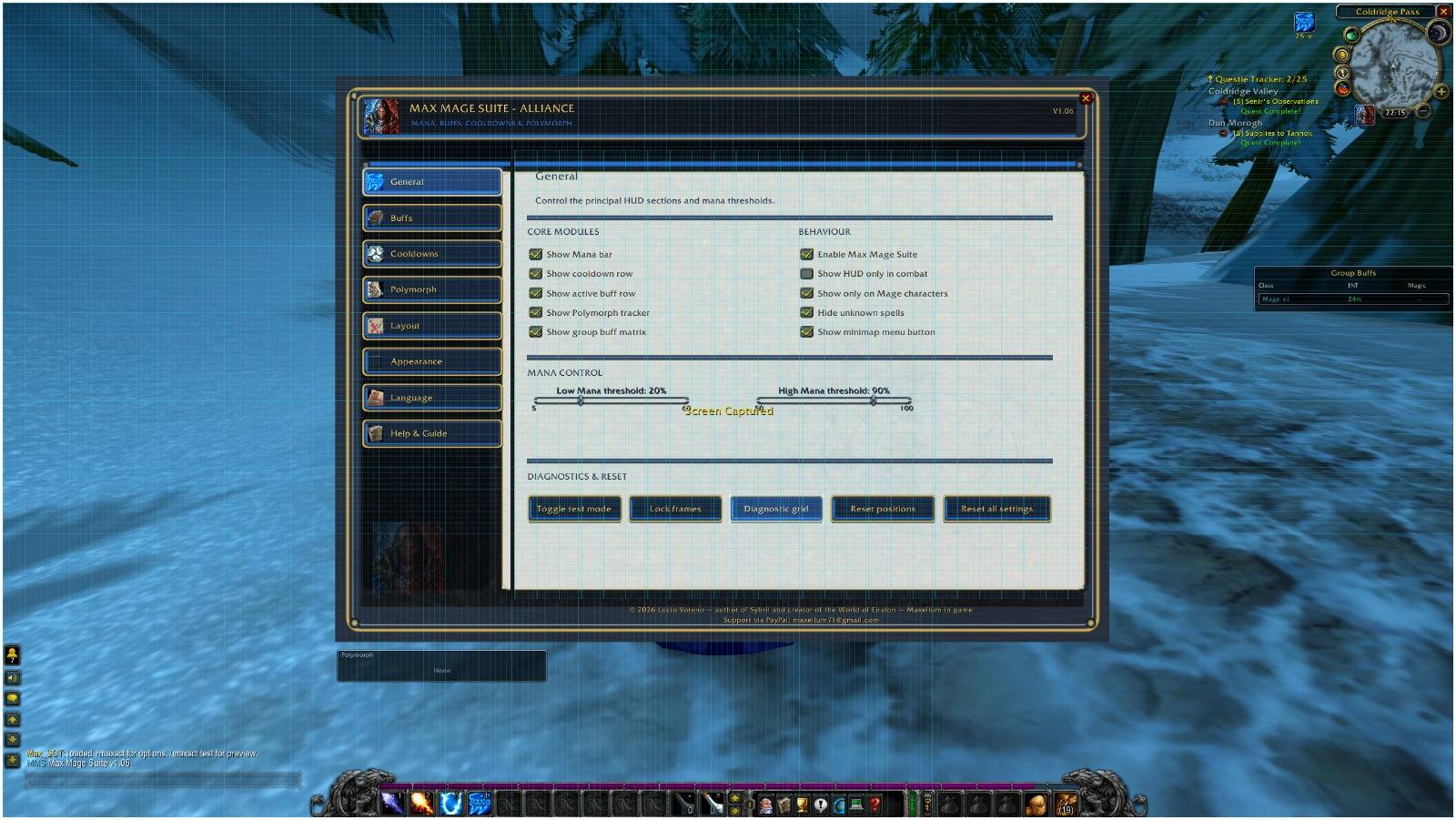
Configuration Pages
The configuration window includes:
- General
- Buffs
- Cooldowns
- Polymorph
- Layout
- Appearance
- Alerts & Sounds
- Mage Stats
- Talent Builder
- Language
- Help & Guide
Themes
Available interface themes:
- Automatic
- Alliance
- Horde
Automatic mode selects the theme according to the player’s faction.
Languages
The interface supports:
- English
- Italian
- French
- Spanish
Spell and talent names remain those supplied by the game client whenever available.
Slash Commands
/mms— Open configuration/mms test— Toggle Test Mode/mms lock— Lock modules/mms unlock— Unlock modules/mms grid— Toggle the diagnostic grid/mms resetpos— Reset positions and module sizes/mms reset— Reset all addon settings/mms toggle— Enable or disable the addon/mms enable— Enable the addon/mms disable— Disable the addon/mms freecd— Toggle individually movable cooldown icons/mms freebuff— Toggle individually movable personal buff icons/mms theme auto— Automatic faction theme/mms theme alliance— Alliance theme/mms theme horde— Horde theme/mms help— Open the internal guide
Combat and Security
Max Mage Suite does not automate combat decisions or repeated spell casting.
Interactive buff actions use secure player-initiated clicks and remain subject to World of Warcraft’s protected-action and combat-lockdown rules.
Configuration changes affecting secure group buff controls may require leaving combat before they can be fully updated.
Author
Author: Lucio Voreno / Maxellum in game
© 2026 Lucio Voreno — author of Sybril and creator of the World of Eiralon. All rights reserved.
Support
For support, feedback, requested features, or optional donations:
PayPal: maxellum71@gmail.com
Max Mage Suite Team