Max Paladin Suite
- By
A complete Paladin suite for TBC with customizable HUDs, spell and aura tracking, smart alerts, debuff monitoring, talent planning, trainer support, equipment scoring, consumable checks, profiles, audio cues and Blizzard-style configuration.
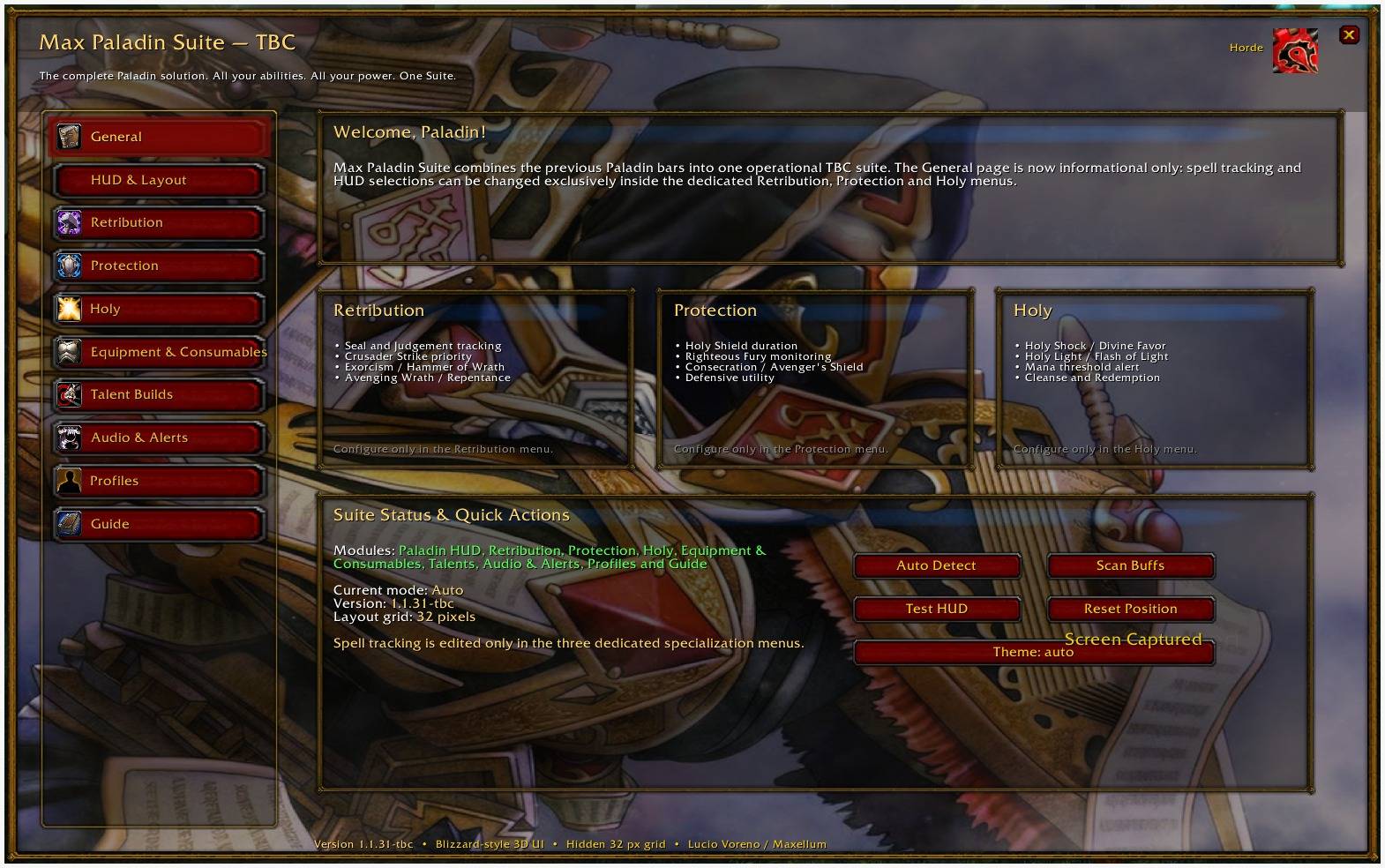
MPS_1.jpeg
Logo.jpeg
Description
Max Paladin Suite
Max Paladin Suite is the unified Paladin addon platform of the Max Mods project.
It combines the systems previously developed through separate Paladin addons and reorganizes them into one modular, specialization-aware and fully configurable Suite.
The goal is to give Paladin players one consistent interface for ability tracking, buffs, debuffs, alerts, character analysis, talent planning, equipment preparation, consumable checks and profile management across supported versions of World of Warcraft.
Features may vary between game versions because spells, talents, ranks, runes, combat mechanics and Blizzard APIs are different. Each supported build is adapted to the systems available in that specific client while preserving the same project identity, interface philosophy and long-term development direction.
Project Continuity
Max Paladin Suite is now the main and continuously maintained Paladin project within the Max Mods addon family.
The following previous addons are being discontinued as independently developed projects:
- Max Prot Paladin Bar
- Max Paladin Universal Bar
Their features are not being abandoned.
Their most useful systems, interface concepts and operational functions are being absorbed, reorganized and improved inside Max Paladin Suite.
The older addons may remain available as legacy downloads for existing users, but future Paladin development will be concentrated on the Suite.
This includes:
- New features
- Compatibility updates
- Interface improvements
- Bug fixes
- New supported game versions
- Specialization refinements
- Improved tracking systems
- Equipment and consumable tools
- Profile management
- Long-term maintenance
Max Paladin Suite therefore represents the official continuation of the Max Paladin addon line.
One Unified Paladin Experience
The Suite replaces multiple overlapping Paladin addons with one coordinated interface.
Instead of maintaining separate bars and duplicated options, Max Paladin Suite places every feature in the most appropriate section.
Protection systems are managed inside the Protection area. Healing tools are managed inside Holy. Offensive Seal, Judgement and priority systems are managed inside Retribution. Shared warnings are centralized in Audio and Alerts. Equipment and consumables are managed from one preparation section. HUD positioning is controlled from one modular layout system, while profiles preserve the complete configuration.
This structure improves clarity, reduces redundancy and creates a stronger foundation for future development.
Main Features
Depending on the supported game version, Max Paladin Suite can include:
- Holy, Protection and Retribution support
- Modular Paladin HUD
- Individually movable and scalable HUD elements
- Strict specialization-based ability selection
- Blessing, Seal, Aura and proc monitoring
- Cooldown and active-effect tracking
- Player buff monitoring
- Dedicated player debuff frame
- Target Judgement and debuff tracking
- Mana and priority assistant
- Seal and Judgement support
- Seal twist assistance where relevant
- Protection defensive statistics
- Retribution offensive statistics
- Holy healing and mana statistics
- Equipment analysis
- Base and Enhanced GearScore
- Consumable and preparation checklist
- Graphical talent planner
- Trainer Mode where supported
- Internal named configuration profiles
- MPS2 configuration import and export
- Audio and visual warnings
- Blizzard AddOns settings integration
- Alliance and Horde visual themes
- Complete in-addon guide
- Interface scaling for different screen sizes
Modular Paladin HUD
The HUD is built from independent functional elements rather than one fixed bar.
Available groups may include:
- Blessings
- Seals
- Core abilities
- Defensive abilities
- Utility abilities
- Player buffs
- Player debuffs
- Active Auras
- Temporary procs
- Target effects
- Assistant recommendations
- Consumables
The player decides exactly what should appear on the screen.
When the HUD is unlocked, supported icons can be detached from their original group and positioned independently.
Each detached element can preserve its own position, size, tracking state and specialization association.
Individual elements can be resized without changing the entire HUD. Complete rows and dedicated frames can also be moved and scaled independently.
Strict Specialization Tracking
Ability visibility is controlled from the dedicated specialization pages:
- Retribution
- Protection
- Holy
Other sections, including the Talent Planner and General settings, do not automatically activate HUD abilities.
Each specialization uses an independent tracking configuration.
Selecting one ability activates only that ability. Enabling an offensive spell must not automatically enable unrelated cooldowns, utility abilities or defensive tools.
Each specialization page can include:
- All
- Purge
- Restore Spec Tracking
All
Activates every supported tracking element for the selected specialization.
Purge
Immediately removes all selected elements belonging to that specialization, including abilities, cooldowns, Blessings, Seals, Auras, procs, target effects, Assistant recommendations and detached icons.
Purge is authoritative. Periodic aura scans, cooldown scans or Assistant updates cannot rebuild purged elements.
Restore Spec Tracking
Restores the recommended default tracking configuration for the selected specialization.
Retribution
The Retribution module focuses on offensive Paladin gameplay.
Depending on the game version, it may include:
- Offensive abilities
- Judgement monitoring
- Seal monitoring
- Seal maintenance
- Execute abilities
- Offensive cooldowns
- Crowd-control abilities
- Offensive procs
- Target Judgements
- Seal twist support
- Relevant Blessings
- Offensive utility
The Retribution statistics section may display values such as Melee Hit, Spell Hit, Expertise, Attack Power, Critical Strike, Haste and weapon information.
Exact abilities, caps and priorities depend on the supported client version.
Protection
The Protection module integrates and expands the systems previously developed for Max Prot Paladin Bar.
Depending on the game version, it may include:
- Threat-related effects
- Defensive abilities
- Shield abilities
- Block-related procs
- Taunts
- Defensive cooldowns
- Utility abilities
- Relevant Blessings
- Relevant Seals
- Tank preparation warnings
- Defensive consumables
- Combat-table analysis
Protection statistics may include Defense, Block Chance, Block Value, Dodge, Parry, Miss Chance, Melee Hit, Spell Hit and version-specific mitigation values.
Where supported, the Suite can compare different defensive states and identify missing tank preparation effects.
Holy
The Holy module focuses on healing, mana management and support.
Depending on the game version, it may include:
- Direct healing abilities
- Emergency healing abilities
- Healing cooldowns
- Cleansing
- Resurrection
- Relevant Blessings
- Relevant Auras
- Healing-related procs
- Mana support tools
- Emergency utility
Holy statistics may include Healing Power, Spell Critical Strike, Spell Haste, Intellect, Mana, Mana Regeneration and other version-specific healing values.
Mana and Priority Assistant
The integrated Assistant can evaluate the current Paladin state and provide a recommended action.
The Mana Core can use four operational states:
- CONSERVE
- CONTROL
- READY
- FULL
The Assistant may evaluate current mana, reserved mana, estimated ability cost, player health, target health, target type, execute range, creature restrictions, active Seal, Judgement state, cooldowns and specialization priorities.
The Assistant respects every manual tracking selection.
A disabled or purged ability cannot appear as a recommendation. When the recommended ability is already visible in another HUD group, the Assistant avoids creating an unnecessary duplicate icon.
Seals and Judgements
Depending on the game version, the Suite can monitor:
- Active Seals
- Seal duration
- Seal expiration
- Judgement availability
- Judgement effects on the target
- Seal-related priority conditions
- Seal and Judgement warnings
Where relevant, an optional Seal Twist Assistant can use weapon-swing timing and a configurable reaction window.
Seal and Judgement logic is adapted independently for each supported version.
Player Buff Monitoring
The Player Buff system can display relevant effects currently active on the character.
Depending on the supported build, it may monitor:
- Blessings
- Auras
- Food
- Flasks
- Elixirs
- Weapon enhancements
- External class buffs
- Raid buffs
- Specialization effects
- Temporary procs
Buff groups can remain attached to the main HUD or be placed in independent frames.
Player Debuff Frame
Max Paladin Suite includes a dedicated frame for harmful effects currently active on the player.
This frame is separate from target Judgements and target debuffs.
Available filters may include:
- All debuffs
- Cleansable debuffs
- Timed debuffs
The frame can prioritize effects removable by the Paladin.
Depending on the game version, debuff categories may include Magic, Disease, Poison and Curse.
Cleansable effects receive clear visual identification so dangerous debuffs can be recognized quickly.
The Player Debuff frame can be attached to the main HUD, detached into a free-position frame, moved independently, resized and limited to a configurable number of icons.
Test HUD mode can generate example debuffs, allowing the frame to be positioned even when the character has no real harmful effects.
Visual Alerts
Abilities and effects requiring attention can use a gradual illumination pulse instead of an aggressive full-frame flash.
Only the relevant icon is animated. The complete frame remains stable and does not blink, jump or change position.
Inactive abilities remain darkened until they are genuinely active.
Equipment Analysis
The Equipment section can scan supported equipment slots and display:
- Equipment
- Base Score
- Enhanced Score
Base GearScore evaluates the equipped item without permanent enhancements.
Enhanced GearScore can include supported improvements such as socketed gems, permanent enchants and version-specific upgrades.
The equipment summary may report equipped slots, Base GearScore, Enhanced GearScore, enhancement gain, average item level, permanent enchants and socketed gems.
The scoring system is intended as a practical comparison tool. It does not replace encounter-specific item analysis, simulations or advanced stat-weighting tools.
Consumable and Preparation Checklist
The preparation checklist can scan bags and active effects for relevant items.
Items may be reported as:
- ACTIVE
- IN BAGS
- MISSING
Consumable display modes can include:
- Off
- Smart
- Always
- Combat
Consumable lists are adapted to each supported game version and may include food, flasks, elixirs, potions, oils, stones, runes, reagents, weapon enhancements and class-specific preparation items.
A minimum required level can be configured to prevent irrelevant low-level items from filling the checklist.
Talent Planner
The Talent Builds section provides a graphical Paladin talent planner.
Available trees depend on the selected game version and may include Holy, Protection, Retribution and additional version-specific systems.
Features may include:
- Current talent ranks
- Planned talent ranks
- Tier requirements
- Prerequisite tracking
- Available and locked states
- Talent tooltips
- Left-click to add a rank
- Right-click to remove a rank
- Clear individual talent tree
- Reset complete plan
- Read current talents
- Save build
- Load saved build
The planner prevents invalid configurations whenever possible.
Talent planning remains completely separate from HUD ability visibility. Changing a talent plan does not activate abilities on the HUD.
Trainer Mode
Where supported by the client, Trainer Mode can guide the player through a saved talent build.
The system identifies the next valid talent rank and highlights it.
The Learn Next function applies one protected talent rank per hardware click when permitted by the game API.
The addon does not bypass Blizzard protected-action restrictions.
In versions where direct talent assignment is not available, the planner remains usable as a manual reference.
Profiles
The Profiles section contains an internal named configuration database.
Players can:
- Save the current setup
- Load a saved configuration
- Update an existing configuration
- Delete a saved configuration
- Maintain different layouts for different specializations or activities
Profiles can include HUD layouts, detached icon positions, individual icon sizes, specialization selections, Mana Core settings, Assistant settings, alerts, audio options, consumables, talent plans, saved builds and Player Debuff frame settings.
MPS2 Import and Export
MPS2 provides a text-based method for transferring or backing up the current Suite configuration.
Export MPS2 generates a configuration string that can be copied and stored outside the game.
Import MPS2 applies a compatible configuration string to the Suite.
This can be useful for reinstalling the addon, moving settings to another computer, sharing a layout or preserving a configuration before a major update.
Audio and Alerts
The Audio and Alerts section centralizes visual and sound notifications.
Warnings may cover:
- Low mana
- Mana ready
- Full mana
- Missing threat effects
- Expiring threat effects
- Missing Seals
- Expiring Seals
- Missing Blessings
- Expiring Blessings
- Expired effects
- Dangerous debuffs
- Incorrect tank buffs
- Priority recommendations
Audio alerts can be configured independently from visual HUD tracking.
Display and Layout
The Suite can be adapted to different screen resolutions and interface configurations.
Layout controls may include:
- Suite window scale
- Global icon size
- Icon spacing
- Row spacing
- HUD opacity
- Warning times
- Lock position
- Combat-only visibility
- Test HUD
- Reset HUD
- Reset individual positions
The configuration interface follows a consistent alignment system to maintain coherent spacing and panel geometry.
Blizzard Settings Integration
Max Paladin Suite can register inside the native Blizzard AddOns settings menu.
The Blizzard settings page may provide quick access to the complete Suite, HUD controls, Talent Builds, Profiles, Guide, minimap button, Assistant display, Player Debuff frame and reset functions.
The complete custom Suite window remains available for advanced configuration.
Complete In-Addon Guide
The Guide section can include information about:
- Installation
- Opening the Suite
- HUD layout
- Individual icon movement
- Specialization tracking
- All and Purge behavior
- Mana Core
- Seals and Judgements
- Player debuffs
- Equipment scoring
- Consumables
- Talent planning
- Trainer Mode
- Profiles
- MPS2
- Audio alerts
- Troubleshooting
- Slash commands
- Blizzard protected-action limitations
Version-Specific Development
Max Paladin Suite is a shared project, but every supported World of Warcraft version may require a dedicated build.
Possible branches may include:
- Classic-era versions
- Season-based versions
- The Burning Crusade
- Later Classic expansions
- Retail World of Warcraft
Support for a specific version is confirmed only when a compatible build is released.
Different game versions may require different implementations because of changes to spells, ranks, talents, runes, resources, specializations, dispels, statistics, consumables, combat mechanics and Blizzard APIs.
Features that do not exist in a specific client should not appear as useless placeholders.
Each build should present only systems that are relevant and technically supported.
Migration from Previous Paladin Addons
Players using Max Prot Paladin Bar or Max Paladin Universal Bar are encouraged to move to Max Paladin Suite when a compatible version is available.
Recommended migration procedure:
- Install the compatible Max Paladin Suite build.
- Disable the previous Paladin addons to prevent duplicated frames and alerts.
- Open the required specialization page.
- Use Purge if you want to begin with a clean HUD.
- Enable only the abilities and effects you need.
- Unlock the HUD and rebuild your preferred layout.
- Save the configuration as a named profile.
- Create an MPS2 backup where supported.
SavedVariables from the discontinued addons may not be automatically compatible with Max Paladin Suite because the Suite uses a different and more complete database structure.
Development Philosophy
Max Paladin Suite follows several core principles:
- The player controls exactly what appears on the screen.
- One selected ability must never activate unrelated elements.
- Purge must produce a genuinely clean HUD.
- Talent planning must remain separate from HUD tracking.
- Specialization settings must remain independent.
- Duplicate icons should be avoided.
- Redundant controls should be removed.
- Frames must remain stable when moved.
- Alerts should be visible without becoming visually aggressive.
- Information should remain analytical, readable and useful during real gameplay.
- New systems should improve the Suite without removing valuable features inherited from previous projects.
- Every supported version should preserve the same recognizable Paladin project identity.
Active Development
Max Paladin Suite is under active development.
Future updates may include new supported game versions, functional additions, interface refinements, compatibility corrections, better tracking accuracy, new specialization statistics, expanded HUD customization, improved profiles, additional alerts and version-specific Paladin systems.
Because the Suite contains interconnected modules, players should replace the complete addon folder when installing a new version rather than overwriting individual files.
Final Project Direction
Max Paladin Suite is the future of the Max Paladin addon family.
Max Prot Paladin Bar and Max Paladin Universal Bar established many of the systems now being integrated into the Suite, but maintaining several overlapping projects would divide development and create unnecessary inconsistencies.
The Suite brings those projects together, preserves their strongest ideas and provides a more advanced foundation for future Paladin gameplay.
One Paladin project.
One modular interface.
One continuous development path.
Installation
- Download the build compatible with your World of Warcraft version.
- Extract the addon folder.
- Copy the folder into the appropriate Interface/AddOns directory.
- Restart the game or use /reload.
- Use the addon command or minimap button to open the Suite.
- Configure the required specialization.
- Use Purge if you prefer to build a minimal HUD from an empty configuration.
- Unlock the HUD and position the selected elements.
- Save the completed setup as a named profile.
Author
Lucio Voreno / Maxellum
Author of Sybril and creator of the World of Eiralon.
© 2026 Lucio Voreno. All rights reserved.
The Max Paladin Suite Team