Kinfolk: TierLedger
- By
Plan your Tier 1 set for WoW Forever: see which of the six pieces you have, which single crafted piece to wear, a shopping list of materials and Malleable Essence, and which guildmates can craft it.
TierLedger_Logo_400.png
Screenshot 2026-10-09 190626.png
Screenshot 2026-10-09 190720.png
Screenshot 2026-10-09 190752.png
Screenshot 2026-10-09 190902.png
Screenshot 2026-10-09 190931.png
Description
TierLedger: tier set planner for WoW Forever
TierLedger is a tier set planner for World of Warcraft: Forever. It shows your class's Tier 1 set piece by piece: what you already have, where each missing piece comes from, what the crafted pieces take to make, which guildmates can craft them, and how close each of your characters is to wearing a second crafted piece. It is for every raider working on a tier set, and for the leatherworkers, tailors and blacksmiths who make the crafted pieces.
Made by the developer of KinFolk.
Please note. The Tier 1 head and chest pieces drop in the Tier 1 raids, Hyjal Summit and Barrow Deeps, and are not in the game yet. TierLedger shows them as "Not in the game yet" and will be updated for them when the raids open. If something breaks or looks wrong, please send me a message here on CurseForge (Teddyruxspin).
At a glance
| Game | World of Warcraft: Forever |
| Made for | Raiders working on a tier set, and the guild's leatherworkers, tailors and blacksmiths |
| Covers | All 18 Tier 1 sets for all 9 classes |
| Pages | Set, Crafting, Guild, and a Welcome page |
| Needs | Nothing else. Works on its own |
Highlights
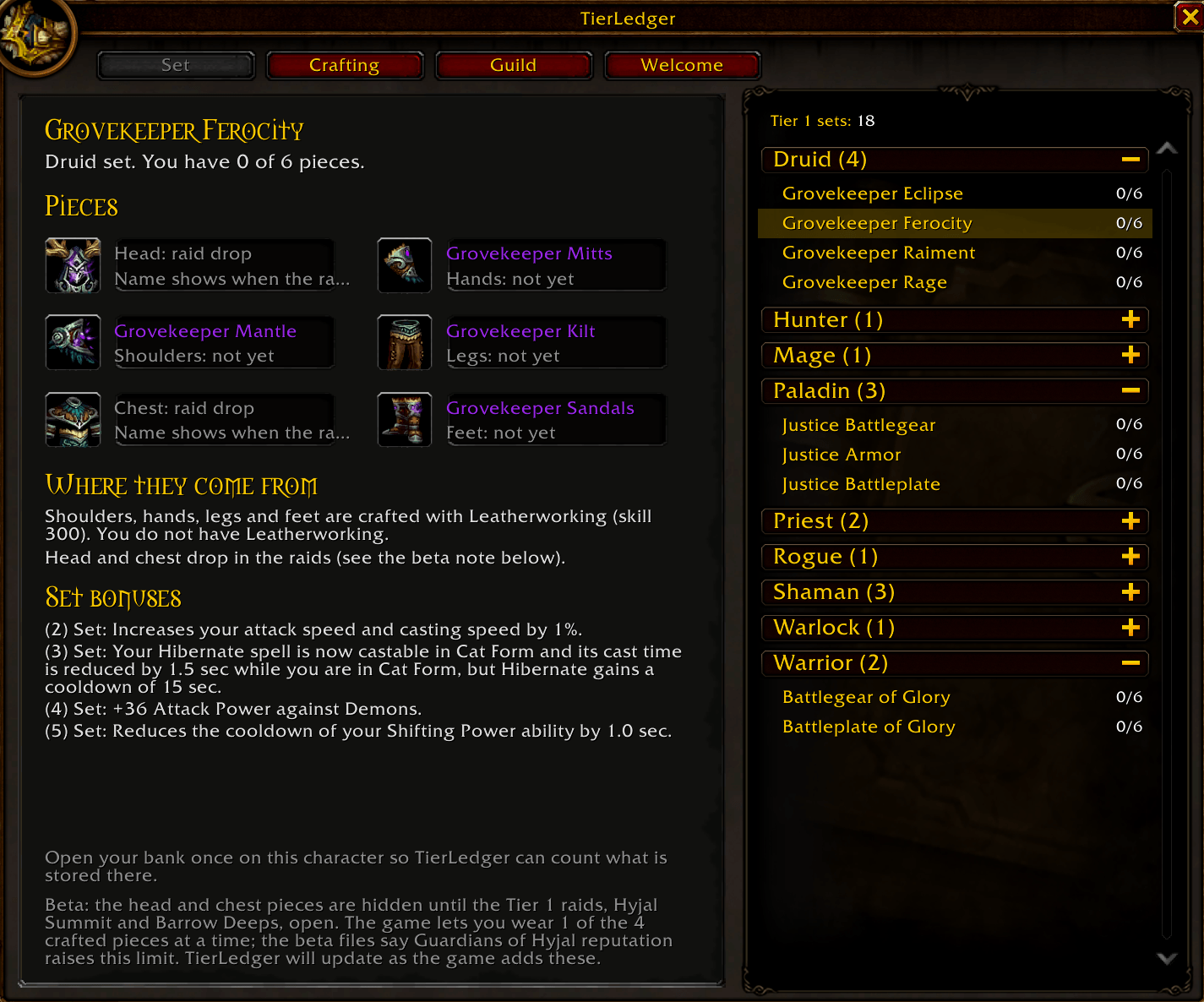
- Your whole set on one page. All six pieces on cards, each marked Worn, In your bags, In your bank, the profession that crafts it, or Not in the game yet. A card's frame turns gold when the piece is yours.
- Set bonuses at a glance. The 2, 3, 4 and 5 piece bonuses, read from the game. The ones the pieces you wear have earned stand out and say "(active)".
- Guardians of Hyjal for each of your characters. Every character of the set's class gets a reputation bar that runs to Revered, where a level 60 character can buy the Rousing Seed Pod and wear a second crafted piece. A gold notice shows when one of them can.
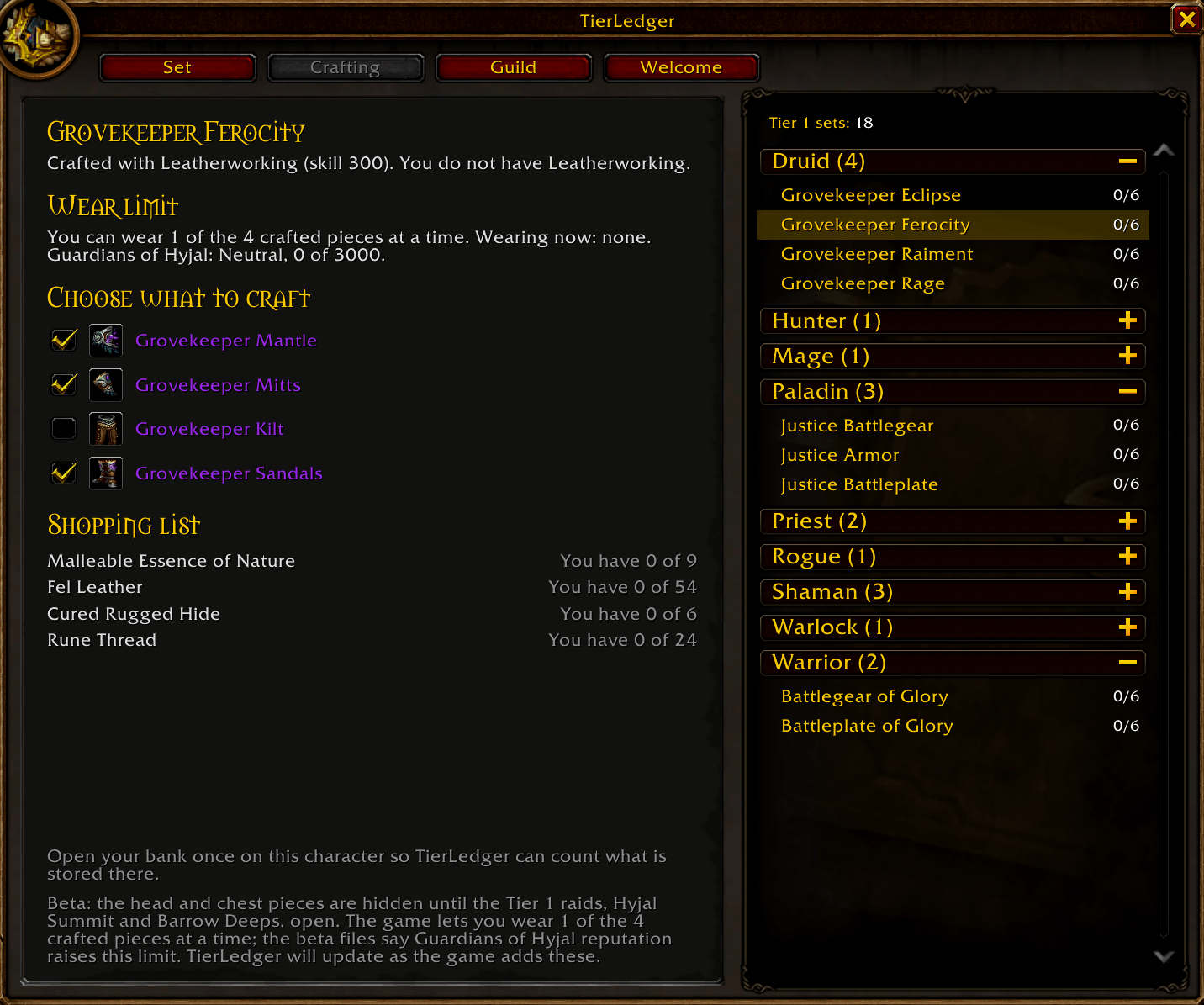
- A shopping list. Tick the crafted pieces you want and see every material, Malleable Essence of Nature included, with how many you have and how many it takes.
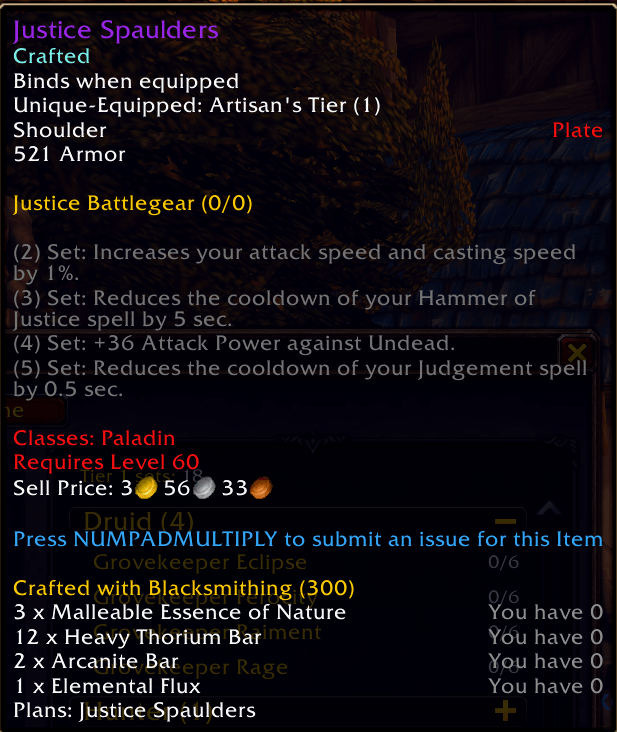
- Materials in the tooltip. Point at any crafted piece to see what it takes to make, whatever your professions.
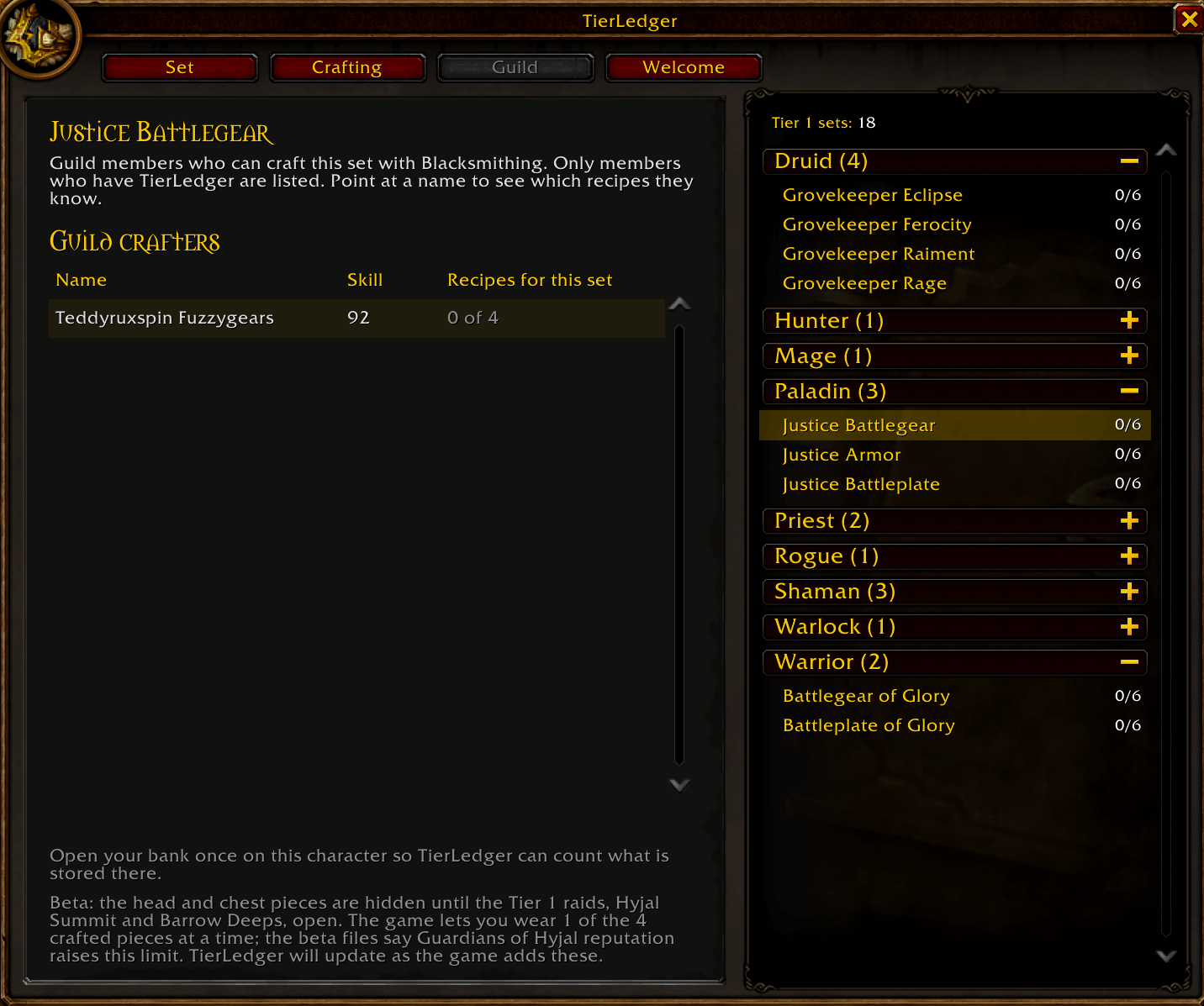
- Guild crafters. See which guildmates with TierLedger can craft your set, with their skill and how many of its recipes they know.
- Try it on. Ctrl+click a piece to see it on your character, or Shift+click to link it in chat.
Why TierLedger?
Forever's first raid tier mixes raid drops with crafted pieces, and the rules are easy to get wrong:
- 18 sets across 9 classes, some classes with one set per role, 6 pieces each.
- 4 pieces of each set are crafted: Leatherworking for Druid, Hunter, Rogue and Shaman; Tailoring for Mage, Priest and Warlock; Blacksmithing for Paladin and Warrior, all at skill 300.
- The crafted pieces need Malleable Essence of Nature, which comes from disenchanting items from Hyjal Summit and Barrow Deeps.
- You can wear only 1 of the 4 crafted pieces at a time ("Unique-Equipped: Artisan's Tier (1)"). A level 60 character at Revered with the Guardians of Hyjal can buy the Rousing Seed Pod and wear 2.
- The head and chest drop in the raids.
- The crafted pieces bind when equipped, so they can be bought, sold and traded.
TierLedger works all of that out for you.
Features
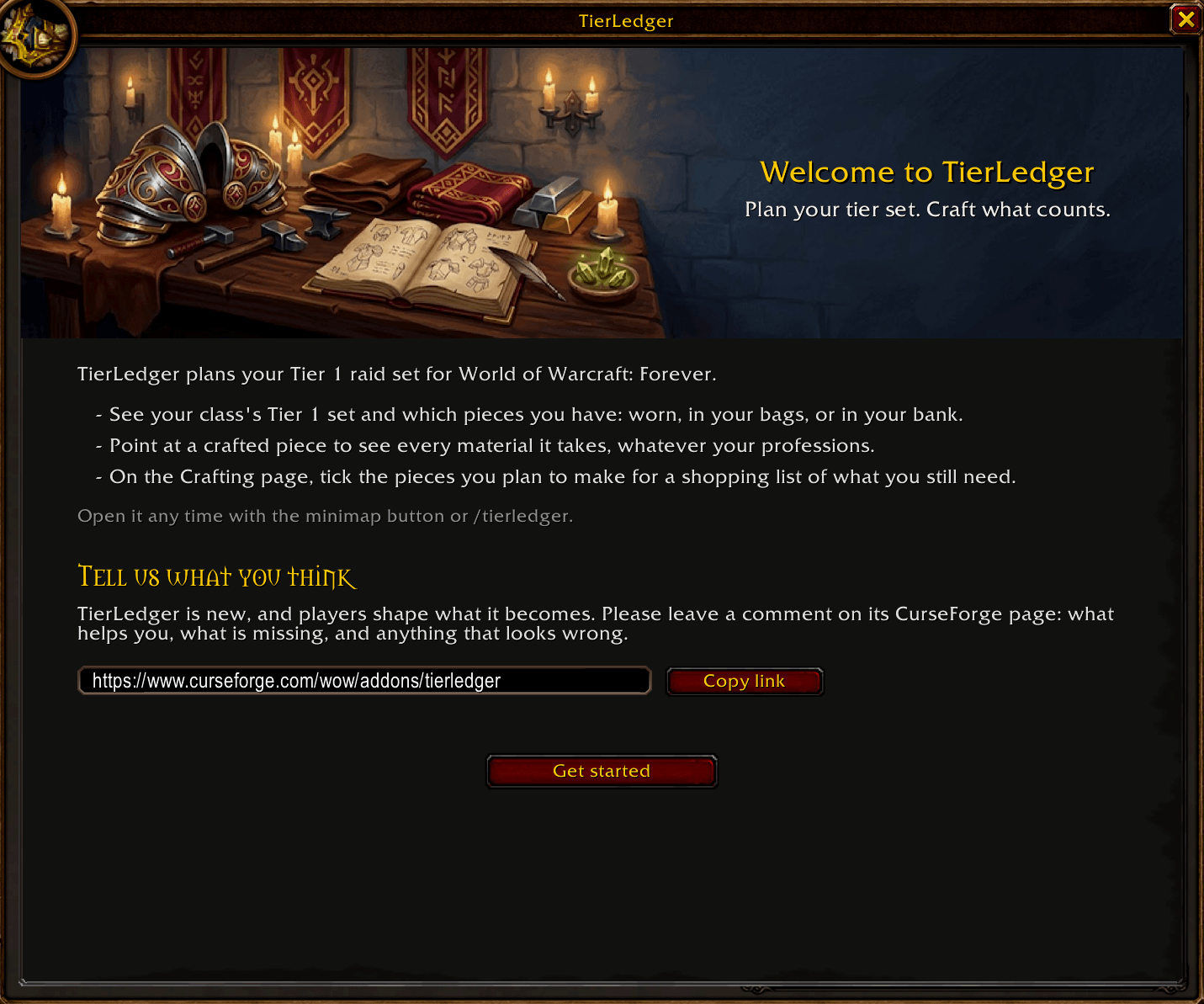
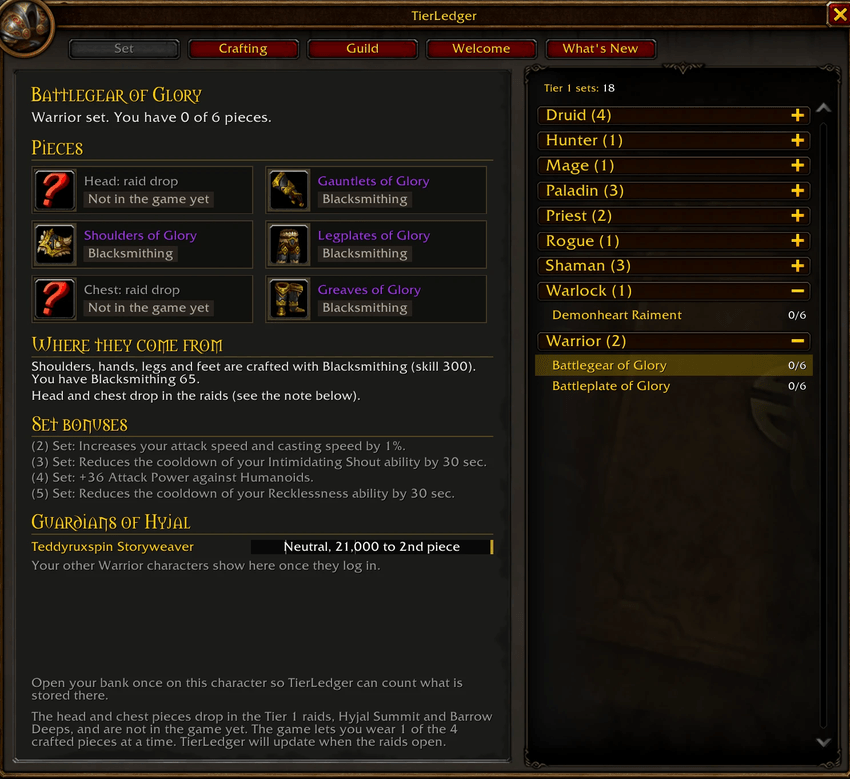
The TierLedger window looks like the game's Map & Quest Log: the set on a parchment page on the left, and every class's sets in a list on the right. Open it with the minimap button or /tierledger. The window is one size for every set, and shrinks to fit if your screen is smaller.
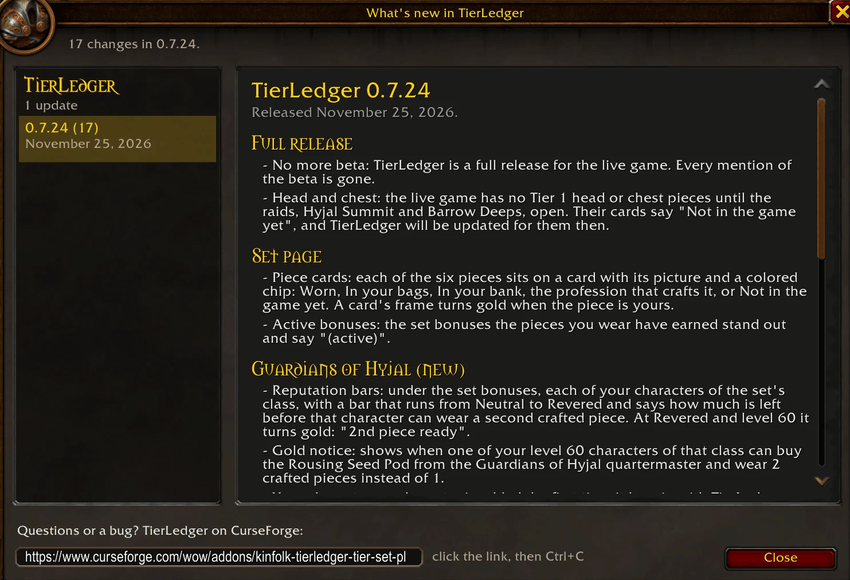
A What's New window opens once after each update with what changed in the 3 newest updates, and the What's New button opens it any time.
Set page: your tier set, piece by piece
- All six pieces of the set on cards with their pictures, and a colored chip on each: Worn, In your bags, In your bank, the profession that crafts it, or Not in the game yet. A card's frame turns gold when the piece is yours.
- Where they come from: the crafted pieces and the profession that makes them, with your own skill in it, and the head and chest from the raids.
- The set bonuses for 2, 3, 4 and 5 pieces, read from the game. The ones the pieces you wear have earned stand out and say "(active)".
- Look at any class's sets, not only your own, with how many pieces of each you have.
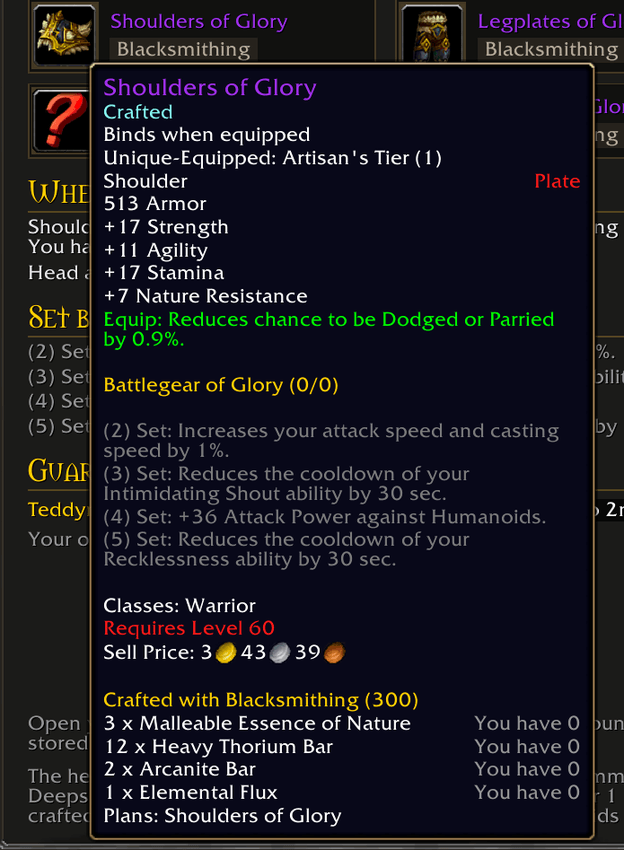
- Point at a crafted piece to see the materials it takes, how many of each you have, whether you know the recipe, and which guild crafters know it.
Guardians of Hyjal: the road to a second crafted piece
- Under the set bonuses, each of your characters of the set's class (a Mage set lists your Mages), the one you are playing first.
- Each bar runs from Neutral to Revered, with marks where Friendly and Honored start, and says how much reputation is left: for example "Friendly, 15,000 to 2nd piece". When a level 60 character reaches Revered, the bar turns gold: "2nd piece ready".
- Second crafted piece: at Revered, the Guardians of Hyjal quartermaster sells the Rousing Seed Pod, which lets a level 60 character wear 2 crafted pieces instead of 1 (from the game's files; TierLedger will be updated if the game changes it). A gold notice on a set shows when one of your level 60 characters of that class can buy it.
- Point at a row for the exact standing.
- Each character keeps its own standing. A character is added the first time it logs in with TierLedger, and drops off after 90 days without logging in.
Crafting page: plan what to make
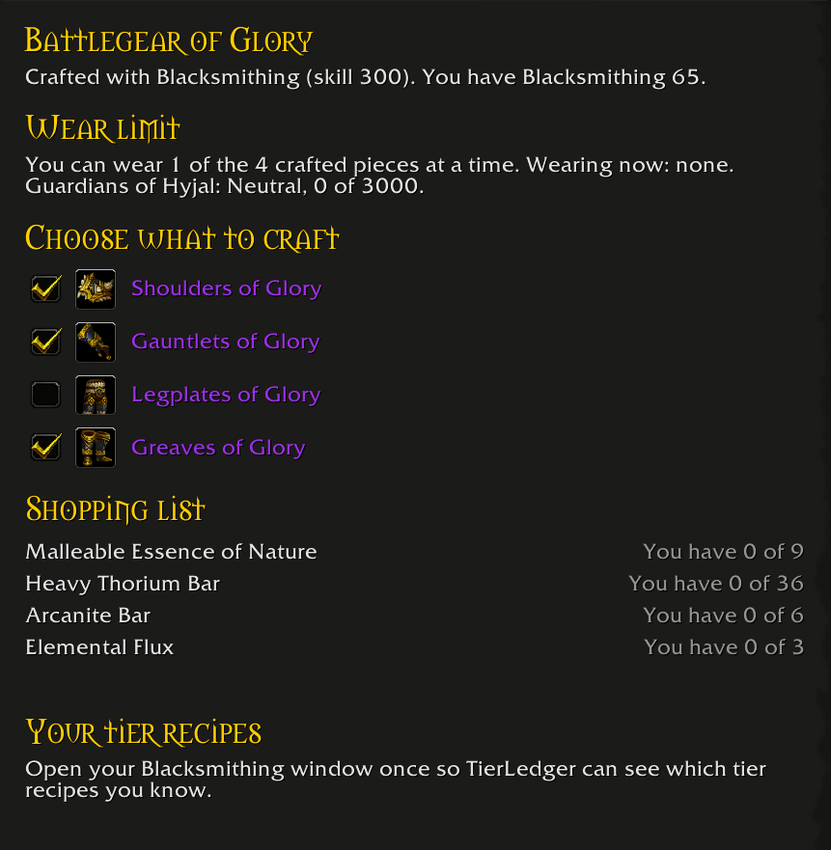
- Wear limit: how many crafted pieces the game lets you wear, which one you wear now, and your Guardians of Hyjal standing.
- Choose what to craft: tick the pieces you want, and TierLedger remembers your picks.
- Shopping list: every material for the ticked pieces added up, with "You have X of Y" for each, counting your bags and bank.
- Your tier recipes: for crafters, how many of your profession's tier recipes you know.
Guild page: who can craft it?
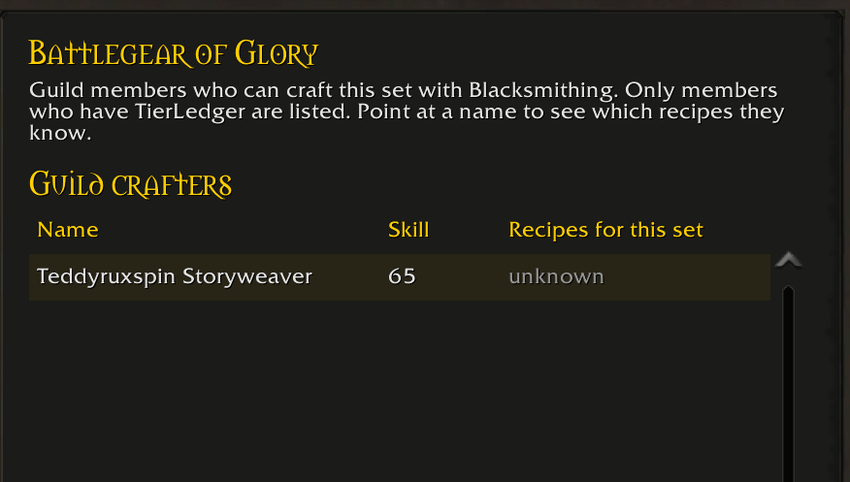
- Guild members with TierLedger who have the profession that crafts the set, with their skill and how many of the set's recipes they know.
- Point at a name to see which recipes they know.
- Members TierLedger has not heard from in 30 days drop off the list.
- A Whisper button opens a whisper with a short request typed in. You change it if you like and send it yourself.
- Only members with TierLedger can be listed. TierLedger shares your crafting professions, skills and known tier recipes with them through hidden addon messages on the guild channel, and holds them while the game blocks addon messages.
Try on and link
- Ctrl+click any piece to try it on in the Dressing Room.
- Shift+click to put its link in your chat box.
- The head and chest can be tried on and linked once the raids open and TierLedger is updated for them.
How it works
- Item names, pictures, set bonuses, the wear limit, the recipes you know and your Guardians of Hyjal standing are read from the game. The materials for each crafted piece are built into TierLedger.
- What you own is counted from what you wear, your bags, and your bank (open your bank once on each character so TierLedger can count it).
- TierLedger never acts on its own. It never posts in chat, whispers, trades or invites by itself. Anything sent to another player happens only when you click and send it yourself.
Getting started
- Install with the CurseForge app (it keeps TierLedger up to date), or download the zip and extract it into your game's
Interface\AddOnsfolder. - Log in. Chat shows "TierLedger: version ... loaded".
- Click the minimap button, or type
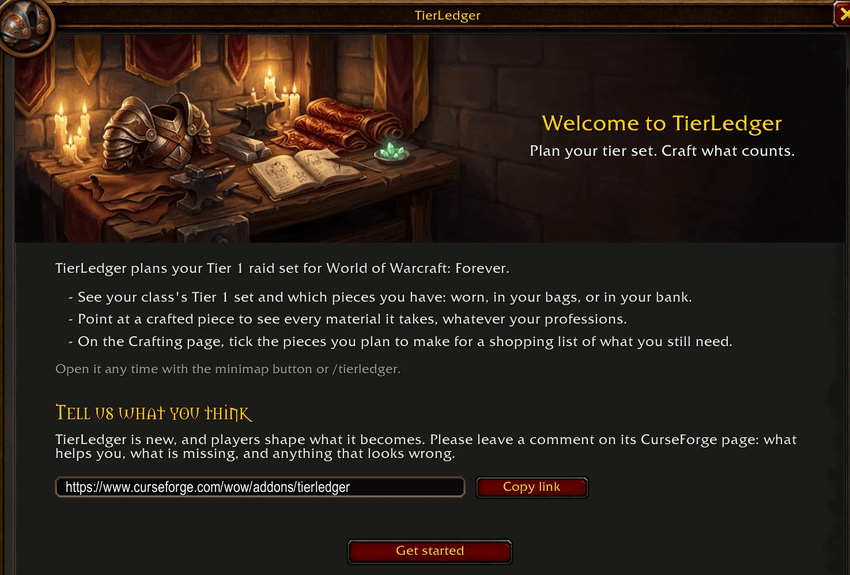
/tierledger. The Welcome page opens the first time. - Open your bank once, and open your Leatherworking, Tailoring or Blacksmithing window once, so TierLedger can count your bank and see your recipes.
- Log in once on each of your other characters so their Guardians of Hyjal bars show.
Slash commands
| Command | What it does |
|---|---|
/tierledger |
Opens or closes the TierLedger window |
/tierledger help |
Lists the commands |
/tierledger welcome |
Shows the Welcome page again |
/tierledger minimap |
Hides or shows the minimap button |
/tierledger check |
Quick health check after a game patch: version match, game functions, and errors |
/tierledger probe |
Shows what your game client supports, for bug reports |
Frequently asked questions
What is TierLedger?
TierLedger is a tier set planner for WoW Forever. It shows which Tier 1 pieces you have, where the rest come from, what the crafted pieces take to make, who in your guild can craft them, and how close each of your characters is to a second crafted piece.
Why do the head and chest say "Not in the game yet"?
They drop in the Tier 1 raids, Hyjal Summit and Barrow Deeps, which are not open yet. TierLedger will be updated for them when the raids open.
How many crafted tier pieces can I wear?
1 of the 4 at a time, read from the item itself, so it stays right if the game changes it. A level 60 character at Revered with the Guardians of Hyjal can buy the Rousing Seed Pod from their quartermaster and wear 2.
Why does a set show none of my characters?
TierLedger can only read the reputation of the character you are logged in on. Log in once on each character of that class, and it shows on that class's sets from then on.
Where does Malleable Essence of Nature come from?
From disenchanting items from Hyjal Summit and Barrow Deeps. It does not bind, so it can be traded and sold.
Why is a guildmate missing from the Guild page?
Only guild members with TierLedger can be listed. They appear once TierLedger has shared their professions, and their recipes show after they open their profession window.
Does TierLedger send anything without me?
No. It never posts, whispers, trades or invites on its own. The Whisper button only opens a whisper for you to send.
How do I report a bug?
- Update to the newest version first.
- Type
/console scriptErrors 1so the game shows Lua errors, then copy the error text and include what /tierledger check prints. - Message me on CurseForge.
Kinfolk: TierLedger Team