Kinfolk: Questworthy Forever
- By
Is this quest worth it? Questworthy rates every WoW Forever quest by minutes, XP and risk against grinding, then guides you along the fastest leveling route with a compass.
Screenshot 2026-11-22 232917.png
download (1).jpg
download (2).jpg
download (4).jpg
download (3).jpg
Description
Questworthy Forever
Made by the developer of KinFolk.
Questworthy is a quest and leveling addon for World of Warcraft Forever that tells you whether each quest is worth doing. It estimates the minutes a quest takes, the XP it gives and how risky it is at your level, compares that with grinding mobs, and plans the fastest route through the quests that are worth it.
Need help, found a bug, or have an idea? Join the KinFolk Studio Discord: https://discord.gg/PEqPRQ95Wd.
The Questworthy section has a getting started guide, an FAQ, a help channel, and forums for bug reports and feature requests. In game, Need help? at the top right of the Questworthy window shows the same link.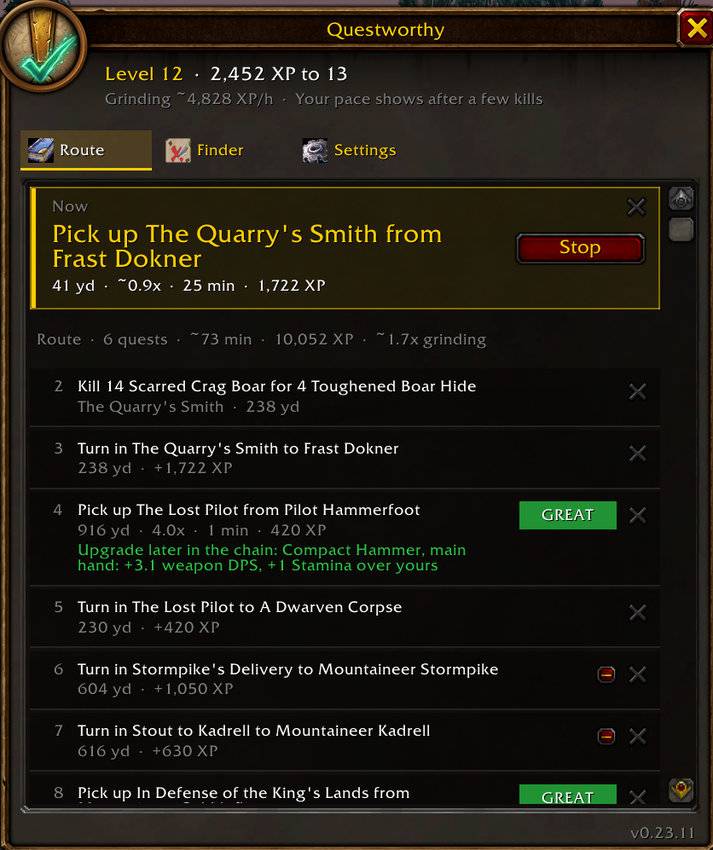
At a glance
| For | Players leveling in WoW Forever who want the fastest XP without needless risk |
| Game | World of Warcraft Forever |
| Requires | QuestieDB, which comes inside Questie's download: install Questie, keep QuestieDB ticked (Questie itself can be off) |
| Help | KinFolk Studio Discord, https://discord.gg/PEqPRQ95Wd |
| Main features | A verdict for every quest, a risk setting per character, a leveling route with a compass, a quest and zone Finder, herbs and ore you gather on the maps |
Quest verdicts: is this quest worth it?
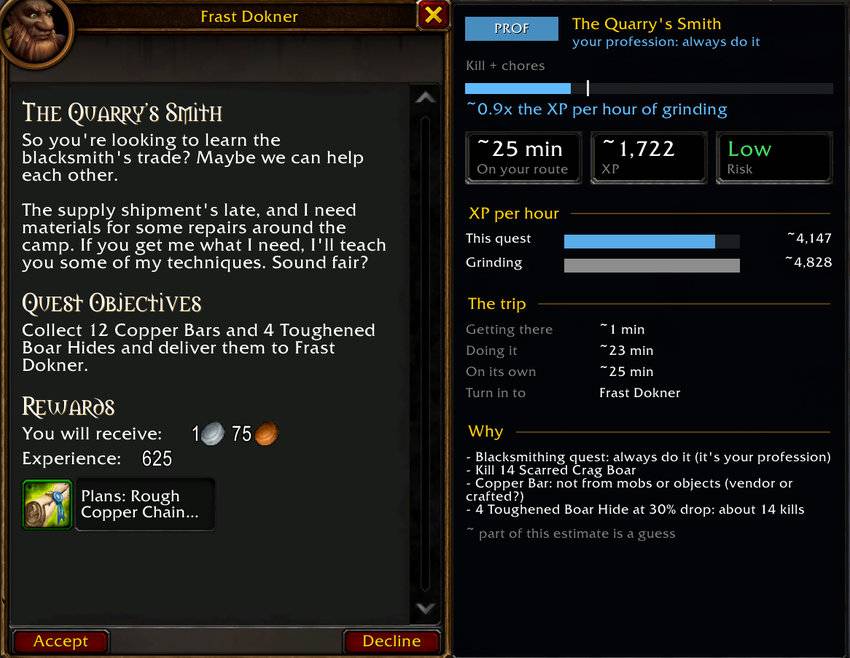
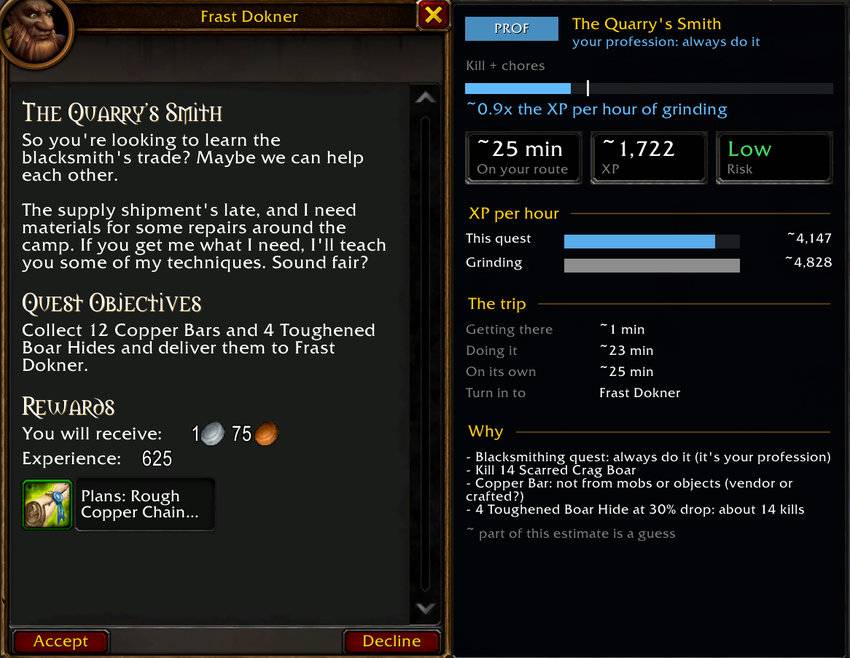
Every quest gets a verdict from its minutes, XP and risk, compared with grinding mobs at your level:
| Verdict | Meaning |
|---|---|
| GREAT | 1.5 times as fast as grinding or better |
| TAKE | 0.9 times grinding or better, or it opens a quest that is |
| OK | 0.6 to 0.9 times grinding: a little slower |
| SKIP | slower than grinding |
| RISKY | above your risk setting |
| CLASS and PROFESSION | class quests, and quests for a profession you have: always worth doing |
| LATER | you can't take it yet: your level, or a profession you don't have |
Each quest is judged by what it adds to the route you are on. A quest that is slow on its own but right on your path can be worth taking, and the reason line says so: "On your route: adds about 3 min for 540 XP (6 min on its own)."
Each verdict comes with its reasons, such as "8 Goretusk Liver at 34% drop: about 24 kills" or "Elite: Bellygrub (level 24)." The verdict shows in a drawer beside the quest window, at the top of the Route tab when you talk to a quest giver, in the Finder and on the route. A summary in chat is a setting, off at first.
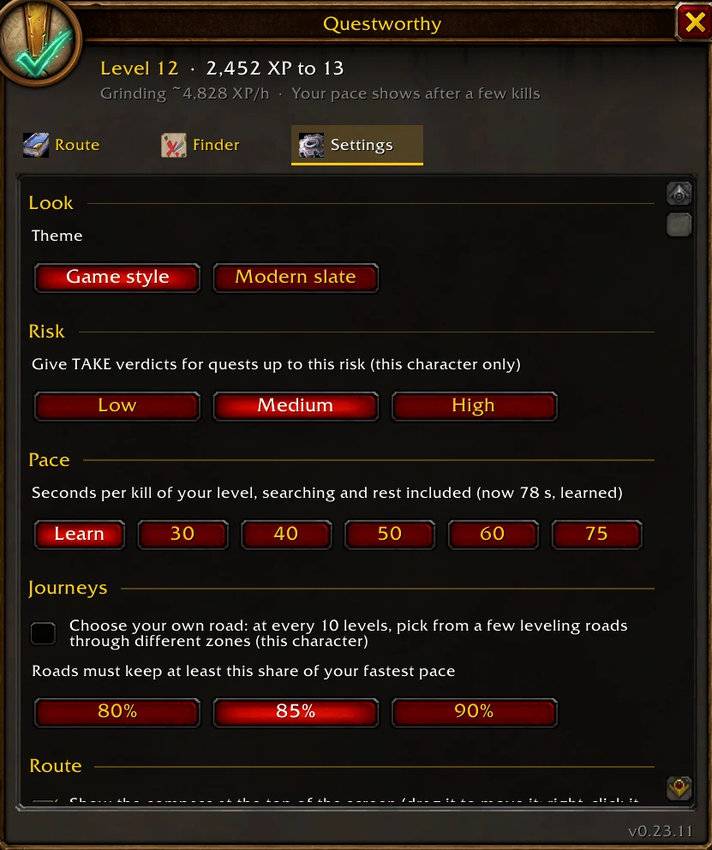
Risk setting
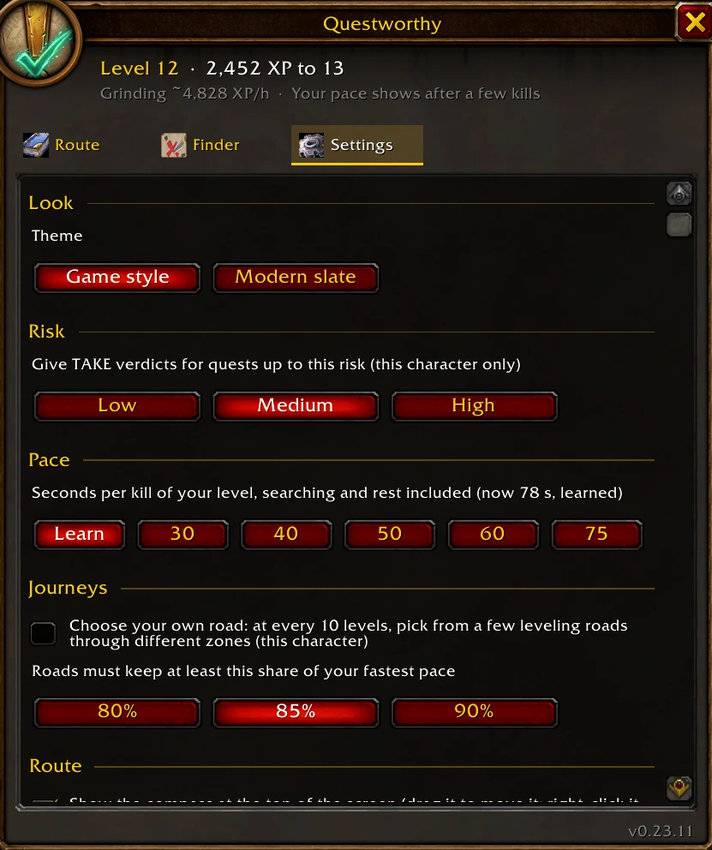
Choose Low, Medium or High for each character. Every new character starts at Medium.
- Low: nothing above your level.
- Medium: at most 1 level above you.
- High: 2 or more levels above you.
Dungeon quests count as high risk, escorts and rare spawns as medium. An elite is high risk until you are about 3 levels above it, then medium. Mobs not friendly to you that spawn within 50 yards of an objective count too, not only the ones you have to kill.
Risk fits your character. Warriors and paladins (heavy armor) and hunters (a pet) can take fights above them a little sooner. Mages and priests (cloth) wait a little longer. Your gear and your recent fights move it too, and the reason is shown, for example "At level 7 (cloth)".
Risky doesn't mean drop. A risky quest that still gives XP waits under For later with the level it fits you at, and rejoins your route when you get there. A dungeon quest shows "With a group" instead.
Leveling route planner
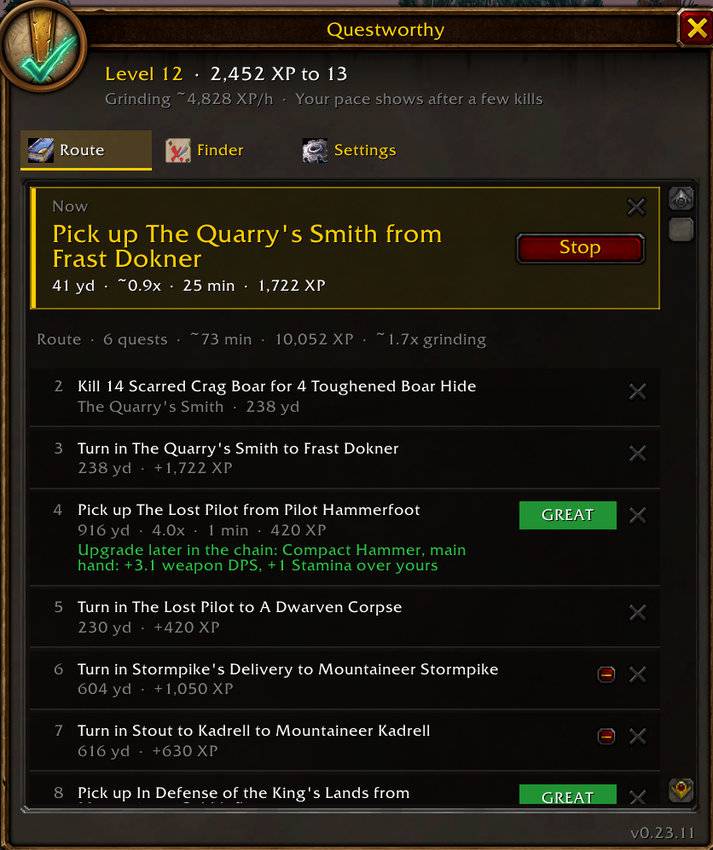
- Fastest order: your quests in the order that gives XP soonest, with one Now step at the top and the compass showing the way along the roads.
- Real travel: walking or riding at your own speed, the flight paths you have discovered, the Deeprun Tram, boats, zeppelins, your hearthstone, and Mage and Druid teleports.
- New quests join: the best quests nearby are added as pickups, so the route keeps going when your log runs low.
- Your call wins: take any quest you like, wherever you are, and the route fits it in. Skip a quest with one click and it is never suggested again for that character.
- What it tells you, it keeps: a quest the route had you pick up stays on it until you hand it in. A quest you have started is never cut.
- Press Start once: the route stays on until you stop it, even after a reload or logout.
- Class trainer: when you have new skills you can afford, your trainer joins the route. You can turn this off.
- Auto-accept (off at first): accepts only quests your route would take, within your risk setting. Hold Shift to choose yourself.
- A compass shows the way: a bar across the top of the screen, always there unless you turn it off (it hides in dungeons unless it is guiding you). While it guides you, a green ring marks the way a few steps ahead along the route, so it follows the roads, the bends and the cave mouths, with the stop's name, distance and time under it, and icons for your corpse, the flight master you'll fly from, and your inn when the route uses your hearthstone. The route lines are on the minimap and world map. Drag it to move it. Right-click it for its menu: stop the route, opacity, what it shows (corpse, flight master, inn, nearby quest givers, herbs and ore), and the route type. The opacity slider is also in Settings.
- Herbs and ore you gather: every herb you pick and vein you mine is saved for all your characters, and shows with its item on the compass (within 40 yards), the minimap and the world map while that character tracks herbs or minerals. It marks where one can grow, not whether one is there now.
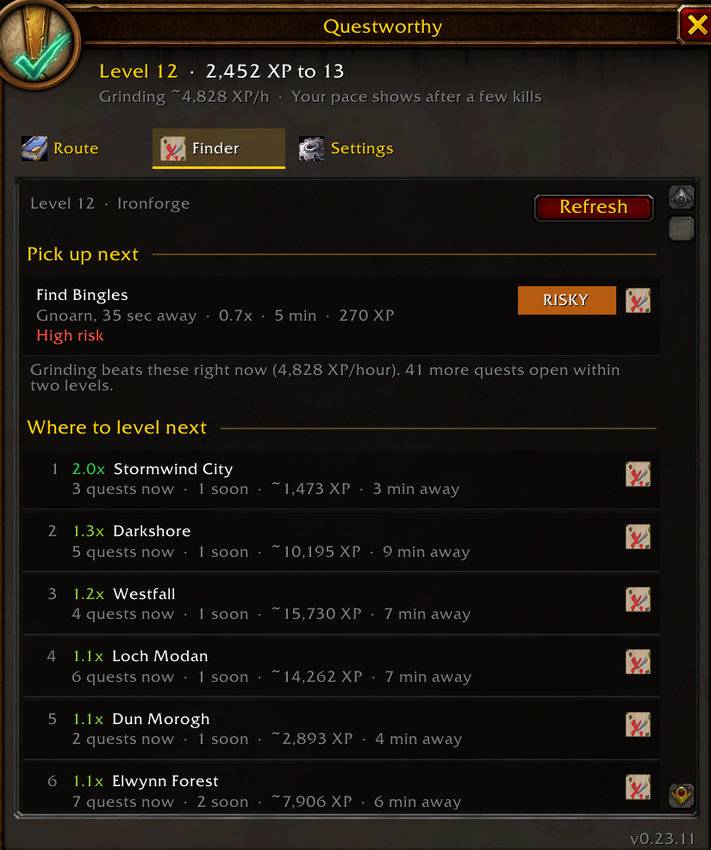
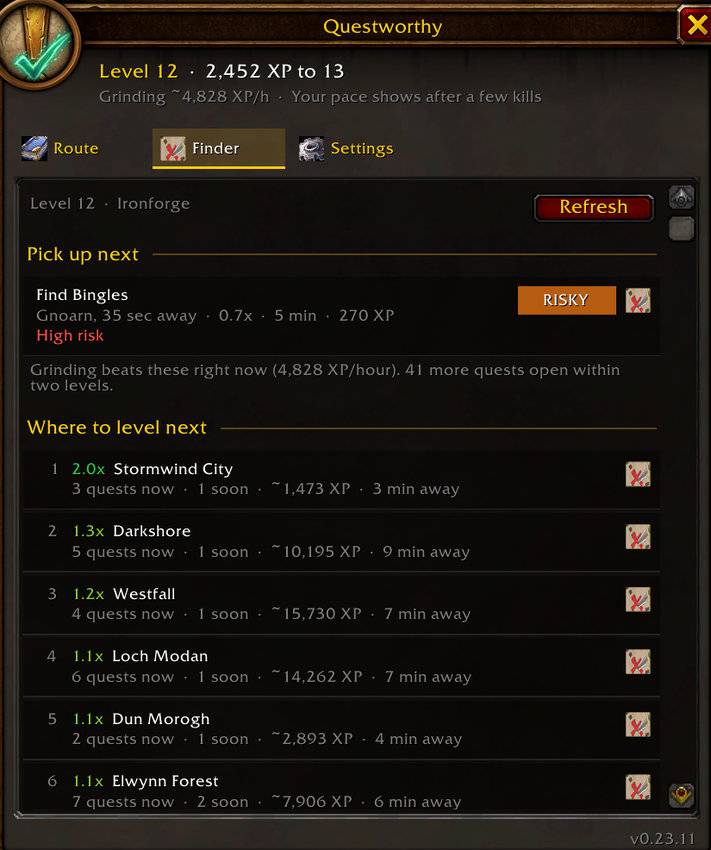
Finder: where to quest and level next
- Pick up next: quests you can take now within 15 minutes' travel, ranked by XP per hour including the walk to the giver.
- Where to level next: zones ranked by the XP per hour their quests give you, counting the trip there.
Also included
- Gear for your spec: quest rewards that beat what you wear, weighed for your class and spec.
- Your pace is learned: grinding speed comes from the XP your kills actually give.
- Journeys (optional): choose your own leveling road every 10 levels, at least 85% of the fastest pace by default (80 to 90% in Settings).
- Two looks: Game style or Modern slate.
Getting started
- Install Questie from CurseForge: its download includes QuestieDB, where Questworthy reads its quest data. At character select, click AddOns and keep QuestieDB ticked. Questie itself can be off: Questworthy needs only QuestieDB.
- Install Questworthy with the CurseForge app, which keeps it up to date. To install by hand, extract the Questworthy folder in the download into
World of Warcraft\_forever_\Interface\AddOns. - Keeping Questie on? Turn off its auto-accept. It accepts every quest before Questworthy can look.
- Type
/qwor click the minimap button, set your risk in Settings, then click Start route.
Slash commands
| Command | What it does |
|---|---|
/qw |
Open or close the window |
/qw help |
List all commands |
/qw route |
Start or stop the route |
/qw find |
The Finder: the best quests near you right now |
/qw settings |
Risk, pace and other options |
/qw why <quest> |
Why Questworthy offers a quest or not (useful in bug reports) |
/qw compass |
Show or hide the compass (/qw compass why: what it shows, and why not) |
/qw nav |
Every route command: route type, boats, flights, the nearest flight master, a problem report |
/qw minimap |
Hide or show the minimap button |
Frequently asked questions
What is Questworthy?
A WoW Forever leveling addon that rates every quest by minutes, XP and risk against grinding, and plans the fastest route through the quests worth doing.
Is there a Classic Era version?
Questworthy for Classic Era is a separate project. It gets no more updates and will be removed by December 31, 2026. Questworthy Forever is the one being developed.
Do I need Questie turned on?
No. Questworthy reads its quest data from QuestieDB and ships none of its own. QuestieDB has no download of its own: it comes inside Questie's. Install Questie and keep QuestieDB ticked in the AddOns list at character select. Questie itself can be off.
Questie accepted a quest Questworthy says to skip. Why?
Questie's auto-accept takes every quest. Turn Questie off (keep QuestieDB on), or turn off its auto-accept, and if you like, turn on Questworthy's own auto-accept in Settings.
Can I go off the route?
Yes. Take or skip any quest, anywhere. The route plans again from where you are.
Will it ever tell me to skip a class quest?
No. Class quests and quests for a profession you have show CLASS or PROFESSION, never SKIP or RISKY.
Where can I get help?
In the KinFolk Studio Discord: https://discord.gg/PEqPRQ95Wd. Start with the Questworthy getting started guide and FAQ, then ask in the Questworthy help channel. Say your class, level, zone and risk setting, and for a quest, what /qw why followed by the quest's name prints. In game, Need help? at the top right of the Questworthy window shows the link.
How do I report a bug or ask for a feature?
Join the KinFolk Studio Discord at https://discord.gg/PEqPRQ95Wd and post in the Questworthy bug reports or feature requests forum. Include your Questworthy version (bottom right corner of its window), your class, level, zone and risk setting, and for a quest, what /qw why followed by the quest's name prints.
Kinfolk: Questworthy Forever Team