
Description
Ka0s WhatGroup





WhatGroup remembers what group you signed up for via the Group Finder tool. Once you get accepted to a group, shut the LFG window, and the details are still in front of you: the group's name, the instance, the type (Mythic+, Raid, Dungeon, PvP and the rest), who is leading, and the playstyle.
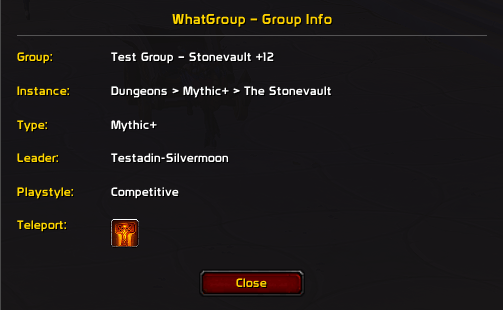
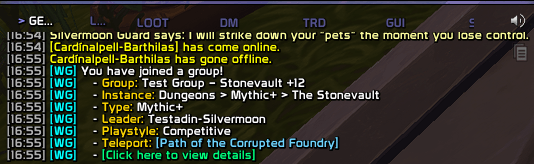
It tells you twice, on purpose. A chat line lands a moment after you join, tagged with a cyan [WG] and ending in a "view details" link. A popup window carries the same fields plus a teleport button for the dungeon. The chat line you can trim down to only the fields you care about; the popup always shows everything.
Screenshots
Popup dialog
Chat message with clickable link
Usage
WhatGroup starts working the moment it loads, with nothing to switch on. Apply to a group through the Premade Group Finder, join it, and the summary prints while the popup opens — instantly, unless you have asked for a pause of up to ten seconds under Chat. Join in the middle of a fight and the popup holds, tells you it is holding, and opens the second you drop out of combat.
The popup is six rows: group, instance, type, leader, playstyle, and the teleport. That last one is the row people install this for. It is a real spell button, so clicking it casts. It sits grayed out until you have learned that dungeon's teleport, and grayed again while the spell recharges, with the time left spelled out beside the icon and a cooldown swipe over it; a dungeon with no teleport at all just skips the row. The chat line marks the same states with (not learned) and (on cooldown). Drag the window by its title bar and it remembers where you left it. ESC or the Close button puts it away; /wg show, or that "view details" link, brings it back for as long as you are still in the group. To watch the whole thing without joining anything, /wg test runs it on sample data, and the Test button on the Chat tab does the same.
Three tabs hold the tailoring. Six toggles on the Chat tab decide what the join summary contains — instance, type, leader, playstyle, the link, the teleport spell — and Print to Chat turns the message off entirely; the mirror of that is Open Automatically under Popup, which skips the window and leaves you the chat line, with Width and Height beside it. The Master controls tab is the one every Ka0s addon shares, so "how do I turn this off, make it smaller, put it back" is always in the same place: Enable WhatGroup, General visibility (always, only in combat, only out of combat, or never), Master scale, Master alpha, Lock frame for when you keep nudging the window by accident, Debug console, and then Reset position and Reset all settings. Every row of every tab, and where each one is stored, is written up in docs/settings-panel.md.
All of it is reachable from chat as well. /wg config opens the panel, /wg list dumps every setting and its value, /wg get and /wg set read and write one by path (switches take on, off or toggle), /wg reset <path> restores one and /wg resetall restores the lot behind a confirmation. When something misbehaves, /wg debug on starts logging and /wg debug opens the window holding it.
Everything else is configuration, and it lives in two places: the Ka0s WhatGroup page in the game's Settings → AddOns list, and /wg (or /whatgroup), which prints the full command list.
How it works
Click Apply in the Premade Group Finder and WhatGroup quietly writes down what the tile said. Applications queue, so four in flight at once do not confuse it — the details waiting for you when an invite lands are the ones belonging to the group you actually joined. Then the chat message prints and the popup opens, instantly by default, or after the pause you set under Chat → Notification Delay if you would rather let the zone-in settle first.
The group info does not outlive the session. It is dropped the moment you leave the group, which is exactly why /wg show stops answering then. Your settings persist, and so do the places you dragged the two windows to. The machinery is in docs/ARCHITECTURE.md.
FAQ
| Question | Answer |
|---|---|
| Does this work for cross-realm or cross-faction groups? | Yes. WhatGroup reads whatever the group finder shows it, so realm, faction and category don't matter. |
| Is anything saved between sessions? | Your settings, plus where you've dragged the popup and debug windows. The group info itself is session-only. It clears the moment you leave the group, so /wg show only works while you're still in it. |
| How do I preview the popup without joining a real group? | /wg test, or the Test button in Settings. Both run the full message and popup on sample data. |
| Can I delay the message and popup instead of getting them instantly? | Yes. They appear instantly by default; set a pause under Chat → Notification Delay (0-10 seconds). |
| What is the Debug console, and how do I turn on debug logging? | /wg debug opens the on-screen window; /wg debug on starts logging into it, off stops it. Logging is session-only and starts off after every login. The Debug console checkbox only shows or hides the window; it doesn't turn logging on. |
| Why is the teleport button or teleport line grayed out or missing? | Three reasons, and the popup says which: you haven't learned the spell (Teleport spell not learned beside the button), you have it but it's still recharging (On cooldown — 7h 58m 12s, counting down, with a cooldown swipe over the icon), or that dungeon has no teleport at all, in which case the row is skipped. |
| Can I keep the chat message but hide the popup, or the reverse? | Yes. Turn Popup → Open Automatically off to skip the popup, or Chat → Print to Chat off to skip the message. They work independently. |
| Can I make the popup bigger or smaller? | Yes. Popup → Width and Popup → Height move it between 320-700 and 200-520 pixels; it ships at 420 x 260. Dragging still remembers where you left it. |
| Are there per-character settings? | No. Your settings are shared across all your characters. |
Troubleshooting
| Symptom | Fix |
|---|---|
| The popup never appears when I join a group | Check that Enable WhatGroup (the Master controls tab) and Open Automatically (the Popup tab) are both on. If you joined while fighting, the popup is held ("Popup deferred until combat ends.") and opens when you drop out. |
| The chat message is missing some lines | The per-line toggles on the Chat tab control what the chat message includes. The popup always shows every line. |
/wg show says "No group info available" |
The group info clears when you leave the group, so /wg show only works while you're still in it. Use /wg test to preview the popup instead. |
| The teleport button is grayed out | You haven't learned that dungeon's teleport spell on this character, or the dungeon has no teleport. |
| I opened Settings but can't find the toggles | /wg config lands on the landing page. Click General in the sidebar. |
/wg config says "cannot open settings during combat" and nothing opens |
The Blizzard settings panel can't be opened in combat. Leave combat and run it again. |
| I ticked Debug console but no debug output shows up | That checkbox only shows or hides the window. Turn logging on with /wg debug on, or the Debug: OFF button inside the window itself. Logging always starts off after a login or /reload. |
Issues and feature requests
All bugs, feature requests, and outstanding work are tracked at https://github.com/tusharsaxena/WhatGroup/issues. Please file new reports there rather than as comments — the issue tracker is the single source of truth for the project's backlog.
Version History
| Version | Date | Highlights |
|---|---|---|
| 1.4.0 | 2026-09-10 | Show and Close are now combat-safe — the popup is no longer asked to hide while protected A popup you closed stays closed instead of returning on the next update The visibility gate is re-asked when combat starts and ends Each capture is paired to its own application rather than to whichever answered first Updated for game patch 12.1.0 |
| 1.3.0 | 2026-07-12 | The Settings page now appears in the AddOns list as soon as you log in. The chat message and popup appear instantly on join (add a delay under Chat if you prefer). New on-screen debug window, toggled with /wg debug; debug output no longer goes to chat.Color-coded /wg list, /wg get, and /wg set output.The Defaults button now performs a full, clean reset. Updated for game patch 12.0.7. |
| 1.2.0 | 2026-05-03 | Added the Settings panel and the /wg slash commands.Added a teleport button to the popup, grayed out until you learn the spell. Fixed a logout error, stale notification timers, and the wrong teleport spell and playstyle showing on real group joins. |
| 1.1.0 | 2026-04-24 | Updated for a new game patch. |
| 1.0.0 | 2026-03-19 | Initial release: a chat message and popup whenever you join a group through the Premade Group Finder. |
The Ka0s WhatGroup Team