Quick Comms (Retail)
- By
Context-aware quick callouts on a Comms Pad and a ping-wheel-style Comms Dial
Quick Comms





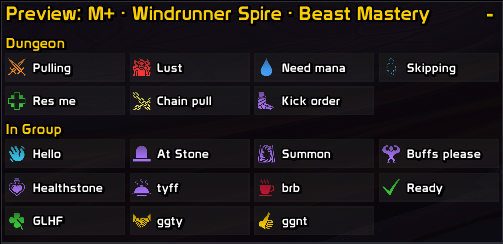
Quick Comms puts your group callouts one click or one keypress away. "Kick on me", "Lust now", "INC Lumber Mill": they sit on a Comms Pad, or open from a ping-wheel style Comms Dial. It knows where you are (a Mythic+ key, a raid, an arena, a battleground or the open world) and shows the callouts that fit. Every message goes out through a button you press, the one way Midnight still lets an addon send chat in keys and on bosses.
The addon ships with a prebuilt set of callouts and groups for a wide variety of situations - including solo, group, dungeon, battlegrounds, arenas - with contextual callouts predefined for every one of them. Use them as is, or throw them away and write your own.
Screenshots
Comms Pad
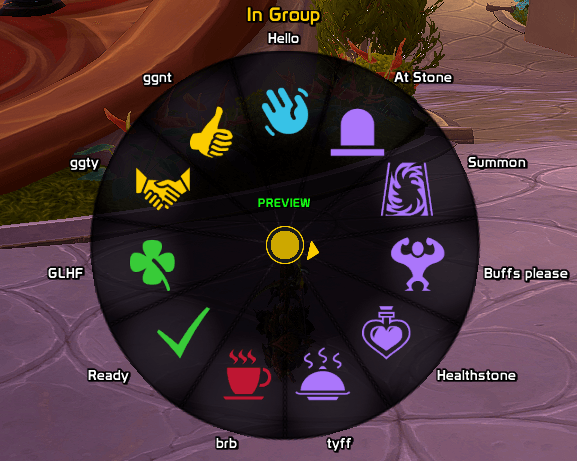
Comms Dial
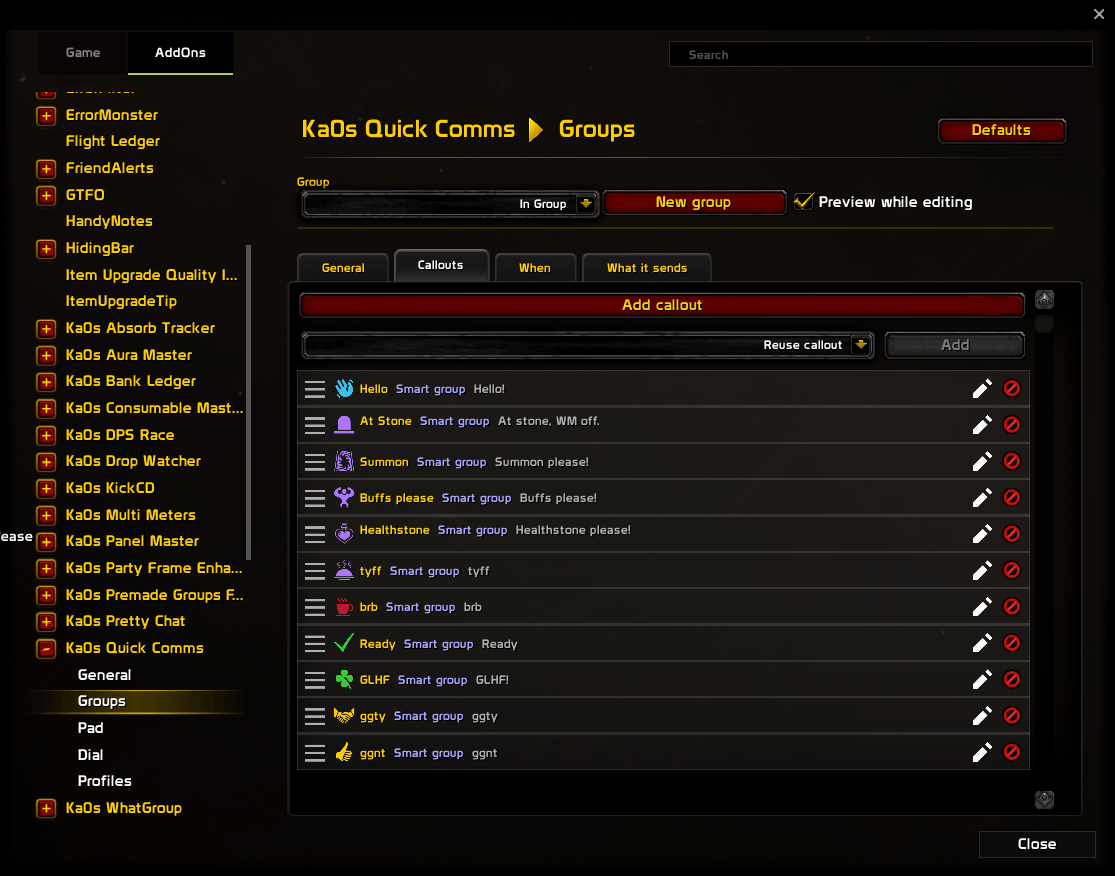
Group editor
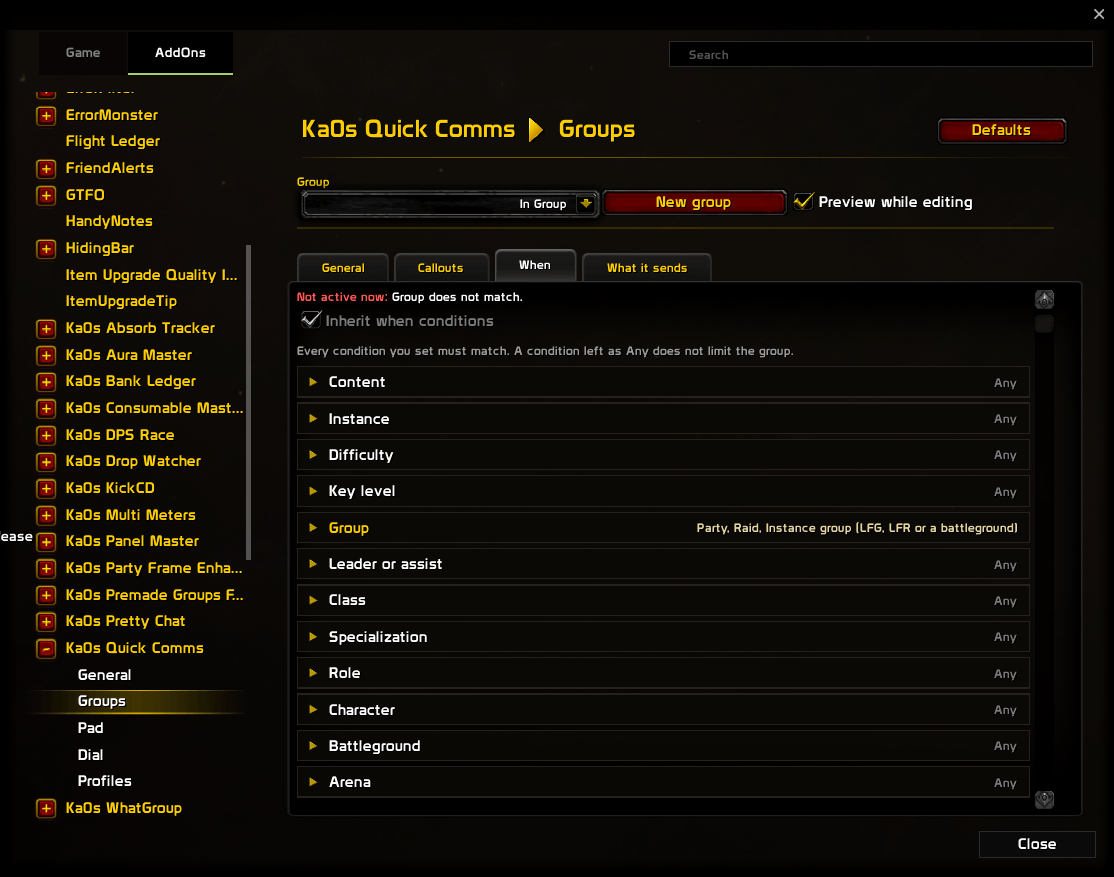
Group situations
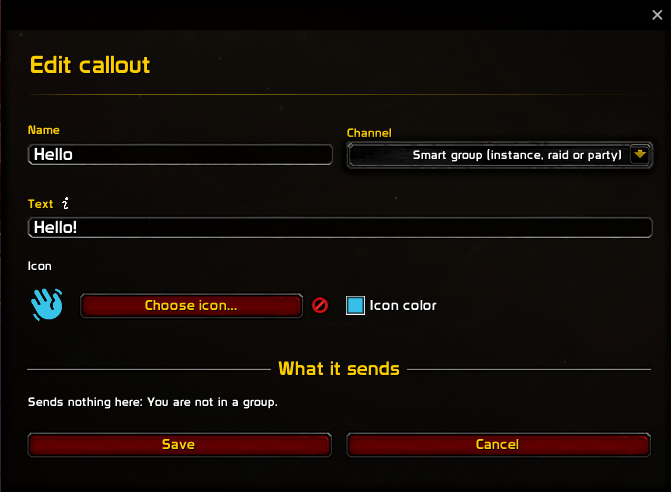
Callout editor
Usage
Step into a key, a raid, an arena or a battleground and the Comms Pad shows the callouts for it. Click one to send it. To move the pad, type /qc unlock, drag it, then /qc lock; /qc test fills it with placeholder buttons first if you want to place it before your next run. /qc toggle, or the Toggle Comms Pads key, hides every pad until you bring them back.
The Comms Dial opens on a key you bind under Options → Keybindings → Ka0s Quick Comms, or on the Keybindings tab of this addon's General page. With one group active it opens straight on that group's callouts; with several it shows the groups first. Click a slice, or press 1 to 8, to send it or open it. A right click goes back a ring, and when a ring holds more than fits, the arrows under the dial or the mouse wheel turn the page. Escape, the key again or a click outside closes it, and the next press opens it where you left off.
Your own callouts live on the Groups page. Add callout opens a small editor for the name, the text, the channel and an icon, and the text can carry tokens such as {target} or {coordinates} (the "i" beside it lists them all). A group's When tab says where it shows. The built-in groups are ordinary groups too, so change or delete whatever you like; Restore built-in groups puts back anything you deleted. How the pad and the dial look is up to you, on the Pad and Dial pages.
To check how things look somewhere else, pick a situation in Preview as… or type /qc preview. A small window lets you switch situations or end the preview. While you preview, and in test mode, a click sends nothing and chat shows you the line it would have sent. Editing a group on the Groups page previews just that group. To see why a group is showing, hover the pad's header or the dial's middle, or type /qc why.
Everything else is under Settings → AddOns → Ka0s Quick Comms, and /qc help (or /quickcomms help) lists the commands.
How the callouts work
- Each callout is a short line of text that lives in a group. Reusing it in a second group makes a copy you can change on its own.
- Each group has conditions for when it applies, such as "in a Mythic+ key" or "I'm the tank". Quick Comms checks them against where you are and shows the groups that match, in the order you set.
- The text is prepared out of combat and loaded onto secure buttons, so a press sends it to the right channel (say, yell, party, instance, raid, raid warning or General) even during a boss. General falls back to say when you haven't joined it.
- After a press every button dims for about a second. On a boss the game quietly drops lines sent faster than that, so if one never arrives you get a note in chat.
- Text that starts with a slash command is refused. A callout only ever sends chat.
FAQ
| Question | Answer |
|---|---|
| Does it send anything on its own? | No. A callout is only ever sent when you press its button or its key. |
| Why secure buttons? | In Midnight an addon can't send chat by itself during a boss, a Mythic+ key or a PvP match. A button you press can, so that's the one way Quick Comms sends anything. |
| Does it work with EllesmereUI? | Yes. With EllesmereUI's Blizzard skins on (and Quick Comms on in its Third-Party Addons list), the callout editor takes the same look as your settings window. Turn it off there, then reload. |
Troubleshooting
| Symptom | Fix |
|---|---|
/qc says the addon is disabled |
Type /qc enable, or tick Enable Ka0s Quick Comms on the General page. |
| The minimap button is gone | Tick Minimap button on the General page. |
| The pad won't move | Type /qc unlock and drag the strip above it; it can't move in combat. |
| The dial's key does nothing | Check Open Comms Dial in WoW's Options → Keybindings → Ka0s Quick Comms, or on General → Keybindings in this addon's settings. The dial opens only where at least one of its groups is active. |
| A message didn't arrive and chat says it may have been dropped | The game drops messages sent too close together on a boss. Wait for the buttons to brighten before pressing again. |
| Something looks wrong and I want to report it | Follow Reporting a bug below. |
Reporting a bug
- Type
/qc debug onand reproduce the bug. - Type
/qc diagnostics. - If the debug window isn't open, open it with
/qc debug. Press Copy, copy the entire output, and include it with your bug report.
The report is added after the debug trace in the same window, so one copy carries both.
Issues and feature requests
Bugs and ideas are tracked in the GitHub issues. Please file them there rather than in comments, so nothing gets lost.
Version History
| Version | Date | Highlights |
|---|---|---|
| 1.0.0 | 2026-10-26 | - First release: the Comms Pad and the Comms Dial, which send through secure buttons so they work in keys and on bosses - Built-in callouts for Mythic+, raids, arenas, the open world and every battleground - Your own callouts and groups, with conditions for when each group shows - Preview as… and test mode, so you can check a setup before a run - Styling, keybindings and a /qc command for pads and dials |
Credits
The glyphs in the icon browser come from three icon sets, each shipped with its license beside its art:
- Open Iconic, by Waybury, MIT license (https://github.com/iconic/open-iconic).
- Phosphor (the Fill weight), by Phosphor Icons, MIT license (https://phosphoricons.com).
- Game-icons.net, CC BY 3.0 (https://game-icons.net), by Andy Meneely, Aussiesim, Carl Olsen, Caro Asercion, Cathelineau, Catsu, DarkZaitzev, Delapouite, Faithtoken, Felbrigg, GeneralAce135, Guard13007, HeavenlyDog, Irongamer, John Colburn, John Redman, Kier Heyl, Lorc, Lord Berandas, Lucas, Pepijn Poolman, Pierre Leducq, PriorBlue, Quoting, Rihlsul, Sbed, SeregaCthtuf, Skoll, Sparker, SpencerDub, Starseeker, Viscious Speed, Willdabeast, Zajkonur and Zeromancer. The marks were rasterized to 64×64, their background square removed and recolored white so the game can tint them;
AUTHORS.txtnames each mark's author, and the icon browser's tooltip does too.
Quick Comms (Retail) Team