Ka0s Premade Groups Filter Extension (Retail)
- By
Mythic+ conveniences for Premade Groups Filter: untimed-dungeon targeting, server regions, composition and leader filters, presets

Description
Ka0s Premade Groups Filter Extension





A small companion to Premade Groups Filter for Mythic+. You type the key level you want to push (or let Smart pick it), and it ticks every dungeon you haven't timed at that level yet. It can also narrow the list to leaders from the server regions you pick and to the playstyles you want, hide groups that already have your spec or your class in your role, ask for a leader who has timed the dungeon, and drop old listings. One Apply button sets all of it in Premade Groups Filter and runs the search. It also shows each listing's server region in the Group Finder.
It doesn't replace Premade Groups Filter's filtering. It sets the same checkboxes and the same advanced filter you could set by hand, so you can always see and edit what it did. Premade Groups Filter has to be installed; without it this addon doesn't load.
Screenshots
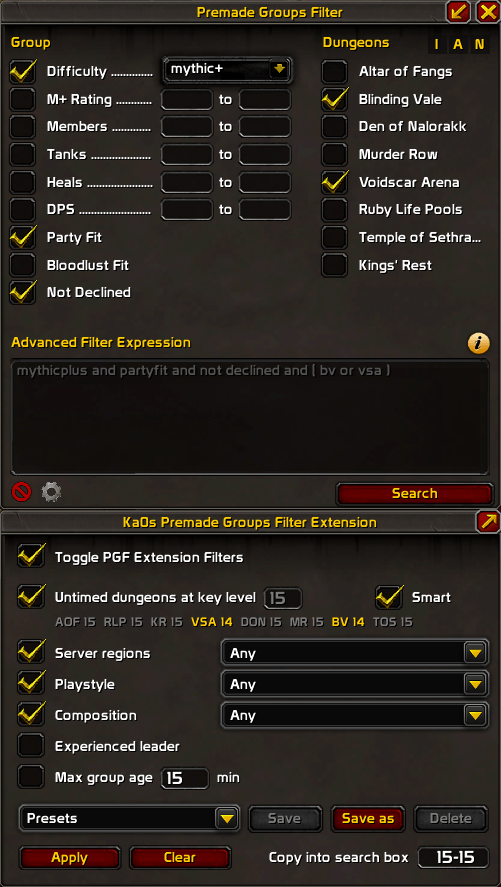
Classic Skin
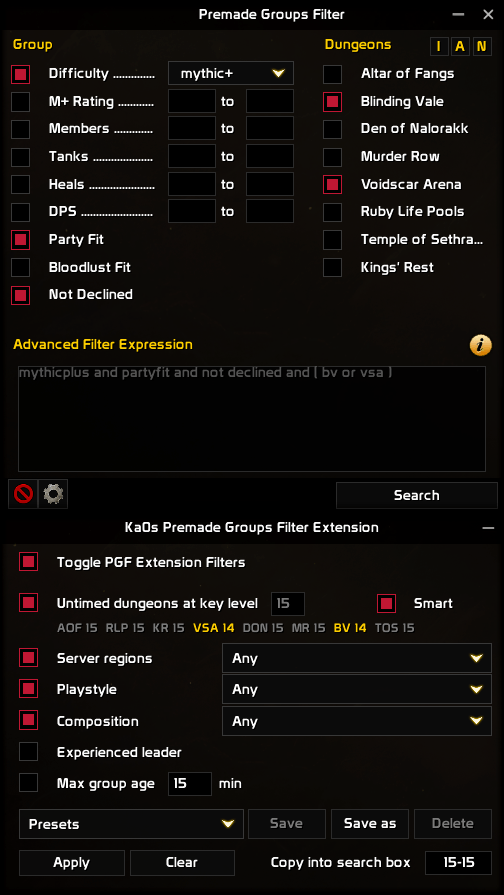
EllesmereUI Skin
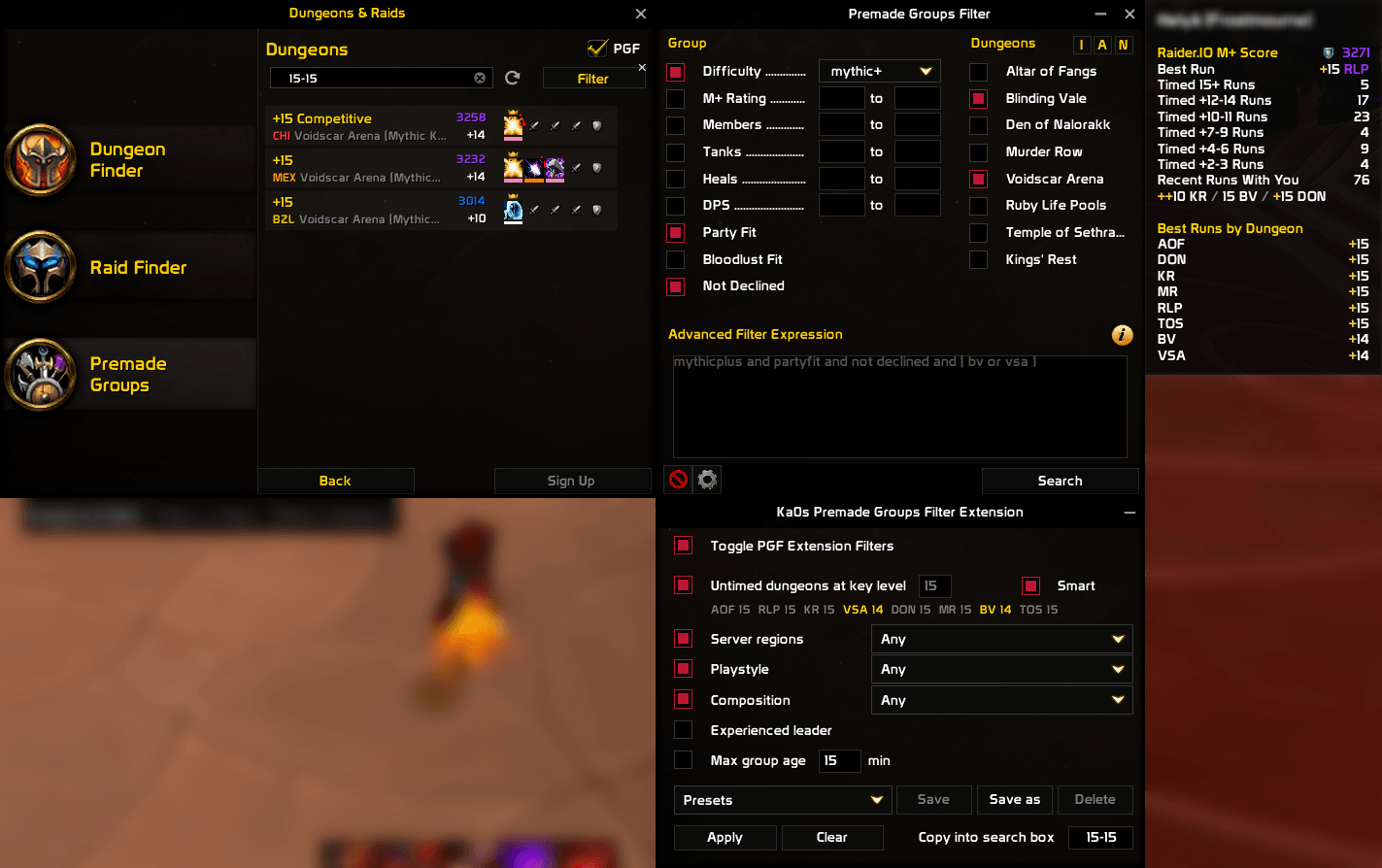
Addon in Action
Usage
Open Premade Groups Filter's dialog on the dungeon category during a Mythic+ search. The panel sits right under it and follows it: switch category, minimize or close the dialog and the panel goes too. Click the panel's title strip to fold it down when it's in the way.
Type a key level, or leave Smart ticked and the addon picks the lowest level where at least one dungeon is still untimed. The panel lists your best timed level in each dungeon this season, with the ones you still need in gold. Set regions, playstyle, composition and the rest (hover any option to see what it does), then press Apply: Premade Groups Filter's dungeon checkboxes and advanced filter update and the search runs. Clear takes the extension's part back out and leaves your own text alone. /pgfe apply does the same as the button, so it works in a macro.
Addons can't type into the Group Finder's search box, so the panel shows the key range (14-14, say) in Copy into search box. Click it, press Ctrl+C, then Enter to jump to the search box, then Ctrl+V and Enter.
Filter choices are saved per character, and presets load on any character. Toggle PGF Extension Filters switches the filtering off without turning the addon off. If you use EllesmereUI with Premade Groups Filter's EllesmereUI skin, the panel matches it once EllesmereUI's third-party skinning is on for both addons; the EllesmereUI skin tab in the settings shows what's missing. /pgfe opens the settings and /pgfe help lists the commands.
How the filtering works
- The addon reads your season's dungeons and your best timed run in each one from the game.
- Every dungeon you haven't timed at your chosen level gets ticked in Premade Groups Filter, and the rest get unticked. Premade Groups Filter passes that list on to the game's own dungeon filter.
- Your other choices become a short block in Premade Groups Filter's advanced filter. The block is marked with comments, so you can see where it starts and ends, and anything you wrote yourself still applies on top of it.
- For each group in the results, the addon adds a few values Premade Groups Filter doesn't have on its own: the leader's server region, and whether the group already has your spec or your class in your role. The filter block uses those.
- Apply then presses Premade Groups Filter's search button for you.
FAQ
| Question | Answer |
|---|---|
| Can it fill in the search box for me? | No. The game blocks addons from typing into it, and a listing's title is hidden from addons, so the key level can't be filtered any other way. Click the Copy into search box field, then Ctrl+C, Enter, Ctrl+V, Enter. |
| Can it filter on the leader's item level? | No. The game only tells addons the item level a group requires, not the leader's. For the leader's M+ rating, use Premade Groups Filter's own M+ Rating row. |
| Do I need PremadeRegions? | No, this addon replaces it. It shows each listing's server region in front of the dungeon name (and each applicant's in front of their name), and the region filter uses its own realm list. You can uninstall PremadeRegions; while it is still installed, this addon leaves the tags to it so you don't see two. Turn the tags off with Show server regions in the Group Finder under Settings → AddOns → Ka0s Premade Groups Filter Extension → General → Filters. |
| Why does it need Premade Groups Filter? | It works through Premade Groups Filter's own checkboxes and advanced filter, so there is nothing for it to do on its own. |
| Does it change anything I typed in the advanced filter? | No. Apply adds its own marked block around your text, and Clear removes only that block. |
| Are my settings shared between characters? | Filter choices are per character. Presets are shared by all your characters. |
Troubleshooting
| Symptom | Fix |
|---|---|
| The addon doesn't load | Premade Groups Filter must be installed and enabled. |
| The panel says "This Premade Groups Filter version is not supported" | Premade Groups Filter changed in an update. Report it (see below) and include your Premade Groups Filter version. |
| Apply says it can't run in combat | Wait until combat ends and press it again. |
| Apply asks you to open Premade Groups Filter on the Dungeons category | Switch Premade Groups Filter's dialog to Dungeons, then press Apply again. |
/pgfe apply asks you to maximize Premade Groups Filter |
Maximize Premade Groups Filter's dialog, then run it again. |
The Apply button is grayed out, or /pgfe apply says PGF Extension filters are toggled off |
Apply stays off while the filters are toggled off. Tick Toggle PGF Extension Filters (the panel's first box), then apply again. |
| Apply says the advanced filter would exceed 2000 characters | Shorten your own text in Premade Groups Filter's advanced filter, then press Apply again. |
| The panel says season data is loading | The game sends it a few seconds after login. Wait, then look again. |
| Apply says the [pgfe] block is damaged | The lines between the -- [pgfe] markers in the advanced filter were changed by hand. Delete the block, markers included, and press Apply again. |
| Something looks wrong and I want to report it | Follow Reporting a bug below. |
Reporting a bug
- Type
/pgfe debug onand reproduce the bug. - Type
/pgfe diagnostics. - If the debug window isn't open, open it with
/pgfe debug. Press Copy, copy the entire output, and include it with your bug report.
The report is added after the debug trace in the same window, so one copy carries both.
Issues and feature requests
Bugs, ideas and planned work all go in the GitHub issue tracker: https://github.com/tusharsaxena/PremadeGroupsFilterExtension/issues. Please file reports there rather than in comments, so nothing gets lost.
Version History
| Version | Date | Highlights |
|---|---|---|
| 1.0.0 | 2026-10-10 | - First release: a panel under Premade Groups Filter's dialog that ticks every dungeon you haven't timed at your key level, with Smart to pick the level for you - Filters for server region, playstyle and group composition, an experienced-leader filter and a maximum group age - Presets that store a setup under a name for any character, and a toggle that switches the filtering off without turning the addon off - Server-region tags on Group Finder listings and applicants, which replace PremadeRegions - An optional EllesmereUI look for the panel when EllesmereUI skins Premade Groups Filter's dialog |
Credits
The addon extends Premade Groups Filter by Bernhard Saumweber. PremadeRegions was the reference for the realm-to-region list.
The debug console uses JetBrains Mono, licensed under the SIL Open Font License 1.1, and its buttons are drawn from Open Iconic (MIT). Both ship inside the addon, with their license text beside them.
Ka0s Premade Groups Filter Extension (Retail) Team