Description
Ka0s Pretty Chat





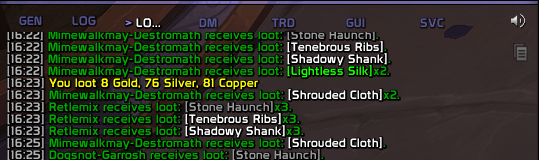
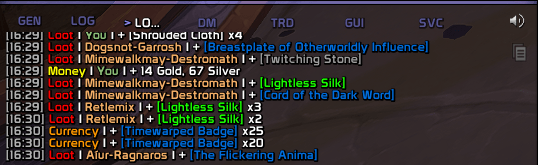
World of Warcraft tells you about loot, currency, gold, reputation, experience, honor and crafting in a stream of sentences that all look alike. PrettyChat rewrites them. The information doesn't change, but it's laid out and color-coded, so you can find the line you actually cared about while the chat window scrolls past you.
You can switch off, reword or recolor any message type, either in the in-game settings panel or from chat with /pc.
Screenshots
Without Pretty Chat
With Pretty Chat
Usage
There's nothing to place, size or lock on the first run, because your chat window is the display. The next thing you loot turns up already rewritten, in whichever frame you read chat in: the stock one, ElvUI's or Glass's. The PrettyChat button on your minimap opens the settings, and its right-click menu switches the addon off and on.
Changing how a message reads takes four steps. The first three happen on the Categories page.
- Find the message. Pick a kind of message from the tabs across the top (Loot, Currency, Money and so on), then a line from the list down the left. Its editor opens beside the list, with the game's wording in Original and yours in New.
- Write your version in the New box. The Preview box shows the finished line and updates as you type. Colors are part of the wording. To recolor a line, edit its
|cffRRGGBB…|rcodes in that same box. - Keep the placeholders. The
%sand%dare the slots the game drops the item name and the amount into. You can stop before the original's last one, and the line just comes out without whatever it carried. You can't add one, change one's type or reorder them. If you try, PrettyChat won't save your version and prints both sets of placeholders so you can see where yours differs. - Try the whole set.
/pc testwrites every message to the debug console twice, the game's version above yours. Sending it there keeps a couple of hundred lines out of your chat window. The Test button on the General page does the same run. Addcategory Lootorformatstring LOOT_ITEM_SELFto the command to narrow it.
Your version is only used while three switches are on: Enable PrettyChat on the General page, the category's switch on its tab, and the message's own Enable. Turn any of them off and the game's original comes back, while your wording stays saved. The General visibility dropdown next to the master switch can also limit PrettyChat to combat, or to the time outside it.
Everything else is on the addon's page under Settings → AddOns, which /pc (or /prettychat) also opens, and /pc help lists every command.
How it works
World of Warcraft builds each system message from a template, which is a %s or a %d with some words around it. Those templates are global strings with names like LOOT_ITEM_SELF, and the game's chat code looks one up every time it prints a line. PrettyChat overwrites the templates it covers with its own wording, so the line has already changed by the time any chat window sees it. Whatever addon draws the window gets the new line without having to do anything.
The placeholder rule comes from the same mechanism. Your template is handed the same arguments the game's template gets, in the same order. string.format ignores an argument nobody asked for, but it raises an error on a conversion with nothing behind it. So a wording that stops short is safe, and four of PrettyChat's own shipped wordings stop short of Blizzard's last placeholder on purpose. A wording that asks for one more than the game passes would blow up inside Blizzard's chat handler, on every matching message. That's why the conversions your wording does keep must match the original's in type and order, and only the tail may go missing. It's also why the check happens when you save and not in the preview. PrettyChat refuses the write, stores nothing, and prints both sets of placeholders so you can see where yours differs.
Switching a message off doesn't throw your version away. PrettyChat stops applying it and puts the original template back, and your wording is still there when you switch the message on again. Every character starts on one shared profile, so one configuration covers every alt until you give one its own.
FAQ
| Question | Answer |
|---|---|
| Does this work with ElvUI, Glass, or other chat addons? | Yes, and there's nothing to configure. PrettyChat changes the game's message templates before any chat window sees them, so whatever you use to display chat gets the tidy version automatically. |
| Why do some lines still look like the default? | Something's switched off. Check the master switch, the category, and that specific message. /pc list shows them all in one place. A switched-off message always shows its original. |
| I edited a message and now it looks broken. | Your version is missing or misusing the %s / %d placeholders. Copy the original wording from the panel and edit around the placeholders, or turn the message off to restore it. |
| Can I change the colors? | Yes. The colors are part of the wording. Each message's text carries WoW color codes (|cffRRGGBB…|r), so you recolor a line by editing those hex values in its New box on the settings panel. There's no separate color picker. (Editing from chat works too, but you have to double every | to ||.) |
| How do I preview my edits without waiting for real loot? | There are two ways. On the settings panel, each message has a live Preview that updates as you type. From chat, /pc test writes a before/after sample of every message to the debug console. Add a category (/pc test category Loot) or one string (/pc test formatstring LOOT_ITEM_SELF) to narrow it down. While the addon is switched off, /pc test asks you to turn it back on, but the Preview and the General page's Test button keep working. |
| Where are my settings saved? | In a profile. Every character starts on the shared Default profile, so one configuration covers all of them. The Profiles page lets you create more, switch between them, copy one into another, and give a character, class, realm or faction its own. From chat, /pc profile lists your profiles and /pc profile Name switches to one you already have. The minimap button's shown or hidden choice isn't part of a profile, so switching never moves it. |
| What's the Debug console for? Do I need it? | No. It's there to help when you're filing a bug, nothing more. /pc debug (or the General-page toggle) opens a small on-screen log window. It starts empty because logging is off by default, and Reporting a bug says how to turn it on and copy out what it caught. Logging is session-only and resets on every reload. |
Troubleshooting
| Symptom | Fix |
|---|---|
| Nothing changed after installing | Make sure it's switched on by checking the master switch, the category, and the message (/pc get General.enabled should be true). Then run /pc test. If the preview looks formatted but real chat doesn't, another addon is changing the same messages after PrettyChat. |
| A message I edited looks broken | Your wording dropped or misused a %s / %d placeholder. Restore that one message with its Reset button (or /pc reset path), or copy the original from the panel and edit around the placeholders. The Categories page's Defaults button also fixes it, but it resets every category tab, so you lose your edits in the other categories too. It asks first. |
| The settings panel won't open | /pc config opens it from chat. Wait until you're fully loaded in, and note that it won't open during combat. If the main page opens but a sub-page doesn't, click the sub-page's row in the settings list (General, Categories or Profiles). |
| I want a clean slate | For one message, use its Reset button or /pc reset path (/pc list shows the paths). For every category's strings, use the Categories page's Defaults button, which asks first and then resets every category tab, not only the one you're looking at. For everything, use /pc resetall, Reset all settings, or the Defaults button on the General page (both buttons ask first). That resets the profile you're on, the same as Reset Profile on the Profiles page, and leaves your other profiles alone. |
| I opened the debug console but it's empty | The window and logging are separate switches, and opening the window (/pc debug) doesn't start logging. Turn logging on first with /pc debug on or the Debug toggle inside the window, then reproduce the problem. To send it in, follow Reporting a bug below. |
| The "you create an item" messages are gone from the Loot tab | They're on the Tradeskill tab now, and only there. They used to appear on both tabs, but only the Tradeskill copy ever reached chat. If you had customized the Loot copy, your wording moved to the Tradeskill tab the first time you logged in on this version. |
| Something looks wrong and I want to report it | Follow Reporting a bug below. |
Reporting a bug
- Type
/pc debug onand reproduce the bug. - Type
/pc diagnostics. - If the debug window isn't open, open it with
/pc debug. Press Copy, copy the entire output, and include it with your bug report.
The report is added after the debug trace in the same window, so one copy carries both.
Issues and feature requests
Bugs and feature requests are tracked on GitHub: https://github.com/tusharsaxena/PrettyChat/issues. Please file them there rather than in a comment, because that's where the project's to-do list actually lives.
Version History
| Version | Date | Highlights |
|---|---|---|
| 1.7.0 | 2026-10-09 | - A new Profiles page where you can create, copy, switch, delete and reset profiles - /pc profile lists your profiles and /pc profile <name> switches to one, and both work while PrettyChat is disabled- The Defaults button on the Categories page now asks before it resets every tab - Clearing a format box and pressing Enter no longer saves a blank message; PrettyChat tells you to use Reset to get the default back - Going back to an older PrettyChat no longer deletes the custom wordings and switched-off messages a newer version saved Checked before release with lint, the automated tests and a complexity scan. The performance suite was skipped, not measured: PrettyChat does no work during combat, so it has a ratified exemption (performance-§12) and ships no performance scenarios. |
| 1.6.0 | 2026-09-27 | - A minimap button, plus a broker entry for Titan Panel, Bazooka or ElvUI data texts: left-click opens the settings, right-click offers an Enabled switch, and the tooltip shows the version and whether PrettyChat is on - /pc disable turns PrettyChat off completely and puts every original chat string back; /pc enable turns it on again- /pc diagnostics writes a report you can attach to a bug report, and the README has a new "Reporting a bug" section- /pc test now writes to the debug console, as the Test button does, and a bare /pc opens the settings- "You create an item" messages now live only on the Tradeskill tab (a custom wording moves over on its own), and the Defaults buttons reset the whole page Checked before release with lint, the automated tests and a complexity scan. The performance suite was skipped, not measured: PrettyChat does no work during combat, so it has a ratified exemption (performance-§12) and ships no performance scenarios. |
| 1.5.0 | 2026-09-10 | - The rewritten strings are now a searchable list beside the editor, with Test next to the reset - The eight category pages became eight tabs on one Categories page - A format with a placeholder the game cannot fill is now refused when you save it, instead of failing when the message prints - Updated for game patch 12.1.0 |
| 1.4.0 | 2026-07-12 | - Added an on-screen debug console (/pc debug, or the new General-page Debug console toggle), a session-only log window for troubleshooting. Fixed the per-category Defaults button, and made a message's Reset restore its on/off state too. Updated for the current game patch. |
| 1.3.0 | 2026-05-03 | - Rebuilt the settings panel: a page per category plus a General page (master Enable, Test, Reset All), a logo-and-commands landing page, and a cleaner layout for each message. Added the /pc commands (help, list, get, set, reset, resetall, test) so you can change any setting from chat, plus a [PC] tag on the addon's chat output. |
| 1.2.0 | 2026-04-24 | - Added a searchable reference of the game's message strings to the settings panel. |
| 1.1.0 | 2026-02-14 | - Made the game's message formats editable from the settings panel. |
| 1.0.0 | 2026-02-14 | - Updated for WoW Midnight. |
| 0.0.3 | 2023-10-05 | - Initial release. |
Credits
The debug console uses JetBrains Mono, licensed under the SIL Open Font License 1.1. It ships inside the bundled LibKa0s payload, with its license text beside it.
Ka0s Pretty Chat (Retail) Team