Ka0s Party Frame Enhanced
- By
Adds party cast bars, party target frames and party pet frames to Blizzard or EllesmereUI party frames.
Description
Ka0s Party Frame Enhanced





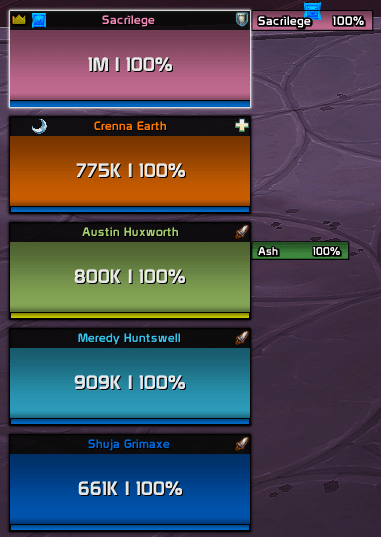
Party frames show you everyone's health. They don't show you what the healer is halfway through casting, or which mob the tank actually has targeted. Party Frame Enhanced puts that next to each party member's frame: a cast bar, a small frame for whatever they're targeting, and one for their pet.
It works with Blizzard's party frames (classic or raid-style) and with EllesmereUI's, and it figures out which one you're using and attaches itself to it. If you'd rather not tie anything to your party frames, any of the three can live in its own movable stack instead.
- Cast bars change color with the kind of cast, carry a small shield when the cast can't be interrupted, and flash red when it gets interrupted.
- Target frames show the target's name, health and raid marker, colored by class for players and by hostility for everything else. Clicking one targets that unit.
- Pet frames show the pet's name and health, and a click targets the pet.
Screenshots
Live (in a party)
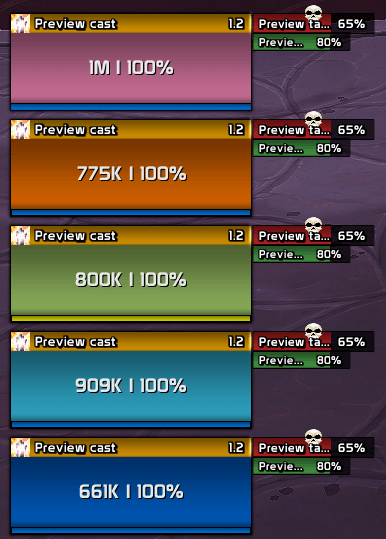
Unlocked (preview, in a party)
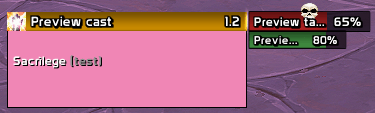
Unlocked (preview, solo)
Usage
Install it and join a party. Each member gets a cast bar across the top of their frame, a target frame just to the right, and their pet's frame below that. A unit with no party frame on screen gets nothing until it has one, which is why your own row doesn't appear in Blizzard's classic party layout: that layout never shows you.
To move things around, type /pfe unlock or untick Lock frame on the General page. Every bar
and frame fills with made-up data, so you can arrange it all without waiting for a pull. Solo, you
get a stand-in party frame to hang them on. You nudge attached elements with the offset sliders on
each feature's Size & Position tab, and drag free-placement stacks wherever you want them. Lock
again and the real data comes back.
Cast Bars, Target Frames and Pet Frames each get their own settings page, with tabs for size and position, the bar, the border and the text. That's also where you switch a feature to Free placement; whichever placement you aren't using grays out. The General page picks which party frames to attach to. Leave it on Automatic unless you run both UIs.
Target and pet frames are secure buttons, the same kind Blizzard's own unit frames are made of, so clicking them works in combat. The game also refuses to let any addon move one mid-fight. If someone joins or leaves during a pull, those frames hide until combat ends and then reappear in the right spot.
Every option is under Settings → AddOns → Ka0s Party Frame Enhanced, and typing /pfe on its
own takes you there. /pfe help (or /partyframeenhanced help) prints the full command list.
There is a minimap button too. Left-click unlocks and re-locks the elements (it's the same switch as Lock frame), and right-click opens the settings. If you use Titan Panel, ElvUI's data texts or Bazooka, the addon shows up there as well, and clicking it does exactly the same thing. To put the button away, untick Minimap button on the General page; it stays away on every character and every profile until you tick it back.
How it works
- When your group or your layout changes, the addon checks the party frames on screen and works out which frame shows which party member. It only reads them. It never moves, hides or restyles them.
- Each cast bar, target frame and pet frame gets pinned to the frame showing its party member, or put in its feature's stack if that feature is in free placement.
- Cast bars start and stop on the game's own cast events and animate from the game's cast timer. Target frames update the moment a member switches target, and their health refreshes a few times a second while they're visible. Pet frames follow the pet's health events.
- In Midnight, a lot of combat information is hidden from addons. Party Frame Enhanced never tries to read it; it passes those values straight to the game to draw, which is why a pull can't break it.
FAQ
| Question | Answer |
|---|---|
| Does it replace my party frames? | No. It adds to them and never moves, hides or restyles them. |
| Does it work in raids? | No, and that's on purpose. It's party-only: in a raid, or solo, it shows nothing. |
| Does it work with ElvUI, Cell or Grid2? | Not as an attachment yet. Use free placement, which works with any setup. |
| Why can't it hide the target frame when a party member targets me? | The game hides "is that you?" from addons in combat, so the addon has no way to tell. |
| Do I need EllesmereUI? | No. It's optional; without it the addon uses Blizzard's frames. |
Troubleshooting
| Symptom | Fix |
|---|---|
| Nothing shows next to my party frames | Type /pfe status. It tells you which party frames the addon found, which members have a frame, and whether something is switched off. The usual culprits are General visibility set to Never or the wrong Frame system on the General page. Solo or in a raid, nothing shows on purpose; /pfe unlock shows you what it would look like. |
| My own row is missing | Blizzard's classic party layout doesn't show you. Use the raid-style layout, EllesmereUI, or free placement. |
| Target or pet frames are missing after someone joined mid-fight | They come back when combat ends. The game doesn't let addons move clickable frames in combat. |
| The settings panel won't open | It refuses in combat on purpose. Try again once combat ends. |
| Something looks wrong and you want to report it | Type /pfe debug on, reproduce it, then /pfe debug to open the log and copy it into your issue. |
Issues and feature requests
Bugs and feature requests are tracked at https://github.com/tusharsaxena/PartyFrameEnhanced/issues. Please file them there rather than in comments. That list is the addon's whole backlog, so anything filed there gets seen.
Version History
| Version | Date | Highlights |
|---|---|---|
| 1.0.0 | 2026-09-18 | - First version: cast bars, target frames and pet frames for your party, attached to Blizzard or EllesmereUI party frames or placed freely. |
The Ka0s Party Frame Enhanced Team