

Description
Consumable Master





Ka0s Consumable Master is an auto-managed consumable macro addon. It keeps a fixed set of account-wide macros pointed at the best consumable in your bags: thirteen categories, plus two combo macros that switch depending on whether you're fighting. You set up your food, flask and potion macros once, and you never rebuild them again.
Loot something better, change spec, reload or drop out of combat, and each macro re-points at your current best pick. Usually that's an item. Where a class ability does the job (Recuperate, for one), it's the spell. The macros are account-wide, so one set covers every character you have. The addon finds them by name rather than by slot, so you can shuffle them around your macro list and they'll keep working next to macros of your own.
English game clients only, for now. To work out how much a consumable heals, or which stats it grants, the addon reads the item's tooltip, and it only understands English text. Other clients aren't fully supported yet, although item and weapon type detection already works on any client. Full localization is planned for a later release.
| # | Category | Macro | Spec-aware? |
|---|---|---|---|
| 1 | Basic / conjured food | KCM_FOOD |
No |
| 2 | Drink (mana regen) | KCM_DRINK |
No |
| 3 | Healing potion | KCM_HP_POT |
No |
| 4 | Mana potion | KCM_MP_POT |
No |
| 5 | Warlock healthstone | KCM_HS |
No |
| 6 | Vantus rune (raid Versatility) | KCM_VANTUS |
No |
| 7 | Flask | KCM_FLASK |
Yes |
| 8 | Combat potion (throughput) | KCM_CMBT_POT |
Yes |
| 9 | Stat food | KCM_STAT_FOOD |
Yes |
| 10 | Weapon enchant (oil / stone, per hand, weapon-type aware) | KCM_WPN_ENCH |
Yes |
| 11 | Augment rune (primary stat, reusable-aware) | KCM_AUG_RUNE |
No |
| 12 | Bloodlust / Heroism / Time Warp (raid haste, incl. drums) | KCM_BLOODLUST |
No |
| 13 | Battle resurrection | KCM_BATTLE_REZ |
No |
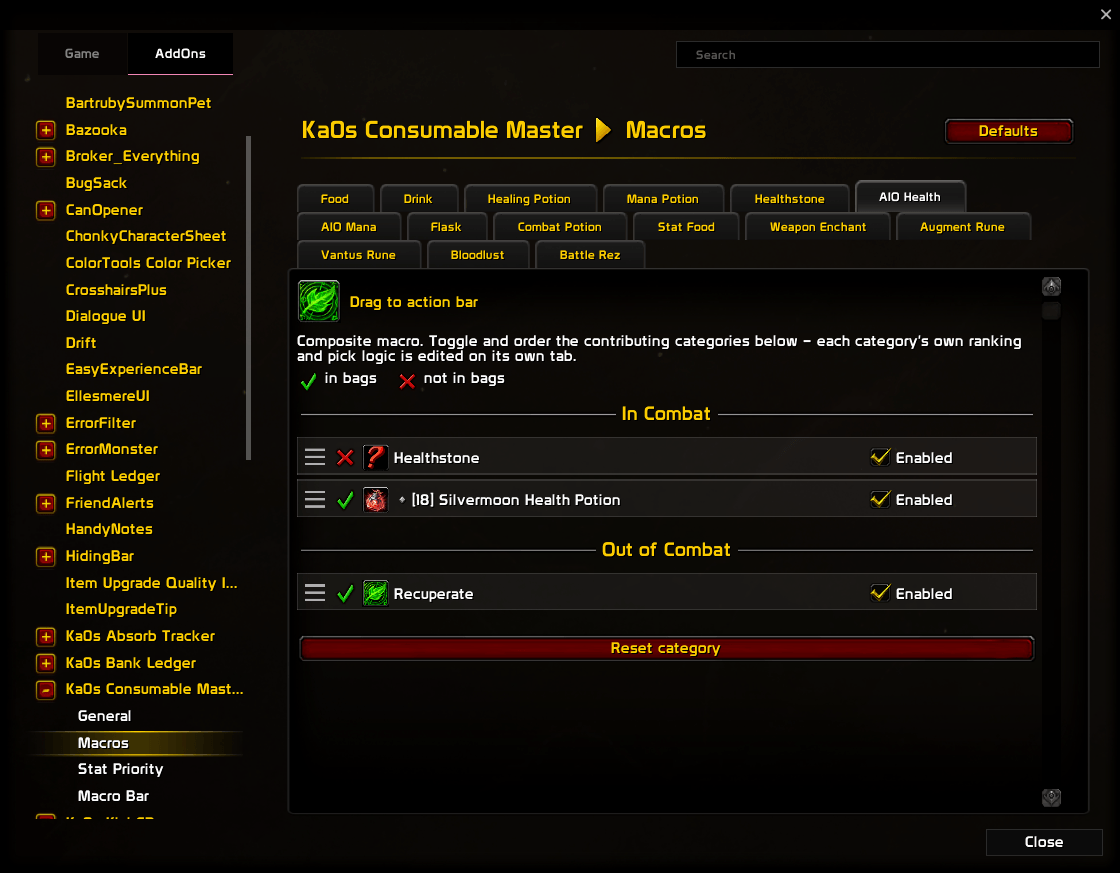
| 14 | All-in-one health (combat: HS → HP pot, out of combat: food) | KCM_HP_AIO |
No |
| 15 | All-in-one mana (combat: MP pot, out of combat: drink) | KCM_MP_AIO |
No |
If a better pick turns up while you're in combat, the macro updates the moment you leave it. WoW doesn't allow macro changes mid-fight.
Screenshots
Stat Priority Selector (Per Spec)
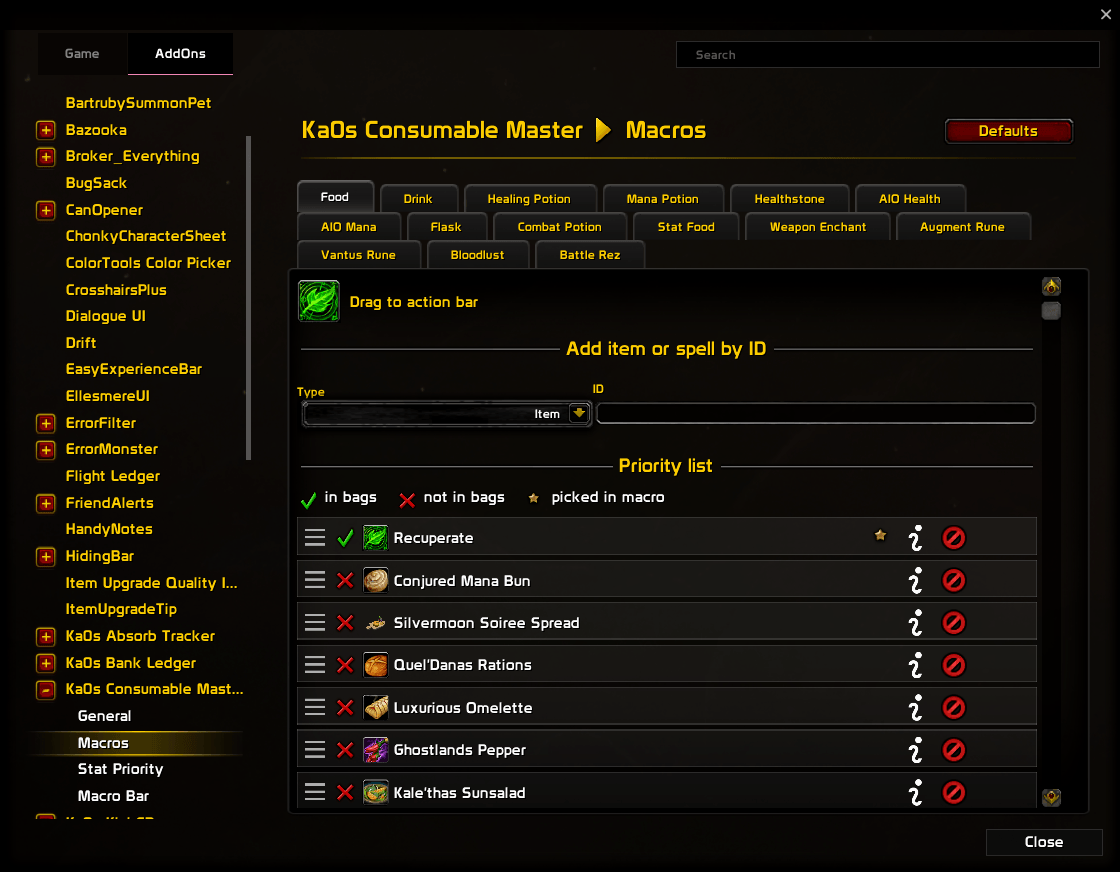
Food category macro selector
All-in-One health category macro selector
Ranking explainer
Macro bar
Usage
Log in after installing and the macros are already there. Consumable Master reads your bags, scores what it finds and writes all fifteen. It also puts a bar of its own on screen that holds those macros and nothing else. The bar starts unlocked so you can drag it where you want it, and /cm lock pins it in place.
Getting the picks right for your character takes four steps, in this order.
- Put the macros within reach. The addon's own bar is the easy option. Hover the shaded strip along the edge of a button and a flyout lists everything in that category you can use right now, best first. If you'd rather use your own bars, drag the macros out of the macro window, or grab the small icon under the title of a category tab on the Macros page.
/cm bar offhides the addon's bar. - Set your stat order. Flask, Combat Potion, Stat Food and Weapon Enchant rank by the stats your spec wants, and they read that order from the Stat Priority page. Drag Crit, Haste, Mastery and Versatility into the order you want. Click a stat's green tick and it drops to the bottom, where it counts for nothing. The banner tells you which spec you're editing.
- Check the picks. Each category has a tab on the Macros page that lists its candidates in order. A green check marks the ones you own, and a yellow star marks the one the macro is using right now. The blue info button on each row explains why it landed where it did.
- Overrule anything you disagree with. Drag a row by its handle and drop it higher to pin it above the score. Press × to block it, and a later bag scan won't put it back. For something the addon has never heard of, use Add item or spell by ID at the top of the tab: pick Item or Spell, then type the ID or the name, or shift-click it into the box.
After that the macros look after themselves. If a pick ever looks stale, /cm resync checks them all again. The minimap button opens the settings with a left-click, and a right-click gives you two switches, Enabled and Locked.
Everything else is on the addon's page under Settings → AddOns, and /cm opens it. /cm help (or /consumablemaster help) lists every command.
How picking & ranking works
The macros are ordinary WoW macros. The addon creates and edits them with the game's own macro functions, which is why any bar addon can hold them. The game locks those functions during combat, so a better pick found mid-fight waits until you leave combat.
Each macro is built in four steps, in this order.
- Gather the candidates. That's everything in the built-in default list, anything you added by hand and anything found in your bags, minus whatever you blocked with ×.
- Score each candidate. Higher is better, and each category scores differently:
- Food and Drink score on how much they heal or restore, with a bonus for conjured items and percentage-based ones. That's why Midnight's %-based food beats older flat food.
- HP and MP potions score on how much they restore. An instant potion beats a heal-over-time one unless the heal-over-time total is more than 20% bigger. A slightly larger slow heal won't win you an emergency.
- For Stat Food, Combat Potion and Flask, what counts is how well the item matches your spec's stat priority. Primary stat always beats secondary. Among secondary stats, the ones you put earlier count for more.
- Weapon Enchant checks each equipped weapon on its own. Attack Power oils and stones score highest for Strength and Agility specs, and Spell Power ones for Intellect specs, since that's each spec's real throughput stat. Other oils rank by your stat priority. The addon also tags every enhancement from its tooltip as bladed (whetstone), blunt (weightstone) or any (oil), and only considers the ones that match that hand's weapon. Dual-wield a sword and a mace and you can end up with a whetstone on one hand and a weightstone on the other. A hand that's empty, or has nothing valid to apply, is dropped from the macro. Swap weapons and the macro follows immediately, without a reload.
- Augment Rune picks the rune that grants the most primary stat. "Permanent" runes like Ethereal and Dreambound don't give a longer buff. They just aren't consumed, so they win ties and nothing else. The addon discovers new runes from their tooltip, which means a future one works without an addon update.
- Healthstone has a small preference for modern auto-leveling stones over old ones.
- Spell entries are class abilities (Recuperate as a Food entry, say). They score above every item, so they sit at the top by default. Pin items above them if you prefer.
- Apply your pins. Any rows you dragged into place override the score.
- Pick the first one you have, meaning the first item you own or spell you know. If you have none of them, clicking the macro prints a friendly
[CM] no categorynote.
Hover the blue info button on any row to see exactly why it landed where it did.
FAQ
| Question | Answer |
|---|---|
| Will this delete or overwrite my existing macros? | No. The addon finds its macros by name, never by slot, and it only ever touches its own. It never reads, moves or deletes yours. If you delete one of its macros by hand, it comes back on the next update. |
| Do the macros work across all my characters? | Yes. They're account-wide, so every character shares one set, and your priority lists and stat choices are shared too. |
| Why are some categories per-spec and others aren't? | Flask, Combat Potion, Stat Food and Weapon Enchant depend on your stat priority, which changes with your spec. Weapon Enchant also looks at your weapon types. Food, Drink, HP Potion, MP Potion, Healthstone, Augment Rune, Vantus, Bloodlust and Battle Rez rank the same for every spec, so they share one list. |
| How does it pick weapon enchants when I'm dual-wielding? | It picks for each hand separately. A whetstone only goes on a bladed weapon and a weightstone only on a blunt one. Oils fit any weapon at all, including a bow, gun or wand, which can't take a stone. So a sword-and-mace pair can end up with a different enhancement on each hand. A hand with nothing equipped is left out of the macro. Swapping weapons updates it right away, and you don't need to reload. |
| Why isn't it using my reusable (permanent) augment rune? | That's deliberate. A reusable rune like Ethereal or Dreambound doesn't give a longer buff. It just isn't consumed, so it only wins when it ties the best rune on primary stat. If a single-use rune grants more stat, the addon picks that one instead. Drag the reusable one to the top of its list if you'd rather never spend charges. |
| How do I add an item or spell the addon doesn't know about? | Open the category's page and use Add item or spell by ID at the top. Choose Item or Spell, then type the ID or the name, or shift-click the item (or spell) into the box, and press Enter or click Add. If it can't be found, the line under the box says so. An item's name only works once the game has seen that item this session. |
| How do I force a specific item to always win? | Grab its row by the drag handle and drop it where you want it. A pinned item overrides the automatic ranking. |
| How do I permanently remove an item? | Press × on its row. That blocks it, so it won't get auto-added again. Reset category or Reset all priorities clears the block. |
| Does it work with ElvUI / Bartender / other bar addons? | Yes. The macros are plain WoW macros. If a picked item's icon doesn't show on the bar, see Troubleshooting; a one-time Force rewrite macros plus /reload usually sorts it out after an upgrade. |
| Can I use this in a non-English client? | Not fully, yet. Item and weapon type detection works on any client, but the addon reads heal, mana and stat amounts out of the tooltip text, and it expects that text in English. Full localization is planned for a later release. |
| Will new patch flasks / potions work automatically? | Usually. It scans your bags and recognizes anything that matches by type and tooltip, so a freshly looted new flask joins the list on the next bag update. If a patch renames something, please file an issue. |
| Why does a smaller instant HP potion beat a bigger heal-over-time one? | When you're about to die, an instant restore is usually what you want. The heal-over-time potion only wins if its total is more than 20% bigger. Pin the heal-over-time potion above the instant one to override that. |
Troubleshooting
| Symptom | Fix |
|---|---|
| Action bar shows a cooking-pot icon instead of the picked item's icon. | Run Settings → General → Force rewrite macros (or /cm rewritemacros), then /reload. Some bar addons hold the old icon until the button redraws. |
| The macro shows the cooking pot but I do own the item. | Run /cm dump pick catKey (e.g. /cm dump pick FLASK) to list every candidate with its score and owned status. If your item isn't there, it is blocked or its tooltip hasn't loaded yet. |
| I just looted a better food / flask but the macro didn't update. | Give it a second; bag updates are batched. If nothing changes, run /cm resync. If it happened in combat, the macro updates when you leave combat. |
| My macro changed but my action bar didn't. | /reload. Some bar addons cache icons and don't redraw on every macro change. |
| Swapped specs but the flask / combat-potion / stat-food / weapon-enchant macro didn't update. | Run /cm resync, and check that the viewed spec on the Stat Priority page matches the spec you are actually playing. |
| Only one weapon got an enchant, or a hand was left bare. | Either that hand has nothing equipped, or you own nothing that fits it. Whetstones need a bladed weapon, weightstones need a blunt one, and oils fit anything. The Weapon Enchant tab names each hand's weapon type above the list, so a hand reading no stone (oils only) wants an oil. |
| I opened the debug console but nothing shows up in it. | The window and the logging are two separate switches, and that's what trips people up. A bare /cm debug only shows or hides the window and never turns logging on. /cm debug on (or the window's Debug: ON/OFF toggle) is what captures output. The log also clears on every login. |
/cm dump item id shows a type the addon doesn't recognize. |
A patch probably renamed that item type. Please file an issue with the type shown in the dump. |
| Chat says "macro body exceeds 255 bytes" once on login. | WoW limits macros to 255 characters. The addon won't write a broken macro, so it leaves that category on its empty note instead. Please report it with the category name. |
| Chat says it "gave up on a macro after 3 failed writes". | Something keeps blocking the macro write, usually another addon getting in the way. Follow Reporting a bug below and reproduce the failed writes at step 1. |
/cm resetall or "Reset all settings" says it didn't work. |
The addon's saved data hasn't finished loading. Reload and try again. |
/cm resetall or "Reset all settings" says "reset deferred until regen". |
You were in combat, so nothing was reset. Run it again once combat ends. |
| I want to restore a default list after removing items by hand. | Reset category clears that one category. Reset all priorities clears every category and every stat choice. Reset all settings puts the whole profile back the way it shipped. |
| I want different settings on different characters. | Options → Profiles creates, switches, copies, resets and deletes profiles. /cm profile lists them, and /cm profile <name> switches to one you already have. Everything moves with the profile: the priority lists, the stat order, the macro bar and where it sits. The macros rewrite themselves on the spot. They are shared by the whole account, so two characters on different profiles take turns rewriting the same set. |
| Something looks wrong and I want to report it. | Follow Reporting a bug below. |
Reporting a bug
- Type
/cm debug onand reproduce the bug. - Type
/cm diagnostics. - If the debug window isn't open, open it with
/cm debug. Press Copy, copy the entire output, and include it with your bug report.
The report is added after the debug trace in the same window, so one copy carries both.
Issues and feature requests
Bugs, feature requests and planned work all live on GitHub: github.com/tusharsaxena/consumablemaster/issues. Please file them there rather than in comments. The tracker is the project's to-do list; a comment isn't.
Version History
| Version | Date | Highlights |
|---|---|---|
| 1.8.0 | 2026-10-09 | - /cm profile lists your profiles and switches between them from chat- Fixed macro icons going blank after a /reload or relog mid-key; every macro is rewritten once the restriction lifts - A macro that another character overwrote, or that you deleted, is now rewritten when you log in - Devourer Demon Hunters get their own stat priority, so flasks, food and potions rank for Intellect instead of Agility - Changing spec now picks up consumables in your bags for the new spec straight away |
| 1.7.0 | 2026-09-27 | - New Profiles page: create, switch, copy, reset and delete profiles, and every setting follows the active profile - Minimap button, also shown in broker displays: left-click opens the settings, right-click offers Enabled and Locked. New /cm enable and /cm disable, and a bare /cm now opens the settings- /cm diagnostics writes a snapshot for bug reports to the debug console- Add by ID accepts an ID, a link or a name, suggests IDs as you type, and finds items by name even when they aren't in your bags - Macro bar: an X on the unlocked drag handle hides the bar, and the Buttons tab is now a list you reorder by dragging |
| 1.6.2 | 2026-09-11 | - Fixed the AIO Health and AIO Mana tooltips on the macro bar showing the macro's text instead of the item or spell it will use |
| 1.6.1 | 2026-09-11 | - Fixed the macro bar and its flyouts doing nothing when clicked while WoW's "cast on key down" setting is on (the game's default) |
| 1.6.0 | 2026-09-10 | - Maintenance has its own tab on the General page again - Fixed a refresh burst arming about a hundred and fifty timers to perform one rebuild - Category registration is now refused in combat and replayed when combat ends, instead of tainting - Fixed the info glyph lighting up a whole panel; it now matches Loot History's - Updated for game patch 12.1.0 |
| 1.5.0 | 2026-07-13 | - Three new macros: weapon enchant (KCM_WPN_ENCH, best oil/stone per hand, weapon- and spec-aware), augment rune (KCM_AUG_RUNE, best primary-stat rune, reusable-aware), and Vantus rune (KCM_VANTUS). New on-screen debug console: a movable window with Copy and Clear, opened by /cm debug or the General → Debug console toggle (/cm debug on/off); logging now resets each login. Updated for World of Warcraft: Midnight (12.0.7). |
| 1.4.0 | 2026-05-03 | - Redesigned settings panel with Blizzard sub-categories and an About page; slash commands moved to /cm with a cyan [CM] chat tag; new /cm list, /cm get, and /cm set commands; master enable toggle; Stat Priority now follows your active spec automatically. |
| 1.3.0 | 2026-04-25 | - New combo macros KCM_HP_AIO and KCM_MP_AIO that switch picks based on whether you're in combat, with AIO Health and AIO Mana settings pages to toggle and reorder each side. |
| 1.2.1 | 2026-04-25 | - Fixed a Lua error on login. |
| 1.2.0 | 2026-04-24 | - Action-bar icons now show correctly on ElvUI, Bartender, and other bar addons; new /cm rewritemacros command (and Settings → General → Force rewrite macros); category drag icons now show the picked item's texture. |
| 1.1.0 | 2026-04-24 | - Stability fixes: pinned items no longer cause macros to flip back and forth, over-long macros fall back cleanly instead of breaking, and spell names appear without a reload. Category tabs can be reordered, and empty categories show a fallback icon. |
| 1.0.0 | 2026-04-24 | - Initial release: auto-updating account-wide macros across eight categories, spell entries in priority lists, an item/spell picker, and a per-row score tooltip that explains each ranking. |
Consumable Master (Retail) Team