Ka0s Loot History (Retail)
- By
Records every item you loot, attributes where it came from, and lets you browse and analyze your loot history — account-wide.
loothistory.logo.jpg
loothistory-screenshot-01.png
loothistory-screenshot-02.png
loothistory-screenshot-03.png
loothistory-screenshot-04.png
Description
Ka0s Loot History





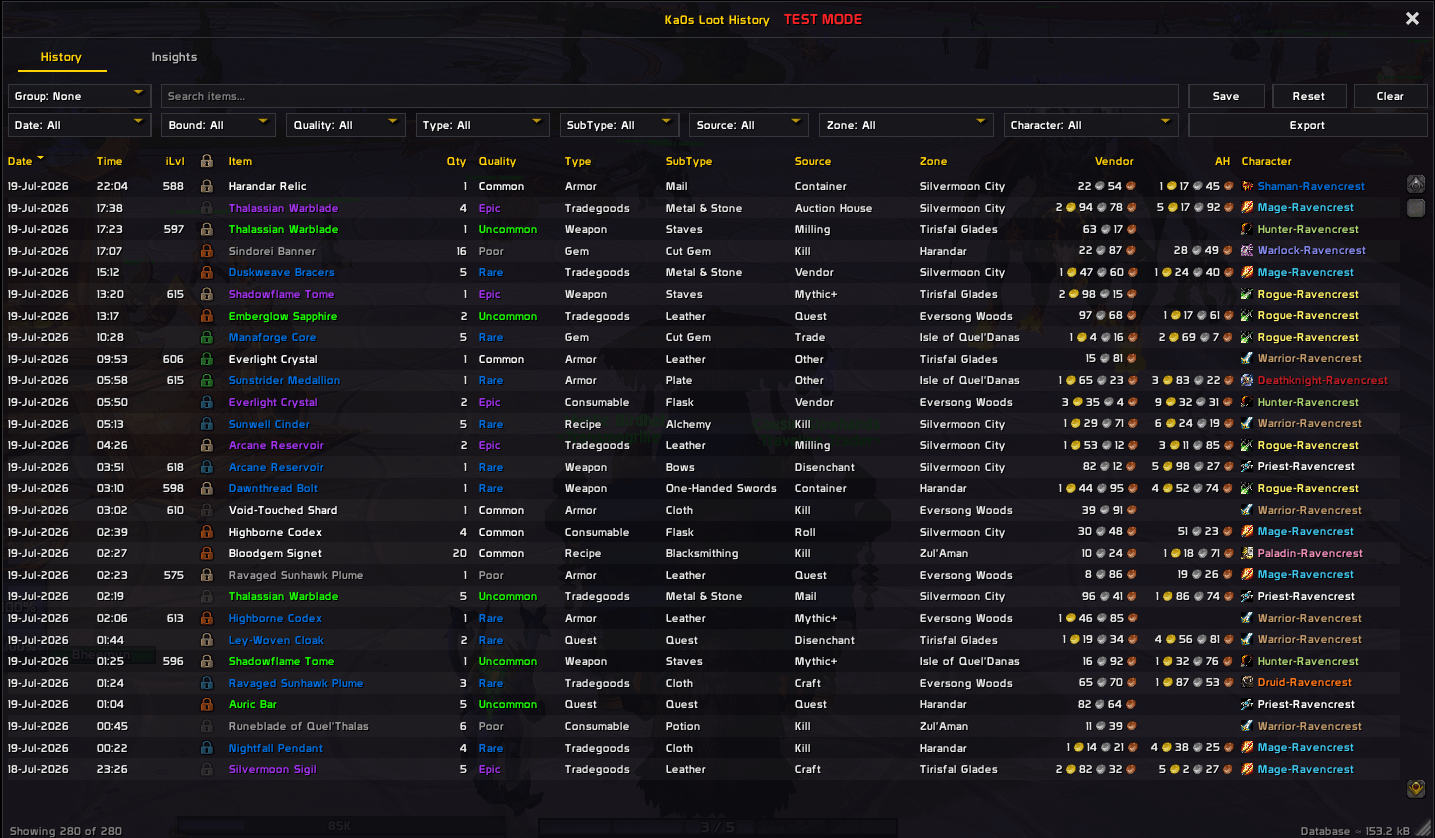
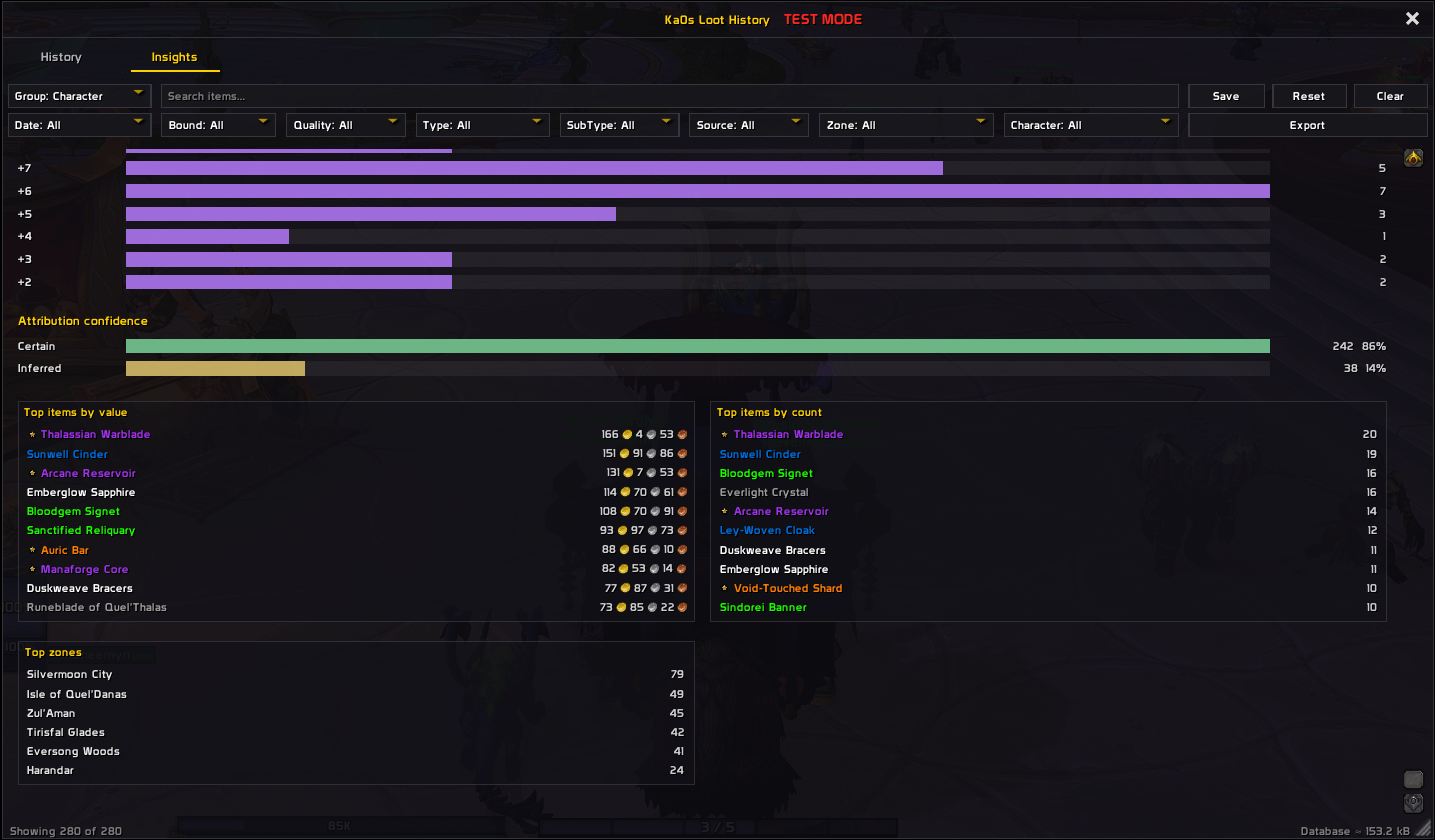
Ka0s Loot History is a passive loot tracker for World of Warcraft: Midnight. It records every item you pick up and works out where it came from: a kill, a chest, the mailbox, the auction house. Open the window whenever you like to read back your loot. The Insights tab shows the same log broken down by source, value, quality and more.
The history is account-wide. Every character writes to and reads from the same log, and it survives reloads and logouts. You pick a minimum quality, and anything below it is ignored.
Each item is filed under one of these sources:
| Source | What it covers |
|---|---|
| Kill | Looting a creature you killed |
| Container | Opening a chest, lockbox, or lootable object |
| Mythic+ | End-of-run and Great Vault chests |
| Bonus Roll | Items from a bonus roll |
| Roll | Items you won on a group-loot roll |
| Quest | Quest rewards |
| Trade | Items received in a trade |
| Items taken from the mailbox | |
| Auction House | Items won at auction |
| Vendor | Items bought from a vendor |
| Craft | Items you created by crafting |
| Refund | Items returned to you by a refund |
| Disenchant / Milling / Prospecting | Items produced by those actions |
| Other | Anything that arrived with no clear source |
Most items are filed straight from what the game reported, and those are marked Certain. Sometimes nothing says where an item came from. The addon still records it, under Other and marked Inferred, rather than dropping it on the floor. Every row shows which of the two it is, so you always know what you're reading.
Screenshots
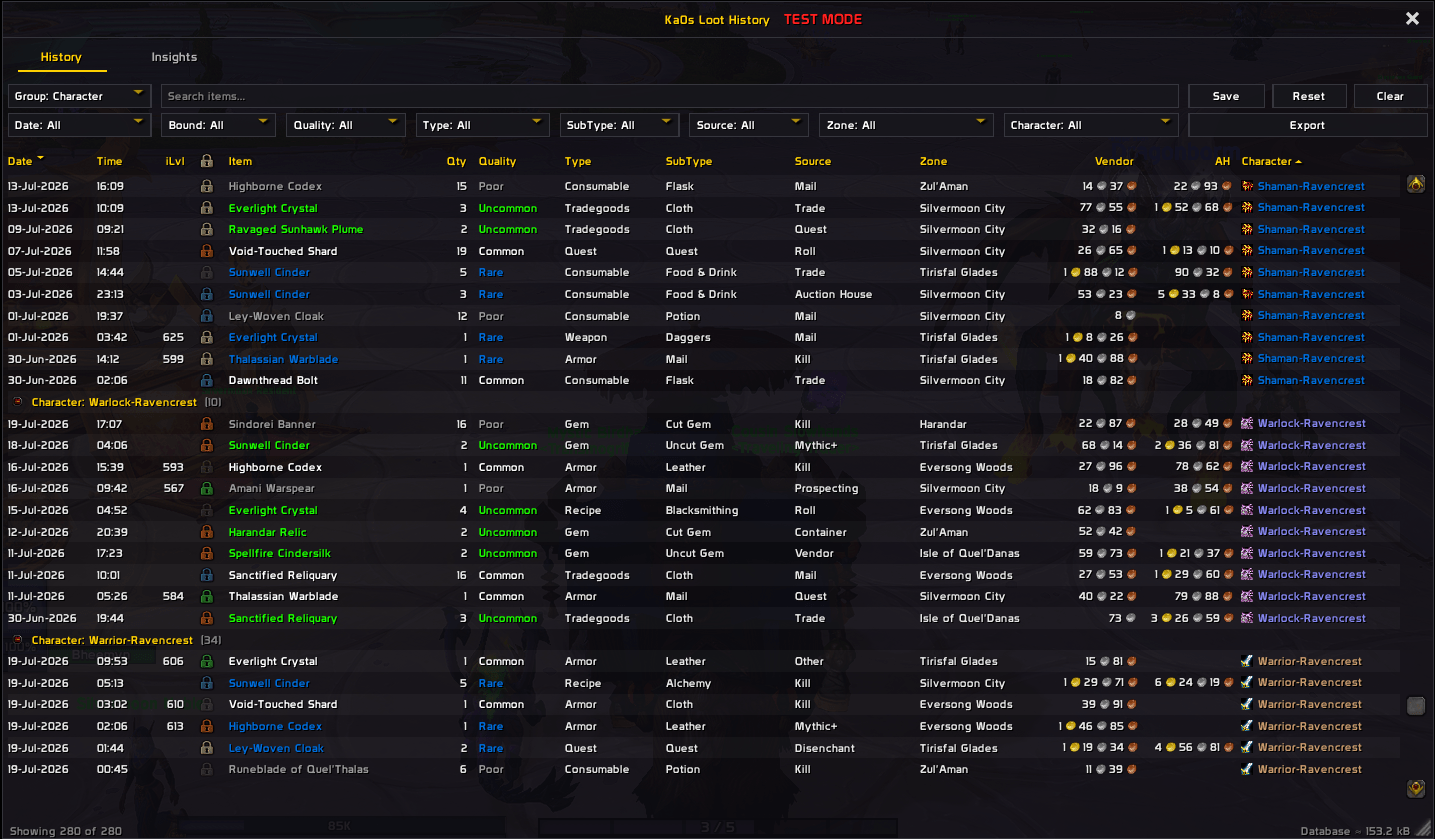
History browser
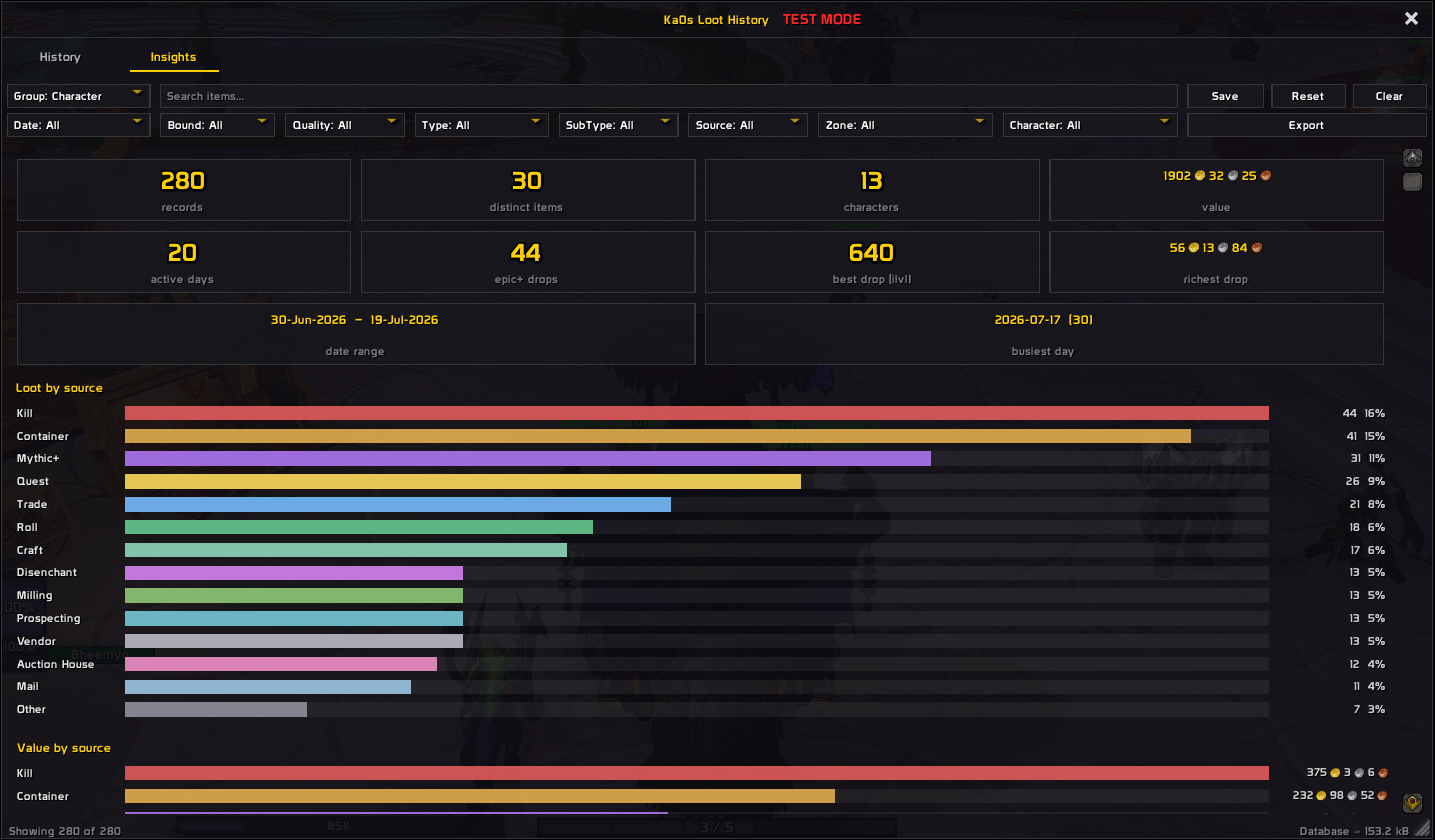
Insights panel
Usage
There's nothing to set up. Install it, log in, and it's already recording. At first all you'll see is a minimap button, because the History window stays shut until you open it. Drag the window by its title bar and pull its bottom-right corner to size it, then tick Lock frame on the Master controls tab (or Locked in the minimap button's menu) to keep it there. A new install has no loot to look at, so /lh test, or the Test mode box on Master controls, fills the window with sample rows. Combat switches it off, and it's never saved.
Reading back your loot happens in the History window, in this order:
- Open the window. Right-click the minimap button and tick Show window, or type
/lh toggle. A left-click on the button opens the settings instead. The window has four tabs: History, a table of every item you've recorded, Insights, Timeline and Holdings. - Narrow it down. Click a column header to sort. The filter bar above the table picks by date, bound, quality, type, sub-type, source, zone or character, the search box matches item names, and Group by folds rows together. Each tab (History, Insights, Timeline, Holdings) keeps its own filters. Save keeps the current tab's view as its default, Clear goes back to that saved view, and Reset forgets it and returns the tab to stock. Sorting and filters only carry over to your next session if you pressed Save.
- Handle a row. Hover it for the item's tooltip, or shift-click it to link the item in chat. Right-click opens a menu with Link to chat, Blacklist item and Delete. Blacklisting stops future loots of that item being recorded but leaves this row where it is, so use Delete when you want the row gone.
- Open the Timeline. It charts one thing at a time (gold, a currency or an item) over time: a thick Total line plus a line per character or the Warband, with daily gained and lost bars underneath. Type in the search box to pick what to chart, and hover for the day's numbers. Right-click a History or Holdings row and choose Show in Timeline to jump straight to it. The Timeline starts at the upgrade; there is nothing to chart before it. Keep Timeline days for in Settings controls how long the daily balances are kept.
- Switch to Insights. It breaks your loot down by source, value, quality and character, and gives currency a section of its own. Insights keeps its own filters, separate from History's, so narrowing one tab leaves the other's slice alone.
- Export. The Export button copies the tab you're on: loot rows as CSV from History, or a summary of the charts from Insights. Data Set picks all your data or just the current view. The addon can't reach your clipboard, so it opens a box with the text selected and you press Ctrl+C.
What gets recorded is up to you. The Capture tab sets a Minimum quality, which sources count under Record data from, and whether quest items and currency are kept. /lh disable stops the addon watching for loot and closes the window, and /lh enable switches it back on.
Everything else is on the addon's page under Settings → AddOns, which /lh (or /loothistory) opens on its own, and /lh help lists every command.
How attribution works
The game tells addons about each item you receive through the loot message, the one that puts "You receive loot" in your chat. It says what arrived but not where from, so a kill, a chest and a mail attachment all look the same.
So when an item arrives, the addon looks at what you were just doing. Killing a creature leaves a signal it can read at the moment the loot lands. So do opening a container, turning in a quest, taking mail, trading, buying from a vendor, winning an auction and finishing a Mythic+ run.
If there's a signal, the item goes under that source and is marked Certain. If nothing says where the item came from, it goes under Other and is marked Inferred. That's still a better record than none. Everything from one loot window gets the same source, so a full chest of drops lands together.
What a drop was worth
Where an item came from is half of what the addon reads when it arrives. The other half is what it's worth, and it reads that at the same moment for the same reason: a price looked up later is a price from a different day.
If you have Auctionator, TSM or OribosExchange installed, the addon reads an auction price for each item the moment you loot it. One of them is enough. With none installed, it skips pricing.
You decide which prices count. The AH Price tab in the settings lists every price your installed addons can supply in one table (TSM's market value alongside its region average, for instance). Tick the ones you want and drag them by the handle on each row into the order you trust them in. When more than one has a price for an item, the highest-ranked ticked source wins. Unticked sources, and any whose addon isn't installed, drop to the bottom.
The value shown throughout the History table and Insights is the higher of an item's vendor sell price and its auction price. Nothing ever shows as worth less than a vendor would pay for it.
FAQ
| Question | Answer |
|---|---|
| Does this track loot for my whole account or just one character? | The whole account. There's one shared history with a Character column, and every character adds to and reads from the same log. |
| Can I use different settings on different characters? | Yes. Settings live in profiles, and every character starts on the shared Default one. Pick, create, copy or reset a profile on the Profiles page in the settings, or switch from chat with /lh profile <name> (a bare /lh profile lists them). Your loot history is shared by every profile, so switching never hides or deletes a record. Keep history for is shared too: it is one setting for the whole account, so a profile switch never changes what gets cleared out. |
| Does it record other players' loot? | No. Only items you pick up. |
| What does the "confidence" marker mean? | Each item is marked Certain or Inferred. Most are Certain, filed straight from what the game reported. When the source can't be worked out, the addon still keeps the item, files it under Other and marks it Inferred. |
| Which sources can I toggle on or off? | Every source it records: Kill, Container, Mythic+, Bonus Roll, Roll, Quest, Trade, Mail, Auction House, Vendor, Disenchant, Milling, Prospecting, Craft and Refund. They're under Capture ▸ Record data from in the settings. |
| Will raising the quality threshold hide items I already looted? | No. The threshold only applies to new items. What you've already recorded stays until the retention setting clears it or you delete it by hand. |
| Do I need another addon to see auction values? | Only if you want them. Prices come from Auctionator, TSM or OribosExchange if you have one installed. With none, every value falls back to the vendor sell price. The value shown is always the higher of the two. |
| How do I stop tracking one specific item, or force-track one below my threshold? | Use the Filters tab in settings. Blacklist an item (by id, name or a shift-clicked link) to skip it from now on. Whitelist one to always record it, even if it's below your quality threshold, from a muted source, or a quest item. Both lists only affect future loots and never touch rows you already have. |
| Does "Export to CSV" send my loot anywhere? | No. It builds the CSV text and opens a box for you to copy by hand. Nothing leaves the game, and what you do with the copied text is your business. |
| Do my filters and sorting stick between sessions? | Only if you save them. Each tab has its own: the filter bar's Save button stores the current tab's group, sort and filters as that tab's default view in your profile. Clear returns to that view, and Reset forgets it and goes back to stock. |
| How do I wipe everything and start clean? | /lh purge deletes all history, and asks you to confirm first. To reset your settings but keep the history, use /lh resetall, or Reset all settings on the Master controls tab. Both reset only the profile you're on. |
What is /lh test for? |
It turns on test mode, which loads a sample dataset into the window and Insights so you can see how they look before you have real loot. The Test mode checkbox on the Master controls tab is the same switch. It's never saved, and it clears when you run the command again, untick the box, or enter combat. |
| Does history survive reloads and relogs? | Yes. It's saved, and restored every time you log in. |
Troubleshooting
| Symptom | Fix |
|---|---|
| Nothing is being recorded. | Check that Master controls ▸ Enable Loot History is on. If you expect grays or whites, lower Capture ▸ Minimum quality. The source may be turned off under Record data from. Quest items are skipped by default, so uncheck Capture ▸ Exclude quest items if you want them. The item may also be blacklisted on the Filters tab. |
| The minimap button is gone. | It's hidden. Tick Master controls ▸ Minimap button back on, or open the window with /lh toggle. |
| An item landed under the wrong source (or "Other"). | When nothing tells the addon where an item came from, it falls back to Other / Inferred. Open the debug console with /lh debug to see how an item was filed. |
| The AH Price / value column is blank, or just matches the vendor price. | You need Auctionator, TSM or OribosExchange installed, AH Price ▸ Enable AH pricing on, and at least one price source ticked. Even then, a price only shows up once that addon actually has one for the item, which is usually after its next scan. Until then the value falls back to the vendor sell price. |
| I clicked Export to CSV but nothing was copied. | The addon can't write to your system clipboard. A box opens with the text already selected: press Ctrl+C to copy, then Esc to close. |
| An item I don't want keeps being recorded. | Blacklist it on the Filters tab. Type its id or name, or shift-click its link into the box. Future loots are skipped, and rows you already have stay until you delete them. |
| Rows are missing from the table. | A column filter or the search box is probably narrowing it. Press Clear on the filter bar to go back to your saved view, or Reset to drop it and every filter. Filters and sorting only carry over between sessions if you pressed Save. |
/lh debug on doesn't open the debug window. |
on / off control debug logging, not the window. Logging is session-only and switches off again after every reload. To show the window, use /lh debug with no argument, or the Master controls ▸ Debug console toggle. Logging runs fine with the window closed. |
| The window is off-screen or the wrong size. | The addon remembers position, size and scale per profile. Adjust Interface ▸ Window scale, or drag the window back into view. |
| I want to preview the window but have no loot yet. | Tick Master controls ▸ Test mode, or type /lh test. Untick it, or run /lh test again, to clear it. |
| I want to wipe everything and start over. | /lh purge clears all history, after you confirm. /lh resetall resets settings without touching your history. |
| Something looks wrong and I want to report it. | Follow Reporting a bug below. |
Reporting a bug
- Type
/lh debug onand reproduce the bug. - Type
/lh diagnostics. - If the debug window isn't open, open it with
/lh debug. Press Copy, copy the entire output, and include it with your bug report.
The report is added after the debug trace in the same window, so one copy carries both.
Issues and feature requests
Bugs and feature requests are tracked at github.com/tusharsaxena/LootHistory/issues. Please file them there rather than in comments. That's where the project's to-do list lives.
Version History
| Version | Date | Highlights |
|---|---|---|
| 1.5.0 | 2026-10-09 | - New Holdings tab shows what each character and the warband bank hold across bags, bank, equipped gear, currencies and gold - Records gains and losses as well as loot: mail, auction posts and sales, trades, warband deposits and moves between your characters, each with a reason and a Direction column - New Timeline tab charts how much of an item, currency or gold you held over time, with daily in/out bars - Settings live in profiles, with a Profiles page and /lh profile; loot history stays account-wide. Each tab now saves its own filter view, Search suggests items as you type, and Holdings groups by quality, type or character- If you upgrade with history already recorded, a one-time popup offers to reset it so gains and losses start from a clean slate. You can export first, and nothing is deleted unless you confirm |
| 1.4.0 | 2026-09-27 | - Left-click the minimap button to open settings, right-click it for Enabled, Locked, Test mode and Show window, and hover over it to see the status and record count - New /lh enable and /lh disable commands and a Test mode box on Master controls. Turning the addon off now stops it watching for loot entirely- New /lh diagnostics command and a "Reporting a bug" guide- The blacklist, whitelist and currency lists on the Filters tab take item names and suggest them as you type - Fixes: shortening "Keep history for" asks before it deletes records, boss loot keeps its kill source for a short grace window, the Mythic+ context clears when you leave, a hidden minimap button stays hidden through resets, and Lock frame also stops resizing |
| 1.3.0 | 2026-09-10 | - General and Filters are now tab strips, with price sources reordered by drag and a Master controls group - Fixed the auction-house status colors rendering muted instead of saturated - Attribution wiring and the lifecycle kick gained guard rails against a half-built window - The saved-data byte estimate now counts every field it declares - Updated for game patch 12.1.0 |
| 1.2.0 | 2026-07-26 | - Currency capture — currencies recorded as their own rows with a dedicated Insights section, in-game tooltips, quality colors, and blacklisting - Insights dashboard overhaul — Loot/Currency sections, per-character companion charts, refreshed source palette and legends - More loot sources — Bonus Roll, Craft, Roll, Refund - Removed Export to AI — Export to CSV remains for History and Insights |
| 1.1.0 | 2026-07-20 | - Export to AI report (Claude — Desktop, Code, and Web); auction-house values via Auctionator / TSM / OribosExchange, shown in a new AH Price column with its own settings page; Blacklist / Whitelist item filters; a shared History/Insights filter bar with new Bound and Sub-Type filters and Group by Type; Insights valued at market price. Plus settings-panel polish — the scrollbar no longer shifts the layout between pages, and Reset All / Purge are no longer clipped. |
| 1.0.2 | 2026-07-12 | - Exclude quest items — a new opt-out setting (on by default) that skips the temporary items you pick up during quests. Uncheck it to record them too. |
| 1.0.1 | 2026-07-12 | - Maintenance republish — a packaging-only change to refresh the CurseForge listing. No functional changes. |
| 1.0.0 | 2026-07-12 | - Initial release: passive loot capture with source attribution and a Certain/Inferred confidence marker; account-wide history with a Character column; a standalone browser with filters (quality, type, source, zone, character), name search, sorting, and grouping; an Insights tab with breakdowns and highlights; a settings panel with full /lh slash support and per-source toggles; and a minimap button. |
Credits
The debug console and the export window use JetBrains Mono, licensed under the SIL Open Font License 1.1, and the History window's lock, dropdown and checkbox marks, the export icons and the settings page's info button are drawn from Open Iconic (MIT). Both ship inside the bundled LibKa0s payload, with their license text beside them.
Ka0s Loot History (Retail) Team