Description
Ka0s KickCD





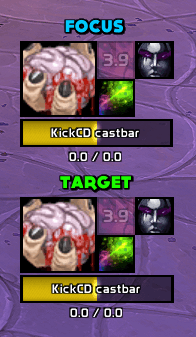
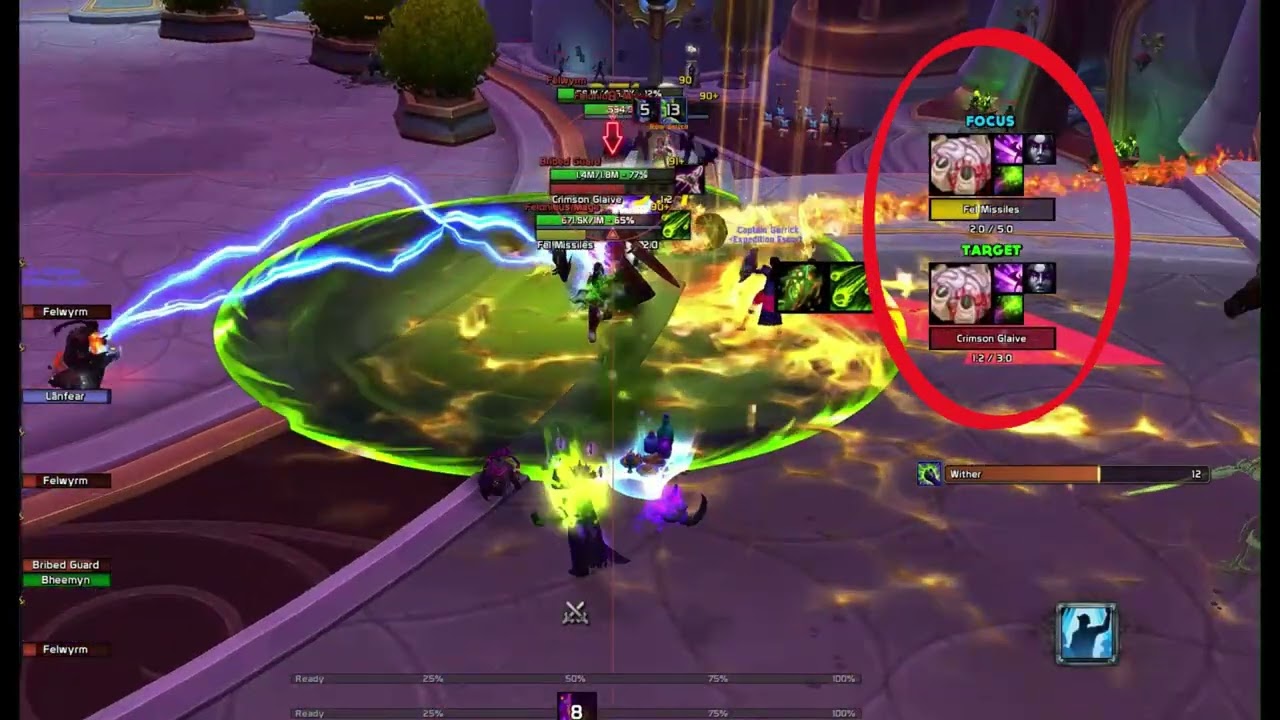
KickCD answers one question: is this cast worth a kick? It watches two enemy units, your target and your focus. Each one gets a grid of your own interrupts and cast-stopping crowd control, every icon running its cooldown timer with a clear ready / not-ready look, plus a cast bar showing what that unit is casting — the spell's icon, its name, the time left — colored by whether the cast can be interrupted at all. The grid arrives already filled in for your class and spec, so it is useful before you have opened a single settings page.
Focus tracking is on out of the box and mirrors your target set's styling, so the second pair costs you nothing to set up. Both sets move, resize and lock together. Don't want focus? Switch it off. Want it looking nothing like your target set? Unlink it.
Screenshots
KickCD in Action

Zoomed in view of the icon grid and cast bar
Usage
A fresh install puts a grid of icons and a placeholder cast bar on screen straight away. That is the preview: KickCD ships unlocked, and while it is unlocked every grid and bar ignores the visibility rules and stays put so you have something to drag. Lock it and the real behavior starts — out of the box that means a set only appears while a unit you're tracking is casting something you can actually interrupt, because that is the one moment the information changes what you do. Target something hostile, wait for it to start a kickable cast, and your interrupt cooldowns appear with a cast bar under them; set a focus and you get a second pair the same shape. If you'd sooner have it on screen permanently, or only in combat, or on any cast at all, that is one dropdown on General → Master controls.
So the first job is positioning. Drag the grids and bars where you want them, then run /kcd lock; one lock covers every unit, and /kcd unlock frees them again. A grid always drags while unlocked, but a cast bar drags only if you've set it to move freely, since by default it is anchored to the grid's primary icon and travels along with it. /kcd resetposition brings the target grid back to the middle of the screen if you push it off the edge. /kcd resetall is not the bigger version of that — it restores every settings page and every spec's spell list to defaults as well as the positions, so it is a fresh start, not a nudge.
The grid tracks the spells your current class and spec can cast right now, which is why it changes when you respec: talents you didn't take, abilities you haven't learned and pet spells with no pet out are all filtered away. Each spec starts from its own list, built the first time you play that character. Settings → Spells is where you add to it, disable rows you never use, or drag a row by its handle to change the order icons sit in. Enable more than the grid has room for and the extras are quietly left off, with a single warning in chat.
Focus copies your target set's styling until you say otherwise. Untick "Use same styling as Target" on General → Units and the Icons, Cast bar and Text Label pages will build it separately — switch which unit you're editing with the Target / Focus picker above the tabs. Position and label text stay independent either way. That label is the "Target" or "Focus" tag you may have spotted beside a grid, and the Text Label page renames it, restyles it, moves it onto the cast bar or turns it off.
Everything else is configuration, and it lives in two places: the addon's own page under Settings → AddOns in game, and /kcd (or /kickcd), which prints the full command list.
How interrupt tracking works
The master switch settles it first. Addon off, nothing on screen, no exceptions.
After that it comes down to a single visibility setting — always, only in combat, only while a tracked unit is casting, or only while a tracked unit is casting something interruptible. Every grid and cast bar obeys that one setting, which is why they show, hide, move and lock as a group. Each unit is still judged against its own cast, so your focus set can light up for the focus while the target set stays dark. In "interruptible only" mode a set sits hidden through a cast you can't stop and appears the instant its unit starts one you can.
The two halves of a set watch opposite ends of the fight. The icon grids watch you: your interrupts and cast-stopping crowd control for the class and spec you're playing, each icon running its cooldown and showing whether the ability is ready. Both units draw the same cooldowns, because they're yours, not the enemy's. The cast bars watch the enemy, one bar per unit, colored by whether the cast can be interrupted.
Key settings
A few settings shape the addon more than the rest.
Target and focus
Target is tracked whenever the addon is on. Focus is tracked by default and starts linked, copying target's icon and cast-bar styling live; turn it off in General → Units, or untick "Use same styling as Target" there to give it a look of its own.
Position and label text are per-unit whether the link is on or off, and the two sets start well apart for that reason. While focus is linked it also mirrors target's label styling and whether the label shows at all. The drag lock, the visibility mode and overall size and transparency are shared across both units, always.
Visibility (General → Master controls → General visibility)
One setting, four values, and the master switch outranks all of them.
| Value | When a unit's set shows |
|---|---|
always |
Always. |
in_combat |
Only while you're in combat. |
target_casting |
Only while that unit is casting or channeling. |
target_casting_interruptible |
Only while that unit is hostile and casting something you can interrupt. Casts you can't interrupt stay hidden. (Default.) |
The ready glow keeps its own copy of this setting on Icons → Ready glow, with the same four choices plus never to switch the glow off entirely. Primary and secondary icons can run different triggers.
Cast bar placement (Cast bar → Size and position)
Anchored to the primary icon is the default: the bar sticks to the main icon in the grid and moves with it, and you choose which points connect plus a small offset. You don't drag the bar itself in this mode. The alternative is free, where the bar floats on its own — unlock, drag, lock, and the position is saved. Out of the box the bar sits just below the icon grid, lined up with its left edge.
Cast bar direction and auto-size (Cast bar → General)
Orientation is horizontal or vertical, and growth direction picks which way the bar fills: right or left when it's horizontal, up or down when it's vertical. Auto-size to icon grid matches the bar's length to the grid and keeps it matched, so adding, removing or disabling icons resizes the bar in place. Its other dimension stays wherever you set it.
Icon grid layout (Icons → Layout)
The primary anchor sets where the block of secondary icons sits relative to the main icon, the grow direction sets the order they fill in, and Rows × Cols sets how many fit. Any anchor pairs with any grow direction.
Enable more spells than the grid can hold and the extras are left off, with one warning in chat so you can make room or trim the list.
FAQ
| Question | Answer |
|---|---|
| Does this replace Blizzard's cast bars? | No. It adds its own and leaves Blizzard's alone. If you don't want to see both, hide Blizzard's target and focus cast bars in Edit Mode. |
| Does it track my focus too? | Yes, out of the box, with its own grid and cast bar copying your target set's look. Turn focus off in General → Units if you only want your target. |
| How do I make focus look different from target? | On General → Units, untick "Use same styling as Target" (or press "Copy styling from Target" first, then edit), then switch the Icons, Cast bar or Text Label page's unit picker to Focus. |
| I see a "Target" (or "Focus") label on my grid — what is it, and can I change or hide it? | That's the unit's identity label, and the Text Label page owns it: set its text, restyle it, attach it to the icon grid or the cast bar, or turn it off. Each unit has its own. While focus is linked it mirrors target's label styling and whether the label shows; the text stays independent. |
| How do I move the grids or cast bars? | /kcd unlock, drag, /kcd lock — one lock covers every unit. Each icon grid always drags when unlocked. A cast bar drags only when it's set to move freely; anchored, it follows its grid. /kcd resetposition puts the target grid back in its default spot, and /kcd resetall resets every unit's positions. |
| Where do my spell defaults come from, and why isn't every spell there? | Each class and spec comes with a starter list, set up the first time you use that character. The grid then shows only the spells you can cast right now, so spells from talents you didn't pick, spells you haven't learned, and pet abilities without a pet are hidden. To start over, use /kcd spells resetall (all specs) or /kcd spells reset (one spec). |
| Can I add my own spells? | Yes, in Settings → Spells or with /kcd spells add. For the spec you're currently playing, only spells the game already tracks as cooldowns can be added. |
| Does it track items or trinkets? | Not yet. Spells only. |
| Why won't the settings panel open in combat? | The game blocks opening settings mid-fight, so /kcd config waits until combat ends. |
| Are there per-character settings? | Yes, see Settings → Profiles. Every character starts on a shared default, and you can split off a per-character, per-class, per-realm or per-faction profile whenever you like. |
| Does the fill direction change for channels? | Yes. A channel drains the way the matching cast would fill, so a bar that fills to the right during a cast drains to the left during a channel. |
| How do I capture debug info for a bug report? | The one-off snapshots (/kcd debug interrupt, /kcd debug spells, /kcd debug castbar) print to chat, so copy them from there. For a running trace, turn logging on with /kcd debug on, reproduce the problem, then open the on-screen debug window with /kcd debug window and hit Copy. The window resets on every reload. |
Troubleshooting
| Symptom | Fix |
|---|---|
| The icon grid never appears. | Check three things: the addon is on (/kcd get enabled is true), your visibility setting fits the situation (/kcd get visibility — some modes need combat or a casting target), and your spec has at least one enabled spell that you know. /kcd debug spells lists what it's watching. |
| The icon grid won't drag. | It's locked. /kcd unlock, drag, /kcd lock. If unlocking doesn't seem to take, run /kcd toggle. |
| The focus set sits on top of my target set. | They start apart, but they can be dragged into each other. /kcd unlock, move one out of the way, /kcd lock. /kcd resetall puts every unit back to its starting position. |
| I only want my target, not focus. | Turn focus off in General → Units, or /kcd set units.focus.enabled false. Everything focus-related disappears. |
| The cast bar still shows on casts I can't interrupt, even in "interruptible only" mode. | If the bar fades out on those casts, that's it working as intended — the frame is still there, just invisible. For anything else, run /kcd debug interrupt while the target is casting and include the output in a bug report. |
Cooldown text sticks at 0.0 for a few seconds after a spell finishes. |
Fixed, and it shouldn't come back. If it does, capture /kcd debug spells during the stuck moment and report it, and check that cooldown text is on (Icons → Annotations). |
| The glow on secondary icons flickers or restarts constantly. | It should not do that any more. If it still does, check the glow trigger is set to one of the "target casting" options, then send a short video with your settings. |
| The settings panel won't open mid-fight. | On purpose. The game blocks it in combat, and it opens the moment combat ends. |
| The cast bar won't auto-size to the grid. | Toggle Auto-size off and on, or run /kcd resetposition to force a refresh. Auto-size only controls the bar's length; its other dimension stays where you set it. |
| I want a clean slate. | One page: that page's Defaults button. One setting: /kcd reset setting. Everything but profiles: /kcd resetall, or General → Reset all settings. Just the grid's position: /kcd resetposition. One spec's spell list: /kcd spells reset or the Spells page's Defaults button; every spec's: /kcd spells resetall. |
Issues and feature requests
Found a bug or want a feature? File it at https://github.com/tusharsaxena/kickcd/issues. The issue tracker is where all reports and planned work live, so please post there rather than in comments.
Version History
| Version | Date | Highlights |
|---|---|---|
| 1.3.0 | 2026-09-10 | The global cooldown is now attributed per spell rather than per log line, so icons stop reading as ready when they are not (#15) Fixed the cast bar minting a closure on every cast Debug lines now mark which entries the global cooldown explains The download is about 7.5 MB smaller — project-page art no longer ships to players Updated for game patch 12.1.0 |
| 1.2.1 | 2026-07-26 | Fixed spell lists being empty on non-English clients — spec lists are now keyed on Blizzard's spec ID rather than the translated spec name, and existing profiles migrate automatically on load. The Spells tab's spec dropdown now follows an in-game spec change while settings are open. Debug log no longer floods with repeated lines while a spell is on cooldown; the rebuild line now names every watched and skipped spell. Icons skip redundant repainting as a cooldown ticks down — about a third less work per update, with no visual change. |
| 1.2.0 | 2026-07-13 | Added target and focus tracking — each unit gets its own icon grid and cast bar, with focus on by default and linked to target's look. New Text Label tab for custom identity labels on any grid or cast bar. Added an on-screen debug window with Copy/Clear buttons, controlled by /kcd debug on|off|toggle|window (replacing /kcd debug log); debug messages now go there instead of chat and reset each reload. Refreshed default layout: cast bar under the grid, cast time below it, and the two sets spaced apart. /kcd resetall now restores positions; added /kcd version. |
| 1.1.0 | 2026-05-03 | Added texture, font, and border dropdowns with live previews. The settings panel's main page now shows the logo and command list, with breadcrumb headers on subpages. All chat output now uses a single cyan [KCD] label. |
| 1.0.1 | 2026-05-02 | Rebuild only; nothing changed for players. |
| 1.0.0 | 2026-05-02 | Initial release. Interrupt and CC cooldown icon grid with flexible layout, plus a target cast bar that colors itself by interruptibility and can auto-size to the grid. Five-tab settings panel with full /kcd command coverage and per-tab Defaults. Visibility modes (always / in combat / target casting / interruptible only) with a per-icon ready glow. Per-spec spell lists with hover tooltips and known/unknown markers. Saved profiles. |
The Ka0s KickCD Team