Ka0s Aura Master
- By
Build your own buff, debuff and weapon enchant displays for player, target, focus and pet, as bars or icons.
Description
Ka0s Aura Master





Ka0s Aura Master lets you build your own buff and debuff displays. Each one is a container. You pick whose auras it shows (yours, your target's, your focus's or your pet's), whether it shows buffs, debuffs or your weapon enchants, and whether they draw as timer bars, as icons or as lines of text.
Make as many as you like, and trim each one down to the auras you actually care about. Each container picks from the built-in spell categories (offensive cooldowns, defensive cooldowns, movement abilities, utility spells and so on) or ones you make yourself, and has its own whitelist and blacklist for anything the categories don't cover.
Aura Master is built on the Aura Container API that arrived in 12.1. The game hides aura details from addons during combat, so Aura Master never reads your auras at all. It tells the game's own aura display what to show and how to style it, and the game does the rest, in combat and out of it. A container can sit anywhere on screen, or attach to another container or to any in-game frame.
Screenshots
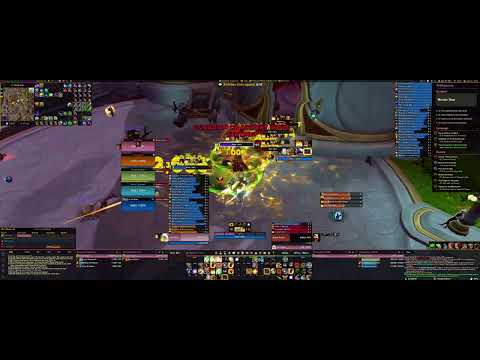
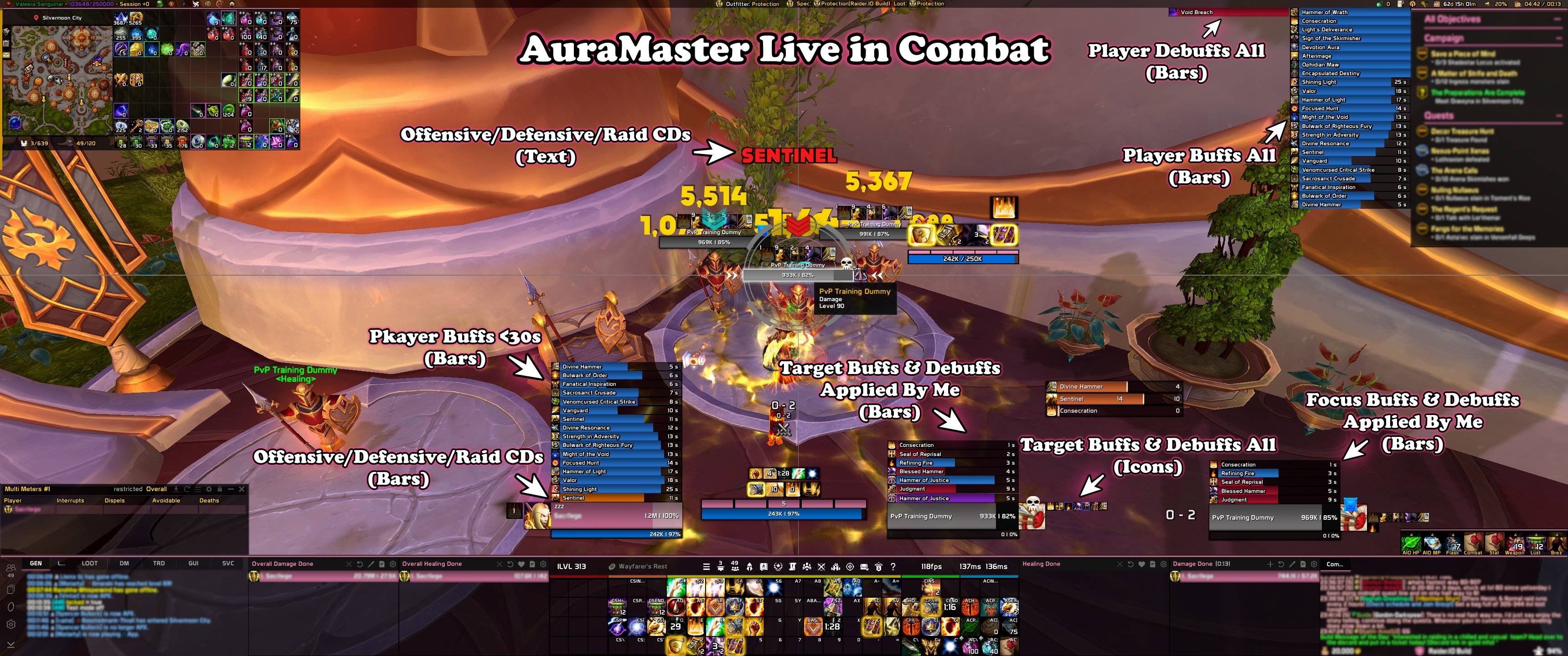
AuraMaster live in combat
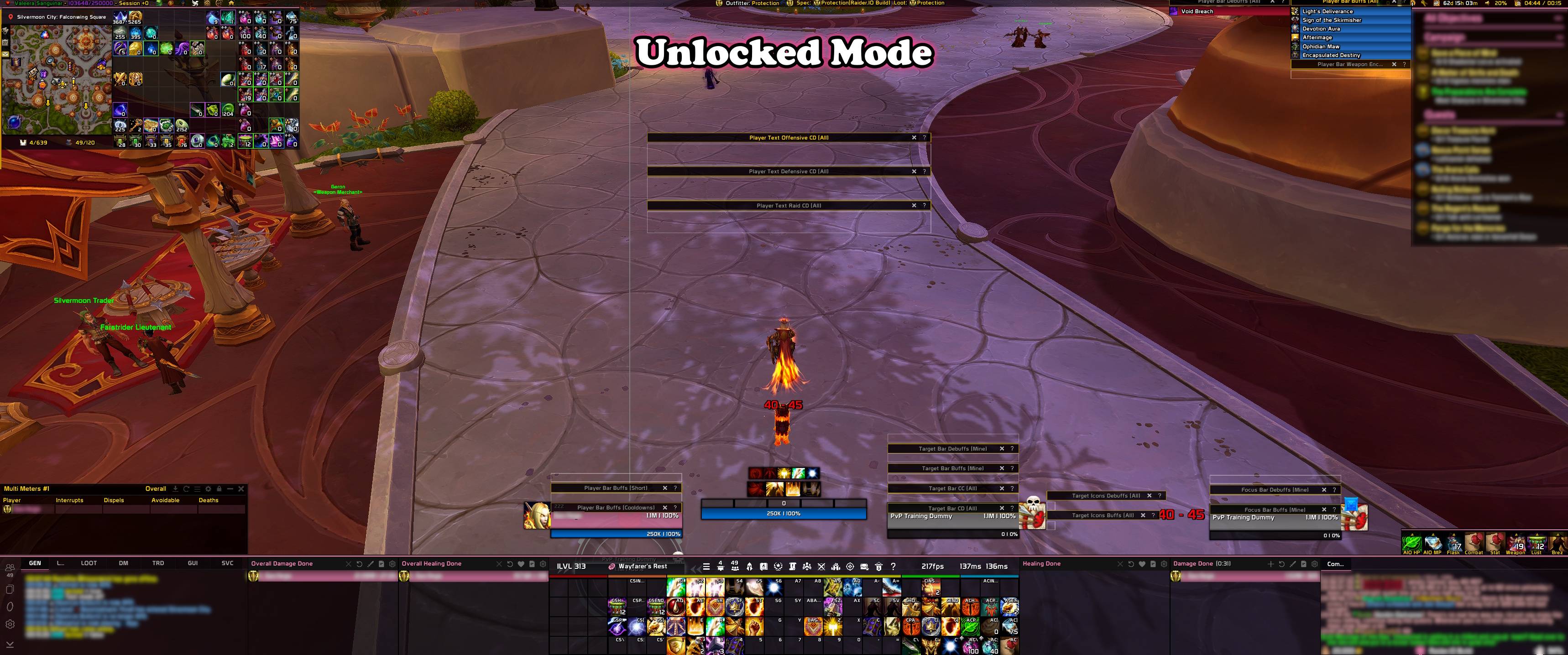
Unlocked mode
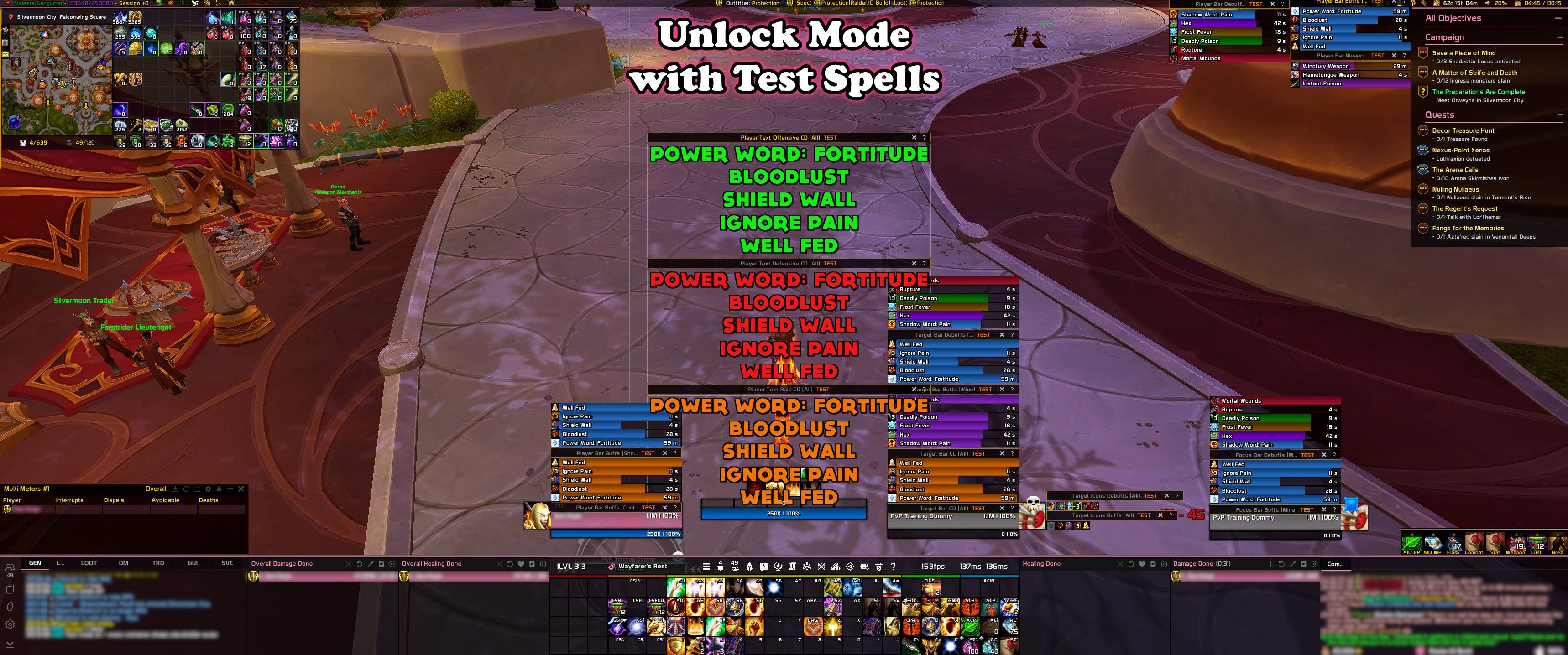
Unlocked mode with test spells
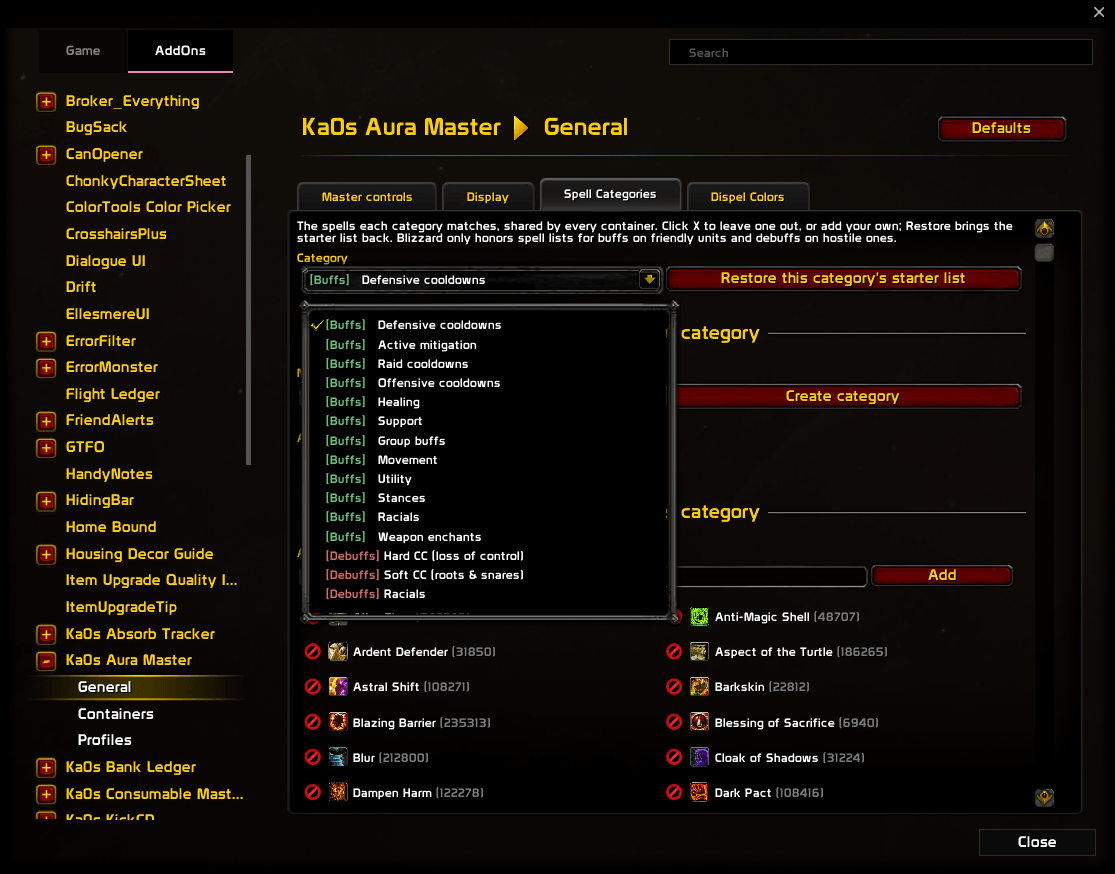
Spell categories
Usage
A fresh install gives you four containers to start from: your buffs as bars near the top right, your
debuffs as a row of icons above them, the debuffs you've put on your target as icons just below the
middle of the screen, and your offensive and defensive cooldowns as a line of text near the middle.
They start locked. /am unlock puts a handle on each one, and you drag the ones placed on the
screen to wherever you want them. /am lock puts the handles away again. Test mode (/am test, or the checkbox on General → Master controls) fills every
container with sample auras, so you can see what you're building without waiting for a real buff.
It switches itself off when combat starts.
Building your own display takes four steps, all on the Containers page. The Container dropdown at the top picks which container you're working on, and the list down the left side takes you through the rest.
- Create a container. Click New container, or type
/am new target debuffs iconsin chat. On General, pick whose auras it shows (yours, your target's, your focus's or your pet's), whether it shows buffs or debuffs, and whether it draws them as bars, icons or text. You can rename, duplicate or delete it there too, or copy another container's settings onto it. - Choose what it shows. Filters decides which auras make the cut: who cast them, timed or permanent, a maximum duration, and the spell categories. Each category is set to Show or Hide, and an aura in any category set to Show gets drawn. The Overrides tab holds a whitelist and a blacklist for single spells, and the whitelist always wins. General → Spell Categories is where you change which spells a category holds, or make your own. If a filter can't work where you've put it, an orange line at the top of the page says why.
- Place it. Layout decides where the container lives: anywhere on screen, following another container as that one grows, or attached to a frame such as your unit frame or an action bar. Pick a frame… closes the settings so you can just click the one you want. Growth direction, spacing, scale and the optional name label are on Layout too.
- Make it look right. The last entry in the list is the container's style, Bar, Icon or Text, with its textures, fonts, colors and borders. A Text container draws each aura as one line from a template such as
$spellname$[ x$stacks$][ - $remainingduration$], and the page lists every token it understands. General → Dispel Colors picks the color for each dispel type.
If you change something mid-fight, it waits until combat ends (or until the encounter, key or match
is over), and chat tells you which. /am disable hides every container at once and /am enable
brings them back.
Everything else is on the addon's page under Settings → AddOns, and /am on its own opens it.
/am help (or /auramaster help) lists every command.
How the containers work
Midnight stopped letting addons read aura details during combat, which is what every buff and debuff addon used to rely on. Patch 12.1 added the Aura Container API in its place: an addon creates an aura container, describes the auras it wants as filter rules, and hands over its own bars, icons and text, which the game fills in with the details the addon itself is not allowed to see.
So Aura Master never looks at an aura itself. That sounds roundabout, but on 12.1 it's the only way an addon can still show your auras in the middle of a boss fight. The steps go like this:
- You describe a container: whose auras, which kind, what to filter out and how it should look.
- Aura Master turns your filters into rules the game understands (one set for each category you set to Show, or a single set when none is) and hands them to the aura display the game added in 12.1.
- The game watches that unit's auras, in combat too, where addons aren't allowed to look, and keeps the ones that match.
- For each match the game makes a bar, an icon or a line of text, and Aura Master dresses it with your textures, fonts, colors and border. The game fills in the icon, the name, the time left and the stack count, and runs the countdown.
- When you change a setting, Aura Master rebuilds the rules and redresses what's already on screen as soon as the game allows it.
Two limits come out of this. The game has no rule for "auras without a duration", so for that filter Aura Master learns which of your and your pet's buffs carry a timer while you're out of combat, and leaves those out. A new timed buff can slip through once before it's learned. The game also only accepts spell-by-spell lists for buffs on friendly units and debuffs on hostile ones. A spell list on your own debuffs does nothing, and the Filters section warns you when that's the case.
FAQ
| Question | Answer |
|---|---|
| Do I need to install anything else? | No. Everything the addon needs comes inside it. |
| Why doesn't my change show up in the middle of a fight? | The game locks its aura display whenever aura details are hidden from addons: in combat, during boss encounters, in Mythic+ keys and in PvP matches. Aura Master holds the change and says so in chat. If the lock outlasts combat because an encounter, key or match is still going, it says so once more. The change goes in as soon as the lock lifts. |
| Can I track my party or raid? | Not yet. Player, target, focus and pet work today. Party members are planned, and there's a GitHub issue tracking them. |
| Can I put a container on my unit frame? | Yes. On Layout → Anchor use Pick a frame… and click it, or set Attach to to Named frame and type the frame's name. If the frame belongs to an addon that hasn't loaded yet, the container waits at its screen position and moves over once the frame exists. |
| Why does my spell list do nothing on my debuffs? | Blizzard only allows spell-by-spell filtering for buffs on friendly units and debuffs on hostile ones. Categories, dispel types and the other filters work on any unit. |
| A timed buff showed up in my "without a duration" container. Why? | That filter learns which buffs have a timer while you're out of combat. A buff you've never seen out of combat can slip through the first time; after that it's known. /am forgettimed clears everything it learned. |
| How do I cancel a buff? | Right-click it in a container that shows your own buffs or weapon enchants. Untick Right-click to cancel on Layout → Mouse if you'd rather it didn't. |
| Can I hide Blizzard's buff frame? | Yes, on General → Display. Your weapon enchants live in that same Blizzard frame and go with it. If you still want to see them, make sure a player buff container's Weapon enchants row on Filters → Categories is set to Show (the default). |
| Can I make my own category? | Yes. General → Spell Categories → Make a new category. Name it, pick buffs or debuffs, then add spells to it. It shows up on every container's Filters → Categories grid marked (yours), where you set it to Show or Hide like any other. Renaming it keeps your spells and each container's choice. Deleting it throws the spell list away, so it asks first. You can't switch a category between buffs and debuffs after you make it; make another one and delete the old one instead. |
| Can different characters have different setups? | Yes, through the Profiles page. A profile holds every container, so switching profiles swaps the whole set. |
| Why won't the settings open in combat? | The game protects its settings window during combat, so /am config prints a gray line instead of opening it. Try again once combat ends. |
Troubleshooting
| Symptom | Fix |
|---|---|
| Nothing shows at all | On General → Master controls, check that Enable Aura Master is ticked (/am enable ticks it) and that General visibility isn't set to Never, or to a combat state you're not in. Then check the container's own Enabled box on Containers. |
| I only see the sample auras | Test mode is on. Type /am test off, or untick Test mode under General → Master controls. |
| A container stays empty and its Filters section says "These filters can never match anything." | Two of your choices rule each other out, such as a spell category set to Show with every spell unticked. Loosen one of them, for example by setting the category to Hide. |
| An orange line says my spell lists only apply to friendly or hostile units | That's the game's rule, not a fault. The spell lists on that container only work while the unit is the kind the line names. |
| I can't drag a container | You can only drag containers attached to the screen, and not during combat. An attached container follows its target. Move it with the offsets on Layout → Anchor, or set Attach to back to Screen. |
| A container attached to a frame is sitting somewhere else | The frame wasn't found, so the container fell back to its screen position. Check the name in Frame name (/fstack shows frame names), or pick the frame again. |
| Blizzard's buff frame is still showing after I hid it | Blizzard's frames can't be moved during combat. The change goes through as soon as combat ends. |
| My weapon enchants don't show | Enchants appear in a player buff container whose Weapon enchants row on Filters → Categories is set to Show (the default). /am new enchants makes a container that shows nothing else. You choose which weapon slots count under General → Spell Categories → Weapon enchants. Enchants that never expire are skipped while Hide enchants without a duration is on. |
| Chat says the client has no aura container API | Aura Master needs Retail patch 12.1 or later. |
| A container vanished after I clicked the X on its handle | The X turns the container off. Tick its Enabled box on the Containers page to bring it back. Its settings were kept. |
| Something looks wrong and I want to report it | Follow Reporting a bug below. |
Reporting a bug
- Type
/am debug onand reproduce the bug. - Type
/am diagnostics. - If the debug window isn't open, open it with
/am debug. Press Copy, copy the entire output, and include it with your bug report.
The diagnostics report goes in after the debug trace in the same window, so one copy gets you both.
Issues and feature requests
Bugs, ideas and planned work all go in the GitHub issue tracker: https://github.com/tusharsaxena/AuraMaster/issues. Please file reports there rather than in comments, so nothing gets lost.
Version History
| Version | Date | Highlights |
|---|---|---|
| 1.0.1 | 2026-09-27 | - Fixed bar names and timers that stayed blank until a /reload when a container used an addon font such as Ka0s Prototype. Aura Master now loads every font your containers use at login and again after each loading screen |
| 1.0.0 | 2026-09-27 | - First release: build your own buff and debuff displays for yourself, your target, your focus and your pet, drawn as bars, icons or lines of text - Choose what each one shows with spell categories (the built-in ones or your own), who cast it, how long it lasts, and a whitelist and blacklist - Put a container anywhere on screen, or attach it to another container or to any frame; unlocked, each one shows a handle and an optional name label - Test mode fills every container with sample auras, so you can style it before a real buff turns up - Weapon enchants, dispel-type colors, and /am diagnostics for bug reports |
Credits
The trick that lets a permanent buff draw as a full bar, and the idea of learning which buffs carry a timer so the rest can be shown on their own, both come from TinyBuffBars by mixMugz, released under the MIT license.
The debug console uses JetBrains Mono, licensed under the SIL Open Font License 1.1, and the ? and X on each container's handle are drawn from Open Iconic (MIT). Both ship inside the bundled LibKa0s payload, with their license text beside them.
The Ka0s Aura Master Team