Ka0s Absorb Tracker (Retail)
- By
Display your total absorb shield value in a clean, customizable bar interface.
Description
Ka0s Absorb Tracker





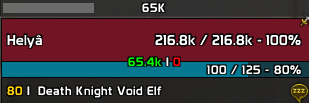
Ka0s Absorb Tracker shows your absorb shields as a movable bar. It adds every shield on the unit into one number, so a glance tells you how much damage you can eat before your health starts moving.
There are three bars: Player, Target and Focus. Target and Focus ship switched off. You can put each bar anywhere on screen and restyle it down to the texture, the border and the font, or link it to the Player bar and let it follow along. The fill, background, border and absorb number can each take a class color if you prefer, and the class is always that bar's own unit's.
Screenshots
Absorb Tracker in Action
Usage
The first time you log in, the Player bar shows up in the middle of the screen, unlocked. An
unlocked bar draws a partial fill and a small handle strip with the unit's name, so there's
something to grab even with no shield up. That is the whole preview. There's no separate test
mode. /at lock pins the bars and /at unlock frees them again. Entering combat locks them for
you, and you can't unlock in the middle of a fight.
Setting up takes four steps.
- Place the Player bar. Drag the bar or its handle strip where you want it, then type
/at lock. If a bar ever ends up somewhere you can't reach,/at resetpositionputs every bar back in the middle. The small X on the strip turns that bar off. Tick its box on General → Bars, or type/at toggle player, to bring it back. - Turn on Target and Focus. Both ship switched off. Tick Enable Target Bar or Enable Focus Bar on General → Bars. A Target or Focus bar only draws while you have that unit, but it shows while unlocked even with nothing targeted, so you can drag it into place. Each bar keeps its own position.
- Style the bars. The Unit picker at the top of the Appearance page picks the bar you're editing, and the Size, Bar, Background, Border and Text tabs sit under it. The bar fill, background, border and text can each take a class color, and it's always the class of that bar's own unit, so the Target bar wears your target's. Target and Focus start with Use same styling as Player ticked and follow the Player bar live. Untick it to style one yourself, or press Copy styling from Player for a one-time copy.
- Decide when the bars show. General → Master controls covers all three at once. General visibility picks always, only in combat, only out of combat or never, and master scale and master alpha sit next to it. Master alpha multiplies with each bar's own Bar opacity, so 50% under a master alpha of 50% draws at 25%.
To see how a real number looks, /at debug hold 50000 puts a 50K absorb on every visible bar for
five seconds (add a second number for anywhere from half a second to a minute). The minimap button
opens the settings on a left-click, and a right-click gives you a small menu to turn the addon on or
off (the same as /at enable and /at disable) and lock or unlock the bars. You can hide it with
Minimap button on General → Master controls.
Everything else is on the addon's page under Settings → AddOns, and /at (or /absorbtracker) on
its own opens it. /at help prints the full command list.
How the bar works
The number comes from the game's UnitGetTotalAbsorbs, which adds up every absorb shield on a
unit. In combat the game can hand that number back as a secret: an addon can pass it to a bar or
format it for display, but it can't read it or compare it to anything. So Absorb Tracker never
does math on your shield. It gives the game's number straight to the bar and lets the game draw it.
- A tracked unit gains or loses a shield (Power Word: Shield, Ice Barrier, a trinket proc, whatever else is up), and the game reports the new total.
- The bar fills to that total, measured against the unit's maximum health, with the number written
across it in short form (
1.2M). - Damage and expiry drain it toward 0.
- With nothing up, the bar reads 0 and sits empty.
At any moment, then, the bar shows how much a unit can take before its health starts dropping.
FAQ
| Question | Answer |
|---|---|
| Do I need to install anything else? | No. Everything the addon needs is bundled, so it works on its own. The bundled Ka0s library also registers a shared set of bar textures and fonts, and those show up in the dropdowns without any extra addon. If you want more choices than that, install a media pack (such as one that includes SharedMedia). |
| Does this replace the shield display on my unit frames? | No. These are separate movable bars. The addon leaves Blizzard's shield overlay on the player, target, and focus frames alone. Hide it in Edit Mode if you don't want to see both. |
| How do I turn on the Target or Focus bar? | General page → Bars tab → tick Enable Target Bar or Enable Focus Bar. It only appears while you actually have that unit. |
| Can the Target/Focus bar match my Player bar automatically? | Yes, tick Use same styling as Player. It's a live link, so anything you change on the Player bar carries over at once. Uncheck it when you want to style that bar on its own, or use Copy styling from Player for a one-time copy you can then take in your own direction. |
| How do I move a bar? | Type /at unlock, drag the bar you want where you want it, then /at lock. Each bar remembers its own position, and /at resetposition snaps all of them back to their default spots. Unlocking also brings up the Target and Focus bars with nothing targeted, so you can place those too. |
| Can I show the bars only while I'm fighting? | Yes. Set General visibility to Only in combat on General → Master controls. Every enabled bar then hides out of combat and comes back the moment you enter combat. |
| Can I have different setups? | Yes. Use the Profiles page in the settings panel to save and switch between setups, or type /at profile Name to switch to one you have saved (/at profile lists them). New characters start on the shared Default profile, so your changes carry over until you choose a separate setup. |
| Why is my bar empty? | The fill only shows a value when that unit has an absorb up. With no shield it sits empty, but the background and border stay where you placed them. |
| Why won't the settings panel open in combat? | WoW doesn't let addons change settings screens while you're fighting, so /at config answers with a gray "cannot open settings during combat" line instead. Run it again once you're out of combat and it opens normally. |
| What is the "Update throttle" setting for? | The bar redraws the moment a shield changes, not on a timer. The throttle only caps how fast it can repaint during a burst of rapid changes. The default suits almost everyone, so you'll rarely need to touch it. |
| How do I see debug logs? | /at debug toggles the on-screen debug window, and /at debug on / off starts and stops logging there instead of in chat. The Debug console checkbox on the General page toggles the window too. Logging resets to off on every reload. To send logs with a bug report, follow Reporting a bug. |
| An addon CPU profiler shows Absorb Tracker using a lot of CPU. Is that real? | Almost certainly not. Its actual cost is tiny (~0.18% of one core). WoW addon profilers blame all of a shared library's work on whichever addon loaded it first. AbsorbTracker sorts near the top alphabetically, so it "owns" the shared Ace event frame and gets billed for every Ace addon's event traffic. Disabling Absorb Tracker just moves that CPU to the next addon in line. Read the full investigation. |
Troubleshooting
| Symptom | Fix |
|---|---|
| The Player bar never shows up | Check that Enable Player Bar is ticked on the General page (or run /at toggle player) and that the addon is enabled on the character-select screen. If General visibility is Only in combat, you also have to be in combat. The background and border show even with no shield, so if you see nothing, the bar is hidden rather than empty. |
| The Target/Focus bar never shows up | Confirm Enable Target Bar / Enable Focus Bar is ticked on the General page. Even when enabled, it only appears while you actually have that target or focus set. No target or focus means no bar, by design. |
| The bar(s) disappear when I leave combat | General visibility is set to Only in combat. Set it back to Always on General → Master controls. |
/at debug hold 50000 does nothing |
It needs at least one enabled bar to paint on. If every bar is off, run /at toggle (or tick an Enable … Bar box) and try again. It also needs a number. To see the bars without one, just /at unlock. The old test command is gone, and /at debug hold does the same job. |
| A bar won't stay where I put it | Lock it once it's positioned: /at lock, or tick Lock frame on General → Master controls. Unlock again whenever you want to drag it. |
| My class color isn't showing | The bar has to be visible and have an active shield for the color to appear. Check that the matching Use class color toggle is on. It follows the bar's own unit, so a Target bar takes your target's class, and falls back to your picked color when there is no target to read one from. |
| Custom textures or fonts aren't in the dropdowns | Install a media pack addon (one that includes SharedMedia). Without one you still get WoW's built-in options plus the shared Ka0s textures and fonts the bundled library registers, but nothing beyond those. JetBrains Mono, the face the debug console prints in, is one of them. |
| A bar's position resets after I log out | WoW only saves your settings on a clean logout, so a crash or a force-quit can drop the last position. Log out through the menu and it will stick. |
| I want detailed logs | /at debug toggles a log window, and /at debug on starts logging there instead of in chat. You can also open it from the Debug console checkbox on the General page. Logging resets to off every time you reload. |
| Something looks wrong and I want to report it | Follow Reporting a bug below. |
Reporting a bug
- Type
/at debug onand reproduce the bug. - Type
/at diagnostics. - If the debug window isn't open, open it with
/at debug. Press Copy, copy the entire output, and include it with your bug report.
The report is added after the debug trace in the same window, so one copy carries both.
Issues and feature requests
Bugs, feature requests, and planned work are all tracked on GitHub: https://github.com/tusharsaxena/absorbtracker/issues. Please file new reports there rather than in comments, so nothing gets lost.
Version History
| Version | Date | Highlights |
|---|---|---|
| 1.12.0 | 2026-10-09 | - /at profile followed by a profile's name switches to it, the way it does in every other Ka0s addon, and a bare /at profile lists your profiles with the current one marked. /at profile use no longer turns a mistyped name into a new profile- Tooltips on an unlocked bar's handle, help mark and X open beside the bar, and flip to its left near the right edge of the screen - Unlocked bars lock again if you enable the addon or reload in the middle of a fight - The Appearance page tabs and the hint shown on a mirrored unit now look the same as in the other Ka0s addons |
| 1.11.0 | 2026-09-27 | - Added a minimap button. Left-click opens settings; right-click turns the addon on or off and locks or unlocks the bars. Hide it from General → Master controls. /at enable and /at disable do the same from chat- An unlocked bar shows a handle with the unit's name, a help mark and an X that turns that bar off. Unlocking is the preview now: entering combat locks the bars again, and you can't unlock mid-fight - /at test is now /at debug hold, with a duration from 0.5 to 60 seconds. Update any macros that use /at test- Added /at diagnostics, which writes a report to include with a bug report- Fixed: bars no longer flash on reload, a bare /at opens settings, and /at profile new refuses a name that already exists |
| 1.10.0 | 2026-09-10 | - The settings panel is now three tabbed pages with a Master controls group, replacing the single scrolling wall - Target and Focus bars take composed appearance groups and unit-scoped class coloring - Fixed the unlocked placeholder fill vanishing when a bar repainted - Updated for game patch 12.1.0 |
| 1.9.0 | 2026-07-20 | - Added Target and Focus absorb bars, each switched on independently from the General page — the old single Show Bar master toggle is gone, and a bar you turn off stops receiving events entirely - A Target/Focus bar can mirror the Player bar's look live, or take a one-time Copy styling from Player snapshot and then be customized on its own - /at set and /at get paths are now fully qualified — /at set units.player.barWidth 250 replaces /at set barWidth 250; update any macros- Added a Show only in combat option that hides the bar out of combat - The bar now redraws the instant a shield changes instead of on a fixed timer, for smoother tracking - Added an on-screen debug window with a General-page Debug console toggle — /at debug opens it, /at debug on/off turns logging on or off (no more chat spam), each line tagged by what triggered it |
| 1.8.0 | 2026-05-03 | - Redesigned the settings panel with breadcrumb navigation and an About page - Added a hold-time to /at test (/at test value seconds) and reshaped the Bar and Border pages |
| 1.7.0 | 2026-04-24 | - Rebranded to Ka0s Absorb Tracker with new artwork - Split the settings into separate pages - Chat messages now use a cyan [AT] tag |
| 1.6.0 | 2026-02-14 | - Added /at commands for the class-color options |
| 1.5.0 | 2026-02-14 | - Added class colors for the bar fill, background, and border |
| 1.4.0 | 2026-02-05 | - Long dropdowns now scroll and jump to the current selection |
| 1.3.0 | 2026-01-31 | - Bundled everything the addon needs, so nothing has to be installed separately - Added screenshots for the public release |
| 1.1.0 | 2026-01-31 | - Dependencies install automatically |
| 1.0.0 | 2026-01-31 | - Initial release: movable absorb bar with configurable size, textures, colors, border, and font, plus saved setups |
Credits
The debug console uses JetBrains Mono, licensed under the SIL Open Font License 1.1, and the ? and X on the bar's drag handle are drawn from Open Iconic (MIT). Both ship inside the bundled LibKa0s payload, with their license text beside them.
Ka0s Absorb Tracker (Retail) Team