Huntwell Forever
- By
A Hunter toolkit for WoW: Forever: an ammo counter that keeps your quiver stocked, every spell one click away, pet and Aspect reminders, and a one-key healing potion.
huntwell_image1.JPG
huntwell_image2.JPG
huntwell_menu.JPG
Description
Huntwell
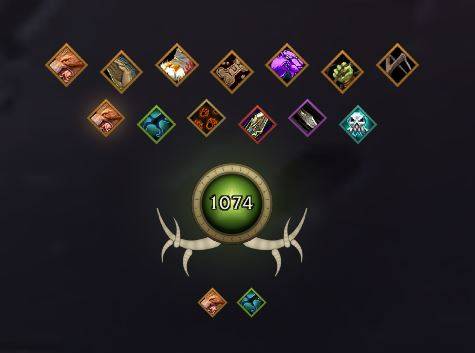
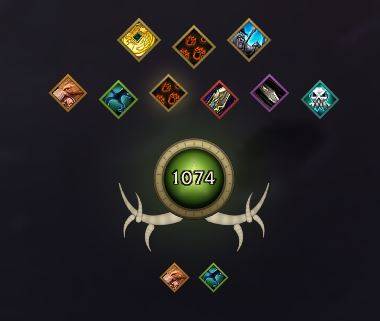
A Hunter toolkit for World of Warcraft: Forever. One antlered medallion on your screen holds your ammo count, your spells, your pet and your potions, and quietly handles the chores hunters forget.
From the maker of Emberwell.
What it does
Your ammo, always counted
- The medallion shows how much ammo you can fire: every arrow if you carry a bow or crossbow, every bullet if you carry a gun. New ammo the game adds is counted automatically.
- The count turns amber when you're running low and pulses red at zero.
- One warning when you drop below a number you choose, and one when you run out. It speaks once, not on every shot.
- Hover the medallion for a breakdown by ammo type, plus a warning if your ammo slot is empty or holds ammo your weapon can't fire.
Your quiver or ammo pouch, always full
- Backup ammo in your other bags moves into your quiver or ammo pouch whenever there's room, topping up part-used stacks first.
- Arrows go to quivers and bullets to ammo pouches, by the game's own rules.
- It never moves anything in combat, while you're dragging an item, or with a vendor or the bank open.
Every spell, one click away
Left-click the medallion for your spells, sorted into rows:
- Pet: Call, Revive, Mend, Feed, Dismiss, Tame Beast, Beast Training
- Aspects, Tracking, Attacks, Stings & Marks, Traps
- Utility: Feign Death, Flare, your racial and the like
Only spells you actually know are shown. Anything you train later joins its row by itself, and every button casts your highest rank.
Reminders that fix the problem
Out of combat, one-click buttons appear under the medallion when:
- Your pet isn't out (Call it) or is dead (Revive it)
- No Aspect is active (casts the one you last used)
Healing on one key
Middle-click the medallion, or bind a key under Key Bindings → Huntwell, to use your best healing potion, or a Healthstone if you have no potion.
Make it yours
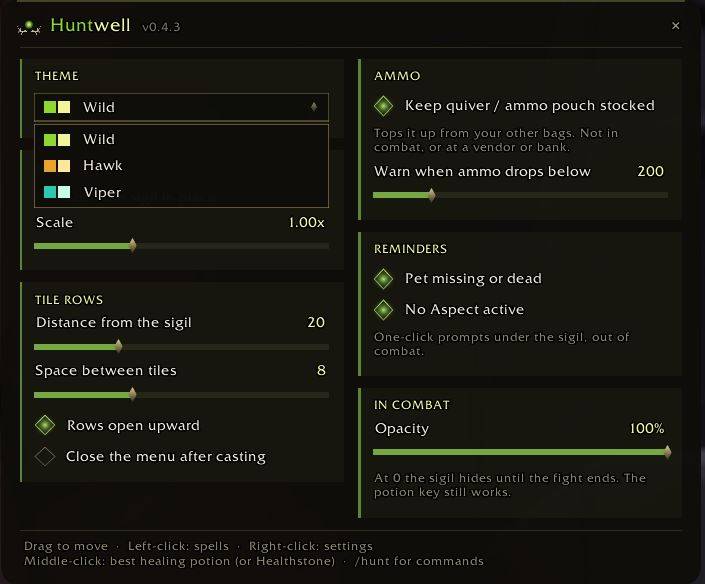
- Three looks named for Aspects: Wild (fel green), Hawk (amber) and Viper (teal)
- Drag it anywhere, scale it, lock it
- Fade or hide it in combat
- Every setting on one page: right-click the medallion
Commands
| Command | What it does |
|---|---|
/hunt |
List all commands |
/hunt config |
Open settings |
/hunt bags |
Your bags, quiver/pouch, ammo slot, and what stocking will move next |
/hunt stock |
Turn quiver/pouch stocking on or off |
/hunt spells |
What the menu found in your spellbook |
/hunt pet |
What the game reports about your pet |
/hunt diag |
A report to paste when something isn't working |
/hw works as a short form of /hunt.
Good to know
- Built for WoW: Forever. Forever renames some spells (Call Pet becomes "Call your pet's name"), changes others, and limits what addons can see. Huntwell checks everything against your live spellbook and bags instead of assuming.
- After updating, fully quit and restart the game. Forever doesn't pick up new addon code on a /reload.
- Not possible on Forever: sting and trap timers, "trap broke" alerts and swing timers. The game doesn't share the combat data they need with addons.
- Combat-safe. Huntwell never moves or rebuilds its buttons mid-fight, which is what usually causes "blocked by an AddOn" errors.
Beta
Huntwell is in beta. If something doesn't work, run /hunt diag, or log out and attach your
WTF/Account/<account>/SavedVariables/Huntwell.lua file to a comment. It records what the game reported, which is how most fixes so far were found.
Huntwell Forever Team