Range Check
- By
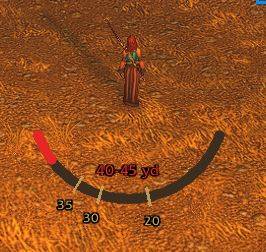
See at a glance which spells can't reach your target. Out-of-range action buttons turn red.
RangeCheck2.JPG
RangeCheck.JPG
RangeCheckMenu1.JPG
Description
RangeCheck
Stop casting into thin air. RangeCheck marks every action button whose spell can't reach your current target, right on the bar, and adds a range indicator that fills as you close in, in the style you prefer. Each spell uses its own range, so your 30-yard nuke and your melee strike light up independently.
Button styles
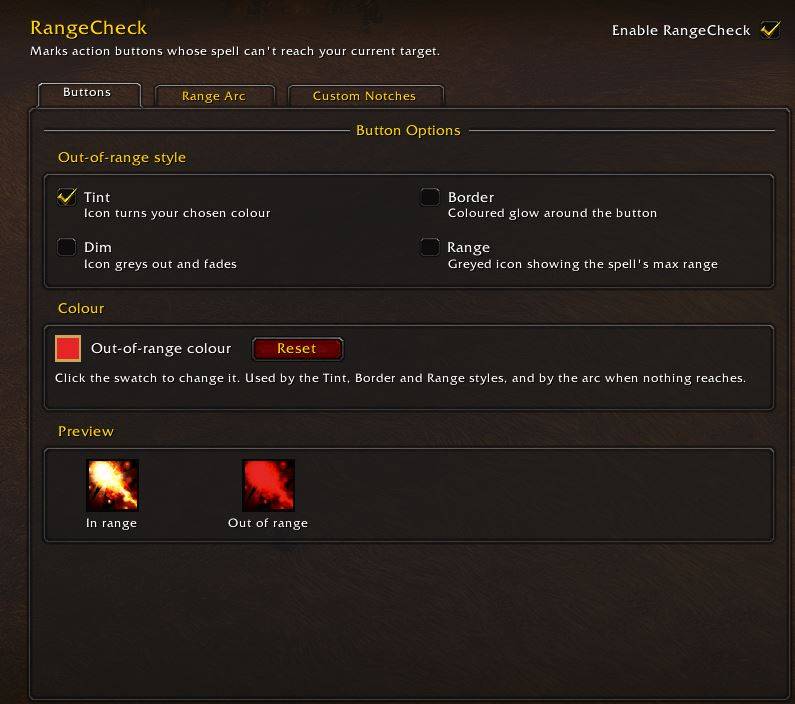
- Tint (default): the icon turns your chosen colour
- Border: a coloured glow around the button, icon left untouched
- Dim: the icon greys out and fades
- Range: the icon greys out and shows the spell's max range in yards, so you know how far to close
Range indicator
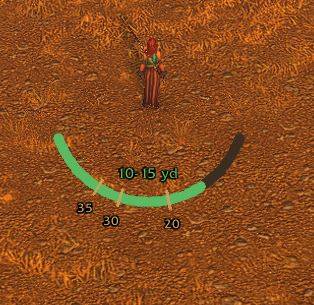
An on-screen indicator fills as you close in on your target and shows the distance in bands of a few yards (e.g. 25-28 yd). Pick the style that suits you:
- Arc: a slim curved bar under your character
- Gauge: a vertical bar with yard marks beside it
- Ring: a reticle ring that closes as you approach
- Nameplate: chevrons that light up under your target's nameplate
In every style it's red when nothing on your bars can reach, gold when some spells can, and green when everything can. Gold notches mark the range of each spell on your action bars. Move it, resize it or turn it off from the options panel.
Custom notches
Mark the distances that matter to you, like 20 yd for Fire Blast, 35 yd for Fireball, or 8 yd to find a Hunter's dead zone in PvP.
- Add a distance and an optional label; it appears as a cream notch on the range indicator
- Switch each notch on or off, so you can keep situational ones (like PvP) ready without cluttering the indicator
- Saved per character, up to 8 notches
Options
Everything is set up in Esc > Options > AddOns > RangeCheck, laid out in three tabs (Buttons, Range Indicator, Custom Notches). No commands to learn.
- Live preview of your chosen button style
- Pick your own out-of-range colour, handy if red is hard for you to spot
- Turn RangeCheck on or off without disabling the addon
Prefer typing? /rangecheck opens the options, /rangecheck tint (or border, dim, range) switches the button style, and /rangecheck arc (or gauge, ring, nameplate) switches the range indicator.
About distances
WoW doesn't let addons read the exact distance to an enemy, so no addon can show "24 yards" precisely. RangeCheck uses the bundled LibRangeCheck-3.0 library (the same one WeakAuras and ElvUI use) to narrow it down to a band of a few yards. Bands get wider in combat against friendly targets, where the game restricts some range checks.
Details
- Works on the default bars, Bartender4, Dominos and ElvUI, including macros that cast a spell
- Keeps the normal "not enough mana" and "unusable" colours when a spell is back in range
- No setup needed. Install it and it works
Works with your bars
RangeCheck works on Blizzard's default bars and on Bartender4, Dominos and ElvUI. Buttons added later (new bars, bar paging) are picked up automatically.
Tip: Bartender and ElvUI have their own out-of-range colouring. If you use RangeCheck's Border, Dim or Range style, set their out-of-range indicator to "None" so the two don't stack.
Credits
Distance estimates by LibRangeCheck-3.0 (MIT licence), bundled.
Bugs or suggestions? Leave a comment.
Range Check Team