HunterClickTrack
- By
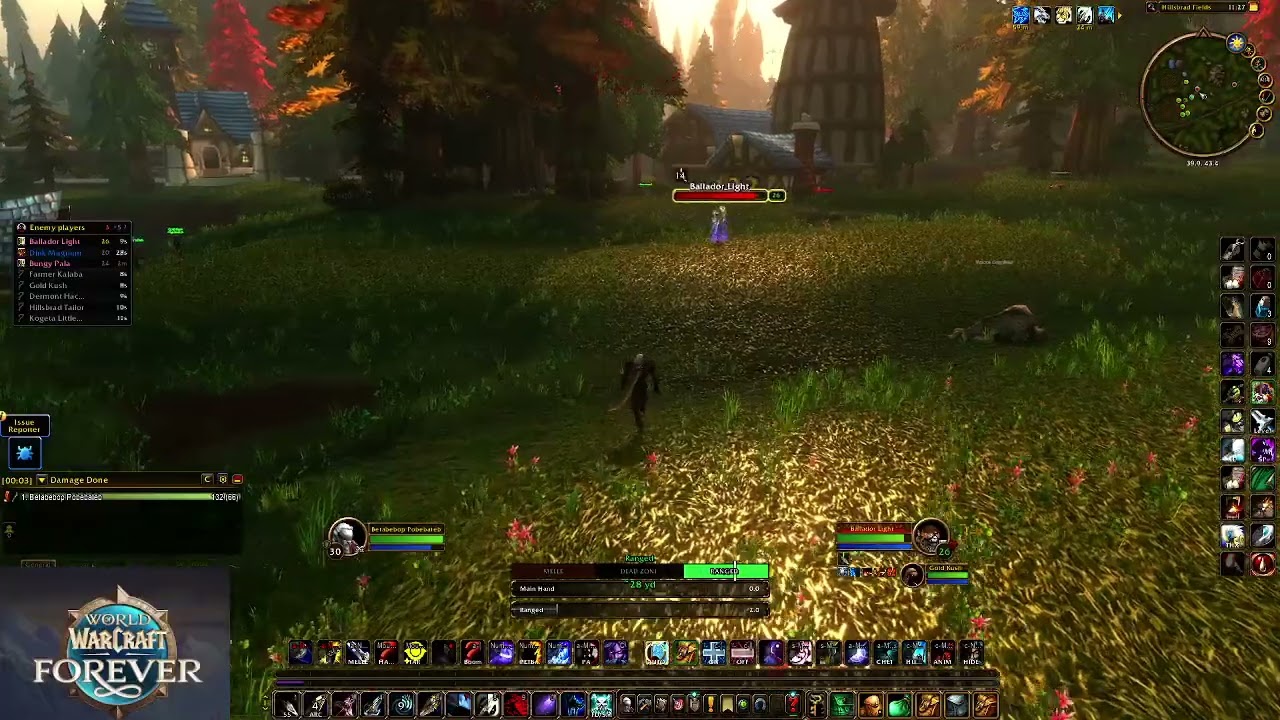
Click minimap tracking dots to target them, plus an enemy player list with kill on sight alerts. WoW Forever, PvP and hunting.

HCT1.jpg
HCT2.jpg
Description
HunterClickTrack
See it on the minimap? Click it to target it.
HunterClickTrack lets you click a tracking dot on your minimap to target that unit. It works with Track Beasts, Track Humanoids, Track Hidden or any other tracking. Spot a rare, a player or your next tame on the minimap and target it in one click, without hunting for it on screen.
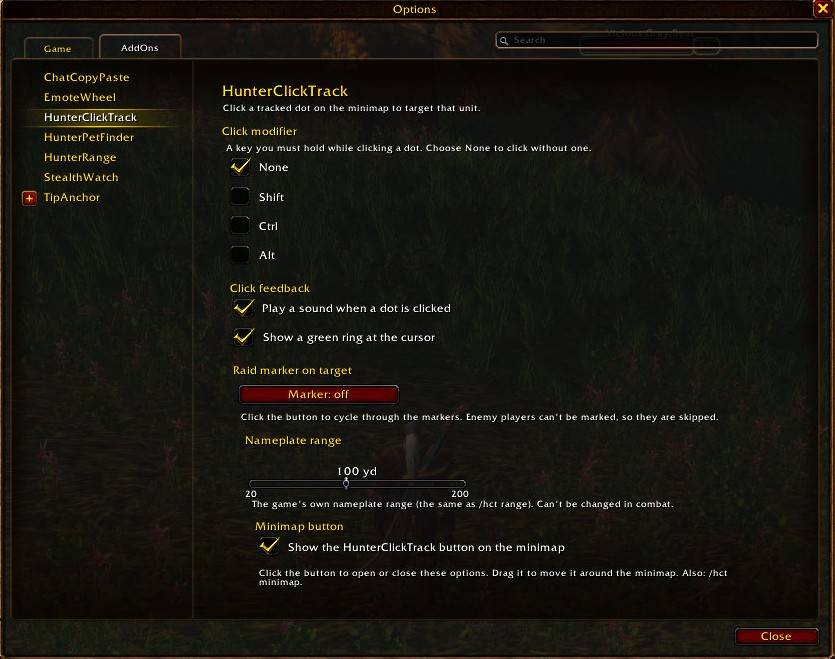
Open the options with /hct options or the minimap button.
Features
Click to target
- Left-click a tracked dot on the minimap and you target that unit.
- Overlapping dots? Click again to cycle through every unit under your mouse.
- Hover a dot as usual to see its tooltip. HunterClickTrack only steps in when you click.
- Optional modifier key: require Shift, Ctrl or Alt while clicking, so ordinary minimap clicks stay ordinary.
- Key binding: bind a key with
/hct bind <key>, then press it while hovering a dot to target that unit.
Raid marker
- Automatically places a raid marker (skull by default) on whatever you target this way. Pick any marker, or turn it off.
- Enemy players can't be marked, so they're skipped automatically, and the "can't mark" error message is hidden.
Click feedback
- A click sound and a green ring at your cursor confirm each click. Turn either one off.
Longer reach
- A nameplate range slider (20–200 yards, also
/hct range <yards>) raises the game's own nameplate distance, which can let you target dots that are farther away.
Enemy player list
- Hover dots on the minimap and HunterClickTrack keeps a small list of the enemy players you've come across.
- A name is confirmed as an enemy player when you hover a single player dot (its tooltip shows the player), or see their nameplate, mouse over them or target them. Confirmed enemies show at the top in their class colour, with how long ago you saw them.
- Remembers enemies between sessions: once someone is confirmed, the next time you hover their dot (even after a restart) they go straight on the list. Enemies you haven't seen for 30 days are forgotten.
- Unconfirmed names show below in grey with a "?", but only outside cities, inns and friendly zones. Names the game has shown to be NPCs or friendly players drop off and are remembered, so they don't come back. Right-click a grey name to hide it for good.
- Works with WoW Forever's last names ("First Last").
- Left-click a name to target it, right-click to remove it. Names drop off after 2 minutes unless you hover them again.
- Works in battlegrounds: the game hides enemy classes there, so HunterClickTrack reads them from the battleground scoreboard instead, and names keep their class colours. Enemies whose class isn't known yet show crossed swords (the skull is only for kill on sight).
- Shows each enemy's level (coloured by difficulty, "??" if they're far above you) once the game has shown it to you.
- Kill on sight: Shift + right-click an enemy (or
/hct kos <name>) to mark them. Marked enemies stay pinned at the top with a red skull, and you get a raid-warning alert and sound whenever they're spotted. Saved between sessions. - Optional sound when a new enemy player is added. Pick separate sounds for new enemies and kill-on-sight alerts from 21 built-in game sounds. Lock the list in place and/or hide it when it's empty (two separate options).
- During combat the list keeps working but only updates once combat ends (the game doesn't allow addons to change click-to-target buttons mid-fight).
- Tip: turn on enemy nameplates and use
/hct range 100so enemies nearby are confirmed automatically.
Update notice
- HunterClickTrack quietly compares versions with other users in your party, raid or guild. If someone has a newer version, you get a single chat note telling you an update is available.
Minimap button
- Click: open or close the options
- Drag: move the button around the minimap
- Hide it from the options panel, or with
/hct minimap
Commands
| Command | What it does |
|---|---|
/hct |
Show the list of commands and your current settings |
/hct options |
Open the options panel |
/hct mod none|shift|ctrl|alt |
Require a key held while clicking |
/hct mark skull|cross|square|moon|triangle|diamond|circle|star|off |
Choose the marker placed on your target |
/hct sound on|off |
Click sound |
/hct highlight on|off |
Green ring on click |
/hct bind <key> |
Bind a key that targets the dot under your mouse |
/hct range <yards> |
Set the nameplate range (try 100) |
/hct minimap |
Show or hide the minimap button |
/hct list |
Turn the enemy player list on or off |
/hct list clear |
Empty the enemy player list |
/hct list forget |
Forget saved enemy players and hidden names |
/hct kos <name> |
Add or remove a kill-on-sight enemy |
/hct kos |
Show your kill-on-sight list (/hct kos clear empties it) |
Tips
- Turn on a tracking ability first (e.g. Track Beasts), then hover the minimap to see the dots.
- If a far-away dot won't target, raise the range:
/hct range 100. - Click-targeting is switched off during combat, since the game doesn't allow addons to change how it works mid-fight. Set things up before you pull.
Notes
- Built for WoW Forever (
## Interface: 16001, 120000).
More addons by Beleriand
More of my addons for WoW Forever:
- HunterRange: a clear melee / dead zone / ranged bar with yards
- HunterPetFinder: which beast to tame for each pet ability, with spawn maps and tracking
- HunterPetHappiness: pet happiness bar, feed timer, warnings and pet buffs/debuffs
- HunterStealthWatch: alerts when enemy players appear, rogues vanish or druids prowl
Credits
- Author: Beleriand
Found a bug? Leave a comment with what happened. /hct debug shows extra detail in chat that helps track problems down.
HunterClickTrack Team