Hoarder Vendor
- By
Hoarder Vendor — sell junk and repair the moment you open a vendor. Junk List per account and character make it simple.
Hoarder Vendor 1.png
Hoarder Vendor 2.png
Hoarder Vendor 3.png
Description
Hoarder Vendor — sell junk and repair the moment you open a vendor
Requires Hoarder. Hoarder Vendor is a module for Hoarder: it opens from the Hoarder window and uses the Hoarder look and themes.
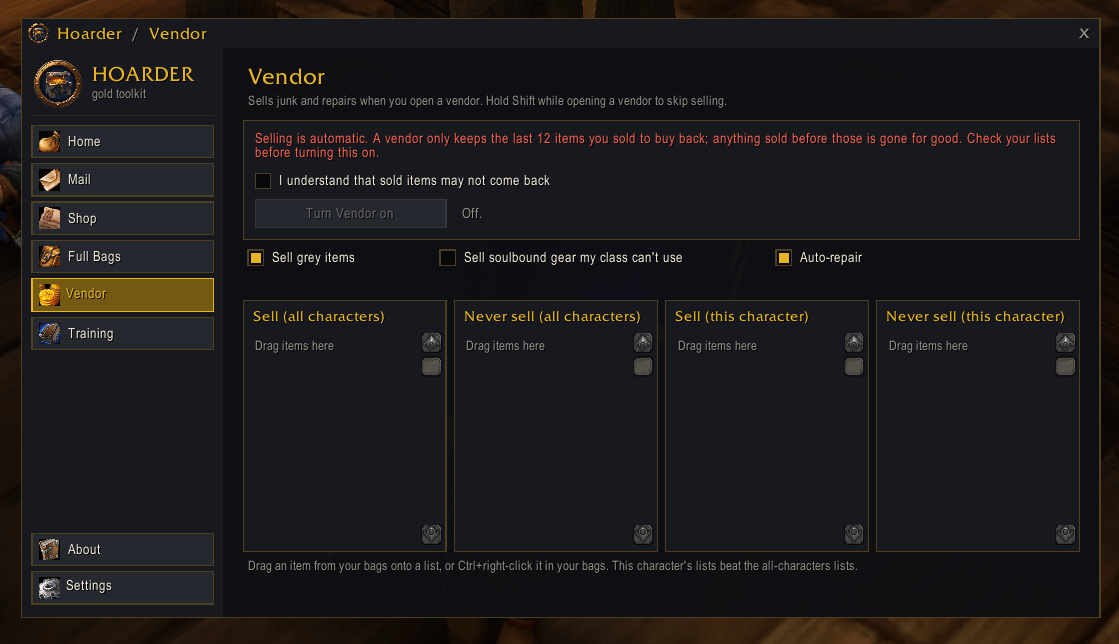
Open a vendor and Hoarder Vendor sells your junk and repairs your gear. You decide what counts as junk, for all your characters or for one.
What gets sold
- Grey items, unless you turn that off.
- Your Sell lists: anything you add, such as old food, cheap reagents or vendor-only drops.
- Optional: soulbound gear your class can never use, such as plate on a mage or a bow on a priest. It's off by default. Gear your class gets later (plate or mail at level 40) counts as usable.
Two kinds of lists, two levels
- Sell and Never sell, for all characters or this character.
- This character's lists beat the all-characters lists. Your hunter can keep the arrows every other character sells, and your mage can sell the cloth every other character keeps.
- Add items by dragging them from your bags onto a list on the Vendor tab, or Ctrl+right-click an item in your bags and pick from a menu.
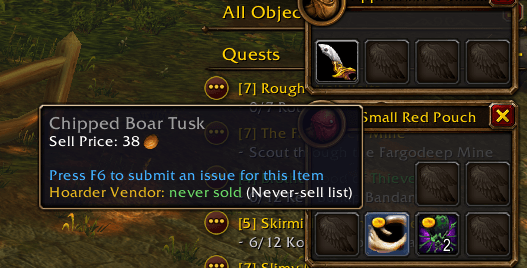
- Item tooltips tell you what will happen, for example "Hoarder Vendor: never sold (your Never-sell list)".
Built to be safe
- Off until you turn it on. A warning explains that a vendor only keeps the last 12 items you sold, and you must tick "I understand" before it can be switched on.
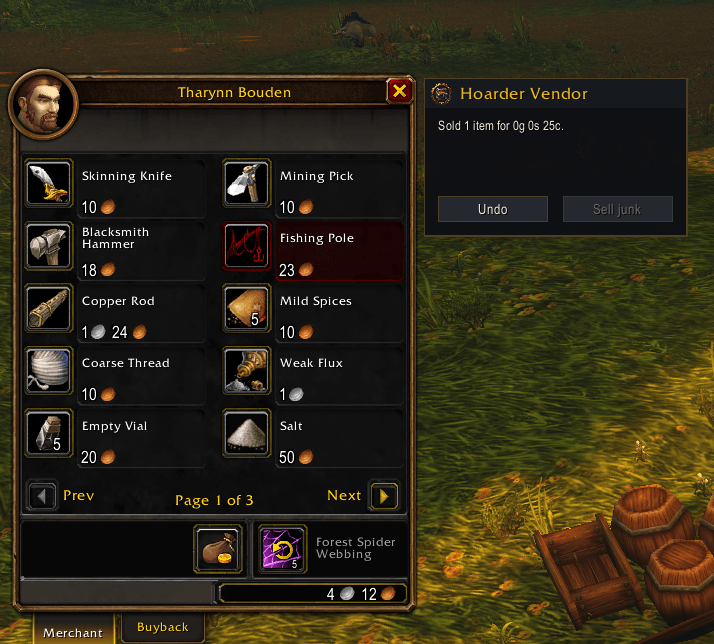
- Undo: a small panel beside the vendor shows what was sold and buys it back while it's still on the vendor's buyback tab.
- Hold Shift while opening a vendor to skip selling for that visit. The panel's Sell junk button sells anyway.
- Never sold, whatever the lists say:
- items with no vendor price;
- quest items, Hearthstone and profession tools;
- legendary items;
- your equipped gear;
- anything on your Hoarder Shop list.
- Enchanters keep their gear: on a character with Enchanting, soulbound green, blue and purple armor and weapons are always kept to disenchant. Grey gear still sells.
Repair
- Auto-repair whenever the vendor can repair and you have the gold. It says what it cost, or what it would cost if you're short.
Commands
/hvendoropens the Vendor tab.
Installation
- Install Hoarder first (required), then Hoarder Vendor.
- Open Hoarder from its minimap button, go to Vendor, read the warning, tick "I understand" and turn it on.
Good to know
- Supported clients: Classic (Interface 11507, 11508 and 16001).
- Privacy: everything stays in your own SavedVariables; nothing is uploaded.
- Free, with no paid features.
- Bugs or ideas? Leave a comment on this page.
Hoarder Vendor Team