Hoarder Full Bags
- By
“Loot with full bags: pick one of your 3 cheapest items to destroy, or keep everything.”
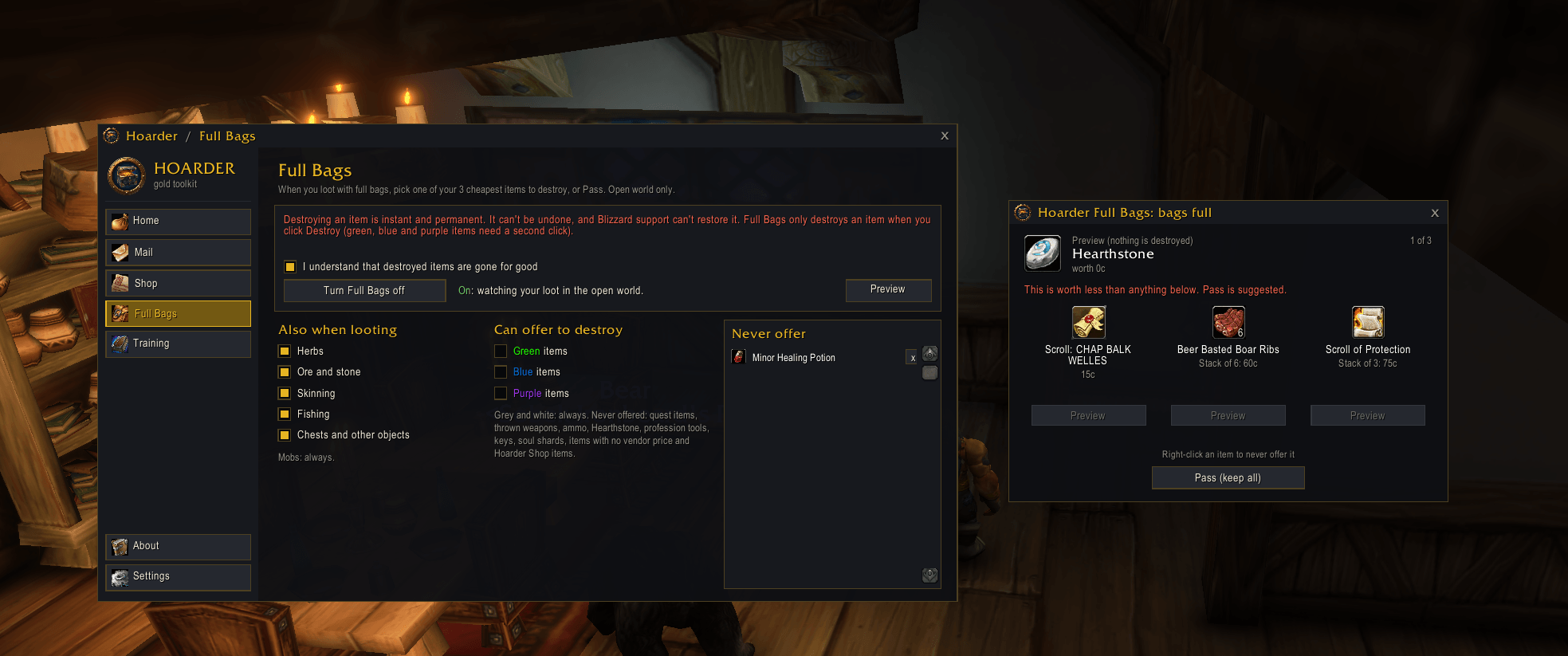
Hoarder Full Bags 1.png
Description
Hoarder Full Bags — make room when you loot with full bags
Requires Hoarder. Full Bags is a module for Hoarder: it opens from the Hoarder window and uses the Hoarder look and themes.
You kill a mob, it drops something good, and your bags are full. Normally you close the loot window, dig through your bags for something cheap to throw away, find it, destroy it, and loot again, if the corpse hasn't despawned.
Full Bags does that for you in one click. When you loot an item that won't fit, a popup shows the item, what it's worth, and the 3 cheapest stacks in your bags. Click Destroy under one to make room and the new item is looted immediately, or click Pass to keep everything.
What you see
- The item you're looting: icon, name, stack size and vendor value.
- Your 3 cheapest stacks: each with its value and a Destroy button. Value means vendor price × stack size, because the whole stack goes.
- A warning when it isn't worth it: if the new item is worth less than all 3, the popup says so and suggests Pass.
- One item at a time: after you decide, the popup moves to the next item in the loot window. It closes when everything is decided or you leave the corpse.
Example: your bags are full and a mob drops 2 Medium Leather (30c). The popup offers a Ruined Pelt (12c), 3 Broken Fangs (15c) and 5 Tough Jerky (30c). Click Destroy under the Ruined Pelt: it's gone, and the Medium Leather is in your bags.
Built to be safe
- Off until you turn it on. The first time, a warning explains that destroying an item is instant and permanent, and you must tick "I understand" before it can be switched on.
- Never offered for destroying: quest items, thrown weapons, ammo, Hearthstone, profession tools (Mining Pick, Skinning Knife, Blacksmith Hammer, enchanting rods, fishing poles), keys, soul shards, items with no vendor price, and anything on a Hoarder Shop list.
- Green, blue and purple items are only offered if you tick them in Settings, and they always need a second click to destroy.
- Your own "never offer" list: right-click an item in the popup to add it. Remove it again from the Full Bags tab.
- Only real full-bag moments: an item that stacks onto a partial stack, or fits a quiver, ammo pouch or soul bag, loots normally with no popup.
- Only items that actually make room: something in a leatherworking, herb, mining or enchanting bag (or the reagent bag) is only offered when the new item can go in that bag.
- No popups in combat: it waits until combat ends.
- In a group: it waits until every need/greed roll on the corpse is finished.
- Open world only: it never pops up in dungeons, raids or battlegrounds.
Your choices (Full Bags tab)
- On / Off, with a Preview button that shows the popup with your current bags (nothing can be destroyed from the preview).
- Loot sources: mobs always count. Tick herbs, ore and stone, skinning, fishing and chests to include those too.
- Item qualities that may be offered: green, blue and purple, each with its own checkbox. Grey and white can always be offered.
- Never offer list.
Commands: /hfull opens the tab, /hfull preview shows the preview.
Installation
- Install Hoarder first (required). Then install Full Bags with the CurseForge app, or unzip it into
World of Warcraft<your game folder>\Interface\AddOns. - Open Hoarder from its minimap button, go to Full Bags, read the warning, tick "I understand" and turn it on.
Good to know
- Supported clients: Classic (Interface 11507, 11508 and 16001).
- Privacy: everything stays in your own SavedVariables; nothing is uploaded.
- Free, with no paid features.
- Bugs or ideas? Leave a comment on this page.
Hoarder Full Bags Team