Forever Price Checkin
- By
See real auction house prices in your tooltips. Forever Price Checkin scans the AH and shows market price, trend and vendor comparison, plus a deal finder, bag appraiser and watchlist. Type /fpc.
Description
Forever Price Checkin
Know what it's worth before you sell, buy, or vendor it. Forever Price Checkin scans the auction house and shows real prices right in your item tooltips. It also finds deals, appraises your bags, and watches prices for you.
Find the button on your minimap, or type /fpc.
What it does
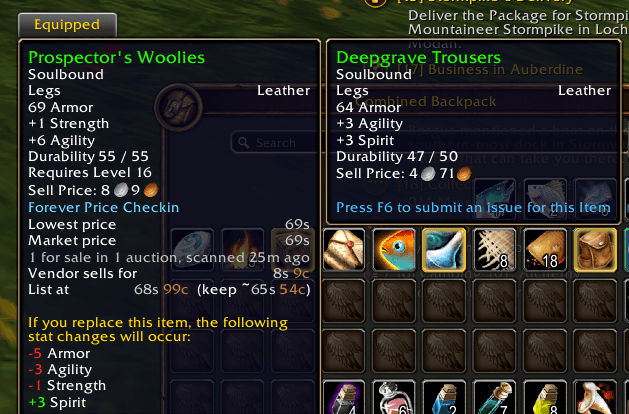
- Prices in every tooltip: hover any item to see the lowest price, the market price, how many are for sale, and how recently it was scanned.
- Auction house or vendor? tooltips compare the auction price with the vendor price and warn you when a vendor pays more.
- Price trends: see whether an item is cheaper or more expensive than it has been lately.
- Smart listing price: get a suggested price to list at, plus what you'd keep after the auction house cut.
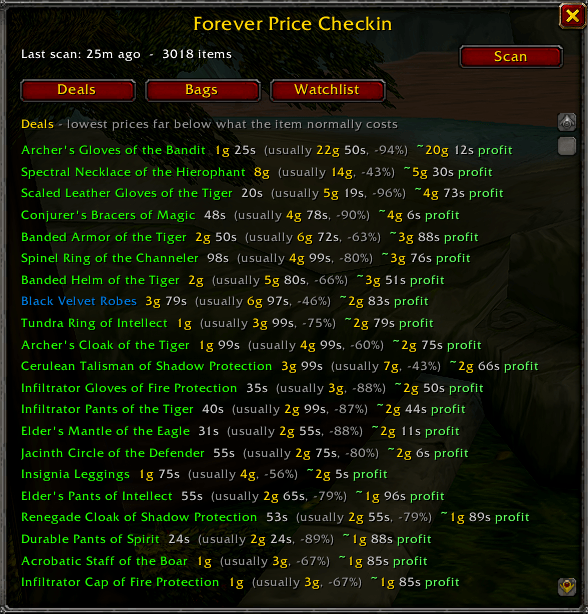
- Deal finder: the Deals tab lists items priced far below what they normally cost, with an estimated profit.
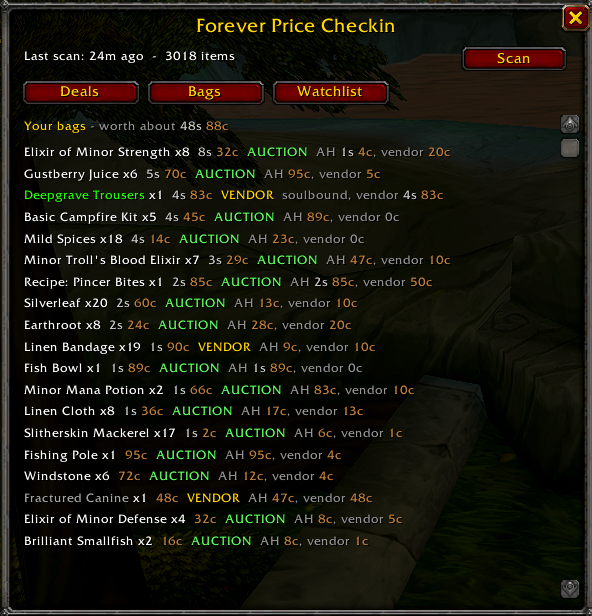
- Bag appraiser: see what your bags are worth, and which items to auction and which to vendor.
- Soulbound items are handled for you.
- Price watchlist: choose an item and a price, and you're alerted after a scan when it drops to your target.
- Price history: check the lowest price of an item for each day you've scanned.
- PopUp Button: open the window, scan, or check your bags in one click. Drag it anywhere around the minimap.
How to use it
- 1. Open the auction house. Forever Price Checkin scans automatically, or you can click **Scan** in its window.
- Hover over items anywhere in the game to see their prices.
- Open the window with /fpc or the minimap button to see deals, appraise your bags, and manage your watchlist.
Popup Button
| Action | What it does |
--------------------------
| Left-click | Open or close the window |
| Shift-click | See what your bags are worth |
| Right-click | Scan prices (with the auction house open) |
| Drag | Move the button |
Commands
| Command | What it does |
------------------------------
| `/fpc` or `/pricecheckin` | Open or close the window |
| `/fpc scan` | Scan the auction house |
| `/fpc price [item]` | Show prices for an item |
| `/fpc history [item]` | Show recent daily lowest prices |
| `/fpc watch [item] 5g` | Alert when it reaches that price or lower |
| `/fpc unwatch [item]` | Remove it from your watchlist |
| `/fpc bags` | See what your bags are worth |
| `/fpc cut <percent>` | Set the auction house cut (default 5) |
| `/fpc deal <percent>` | Deals are this % of normal price or less (default 60) |
| `/fpc profit <amount>` | Smallest profit to show as a deal, like `50s` |
| `/fpc auto on/off` | Scan when the auction house opens |
| `/fpc tip on/off` | Show prices in tooltips |
| `/fpc minimap on/off` | Show or hide the minimap button |
| `/fpc icon custom/coin` | Change the minimap button picture |
| `/fpc mode auto/stack/unit` | Change how buyout prices are read |
| `/fpc sample` | Check prices against the auction house window |
Good to know
- Prices come from your own scans. Addons can't look up prices from outside the game, so you see the prices from your last scan, along with how old they are.
- The game allows one full scan every 15 minutes. This limit is shared with any other auction house addons you use.
- Prices are saved separately for each realm and faction.
- Per stack or per unit: the addon works out how buyout prices are listed by itself. If a price ever looks off, type `/fpc sample` to compare it with the auction house window, then use `/fpc mode stack` or `/fpc mode unit`.
- It never buys, posts, or cancels anything. It only reads prices and gives you information.
- Deals and bag advice are estimates based on the auction house cut, which you can change with `/fpc cut`.
Feedback and ideas Forever Price Checkin is new and actively being improved. If you hit a bug or a price looks wrong, please post it in the comments or on the Issues tab, with the item name, the price you expected, and the Lua error text if you got one. Ideas are welcome too.
Forever Price Checkin Team