Yonder: Riddles, Rare Hunts & an Explorer's Journal
- By
Solve exploration riddles, hunt rare creatures and keep a journal of the creatures, places, fish, herbs and materials you find.
gallery-01-riddle.jpg
gallery-02-quarry.jpg
gallery-03-map.jpg
gallery-04-beasts.jpg
gallery-05-timber.jpg
Description
Yonder: Riddles, Rare Hunts & an Explorer's Journal
Yonder gives you riddles to solve, rare creatures to hunt and a record of what you find along the way. Follow a clue to a forgotten grave, track down a rare you've never fought, or fill in your bestiary while levelling. The journal keeps your discoveries, with notes from an Explorers' League naturalist.
For Classic Era (including Hardcore and Season of Discovery) and World of Warcraft: Forever.
Yonder was called Explorer's Field Journal until version 0.8.0. Your journal comes along on its own: see Coming from Explorer's Field Journal below.
Expeditions
There are 162 riddles and 38 rare hunts across the original world. Forever adds four riddles and a hunt on Zephras Isle.
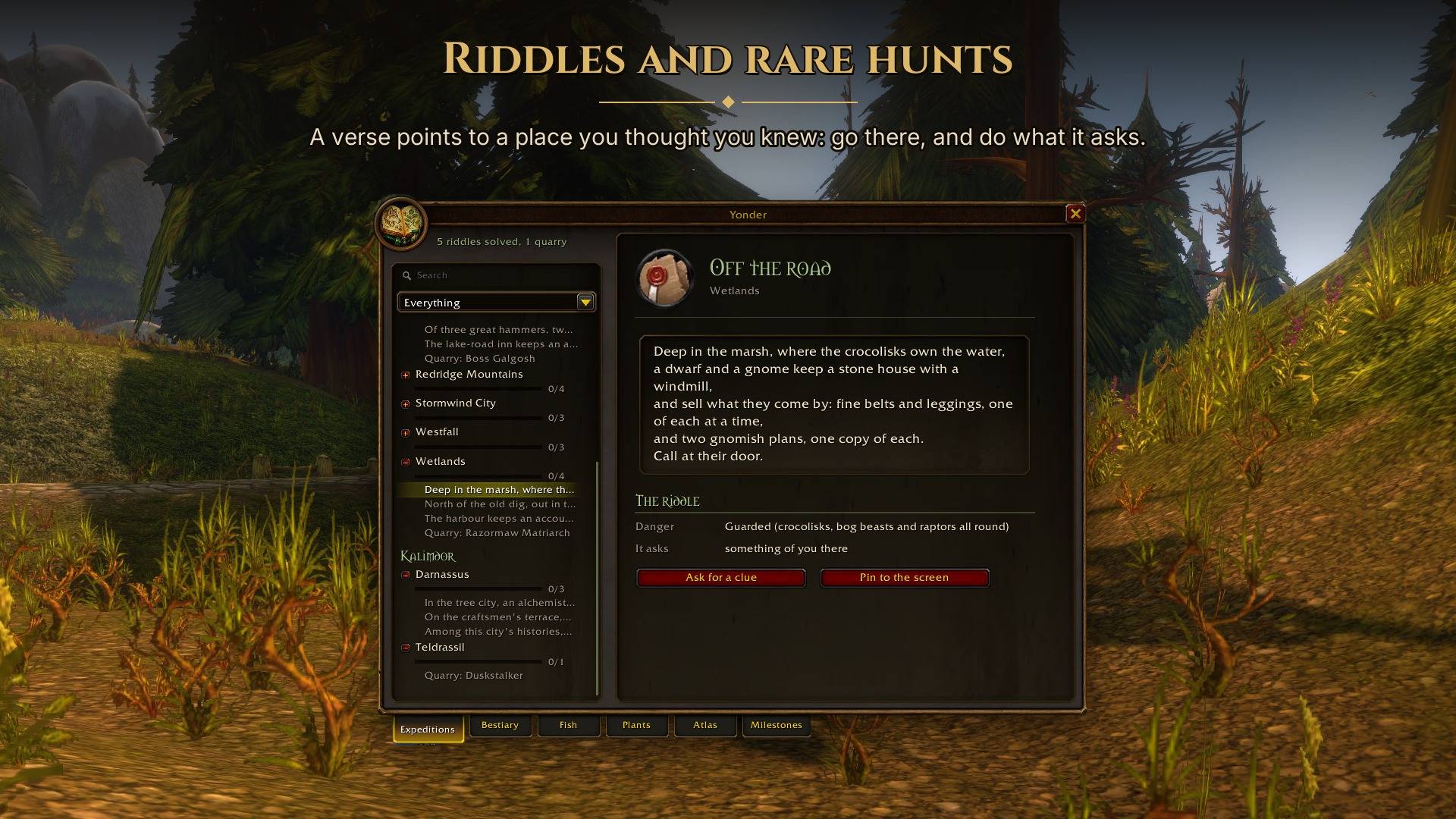
The riddles lead to overlooked statues, books on shelves, graves beside the road and people few players stop to speak to. Some are solved by reaching the right spot or speaking to the right person. Others ask you to read something or work out a gesture from the verse. Riddles are solved on foot and outside combat, and never require a kill.
Each has two optional hints. The first makes the clue clearer. The second shades the location on your world map. Solve it without hints to earn a gold seal and unlock an extra piece of the story. The first hint costs the gold seal, and the map hint costs the silver.
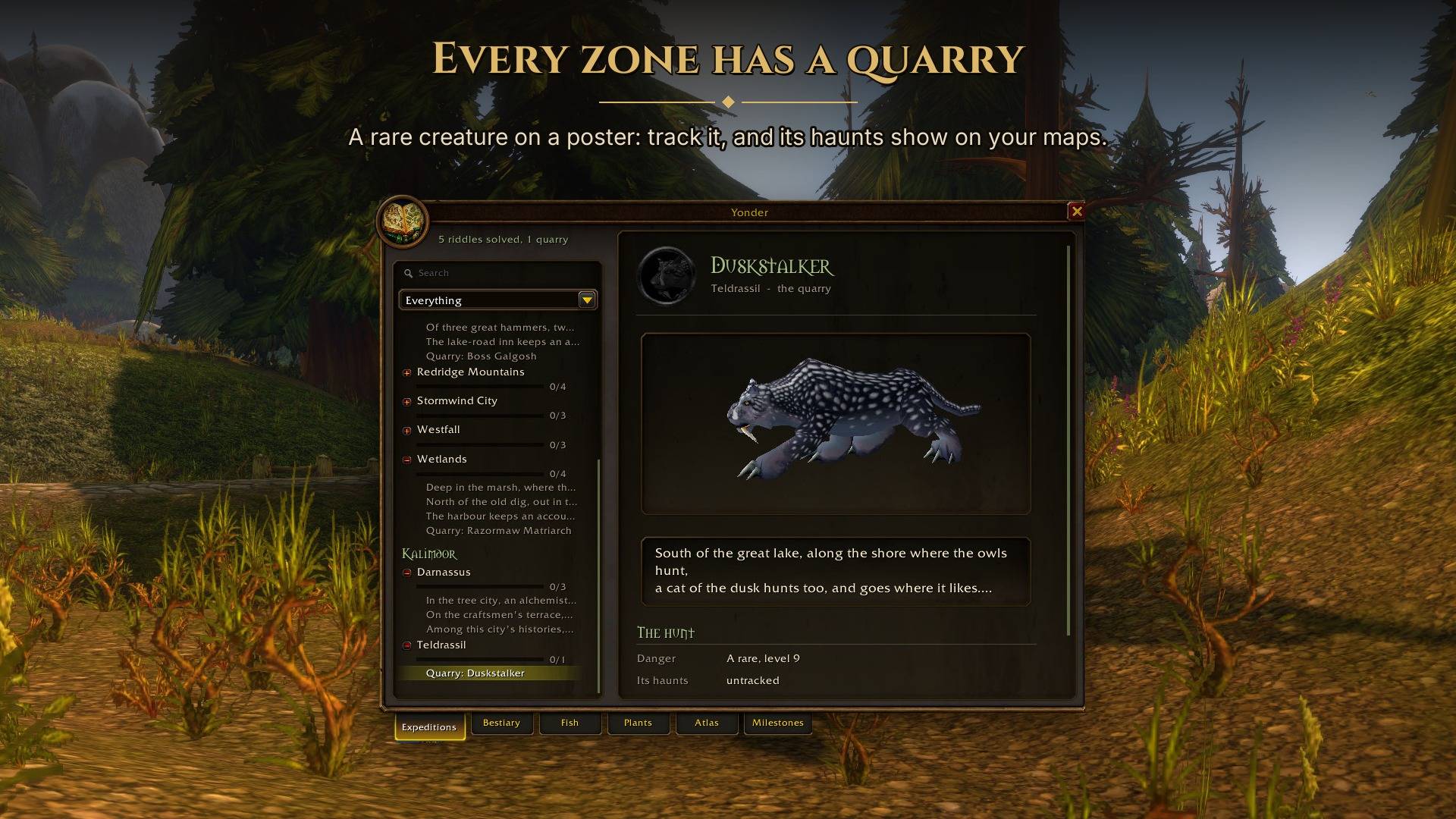
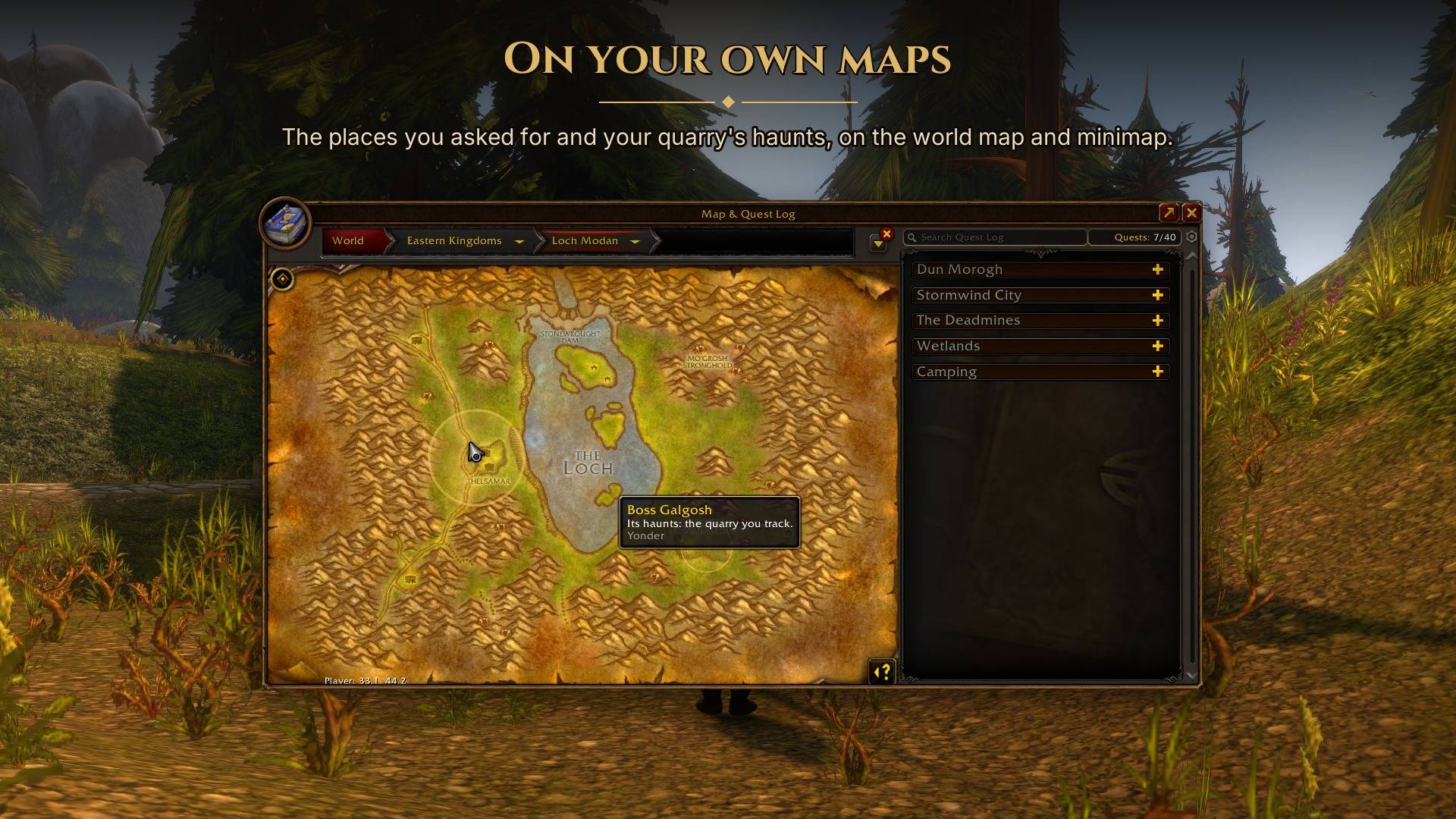
Rare hunts have posters describing creatures such as Humar the Pridelord, Broken Tooth, Rak'shiri, King Mosh and Vultros. You can track a hunt to mark the creature's haunts on the map, or find and defeat it without tracking to earn a gold seal.
The Expeditions tab opens first. It shows the zones you've visited and your faction's capitals, with maps, riddles and hunt posters. Solved riddles reveal a note about what you found. Pin a riddle or a poster to your screen if you want to keep it beside you while exploring. Solving a riddle or completing a hunt brings an alert.
The Bestiary
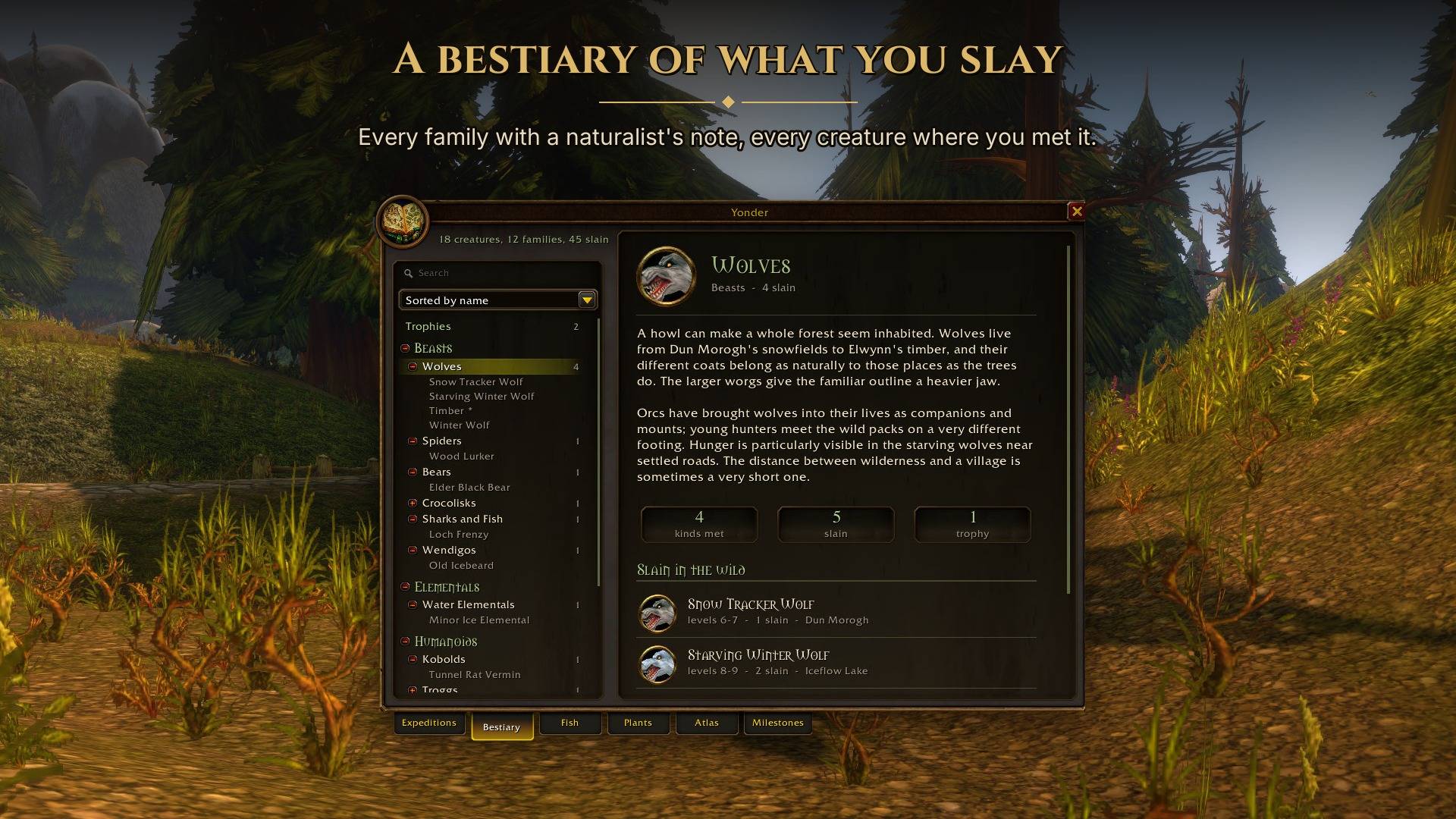
The Bestiary covers around 3,500 creatures in 96 families, from wolves and murlocs to the dragonflights, the Scourge and the Burning Legion. Each family has a naturalist's note about its creatures and their place in the world.
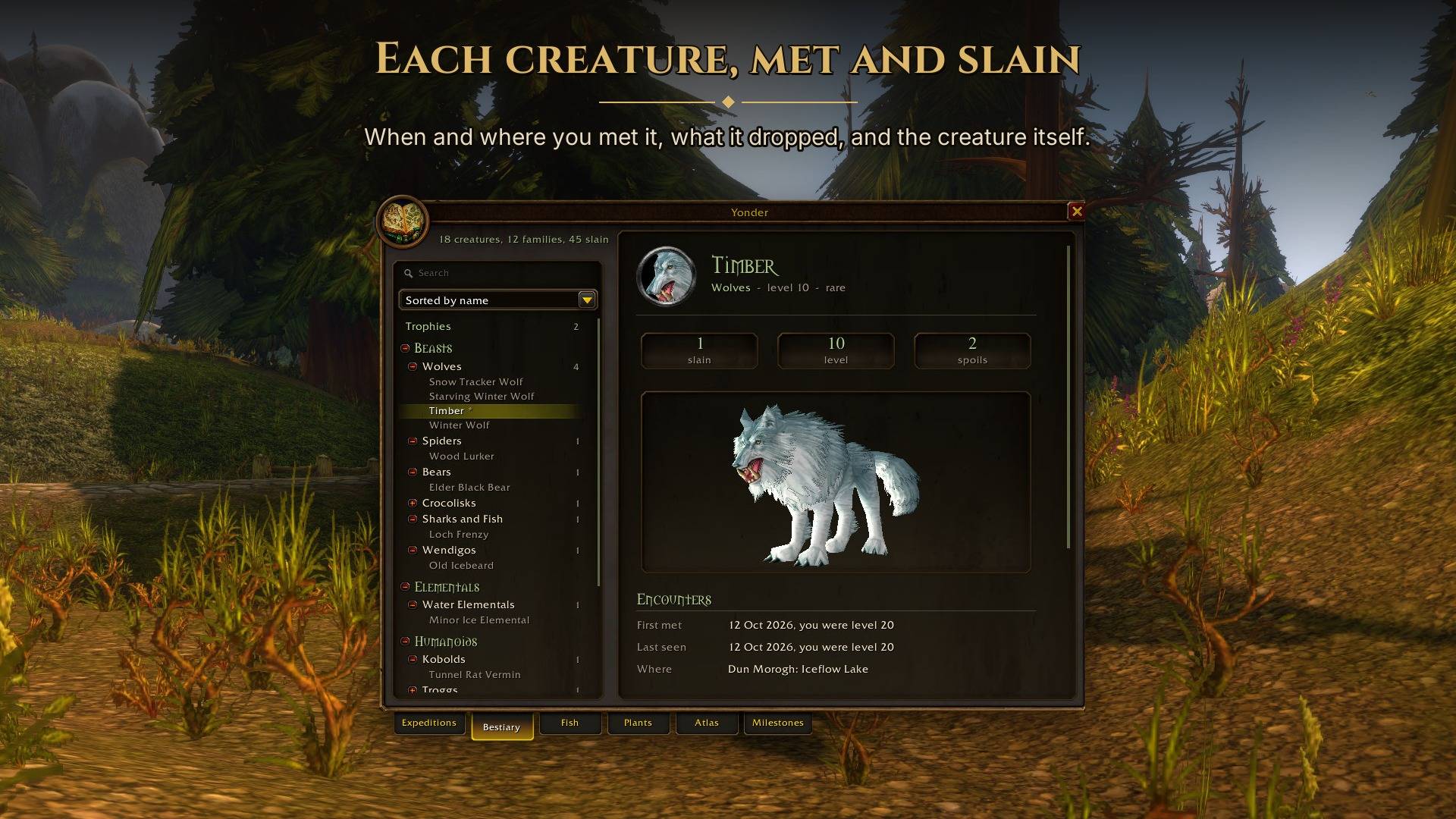
A creature joins the journal when you first kill it. Its page keeps your first sighting, the levels you've seen, your kill count, its loot and your observed drop rates. Rares and bosses become trophies, with a sound when you defeat them.
Kills by you, your pet and your group count, including damage over time and area spells. A creature you tagged and another player finished also counts when one of your quests credits the kill. Friendly townsfolk and critters are left out.
New creatures get a chat link to their page, without a banner or sound. Tooltips show whether you've recorded a creature and how many you've killed. Each character keeps its own journal, and undiscovered creatures are hidden with no total showing how many remain.
Browse by creature type and family, search by name, or sort a family's creatures by name, kill count, most recent kill or first discovery. Creature pages include a rotating model and your loot history. The Trophies page gathers the rares and bosses you've defeated.
Drop rates use corpses you looted or found empty, starting with version 0.7.5. Unlooted corpses and repeat visits, including skinning, do not count. In groups, the calculation only uses corpses you looted.
Finds
The Finds tab brings Fish, Plants, Ores & Gems, and Cloth & Leather together. Choose a category under the search box, or browse your discoveries on the overview.
Fishing opens the fish collection, Herbalism opens plants, Mining opens ores, stones and gems, and Skinning opens leather and hides. Cloth is available to everyone. A banner and chat link announce each new collection. Once opened, it stays in your journal and keeps recording finds even if you change professions.
Fish pages keep your catches, schools, day and night counts, and heaviest catches. Other materials record whether you gathered, skinned, looted or received them. Every item has its own naturalist's note, along with your records and links to the Atlas. Mining nodes supply the items, rather than becoming collection pages themselves.
Herb and material pages show how many you currently carry in your bags, separately from what Yonder has recorded you taking. Items you owned before installing the addon open their pages, without guessing how you obtained them.
The Atlas
The Atlas keeps a page for every zone you enter. Each has a surveyor's note about the terrain, roads and dangers, a map showing your explored areas, and a record of your first visit, flights, deaths and close calls.
It picks up areas you've already uncovered on the game map. Click a discovered place to highlight it, look up the zone's expedition, or see the fish, herbs and materials you've found there. Browse by continent or open the travels page for an overview of your recent discoveries.
Deaths and close calls can also be marked on the game's world map. You can turn those markers off in the settings.
Achievements
The Achievements tab rewards progress throughout the journal. These include creature and trophy counts, completing families, defeating a zone's rares, exploring every part of a zone, and fishing and gathering goals.
There are feats for Hogger, the Emerald Nightmare and the Firelord, for Nat Pagle's rare fish and Black Lotus, and for solving expeditions with gold seals or completing hunts without tracking. Each achievement records the date and level you earned it, and shows in the game's achievement alert with a fanfare and a chat message.
Compatibility
One download covers Classic Era, Hardcore, Season of Discovery and World of Warcraft: Forever.
Forever adds Zephras Isle to the Atlas, and its new rares count towards zone achievements. The game hides creatures inside Forever dungeons and raids from addons, so the journal cannot record them there.
Yonder speaks English and French. With a French client, the whole journal is in French: the riddles and quarries, the Bestiary, the Atlas, the fish, herbs, materials and achievements. Every name is as the game itself writes it. Other clients get English, with the game's own names in their language: creatures, places, flight points, fish, and the riddles' and quarries' answers. Everything the journal records is kept by the game's ids, so it all follows your client's language, even after you switch.
Settings and commands
Type /yonder or click the minimap button to open the journal. Each login says in chat what your journal holds. A welcome page appears once per character. Use /yonder welcome to see it again.
Settings are under Options > AddOns > Yonder, through /yonder settings or by right-clicking the minimap button. Choose the banners for riddles, quarries and collection unlocks, the alerts for achievements (each its own switch), trophy sounds, map markers, tooltip hints and whether to show the minimap button. Chat lines always show.
Two choices change how the journal looks. Book size makes the whole window larger, in four steps from Normal to Largest. Paper colours replace the dark look with dark ink on tan paper, which some players find easier on the eyes. Paper colours take effect after a reload, and the settings page ends with a Reload button for it.
Options > Key Bindings lists Open Yonder under a heading of its own. Put a key on it, or on Forever a controller button, and one press opens or closes the journal. Nothing is bound until you choose.
Settings are saved per character. Copy them from another character of the same game on the welcome or settings page, or transfer them with /yonder export and /yonder import CODE. Codes made by Explorer's Field Journal still work.
/yonder whereshows your current map and position./yonder resetclears this character's journal after confirmation./yonder minimapshows or hides the minimap button./yonder toastpreviews a riddle alert.
Coming from Explorer's Field Journal
The addon was renamed because another addon, Field Journal: Forever, uses the same folder name. With both installed, one replaced the other. Yonder lives in its own folder, so the two can now sit side by side.
You don't need to do anything. At each character's first login with Yonder, its journal moves over: riddles, seals, creatures, Atlas, fish, herbs, achievements and settings. A line in chat confirms it.
The download includes a small FieldJournal folder that hands the old journal over. It does nothing else, and a later update removes it. The handover is for Classic Era. Forever beta journals start fresh, since beta characters don't carry over to launch.
If you install by hand, delete the old FieldJournal folder from Interface/AddOns first, then copy both folders, Yonder and FieldJournal. Copying over the old folder keeps the old addon's files. If it still runs beside Yonder, Yonder turns it off and says so in chat.
Help the addons keep up with Forever
Forever brings new quests and creatures, and the usual databases take weeks to catch up with them. You can help Yonder and its sister addons get there sooner. Tick Share what you see on the welcome page or in the options, and Yonder keeps what the game tells you of quests, creatures and NPCs. Ravenpost, a small free app for Windows and macOS, sends it to the addons' shared database a few seconds after you log out. It asks you once to Sign in with Battle.net: one account, one voice when players' games disagree. What you see fills the bestiary and the atlas with Forever's new creatures, in every language. Every player who shares makes a real difference, and it's truly appreciated.
Your name, class and race are replaced by the game's own placeholders, lines that name another player are left out, and your chat is never kept. Sharing is off until you turn it on. Turning it off stops it: what was kept stays on your computer, and nothing is sent while it's off.
Other addons
These share Yonder's journal style and work independently:
- Hearthtale (Wago) writes a diary for your character as you play, with an epitaph when a Hardcore life ends.
- Lorekeeper's Codex (Wago) unlocks lore pages as you explore Azeroth and meet its people.
- Second Wind (Wago) gives you a debrief after a close call or death.
- Palaver (Wago) puts quests and NPC conversations in a large panel beside the one you speak to, read and answered from the keyboard.
- Mealbook (Wago) keeps a chef's cookbook that fills in as you learn to cook, and plans your road to 300.
- Goodwill (Wago) shows every faction's road to Exalted from where you stand, with a chapter of its story at each standing.
- Yours Truly (Wago) brings letters from the people whose quest chains you finished, waiting at your next mailbox.
Support
Yonder is free and will stay free. If you've enjoyed the riddles or found a new favourite spot, you can support work on the journal with a coffee on Ko-fi. Thank you.
Source
MIT licensed: github.com/salty-max/yonder.
Creature data comes from the CMaNGOS Classic database and QuestieDB, with Forever's rares from QuestieDB's Forever records and Wowhead. Expedition locations use those databases and the game client's tables, checked against Wowhead. Zephras Isle locations use QuestieDB's Forever records. Names in other languages come from the game clients and QuestieDB, and from Wowhead where neither has them. Thanks to their contributors. Not affiliated with Blizzard Entertainment.
Yonder: Riddles, Rare Hunts & an Explorer's Journal Team