Second Wind: Close Call & Death Debrief
- By
Review close calls and deaths after combat. See what hit you, which emergency tools went unused and what your dangerous fights have in common.
Screenshot 2026-10-12 001854.png
Screenshot 2026-10-12 001901.png
Screenshot 2026-10-12 001908.png
Screenshot 2026-10-12 001635.png
Description
Second Wind: Close Call & Death Debrief
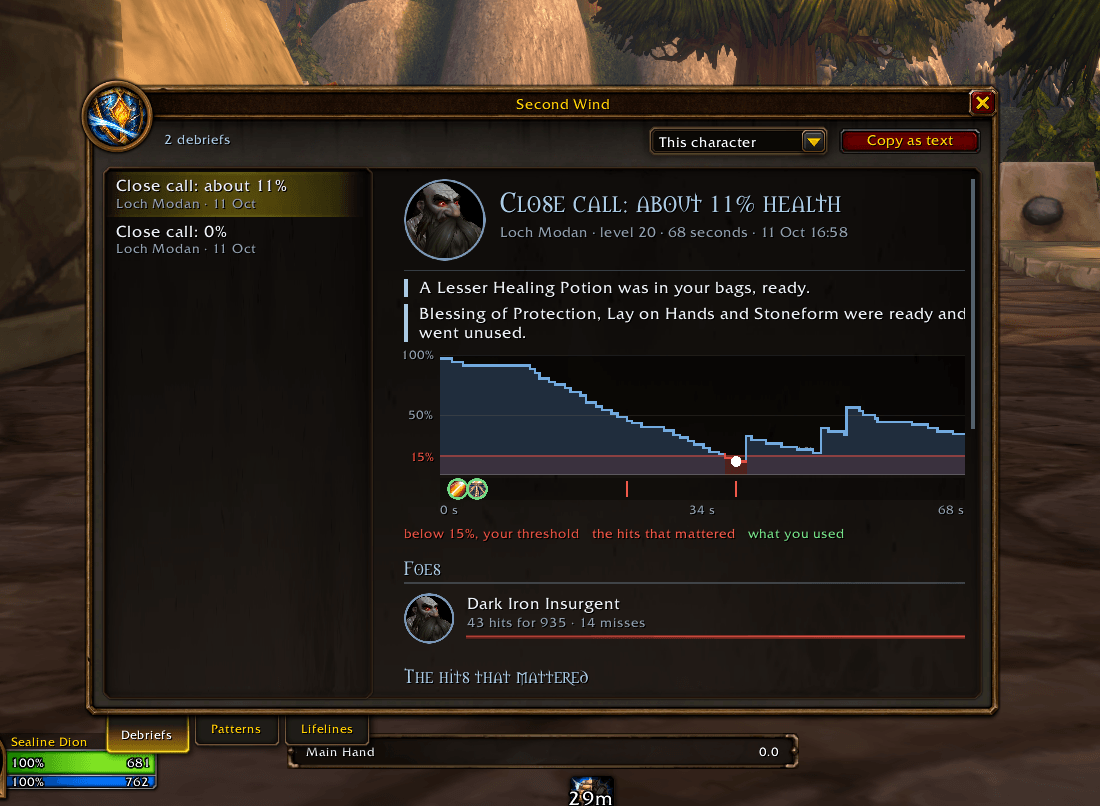
Second Wind gives you a debrief after a close call or death. Once the fight is over, you can see the hits that hurt most, how your health fell, and which potions or abilities were ready but went unused. After a few debriefs, it starts showing what your dangerous fights have in common.
For Classic Era (including Hardcore and Season of Discovery), TBC Anniversary and World of Warcraft: Forever. Nothing pops up during combat. Duels and battlegrounds are excluded.
After the fight
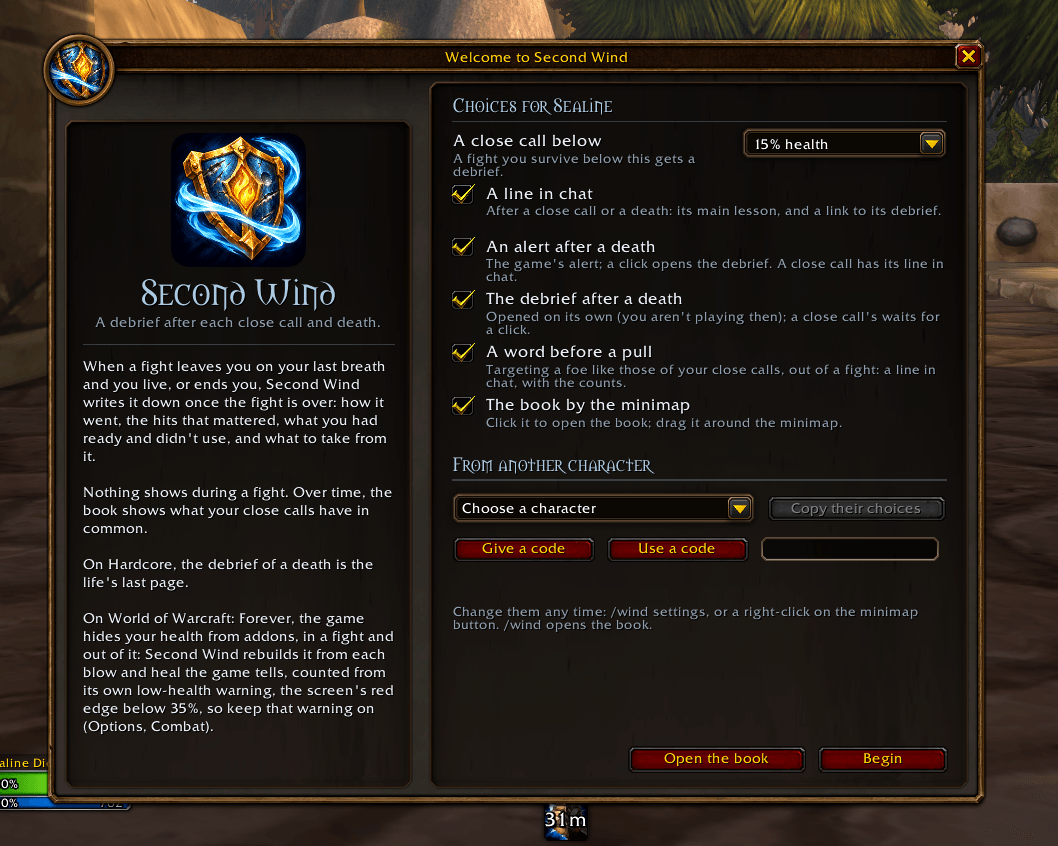
By default, surviving a fight below 15% health counts as a close call. You can change the threshold to 10%, 20% or 25%. Deaths always get a debrief.
A chat message gives the main finding and links to the full card. After a death, an alert appears and the debrief opens automatically. Both are configurable.
Each debrief includes:
- Up to two findings. These come from the recorded fight, such as a healing potion left ready, a third enemy joining or a sudden drop in health.
- The killing blow. For deaths, the game's recap supplies the attacker, spell, damage and overkill.
- The enemies. Who joined, when they arrived, their hits and misses, and how much damage they dealt.
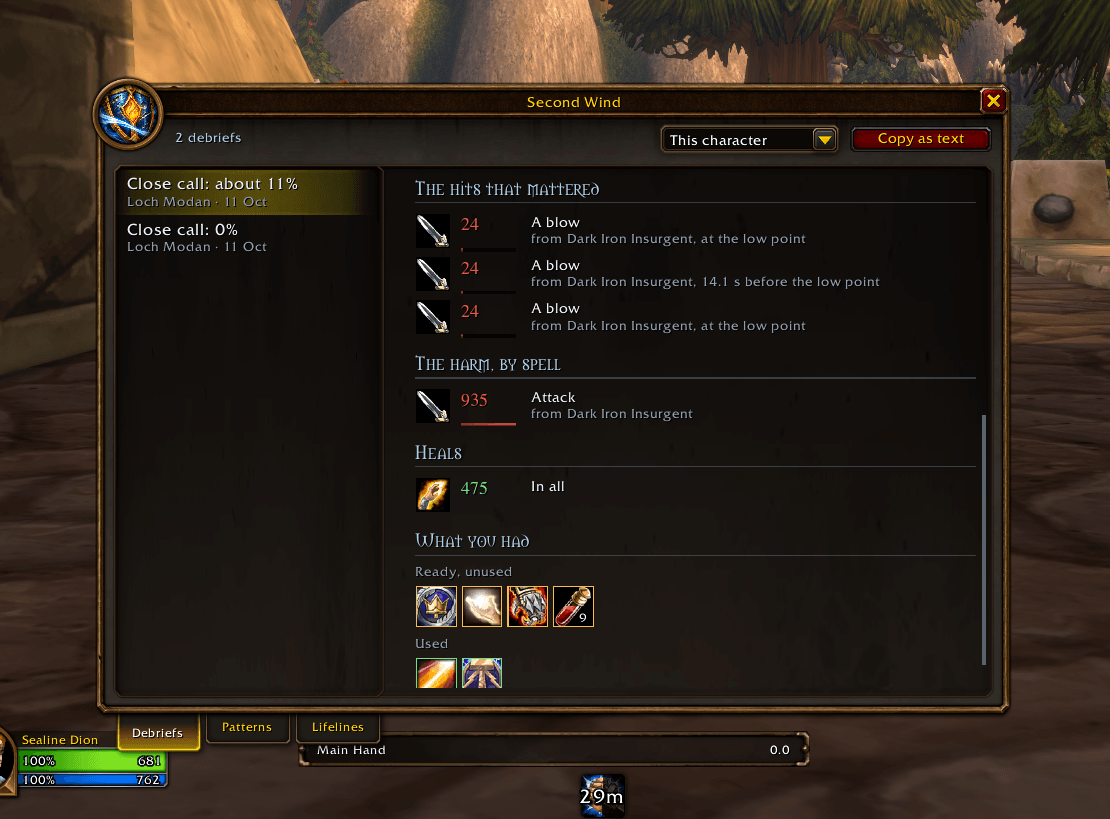
- The three largest hits. Each with its spell icon and timing relative to your lowest health.
- A health graph. Your close-call threshold and lowest point are marked, with a timeline of enemy arrivals, big hits, abilities used and time spent stunned or feared. Hover to inspect a moment.
- Healing received, from yourself and others.
- Time out of your control. Stuns and fears, including their duration and cause. If you were unable to act throughout the health drop, the debrief treats your abilities as out of reach.
- What you had ready. The emergency spells and items available when your health first fell below half, split into used and unused.
Use Copy as text or /wind copy to share a debrief with your guild or on Discord.
Potions, cooldowns and escape tools
Second Wind recognises class and racial emergency abilities such as Divine Shield, Ice Block, Vanish, Feign Death, Frost Nova, Last Stand, Escape Artist and Stoneform. It also tracks 172 emergency items, including:
- Healing potions, healthstones, Whipper Root Tubers and bandages.
- Anti-Venom, Elixir of Poison Resistance and Restorative Potion.
- Free Action, Limited Invulnerability, Living Action and protection potions.
- Grenades, nets, target dummies and Magic Dust.
- Swiftness Potion, Noggenfogger, Rocket Boots, the Gnomish Cloaking Device and Insignias.
The debrief checks whether an item could have helped. A bandage needs a long enough pause in damage and no Recently Bandaged debuff. Cures need something to cure. Protection potions are matched to the damage school, and swimming or slow-fall items only count in water or during a fall. Equipment must be worn, and anything on cooldown is left out.
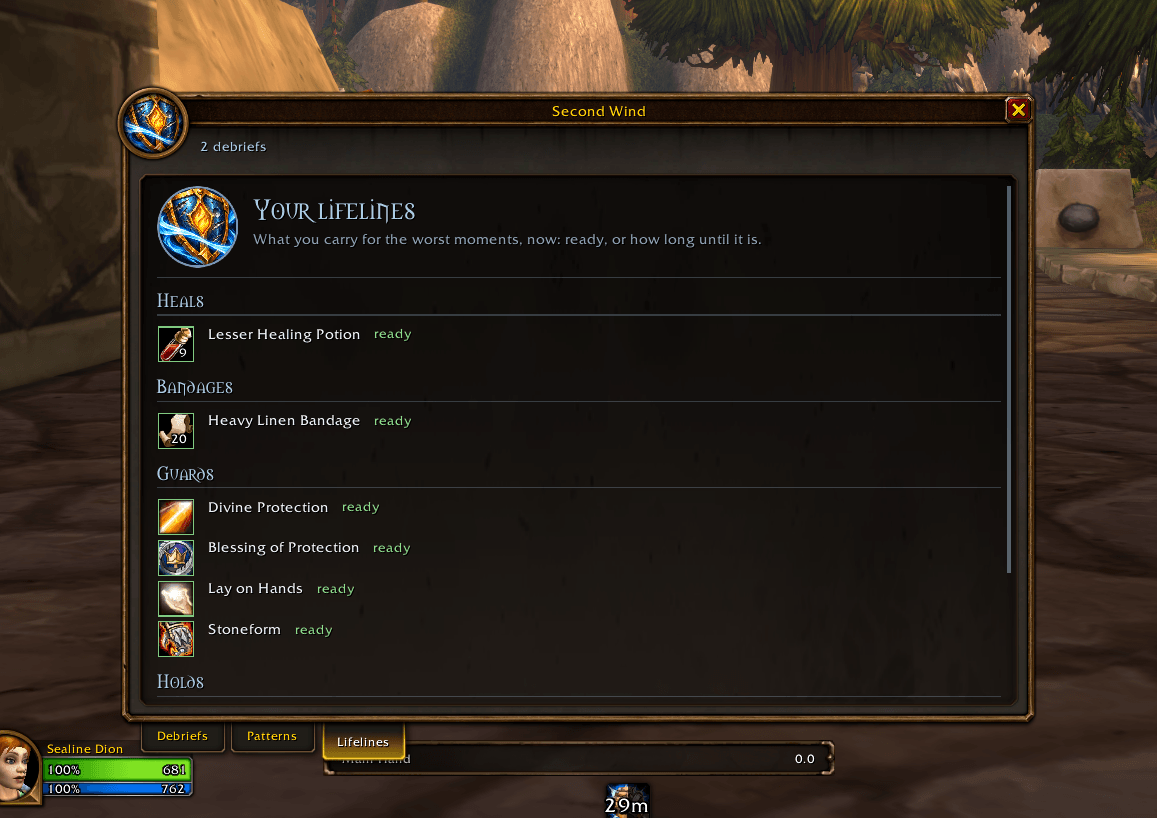
The Lifelines tab shows what you carry now, grouped by purpose, with quantities and cooldowns. It also shows which kinds of emergency supplies you're missing. Open it with /wind lifelines before heading into a dungeon.
Spotting patterns
After three debriefs, the Patterns tab starts comparing them. It might show that you started four of six close calls below 60% health, often fought several enemies at once, or repeatedly left the same potion unused.
It also counts ordinary fights, so you can compare a trait's frequency in close calls with how often it happens overall. Repeated enemies and locations are listed too.
Debriefs are saved across your account, separately for each game. Choose the current character or all characters to browse their fights and compare patterns. A fallen Hardcore character's final fight stays available when you start again.
Before the next pull
Outside combat, Second Wind can give a short chat reminder when you target an enemy that resembles past close calls. It can also flag starting hurt if that was common in those fights. The reminder uses your recorded counts, including earlier Hardcore lives.
It never appears during combat or for critters, and won't repeat for the same enemy within five minutes. You can turn it off in the settings.
Compatibility
One download covers Classic Era, Hardcore, Season of Discovery, TBC Anniversary and World of Warcraft: Forever.
Forever hides health values and the combat log from addons. Second Wind uses the information the game still provides:
- Health estimates are reconstructed from damage and healing, using the game's low-health warning or working back from a death. The debrief shows the uncertainty. Keep the game's low-health warning enabled under Options > Combat.
- Hits retain their damage and timing. The attacker can be identified when there was a single enemy or from the game's damage meter.
- Death details come from the game's death recap.
- Enemies and damage by spell come from the damage meter after combat.
- Available tools are checked at the start of the fight on Forever. Casts, bag changes and cooldowns help determine what you used.
Use /wind probe if you need a report of what the game let the addon read after your next fight.
Settings and commands
Open the book with /secondwind, /wind or the minimap button. The welcome page appears once per character and can be reopened with /wind welcome.
Settings are under Options > AddOns > Second Wind, through /wind settings or by right-clicking the minimap button. Choose the close-call threshold, death alerts, whether a death opens its debrief, pre-pull reminders and the minimap button. Chat lines always show.
Each character has its own settings. Copy another character's settings within the same game from the welcome or settings page, or use /wind export and /wind import CODE to transfer them.
/wind copyopens a text version of the debrief for you to copy./wind lifelinesopens your emergency supplies./wind resetclears this character's debriefs after confirmation./wind minimapshows or hides the minimap button.
Other addons
These share Second Wind's book style and work independently:
- Hearthtale (Wago) writes a diary for your character as you play, with an epitaph when a Hardcore life ends.
- Lorekeeper's Codex (Wago) unlocks lore pages as you explore Azeroth and meet its people.
- Yonder (Wago) offers exploration riddles, rare hunts, a bestiary, an atlas and records of your fish and herbs.
Support
Second Wind is free and will stay free. If the debriefs have helped you survive the next fight, you can support the addon with a coffee on Ko-fi. Thank you.
Source
MIT licensed: github.com/salty-max/second-wind. Item and spell data comes from the CMaNGOS Classic database and the TBC Anniversary client's tables. Not affiliated with Blizzard Entertainment.
Second Wind: Close Call & Death Debrief Team