Enemy Frames
- By
Raid frames for the monsters you’re fighting: see what’s hitting you, what’s loose and what’s casting, and click a frame to target it, even in combat.
Description
Enemy Frames
Raid frames for the monsters you're fighting.
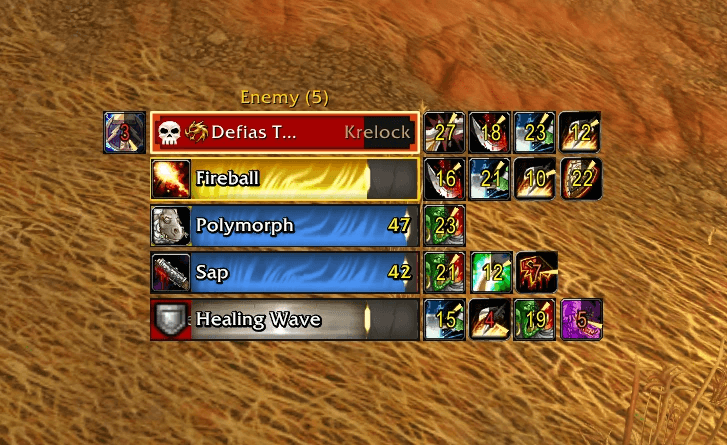
Every monster in the fight gets its own bar in a list, so you can see at a glance what's hitting you, what's loose and what's casting. Click a bar to target that monster, even in combat.
I made it for tanking, but it works for anyone.
Features
- A bar for every monster fighting you or your group, with its health (red for hostile, yellow for neutral), name, elite or rare icon and raid marker
- Click a bar to target it, even in combat (please read the limits below)
- Works with mouseover casting: hover a bar and cast on that monster without targeting it
- Who each monster is attacking, in class colors
- A red border on the ones attacking you, or on the loose ones if you're tanking. White on your target, gold on your focus
- Cast bars that flash when you can interrupt, with a shield when you can't
- Sheeps, saps and fears cover the whole bar (from anyone) with the spell and the time left, so you can see which ones not to hit. Stuns show as an icon next to the bar, so you still see its health
- Your debuffs with the time left, plus buffs your group can dispel, enrages too
- Lots of settings, and a Test button so you can see how it looks
Please read this first: clicking a bar
WoW Forever doesn't let addons make normal clickable frames for enemies, so Enemy Frames uses a workaround, and it has limits.
Put Enemy Frames near the top of your screen, above the mobs. A click (or a mouseover cast) on a bar only reaches a mob that's lower on your screen than the list. Once you're in combat with a mob, clicking its bar works wherever it is on your screen.
Clicking a bar never works:
- On monsters behind your camera. Turn toward them first
- In combat while Show Offscreen Nameplates is on (Options > Nameplates). If it's on, Enemy Frames asks if you want to turn it off
While Click to target is on:
- Your current target has no nameplate bar over its head. Its health is still on your target frame and on its Enemy Frames bar
- In dungeons, friendly players only show their name. Addons can't change friendly nameplates there, so their bars would stretch across your screen. Enemy Frames turns on Blizzard's Only Show Names (Options > Nameplates) while you're inside, and turns it back off when you leave
Don't want any of this? Turn off Click to target in the settings. The bars then just show information, nameplates work like normal
Limitations
- Enemy nameplates must be turned on (press V, or Options > Nameplates > Enemy Unit Nameplate). The bars come from nameplates, so with them off, nothing shows
- Only monsters close enough to have a nameplate show up, about 45 yards. A monster your party is fighting farther away won't be on the list
- Aggro is only "on you" or "not on you". Threat details are hidden from addons in combat, so there's no yellow "losing aggro" warning
- It can't show which monster your party members are targeting
- Monsters tagged by someone outside your group aren't shown
- Which crowd control breaks on damage comes from a list of the classic spells (Polymorph, Sap, Fear, Blind, Freezing Trap and so on), since the game doesn't tell addons. Crowd control that isn't on the list shows as an icon instead of covering the bar. Let me know if I missed any!
Who shows up
Every monster fighting you or your group, in the order they joined. The title shows how many, like Enemy (5).
- Your target shows up too, even before the fight starts (faded until it's fighting)
- You can also show all the monsters around you that aren't fighting yet (faded)
- Or only show the list while your group is in combat
- You can play a sound when a new monster joins the fight (off by default)
Moving it
Drag it by its title. Remember the bars work best near the top of your screen (see above).
Settings
Esc > Options > AddOns > Enemy Frames
- Size and layout: scale, bar size, rows and which way the list grows
- Your debuffs or everyone's, and which crowd control covers the bar
- Cast bars over or under the bar, or only for casts you can interrupt
- How aggro is shown: border, glow, corner marks, side stripe or name color
- Health percent, elite and rare icons, and where raid markers go
- A Test button that shows sample bars for 15 seconds, so you can see how it looks and drag it where you want
Not working?
- Nothing shows up: press V to turn on enemy nameplates
- Clicking a bar doesn't target: move the list higher on your screen, and check that Show Offscreen Nameplates is off
- A monster is missing: it's probably too far away for a nameplate, or tagged by someone outside your group
- If you are still having issues let me know and I will help
Credits
Inspired by Enemy Grid by Terciob.
Logo based on "Triple skulls" by Lorc, from game-icons.net, licensed under CC BY 3.0. Changes were made to the original.
Enemy Frames Team