Claw Frames
- By
Classic-style player, target, target-of-target, pet and party frames for WoW: Forever, with class icons in place of portraits, a thicker health bar and combo points, and a tab of raid tools for groups.
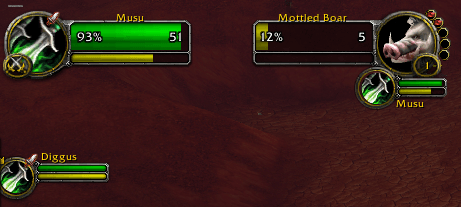
A rogue in a party: class icons in place of portraits, a thicker health bar with percent and value, target of target, a party member, and two combo points lit on the target's ring.
Description
Claw Frames replaces Blizzard's player, target, target-of-target, pet and party frames with classic-styled ones: the older art, a health bar thick enough to read without looking directly at it, and a class icon where the portrait was.
What it changes
- Player and target frames, in classic art, with a thicker health bar. Health reads as a percentage on the left and a value on the right.
- Class icons instead of portraits for players, so you know what you are looking at before anything starts casting.
- Class-coloured health bars for players, optional and off by default.
- Target of target, with its own border so it does not read as part of the target frame.
- Combo points, driven correctly even when the client refuses to tell an addon what the count is.
- A classic pet frame under the player frame while you have a pet: portrait, name, and health and power bars.
- Party frames, replacing Blizzard's, with an option to keep them on screen inside a raid — Blizzard's hide, which suits raiders and does not suit a five-man guild run that happens to be flagged as one.
- Raid tools, in place of Blizzard's. In a party or raid, a small tab on the left edge of the screen opens a panel with a ready check, a role check, a pull timer (5, 10 or 15 seconds), raid target icons for your target, ground markers, everyone-is-assistant, party to raid and back, and who may ping. Drag the tab along the edge, or to the top of the screen.
- Move any frame, and scale everything between 50% and 200%.
Settings
/claw opens the settings window, with pages for General, Frames, Target, Party and pet, and Raid tools; Options > AddOns > Claw Frames has a button that opens it. A few things work from chat too: /claw unlock and /claw lock to move the frames, /claw reset to put them back, /claw scale with a number from 0.5 to 2, and /claw classicons and /claw healthtext to switch those. /claw help lists them.
/claw arttest draws Blizzard's raw frame textures at known coordinates. It is a developer tool left in on purpose: it is how the art was fitted, and it is how you would check it on a resolution nobody has tried yet.
Requirements
BLib, which the CurseForge app installs with it; keep it updated alongside this addon. It gives you the settings window, the edit mode and the raid tools.
Version support
Built for and used on WoW: Forever, tested on its beta up to 0.6.2. The beta closed on 24 October and there is no Forever client until launch, so 0.6.3 was tested on retail (12.1.5). All future development targets Forever; TBC Anniversary is not a development target and will receive no further work.
This is a 0.x, and means it
Claw Frames is used every day, but by a handful of people on a handful of setups, which is not the same as being tested. Frame positions, art fitting and the party frames are the parts most likely to want work on a UI it did not grow up on. Reports are genuinely useful, and small ones are the most useful.
Credit
Named for Highclaw, who asked for them and has used every build.
Claw Frames Team