ConsumableMacro
- By
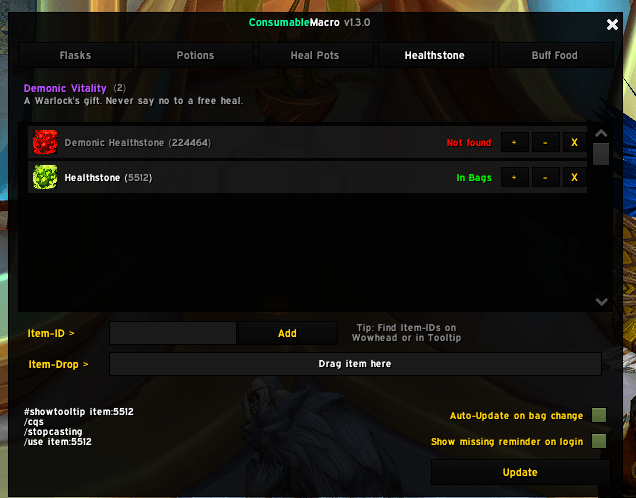
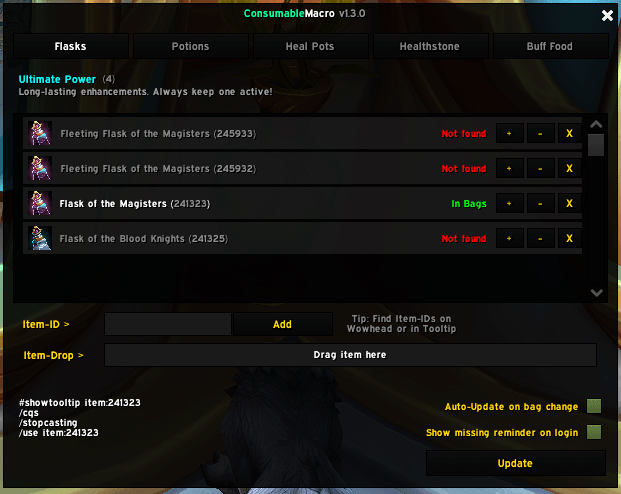
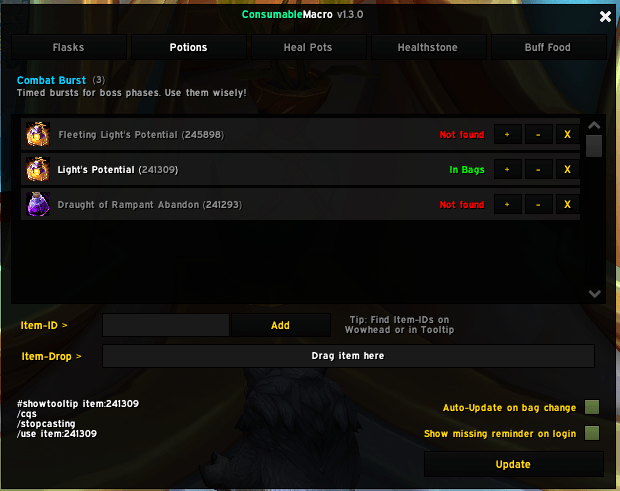
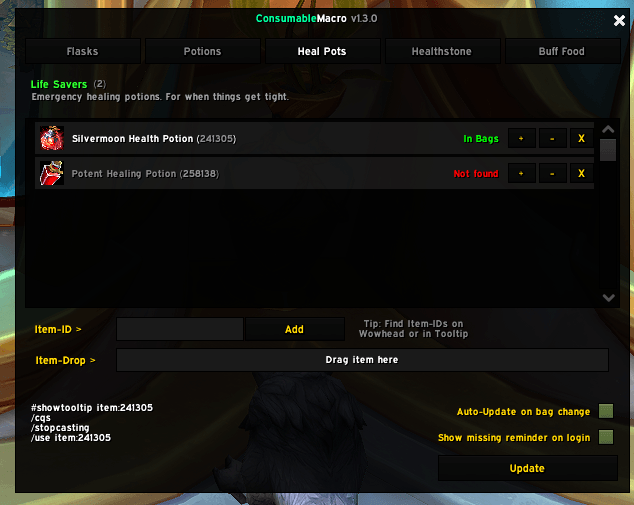
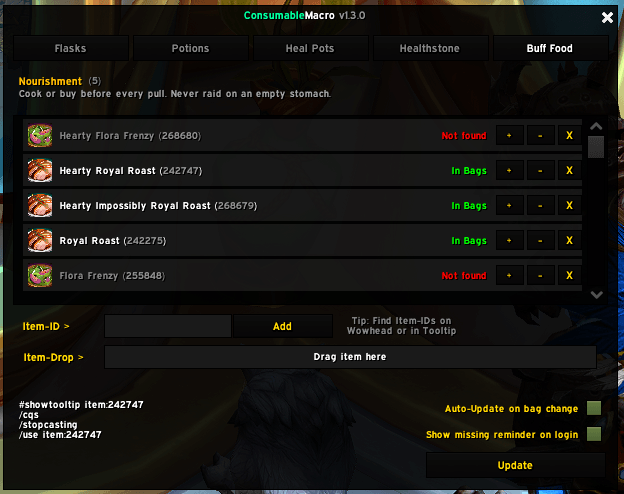
Automatically creates and manages Flask, Potion, Heal, Healthstone and Buff Food macros based on your current bag contents — with a priority list you control.
ConsumableMacro_thumpnail.png
Screenshot 2026-05-17 194853.png
Screenshot 2026-05-17 194822.png
Screenshot 2026-05-17 194829.png
Screenshot 2026-05-17 194837.png
Screenshot 2026-05-17 194859.png
Screenshot 2026-05-22 172053.png
Screenshot 2026-05-22 172106.png
Screenshot 2026-05-22 172133.png
Screenshot 2026-06-05 213231.png
Screenshot 2026-06-05 213254.png
Description
ConsumableMacro
Automatically creates and maintains macros for the best available consumables in your bags — no manual macro editing needed.
Author: Nightwalker559 Interface: 120100 (Patch 12.1, WoW Midnight)
Features
- Auto-managed macros for six categories: Flask, Potion, Heal Potion, Healthstone, Buff Food, Weapon Enhancements.
- Priority lists per category — add items by Item-ID or drag & drop, reorder with
+/-. - Auto-update on bag change (toggleable) — macros always use the best item currently in your bags.
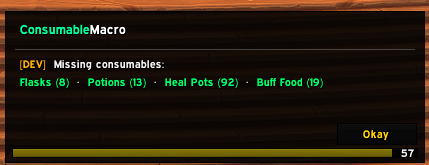
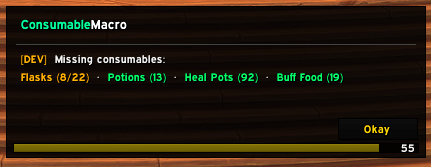
- Reminder — shows missing/low consumables on login and after leaving a dungeon, raid, delve, or scenario. Configurable minimum-count thresholds per tab (checked against your top-priority item in the bags). Fleeting/conjured items (e.g. cauldron flasks) are skipped when picking that item.
- AutoPotion — optional panic-button macro combining a known class/racial self-heal spell, your top Heal Potion, and your Healthstone in one
/castsequence. See below. - Weapon Enhancements — Whetstones, Weightstones and Weapon Oils in one list, auto-applied to whichever hand needs it based on your equipped weapon type. See below.
- Restock — tick items and set a target amount per item; a panel at the Auction House lists what's short, with rank icons and one-click search (Auctionator or default AH). See below.
- Profiles — item lists and settings are stored per profile; every character picks its own. See below.
- Import/Export — share your lists as a single string, per tab.
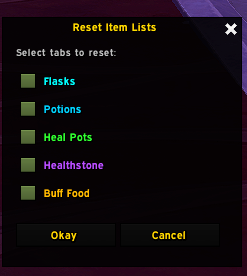
- Reset — clear selected tabs back to empty.
- ElvUI skin support — auto-detected and applied to all frames.
- Combat-safe — all mutating actions are blocked while in combat.
- Full English / German localization.
Usage
/cm— toggle the main window./cm update— force-update all macros immediately./cm profile <name>— switch profile (without a name: show the current one)./cm reset— open the reset dialog (pick tabs, confirm with OK)./cm help— show command list in chat.
Adding items
Type an Item-ID into the input box and press Enter/click Add, or drag an item from your bags onto the drop zone. The addon detects the correct tab automatically (by item subclass, or by name pattern as a fallback).
Options
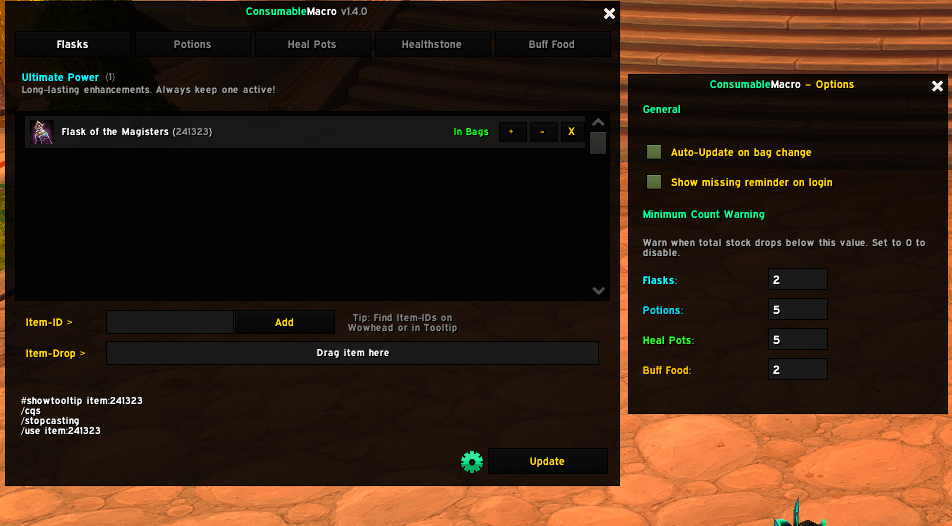
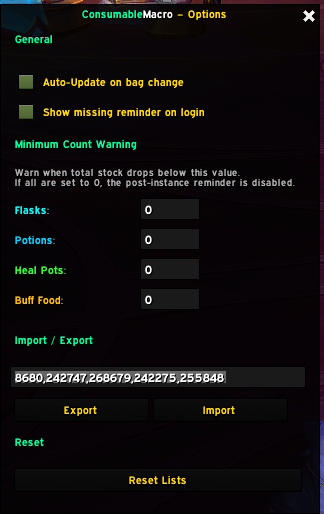
Click the Options button in the main window for:
- Auto-Update toggle, Reminder toggle
- Per-tab minimum count (post-instance/login warning threshold)
- Import/Export
- Profile selection
- Reset Lists
- AutoPotion settings
- Restock setup
Profiles
Item lists, minimum counts, Reminder, AutoPotion and Restock settings live in a profile.
- Options → Profile dropdown: switch, New, Copy current, Rename, Delete.
- Each character remembers its profile. New characters start with their own profile (
Name-Realm); pick a shared one in the dropdown to reuse a setup. - Importing asks whether to put the lists into a new profile or the current one.
- Switching rebuilds all macros. Not possible in combat.
- The active profile can't be deleted. Characters whose profile was deleted get a new one.
- Existing data from older versions is migrated once into the profile Default.
- Only the Reminder window position stays per character.
AutoPotion
An optional extra macro (CM_AutoPotion) for emergency self-healing, separate from the main tabs.
- Enable it in Options.
- Click Configure Priority to set the order the macro tries each category in: Class/Racial Spell, Heal Potion, Healthstone.
- Drag the macro onto your action bar.
Each button press advances one step in the sequence (/castsequence). It resets back to the first step on combat start, or after your configured Reset (sec.) delay — useful for talent-shortened cooldowns. Use the Sync button to read the exact cooldown from a spell that's currently on cooldown (or an approximate base value if it isn't).
If a category has nothing available (unknown spell, empty tab, no matching item in bags), it's simply skipped — the macro never errors out.
Disabling AutoPotion deletes the macro rather than leaving an empty one on your bars.
Weapon Enhancements
One priority list for Whetstones, Weightstones and Weapon Oils — no need for separate tabs per item type.
- Whetstone → edged weapons (swords, daggers, axes, polearms, fist weapons)
- Weightstone → blunt weapons (maces, staves)
- Weapon Oils (and anything else in the list) → any weapon
Each click targets one hand: a hand with no active temporary enchant comes first (mainhand, then offhand). Once every weapon is covered, the hand with the least time left is refreshed - so you can re-apply at any time, even with a few minutes left (the replace popup is confirmed for you). A hand no item in your list fits is skipped. The macro rebuilds on bag changes, on weapon swaps, and periodically (with Auto-Update on), so an expired buff gets picked up even without a bag change.
Restock
Keeps your consumables topped up via the Auction House.
Setup
- Options → Configure Restock.
- Enable Show restock list at the AH.
- Tick the items you actively use and enter a target amount for each item.
- Items without a tab (e.g. something you buy regularly): add them under Other Items via the field at the bottom (item ID, item link, or drag from your bags). The X removes them again.
- Click a section header to fold/unfold it.
- Optional: set a per-item minimum (left box). The item then only shows up once you're at or below it, instead of as soon as you're below target. Empty/0 falls back to the tab's minimum count (Options → Minimum Count Warning).
At the Auction House
- A panel next to the AH lists every ticked item below its target (
have/target), with its rank icon. - Click a row to search for that exact rank. The missing amount is pre-filled as buy quantity (e.g. 12/20 → 8).
- The panel updates on bag changes and can be closed with its X for the current AH visit.
Search backends
- Auctionator (if installed): exact name, rank and quantity via its API.
- Default AH: searches by name, opens the matching rank and fills the buy quantity.
Notes
- Optional: count bank / warband bank in the stock.
- Hidden from the setup (not sold at the AH): Healthstones, conjured/fleeting items and bound items (e.g. Warband-bound Hearty dishes).
- Restock settings are stored per item and are not part of the export string.
- Purchases arrive by mail and are not counted until collected.
Import/Export format
CM:1:flask=191534,191533:potion=191338:healpotion=191380:bufffood=197784Tabs with no items are omitted. Item order reflects priority (first = highest). Both Export and Import let you pick which tabs to include/apply via a selection frame. Restock settings are not exported; on import they are kept for item IDs that already exist in the tab.
Requirements
- WoW Midnight, Interface 120100 (Patch 12.1)
- ElvUI (optional) — auto-detected, skinning applied if present
- Auctionator (optional) — used for Restock searches if installed
Changelog
See CHANGELOG.md for full version history.
Feedback
Found a bug or have an idea? Open an issue on GitHub.
License
MIT with AI restriction (no use for AI or machine learning), see LICENSE.md.
ConsumableMacro Team