ChatterBox
- By
A lightweight WoW addon that lets you send custom chat messages using aliases. Easily create message lists, cycle through them dynamically, and manage everything in a dedicated config window.
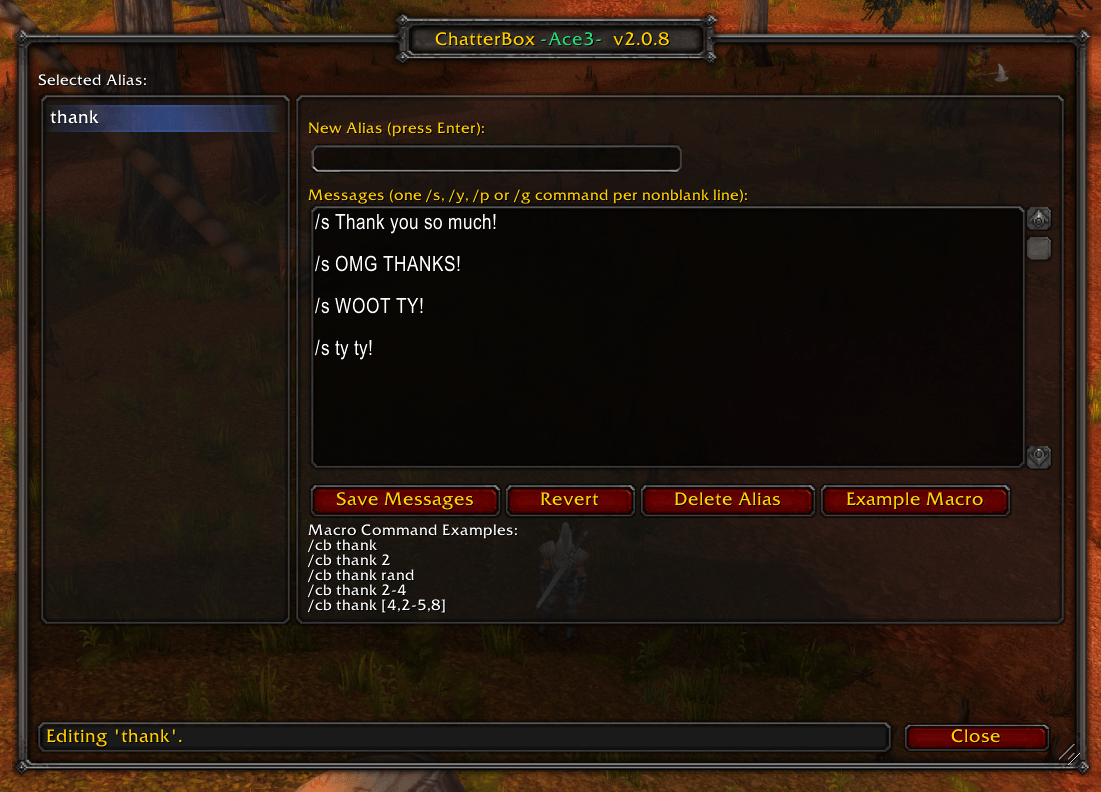
ChatterBox_Standalone.PNG
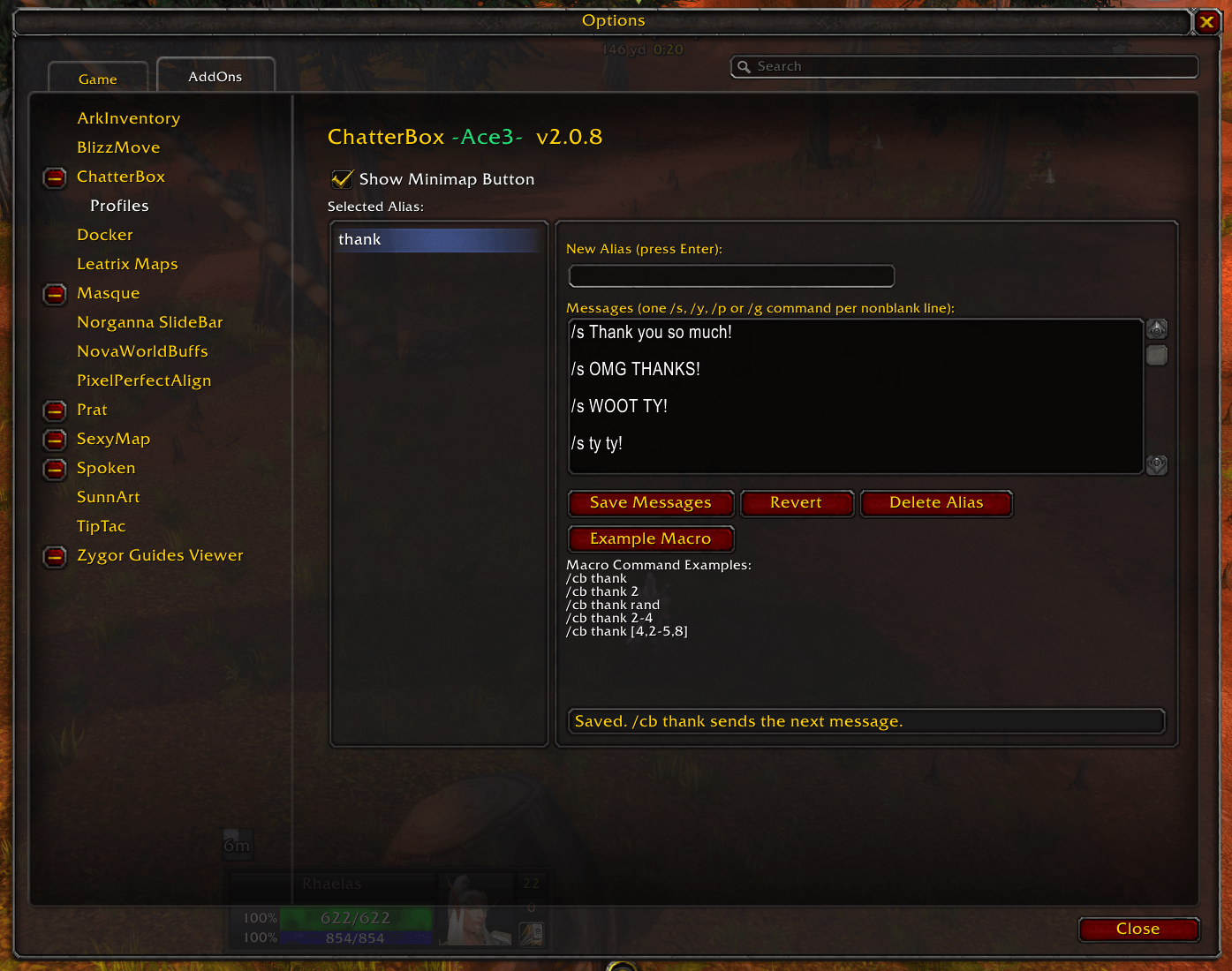
ChatterBox_Options.PNG
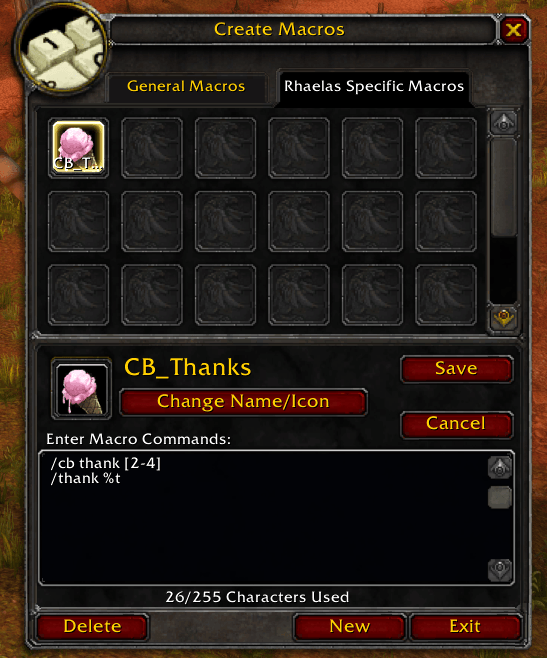
ChatterBox_Macro.PNG

ChatterBox_Minimap_Icon.PNG
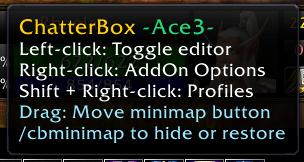
ChatterBox_Minimap_Tooltip.PNG
Description
# ChatterBox
**Save your favorite chat messages. Trigger them with a short command. Spend less time typing and more time playing.**
**ChatterBox** is a lightweight, Ace3-powered chat-alias addon for **World of Warcraft**, created by **Tehdead & Aurion**. Build collections of messages under memorable aliases, then send one saved message at a time using a slash command or in-game macro.
Whether you want quick thank-you messages, a collection of guild greetings, or rotating party announcements, ChatterBox makes them easy to organize and reuse without repeatedly typing them out.
**Current version:** 2.0.8
**Addon category:** Chat & Communication
**Dependency:** None to install separately; the required Ace3 libraries are bundled.
---
## Features
- **Custom chat aliases:** Create named collections of messages, with as many saved messages as you need.
- **Multiple message selection modes:** Use sequential cycling, specific message numbers, random selection, repeating ranges, or interleaved groups of indexes and ranges.
- **Supported chat channels:** Say (`/s`), Yell (`/y`), Party (`/p`), and Guild (`/g`), including their longer command forms.
- **Two ways to edit:** Use the standalone `/cb` window or the full editor embedded in Blizzard's **Options > AddOns > ChatterBox** page.
- **Easy-to-browse alias list:** Select aliases from a scrolling list on the left while editing messages on the right.
- **Reliable editing:** Live status feedback, **Save Messages**, **Revert**, two-step deletion, and validation that protects drafts from accidental loss.
- **AceDB profiles:** Maintain different sets of aliases and preferences using a separate **Profiles** settings entry.
- **Custom artwork:** The enchanted blue spellbook/chat icon appears in the WoW AddOn List, AddOn Compartment where supported, and minimap button.
- **Draggable minimap launcher:** Open the editor or settings without remembering a command. Its position and visibility are saved per profile.
- **Optional example macro:** Create a starter macro only when requested; ChatterBox does not make or overwrite macros automatically at login.
- **Self-contained Ace3 package:** Only the needed Ace3 r1403 libraries are included. No separate Ace3, LibDBIcon, or LibDataBroker installation is necessary.
- **Cross-client design:** Includes interface declarations and API compatibility paths for modern Retail and Classic-family WoW editions.
## Getting started
1. Install the `ChatterBox` folder in `World of Warcraft/<client>/Interface/AddOns/` and restart WoW.
2. Type **`/cb`** in chat to open the standalone editor, or navigate to **Options > AddOns > ChatterBox**.
3. Choose an alias from the list on the left. To create a new one, enter its name in **New Alias (press Enter):** and press Enter.
4. Type one supported chat command per nonblank line in **Messages:**. Blank lines are ignored, so you can leave space between entries.
5. Click **Save Messages**, then run `/cb <alias>` in chat or assign it to a macro.
For example, create an alias named `thank` with these lines:
```text
/s Thank you so much!
/s OMG THANKS!
/s WOOT TY!
/s Thanks again!
```
Then use `/cb thank` to send the first entry. Each subsequent use sends the next one, eventually looping back to the beginning.
**Alias naming:** Names must contain 1-32 letters, numbers, underscores, or hyphens; no spaces. Alias lookups are case-insensitive.
## Commands and selection modes
| Command | What it does |
| --- | --- |
| `/cb` or `/chatterbox` | Open the standalone editor. |
| `/cb thank` | Send the next saved message, cycling 1, 2, 3, 4, then 1 again. |
| `/cb thank 2` | Always send message number 2. |
| `/cb thank rand` | Choose a random message (`random` also works). |
| `/cb thank 2-4` | Cycle messages 2, 3, and 4. |
| `/cb thank [2-4]` | Bracketed single-range form of the same selection. |
| `/cb thank [4,2-4,1]` | Interleave fixed messages with a rotating range: 4, 2, 1, 4, 3, 1, 4, 4, 1, ... |
| `/cbhelp` | Show the available commands in chat. |
| `/cboptions` | Open ChatterBox's AddOn Options page. |
| `/cbminimap` | Hide or restore the minimap button. |
| `/cbmacro` | Create the optional `CB_Thanks` example macro if possible. |
The editor also displays **Macro Command Examples:** with one command per line:
```text
/cb thank
/cb thank 2
/cb thank rand
/cb thank 2-4
/cb thank [4,2-5,8]
```
**Important:** Selectors must refer to message numbers that actually exist in the chosen alias. The `[4,2-5,8]` example illustrates the syntax for an alias with **at least eight messages**; it will not work with the stock four-message `thank` example. ChatterBox rejects invalid or out-of-range selectors rather than sending an unintended message.
### How bracket selectors work
Each comma-separated component gets one turn. With `[4,2-4,1]`, message 4 is sent, then the selected range advances from 2 to 3 to 4 over successive cycles, while message 1 is included after every range selection. This differs from simply flattening the bracket expression into one long list.
Selections maintain separate in-session cycling state by alias and selector. Cycles reset on reload, relevant message edits, or profile changes.
## Supported message formats
Enter one command per nonblank line. ChatterBox accepts:
| Channel | Short command | Long command |
| --- | --- | --- |
| Say | `/s` | `/say` |
| Yell | `/y` | `/yell` |
| Party | `/p` | `/party` |
| Guild | `/g` | `/guild` |
Example of one alias containing multiple channels:
```text
/s Hello there!
/p Ready when you are.
/g Great job, guild!
/y For the Horde!
```
Message text is limited to 255 bytes per line. Invalid or unsupported chat commands produce an actionable error and are not saved. A ChatterBox command triggers **one** selected saved chat message per use; it does not broadcast a whole list at once.
**Blizzard restrictions apply:** Say/Yell and other channels may be restricted by WoW based on hardware input, location, combat/encounter rules, rate limits, or game version. ChatterBox is designed for player-initiated commands/macros, not automated spam, and does not bypass Blizzard's protections.
## Editor and profile management
ChatterBox provides the same core editing experience in two places:
- **Standalone editor:** Type `/cb`, select an alias from the scrolling sidebar, and manage its messages on the right. The window is movable and resizable; v2.0.8 automatically restores a compact height when reopened.
- **Blizzard AddOn Options:** Choose **ChatterBox** to show the main editor. Its **Show Minimap Button** checkbox is directly under the title. Select **Profiles** below the ChatterBox category to manage AceDB profiles.
Editing in either view updates the shared draft. ChatterBox validates edits before switching aliases or closing the standalone editor, prevents invalid drafts from being lost, and provides an explicit **Revert** action. Deleting an alias takes a second confirmation click.
A framed status strip reports the active alias, unsaved edits, saves, errors, and other editor activity. In Blizzard Settings it matches the dark-and-gold status style of the floating editor.
**Saved data:** ChatterBox uses `ChatterBoxDB` and includes migration logic for existing profiles from the original addon and the earlier 2.0 releases. Existing custom messages are retained; updates do not require deleting SavedVariables.
## Custom minimap button
The minimap icon uses ChatterBox's enchanted blue spellbook logo.
| Action | Result |
| --- | --- |
| Left-click | Toggle the standalone ChatterBox editor. |
| Right-click | Open ChatterBox AddOn Options. |
| Shift + right-click | Open Profiles, where supported. |
| Left-button drag | Move the button around the minimap. |
| Hover | Display a tooltip with controls and shortcuts. |
Use the **Show Minimap Button** checkbox in AddOn Options, or type `/cbminimap`, to restore a hidden button. Position and visibility are saved per profile. The button is implemented natively, with no separate minimap library required.
## Optional example macro
ChatterBox will **never silently create a macro at login**. Click **Example Macro** in the editor or use `/cbmacro` to create an optional per-character starter macro named `CB_Thanks`:
```text
/cb thank [2-4]
/thank %t
```
If a macro by that name already exists, ChatterBox leaves it untouched. Macro creation also requires an available character macro slot and follows Blizzard's combat restrictions.
## Installation and updates
1. Download the ChatterBox addon ZIP and extract the `ChatterBox` folder.
2. Place it in the `Interface/AddOns/` folder of the WoW client you play.
3. Replace the previous `ChatterBox` folder when upgrading; do not place a ZIP or a second nested `ChatterBox` folder inside AddOns.
4. Restart WoW, enable ChatterBox in the AddOn List if necessary, and type `/cb` to get started.
**No separate Ace3 addon download is needed.** ChatterBox bundles the specific Ace3 Release-r1403 components it uses. A separately installed Ace3 may coexist, but it is not a required CurseForge dependency.
For extra peace of mind, back up `WTF/Account/<account>/SavedVariables/ChatterBoxDB.lua` before a major upgrade. Do not delete your SavedVariables to apply 2.0.x updates.
## WoW version compatibility
ChatterBox's TOC and compatibility code target the following client families:
- Retail / Midnight
- Classic Era
- The Burning Crusade Anniversary
- Mists of Pandaria Classic
- Titan Reforged
- Forever editions
The addon uses modern `C_ChatInfo.SendChatMessage` when available, with a legacy global `SendChatMessage` fallback. It also includes version-aware settings and AddOn Compartment integration. Compatibility depends on Blizzard's interface versions and restrictions; **this list describes declared support targets, not a claim of full in-game testing on every client or patch**.
## Version 2.0.8 highlights
- More reliable compact sizing for the standalone editor; closes the large blank gap underneath **Macro Command Examples:**.
- Left-side scrolling alias list and a full editor embedded in Blizzard's AddOn Options.
- Custom spellbook icon and draggable minimap launcher with profile-aware position and visibility.
- Matching status displays, safer editing, and individually listed macro examples.
- Bundled Ace3 libraries, preserved `ChatterBoxDB` data, and ongoing compatibility work.
For the complete history of changes from the initial Ace3 rewrite in v2.0.0 through v2.0.8, see **`CHANGELOG.md`**.
---
**ChatterBox by Tehdead & Aurion**
Original enchanted spellbook artwork included with the release kit. Bundled Ace3 components retain their upstream license and attribution.
ChatterBox Team