Dominos Reputation
- By
An independent reputation bar for Dominos with separate faction tracking and location-based Auto-Switch.
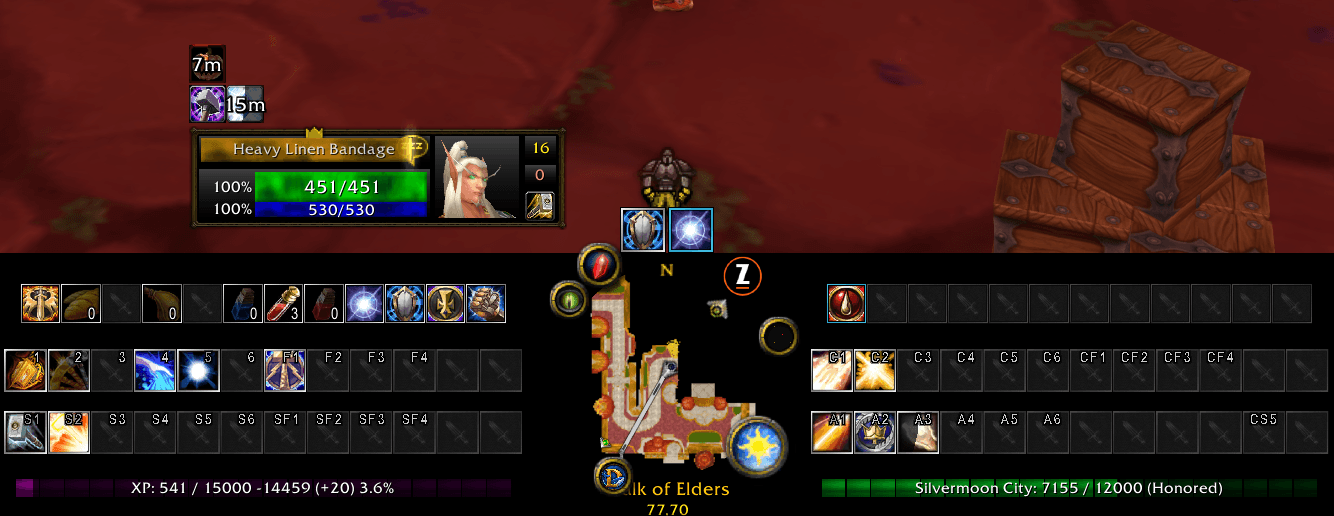
Dominos_RepBar_1.PNG
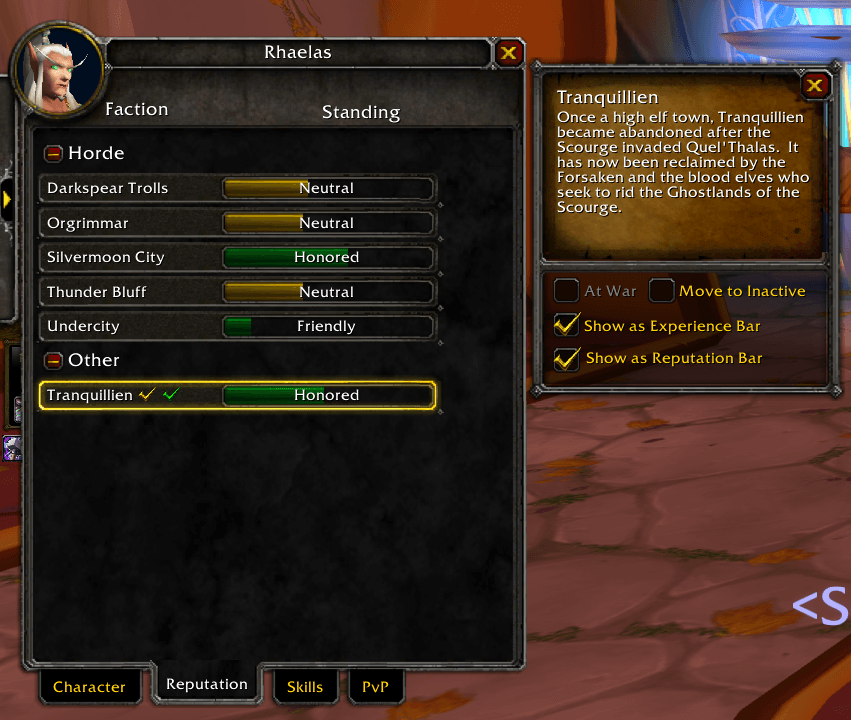
Dominos_RepBar_Checkbox.PNG
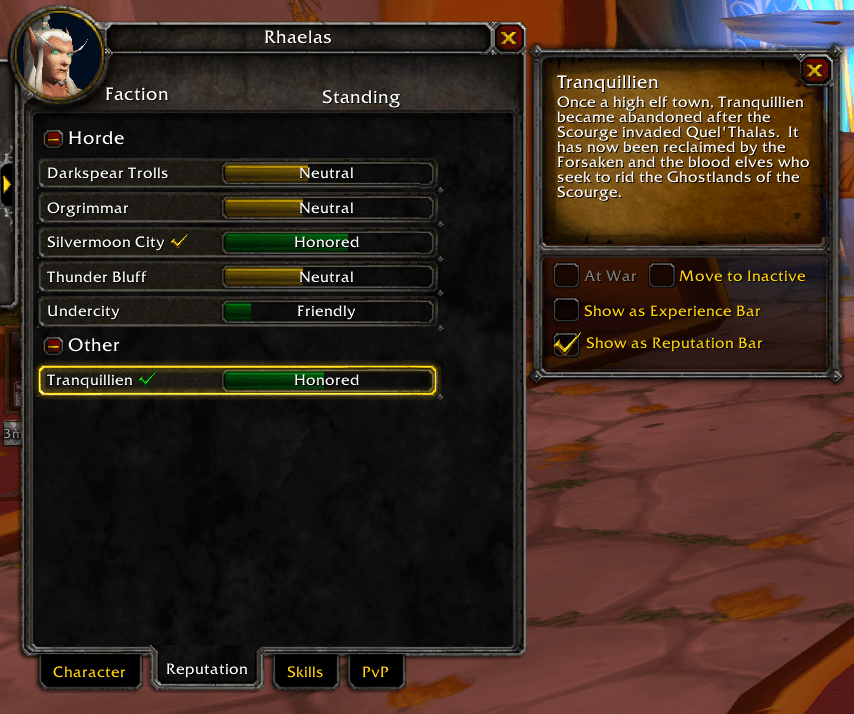
Dominos_RepBar_Split.PNG

Dominos_RepBar_SplitBars.PNG

Dominos_RepBar_EditMode.PNG
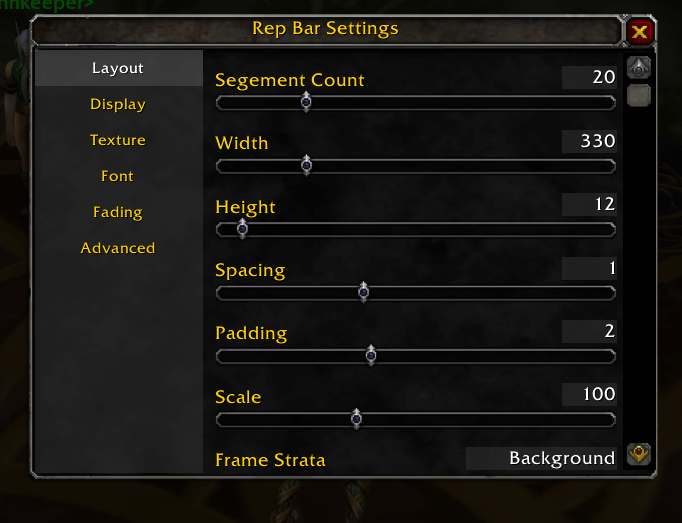
Dominos_RepBar_Options.PNG
Description
# Dominos Reputation
**An independent reputation bar for Dominos, with separate faction tracking and location-based Auto-Switch.**
Keep an eye on a faction while your Dominos Experience bar shows XP, or track **two different factions at the same time** by putting the Experience bar into reputation mode.
## Features
- **Independent faction selection:** choose **Show as Reputation Bar** in the character Reputation panel. A green check beside the faction name identifies the faction tracked by this bar.
- **Native Dominos configuration:** move and configure **Rep Bar** with the familiar Layout, Display, Texture, Font, Fading, and Advanced controls.
- **Separate appearance:** adjust its size, segments, scale, spacing, padding, text, texture, font, and visibility independently of the Experience bar.
- **Optional Auto-Switch:** automatically choose a reputation for mapped zones, subzones, and instances. Unmapped locations fall back to your manual faction.
- **Reputation displays:** show faction name, standing, current progress, maximum, remaining reputation, percentage, or abbreviated values.
- **Client-aware progress:** ordinary reputation, MoP friendship ranks, and modern Renown and Paragon progress where the client provides those features.
- **Character and profile settings:** faction choices are stored per character; bar appearance follows Dominos profiles.
- **Available at maximum level:** the dedicated bar continues showing reputation and does not switch to XP or gold.
## Requirements
Install **[Dominos](https://www.curseforge.com/wow/addons/dominos)** and enable its bundled **Dominos Progress** module. This release targets **Dominos 11.4.1**.
Dominos Reputation is an extension and requires Dominos to work.
## Supported clients
One package includes support for:
- WoW Retail
- WoW Classic Era
- Mists of Pandaria Classic
- TBC Anniversary Edition
- WoW:Forever
Download a file tagged for your game version.
## Getting started
1. Install Dominos and Dominos Reputation, then enable **Dominos**, **Dominos Progress**, and **Dominos Reputation** at character select.
2. Open your character's **Reputation** panel and select a faction.
3. Check **Show as Reputation Bar**. The new bar now tracks that faction, with a green check beside its name in the list.
4. Enter Dominos configuration mode with `/dominos config`, then move or right-click **Rep Bar** to customize it.
To track two factions, use the existing Experience-bar checkbox for faction A and **Show as Reputation Bar** for faction B. Put the existing Dominos Progress bar into reputation mode if it is currently showing XP. The two faction selections are independent.
Uncheck **Show as Reputation Bar** on the tracked faction to clear the independent bar.
## Auto-Switch
Open **Dominos settings → Reputation → Auto-Switch**. The Reputation tab appears immediately after Progress.
Auto-Switch is off by default. When enabled, mapped instances take priority over mapped subzones and outdoor zones. The addon includes Classic/TBC location rules and selected Pandaria and Retail expansion zones. It uses localized area names or map IDs as appropriate for the client.
Examples include Honor Hold or Thrallmar in Hellfire Peninsula, Cenarion Expedition in Zangarmarsh, The Violet Eye in Karazhan, and The Tillers in the Valley of the Four Winds.
Locations without a rule use your manual selection. A manual choice while Auto-Switch is enabled lasts until the next location change; turning Auto-Switch off restores your manual faction. The Experience bar's faction selection stays independent.
**Auto-Switch uses a curated location list. It does not identify every faction in every zone or choose reputations from your current quest or target.**
## Manual installation and upgrades
Extract the download into your client's `Interface/AddOns` folder. The path should be:
`Interface/AddOns/Dominos_Rep/Dominos_Rep.toc`
When upgrading, exit WoW and replace the existing `Dominos_Rep` folder. Your existing character selections and Dominos profile settings are preserved.
## Reporting an issue
Please include the WoW client and build, Dominos version, Dominos Reputation version, faction name, steps to reproduce, and any Lua error text. Enable errors with `/console scriptErrors 1` and reload if needed.
## Credits and license
Created by **Tehdead**. Built around Tuller's Dominos module conventions and native configuration controls. The segmented bar renderer and menu layout are adapted from **Dominos Progress 11.4.1** by **Tuller**, with the BSD license and attribution retained.
Distributed under the **BSD 3-Clause license**. This is an independent extension; it is not an official Tuller release or endorsement.
Dominos Reputation Team