Blackthornes Tradeskills
- By
Shows which of your crafts will make a profit on the auction house, then helps you queue them, craft them and post them for sale.
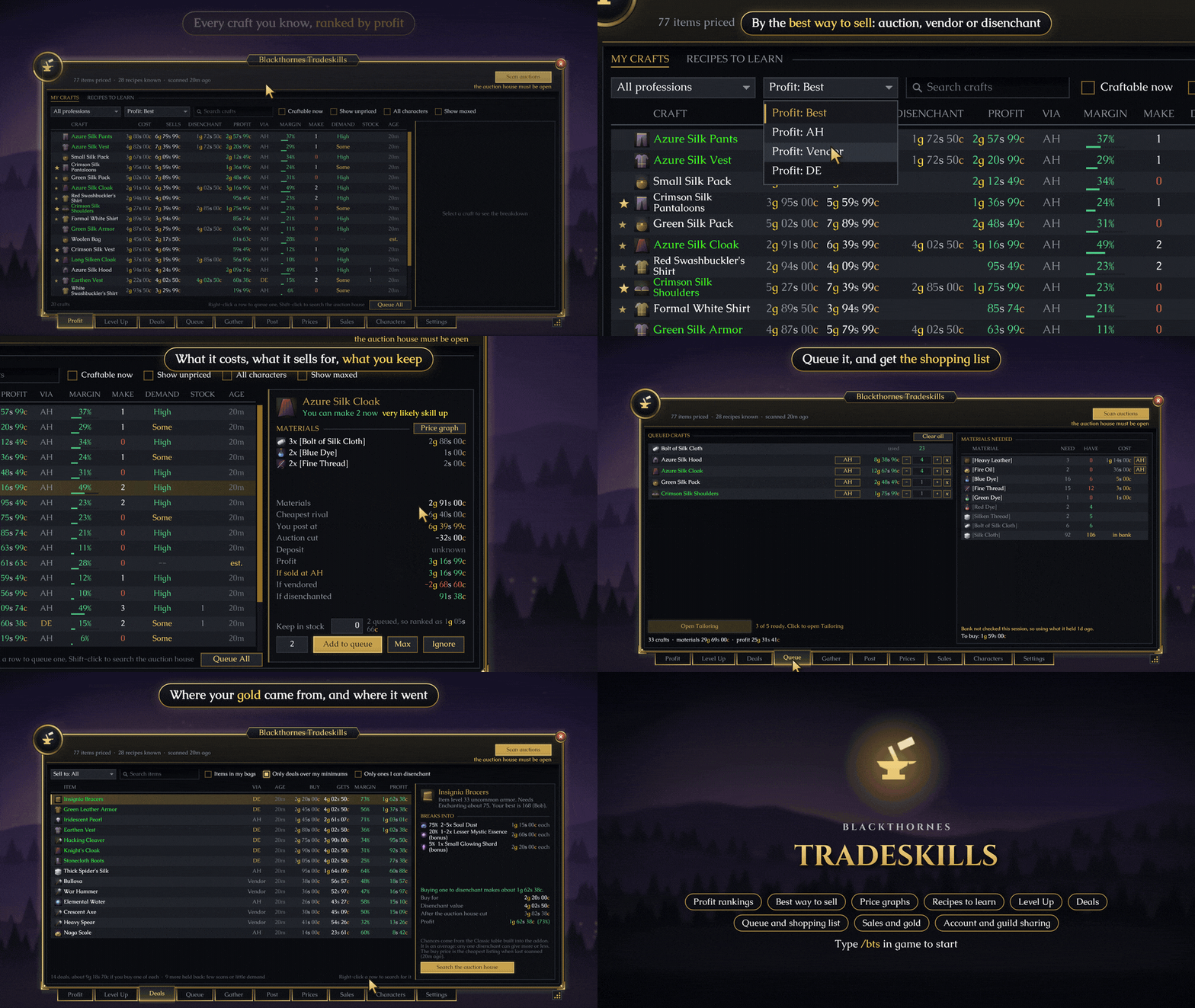
Blackthornes Tradeskills
Tradeskills helps you make money from your professions. It scans the auction house, works out what every craft costs and what it brings in, and puts the ones worth making at the top. From there you can queue them, get a shopping list, craft, post, and see what each sale really earned, all from one window.
Built for WoW: Forever.
Profit
Every craft you know is listed with what it costs, what it sells for and the profit. The profit is the best of three ways to sell: the auction house, a vendor or disenchanting, and the VIA column says which one wins. A switch ranks the list by any one of them instead. Disenchanting only counts when one of your characters can disenchant the item.
Click a craft for the full breakdown: the materials, the cheapest listing you're up against, your price, the auction cut, and what it makes each way. The DEMAND column says High, Some or Low, from your own sales once you have a few, and from how fast the auction house stock sells before that. Recipes that still give skill have a star.
Costs are worked out properly. An in-between material like a bolt of cloth costs whatever is cheaper, making it or buying it. Thread, dyes and vials cost the vendor price. When you're the only seller, a craft is priced from the market and your material cost instead of sitting at an old price. Queue All fills the queue with everything worth making, up to how many you want to keep on hand, and Ignore takes a craft off the list.
Recipes to learn
Switch to Recipes to learn for every recipe in a profession you don't know yet, with what it would make, what the recipe costs (trainer, vendor or auction) and where to learn it. Recipe items such as Patterns and Plans show the same on their tooltip, with who on your account already knows it and how many crafts it takes to pay for itself.
Price graphs
Tradeskills keeps the cheapest listing once an hour for a week for everything your characters craft, their materials and the items you star. See it as a 24 hour or 7 day graph on the Prices tab or in a craft's breakdown, with a line saying when the item is usually cheapest and dearest. Hover the line for the price at any hour.
On the Prices tab you can set a price of your own for any item: use it instead of the auction price, or only as a floor. Everything else follows it.
Levelling a profession
The Level Up tab lists the recipes that still give skill, orange first, ranked by real cost: what the materials cost less what the item gets back when you sell, vendor or disenchant it. Pick a number and click Craft or Queue. Recipes to learn is here too, ordered by the skill each one needs.
Deals
The Deals tab lists every auction house buy worth making: gear to disenchant, items a vendor pays more for than they're listed at, and items listed well under their usual price to put back up. Pick Sell to for one kind or all of them. Pick a deal to see how it pays: what it breaks into, what a vendor gives or what to list it at, and the profit after the cut. Your minimum profit and margin apply.
Queue, shopping list and crafting
Queue a craft with one click and the queue adds the in-between crafts for you. The shopping list shows what you need, what you have (bags, bank and mail all count) and what the rest will cost. Each queued craft has an AH, DE or Vendor button for how you'll sell it, starting on whichever pays most.
Beside your profession window, a craft pane has the queue with Craft buttons and a progress bar with the time left. At the auction house the shopping list has a Search button for each material, and picking one fills in how many to buy. At a vendor, Buy materials buys what the queue needs.
Optional extras: let your alts make sub-crafts when they make them for less, with a panel at the mailbox to send them what they need. Disenchant next breaks the next item the queue marked DE, one click at a time, and Sell marked sells the items the queue marked Vendor. They never touch anything blue or better, anything worn, or anything the queue didn't make.
Posting
Ready to sell sits beside the auction house with what to list and the price for each. Listings undercut the real cheapest rival, and anything that would sell below what it cost to make is marked red and refused. Several copies of an item can go up in one click.
Sales and gold
The Sales tab lists every sale with its profit over what the item cost to make, plus what's still listed on each character. After a mailbox visit a report shows what you collected, your best sale and what came back, and celebrates a new record.
Gold in and out is a chart of where your gold came from and where it went: auction sales and buys, deposits, vendors, repairs, loot, quests, training and flights, for today, the last 7 or 30 days, or dates you pick. Hover a bar for what made it up. Gold moved between your own characters is kept apart.
Tooltips
Hover any item for its auction value, the lowest listing from your last scan (marked when it's yours), what it's worth disenchanted, its demand, and for your own crafts what it cost you to make and the profit at today's price.
Your characters
The Characters tab shows every character's professions, gold and bags, and the Bank view searches every bank on your account. Link a character on your other account (each side names the other), and when both are logged in on the same realm they swap characters, so the other account's show up with your own. Guild prices fill in items you haven't scanned or whose price has gone stale, from guildmates who also use Tradeskills; turn it off any time.
Make it yours
Settings are on seven pages with a search box. Drag the gold grip to make the window anywhere from 50% to 150% of its size, and pick a bigger text size if you like. Every sound has its own switch, and there are key bindings to open the window and to disenchant.
Commands
| Command | What it does |
|---|---|
/bts |
Open or close the window |
/bts scan |
Scan the auction house (open it first) |
/bts top |
The most profitable crafts right now |
/bts why <craft> |
Full cost breakdown for a craft |
/bts price <item> |
What the auction house says |
/bts de <item> |
What an item disenchants into |
/bts stock <item> |
How many you have, and where |
/bts sold <item> |
What it really earned |
/bts recipes |
Recipes you haven't learned, with what each is worth |
/bts bank |
Every character's bank |
/bts haul |
The report from your last mailbox visit |
/bts salealarm on |
Sound when an auction sells |
/bts size |
Window size: small, normal, large or a percent |
/bts share |
Link your other account, or turn guild prices on or off |
/bts help |
Every command |
Good to know
No libraries needed. Works well alongside Blackthornes Farmer, which uses these prices to say what each kill is worth (the Gather tab can turn a material you need into a Farmer goal), and Blackthornes Equipment, which puts a green arrow on upgrades in every Tradeskills window.
Community
Questions, ideas or bugs? Join us on Discord: https://discord.gg/f2geDecrw2
Blackthornes Tradeskills Team