
BigNoteBox
- By
BigNoteBox is a modern and feature rich in-game notepad addon letting you create, organize, & access notes without leaving WoW. Track quests, boss strategies, crafting, other info. It keeps your notes handy & shows them when needed by place or situation!
File Details
BigNoteBox v1.6.0
- R
- Apr 27, 2026
- 19.91 MB
- 113
- 12.0.5+2
- Retail
File Name
BigNoteBox_v1.6.0.zip
Supported Versions
- 12.0.5
- 12.0.1
- 12.0.0
Changes in v1.6.0
Major feature: Rich notes!
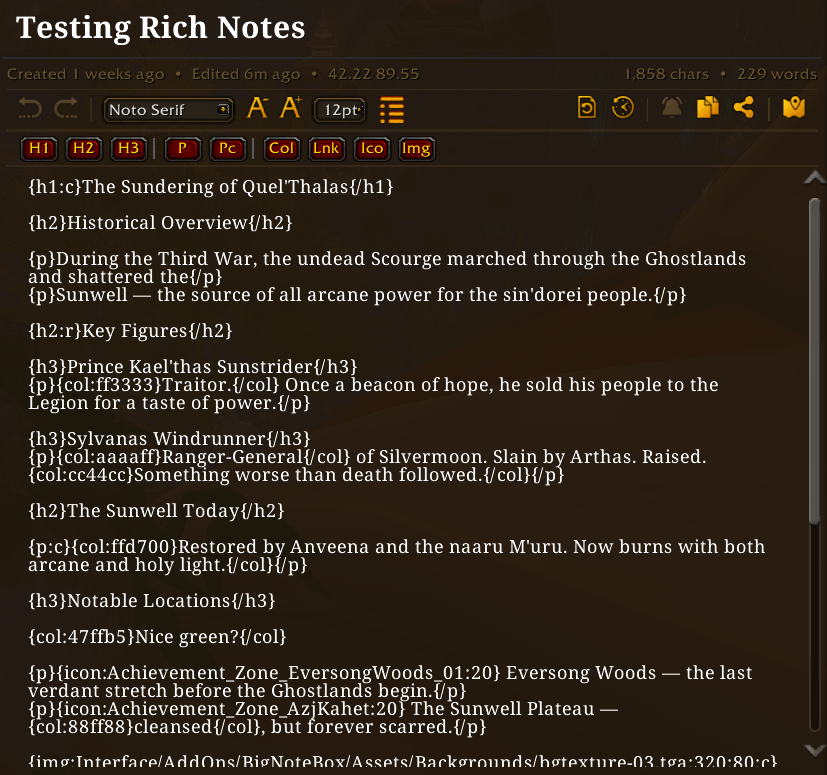
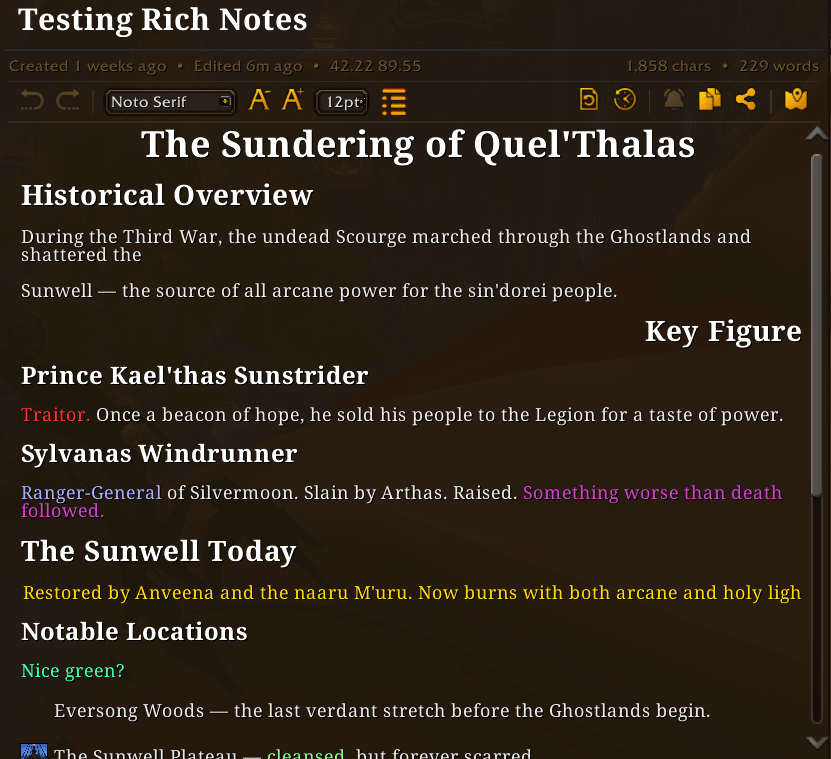
BigNoteBox now supports "rich notes". When creating a new note you can make it a rich notes which behave like a very rudimentary HTML editor. It will also give you a new toolbar below the WYSIWYG toolbar above the note body area. These rich notes use the same tagging system as Total RP 3. So you could easily move notes between BNB and Total RP 3. I'm working on make this process easier for those of you that use TRP3, and a separate addon to integrate the two more. You can also convert a regular note to a rich note and start adding your formatting, or convert a rich note to a normal note (this will remove all formating tags and only keep text).
- Added: Rich notes, a new note type for those that want to "format" their notes.
- Added: You can now have BNB randomize which skin you use on relog/reload in main config → appearance → skins section. Only in skin mode
- Added: You can add your own images to use in rich notes in the UserImages folder. There is a readme file there on how to add your own files
- Added: Clicking the Col button in rich note toolbar will let you select a color before adding it
- Added: Clicking the Img button in rich ntoe toolbar will give you a dialogue box to type inn file name and size
- Added: You can add a keybind to quickly enter editor mode when viewing a rich note (both from "ESC → Options → Keybindings → BigNoteBox" and "Main config → Features → Rich Notes")
- Change: Moved "Hide entire WoW UI in focus mode" from Editor to Features under "Focus mode"
- Change: Sticky Notes now support rich notes. You can toggle on or off showing the sticky note as arich note or in plain text
- Change: Moved "Text color" in the sticky note settings window from the "Appearance" tab to top of the "General" tab
- Fixed: A bunch of small and annoying stuff to numerous to mention
Changes in v1.5.4

- Added: The camera can now orbit your character in focus mode. Can be configured or turned off in Config → Features → Focus Mode. The feature can also be stopped in the focus mode window itself
- Added: There is now an overlay in focus mode that is either dark (slider for transparency) or it can follow the color
- Added: If you have Narcissus installed, BNB will suppress the screensaver mode in Narcissus while you are in focus mode
- Change: The brightness for skin mode can now go to 3.0 making the skin much brighter
- Change: The topbar icons are also colored in skin mode
- Change: Tag chips below note body are now colored in skin mode
- Change: The search input box is now colored in skin mode
- Fixed: If refbox or share note windows were open on entering combat all other windows would go away except those two
- Fixed: There is now a dividers line between Character Sidebar and Tag Tree View sections in main config → features
- Fixed: The info line bellow note title in note body is much lighter, was very hard to see
Changes in v1.5.3

- Added: There is now a tag tree view which can be toggled with the button to the left of the search field
- Fixed: The "Import Note(s)" window that opens from the welcome panel is now skinned like everything else in skin mode
- Fixed: The "Open config" button will now say "Close config" if the config window is in fact open
Changes in v1.5.2
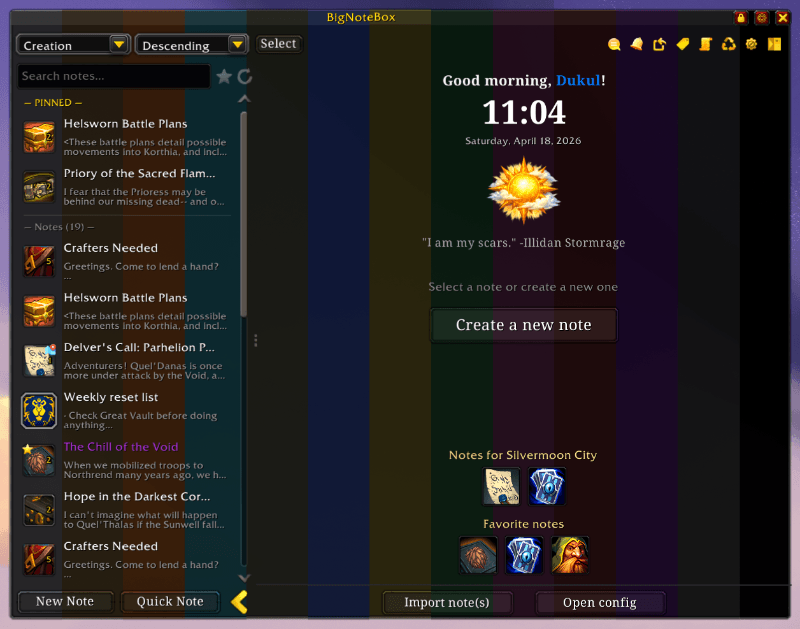
- Added: There are now 12 colors to choose from including an OLED version that is pure black
- Added: There is now a slider undre the color dropdown for skins that let you change the brightness of the selected skin
- Change: The main config has been made in the skinned version like everything else
- Change: Made the skinned version of the main config window. Now all windows are done!
- Change: All buttons are now in skin mode now follow the color theme
- Change: The sidebar border will now follow the color theme in skin mode
- Fixed: Importing notes using main "Config → Backup → Import" will now ask if you are sure before you import anything
- Fixed: Close buttons for all other windows other than the main window were wrong
Changes in v1.5.1
- Added: You can now migrate notes from the addons Notepad, Notes and TinyPad too
- Added: There are 8 more skins to choose from Midnight, Ember, Arcane, Fel, Titan, Frost, Emerald and Light
- Removed: Left over code from when I was working on a classic version
Changes in v1.5.0
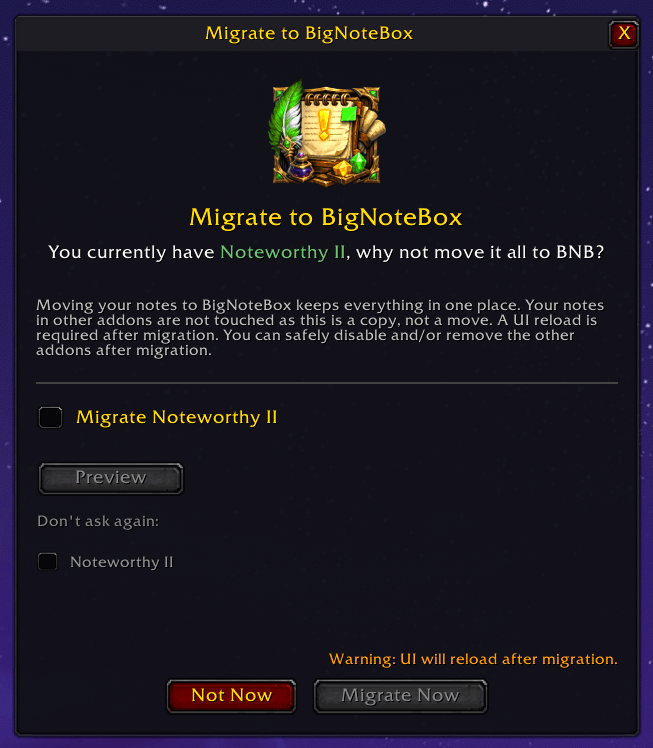
- Major feature: Migration from NoteworthyII, TakeANote and YetAnotherNotepad. If you have any of the three you will get a popup window when you start the game that asks if you want to migrate your notes from them to BNB. This will not remove the notes for the three other addons, only make copies of the notes in BNB. There is also a preview window so you can see what is migrated to BNB
- Added: New section in "Config → Advanced" for migrating from the three addons above. This section will only show if any of the three addons are installed and active
- Added: You can now show/hide the sidebar using the sidebar button in the topbar to the right of the config cog
- Added: The time of day icon that shows in the note window with no note selected now has an icon for dawn and dusk
- Fixed: Importing a shared note wouldn't show refbox content if there was any
- Fixed: Ctrl+C popup didn't work as intended, fixed it and added a nice AutoCast animation to make it pop more
- Fixed: Disabling the sidebar in "Config → Features → Character Sidebar" will now set the filter to "All notes", before it would keep the current selected sidebar item