Better Dungeon Loot
Automatically handles Greed, Disenchant, and Bind confirmations while providing a cleaner, smarter dungeon loot interface
Screenshot 2026-07-08 071630.png
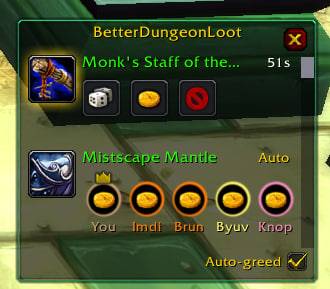
photo_2026-07-07_23-02-13.jpg
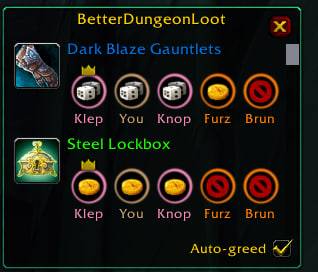
photo_2026-07-07_22-30-48.jpg
Screenshot 2026-07-09 140527.png
Description
Better Dungeon Loot
Tired of clicking Need / Greed / Pass on every single dungeon drop — and then confirming a "this will bind to you" popup on top of it? Better Dungeon Loot does the boring part for you and keeps the loot you care about one click away.
What it does
Auto-greed what you can't use. When a drop isn't for your class, the addon greeds it automatically. Pick the rule that suits you:
- Anything I can't equip/use — greeds everything your character can't roll Need on.
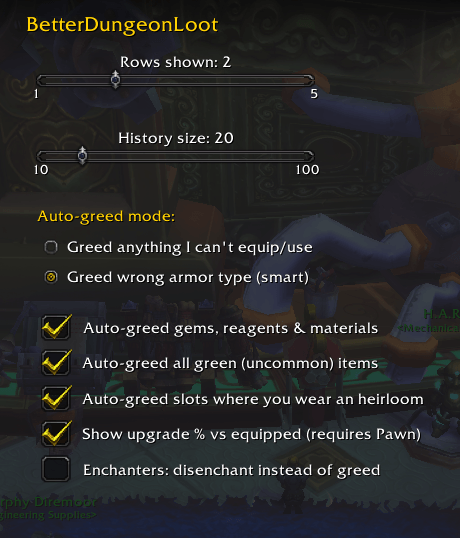
- Wrong armor type (smart) — greeds body armor that isn't your class's armor type for your level (e.g. cloth/leather for a plate class), and leaves the rest to you.
- Greed everything that isn't an upgrade — with Pawn installed, greeds every drop Pawn doesn't consider an upgrade for your spec, and leaves real upgrades for you to roll on.
Auto-confirm binding. The "this item will become soulbound" confirmation is accepted for you, so blue+ drops don't interrupt you mid-fight.
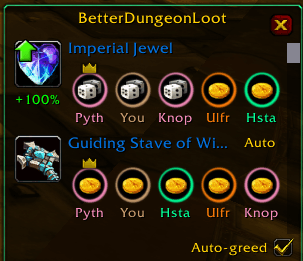
A clean loot log instead of centre-screen clutter. Blizzard's roll frames are hidden and replaced by a small, movable window:
- Items that still need your decision are pinned to the top and pulse for attention — roll Need / Greed / Pass / Disenchant right there, with a countdown bar (green → yellow → red) showing how long you have left to roll.
- Once rolled, the item shows who rolled Need as class-coloured circles, with a crown over the winner — great for spotting ninja looters.
- Closed the window? A drop that needs a roll opens it automatically, then closes again once there's nothing left to roll.
- Ctrl+Right-click an item to try it on in the Dressing Room.
- Scrollable per-character history (up to 100 rolls) that survives
/reload.
Works with Pawn. If Pawn is installed, a green upgrade arrow appears on the icon and the upgrade percentage versus your currently equipped item — for your active spec's scale — is shown right under it, so you can tell an upgrade from a side-grade at a glance. Better Dungeon Loot will also never auto-greed an item Pawn calls an upgrade — it offers you the roll instead.
Handy extras.
- Optionally auto-greed gems/reagents/materials, all green (uncommon) items, or drops for a slot where you already wear an heirloom.
- "Wrong armor type" mode also greeds weapons your character can't use.
- Minimap button (left-click: window, right-click: settings).
- Settings panel: rows shown (1–5), history size (10–100), auto-greed mode, and more.
By default it only acts in dungeons and raids, so the open world is untouched.
Getting started
- Left-click the minimap button (dice icon) to show/hide the window.
- Right-click it, or type
/bdl config, to open settings. /bdllists all commands.
Built for Mists of Pandaria Classic (5.5.4).
Better Dungeon Loot Team