Enemy Totem Marker
Marks enemy totems on their nameplates with the totem's icon, a lifetime countdown, and an element-colored border.
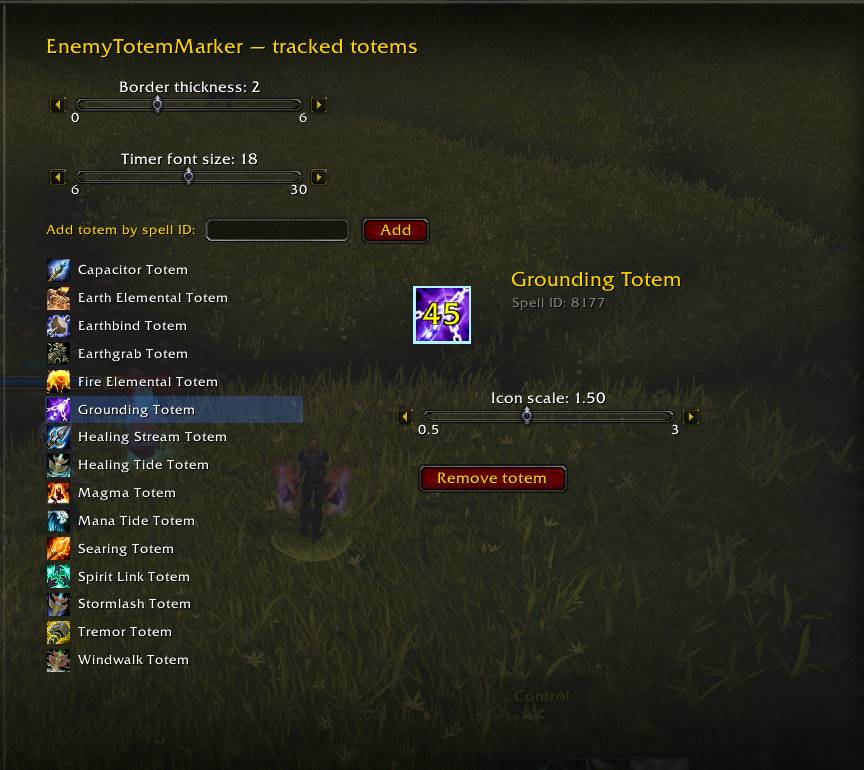
photo_2026-06-28_12-49-28.jpg
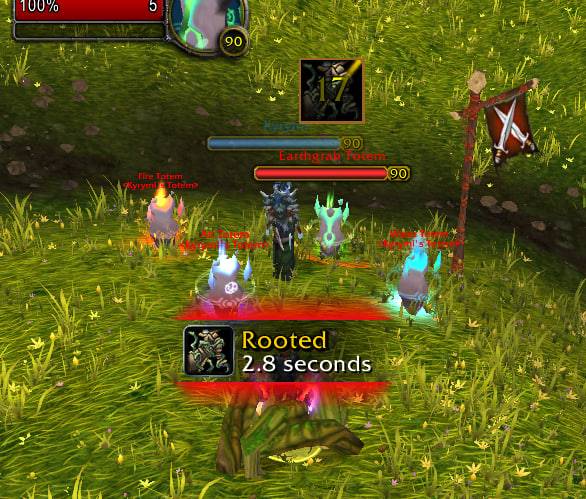
photo_2026-06-28_13-53-55.jpg
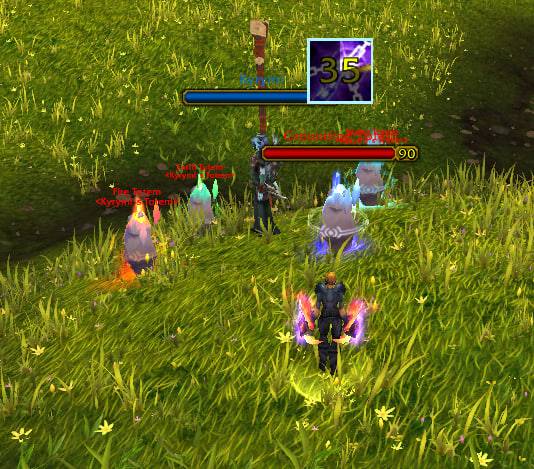
photo_2026-06-28_12-48-48.jpg
Description
Enemy Totem Marker
Never miss an enemy totem again. Enemy Totem Marker places the totem's icon above every enemy totem's nameplate, with a lifetime countdown and an element-colored border so you can tell at a glance what just dropped and how long it lasts.
Built for Mists of Pandaria Classic (5.5.4).
Features
- Icon on the nameplate — every enemy totem is marked with its real spell icon (or a generic totem icon for unknown ones).
- Lifetime countdown — known totems show a timer counting down their duration, so you know exactly when Grounding, Capacitor, Tremor, etc. expire.
- Element-colored border — the marker border is tinted by the totem's element (Fire / Earth / Water / Air), for instant recognition.
- Per-totem icon size — make the totems you care about (Capacitor, Grounding, Spirit Link…) bigger than the rest.
- Scaling timer — the countdown font scales together with the icon.
- Fully configurable in-game — a tracked-totem list you can edit yourself.
How to use
- Install and log in — the addon enables the "show enemy totems" nameplate option automatically.
- Enemy totems are now marked on their nameplates.
- Open the options panel to customize: ESC → Options → AddOns →
Enemy Totem Marker, or type
/tm config.
Options panel
- Border thickness — global border width (with +/- steppers).
- Timer font size — global countdown font size.
- Tracked totem list — every totem the addon recognizes.
- Add a totem by its spell ID.
- Remove a totem from the list.
- Icon scale — per-totem size, with a live preview that mirrors the on-nameplate marker (border + scale + sample timer).
Slash commands
/tm— inspect your current target and print its totem info (name, npc ID, whether it's recognized) — useful for finding spell IDs to add./tm config— open the options panel.
Notes
- All enemy totems are marked. Totems in the tracked list also get their real icon, countdown, element border and custom scale; unrecognized totems still get a generic marker so you never miss one.
- Found a totem that isn't recognized? Target it, run
/tmto read its info, then add its spell ID in the options panel.
TBC Classic (2.5.5) Build
A separate Burning Crusade Classic build is available on this same project. Ported from the MoP version by Denlex92.
It keeps the same idea (icon + element-colored border + timers above enemy totem nameplates) but is adapted to the older 2.5.x engine. Key differences from the MoP build:
Totems matched by name, not spell ID — icons are hardcoded per totem, so it doesn't rely on GetSpellInfo. Covers the full TBC shaman roster (Grace of Air, Windfury, Wrath of Air, Tremor, Earthbind, Stoneskin, Searing, Fire Nova, Magma, Totem of Wrath, Healing Stream, Mana Spring, Mana Tide, resistance and cleansing totems, etc.).
Timers only on totems that matter — to avoid clutter, only the critical PvP totems get a countdown:
| Totem | Timer |
|---|---|
| Tremor Totem | Tick timer (3s pulse cycle, to time fear/charm/sleep breaks) |
| Earthbind Totem | Lifetime (45s) |
| Grounding Totem | Lifetime (45s) |
| Mana Tide Totem | Lifetime (12s) |
| Fire Nova Totem | Lifetime (5s) |
| All others | Icon only, no timer |
- Enlarged important totems — key PvP totems get a bigger icon automatically.
- Simpler options panel — global border thickness and timer font size only (legacy ESC → Interface → AddOns → EnemyTotemMarker). No editable tracked-totem list and no per-totem scaling — the totem roster is fixed.
Everything else — the element color scheme, the scaling timer font, and the /tm / /tm config commands — works the same as the MoP build.
Enemy Totem Marker Team