Burst Cooldown Tracker
A compact, movable icon bar that shows your burst (major offensive) cooldowns at a glance — so you can line them up for a burst window.
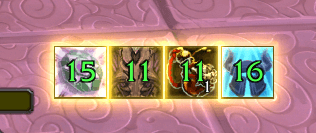
image001.png
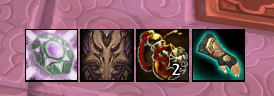
image003.png
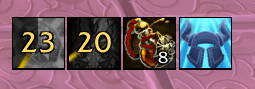
image002.png
Description
Burst Cooldown Tracker
Compact, movable icon bars for PvP: one shows your burst (major offensive) cooldowns so you can line them up for a burst window, and a second watches the buffs you keep on yourself and lights up the moment one is dispelled, purged or drops.
Built for World of Warcraft: Mists of Pandaria Classic (5.5.4).
What the cooldown bar tracks
- PvP trinkets — on-use Badge of <type> and proc Insignia of <type> (recognised across all seasons). Non-burst trinkets (Medallion, Emblem) are ignored.
- Profession procs — tailoring cloak embroideries (Swordguard / Darkglow / Lightweave) and engineering glove tinkers (Synapse Springs / Phase Fingers). Shown only if you have the profession and the enchant.
- Custom spells — add any ability by its spell ID.
Each icon has three states:
- Ready — bright icon.
- Active — bright + pulsing glow + green timer (its buff is up).
- Cooldown — greyed out + cooldown sweep + amber timer.
A small white number in the corner shows stacks (e.g. Tigereye Brew charges) while the source is idle.
The Buff Watch bar
A second bar that watches the buffs you maintain on yourself and glows an icon when one is missing — so a stripped Blessing, Power Word: Fortitude or similar effects never goes unnoticed in the arena.
- Comes seeded with a per-class preset of the usual maintained buffs (Blessings, Fortitude / Inner Fire, Mark of the Wild, shouts, presences, armors, shields, Legacy of the Emperor / White Tiger, …). Preset IDs are verified by name from your spellbook at login, so a wrong built-in ID fixes itself.
- Add or remove any buff — type an aura ID, or pick an ability from your spellbook.
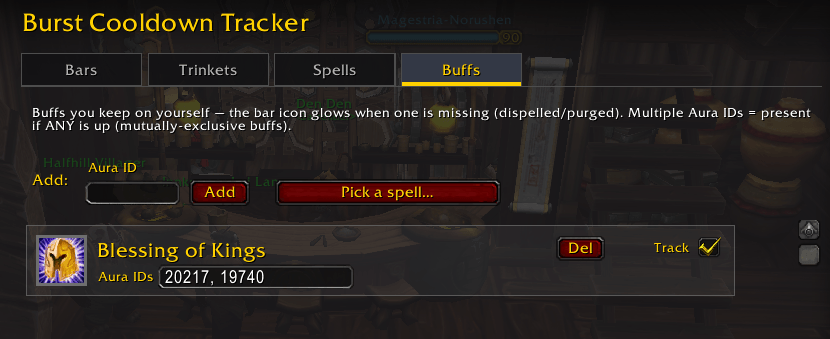
- Interchangeable buffs (e.g. Blessing of Kings or Might) are one icon that shows whichever one is actually on you — even if another player overwrote it — and only glows when none of them is up.
- Show only missing buffs (on by default) hides buffs that are up, so the bar collapses to nothing while everything is fine and only surfaces what needs recasting.
Setup
For most sources there's nothing to do — equipped trinkets and profession enchants are detected automatically, buff IDs / cooldowns are filled from a built-in database, and the Buff Watch bar is pre-populated for your class.
Open the options with /bct config (or ESC → Options → AddOns → Burst Cooldown Tracker). Settings are grouped into tabs:
- Bars — for each bar (cooldown and Buff Watch): an Enabled toggle, icon size, and anchor / grow direction, plus Show only missing buffs for the Buff Watch bar.
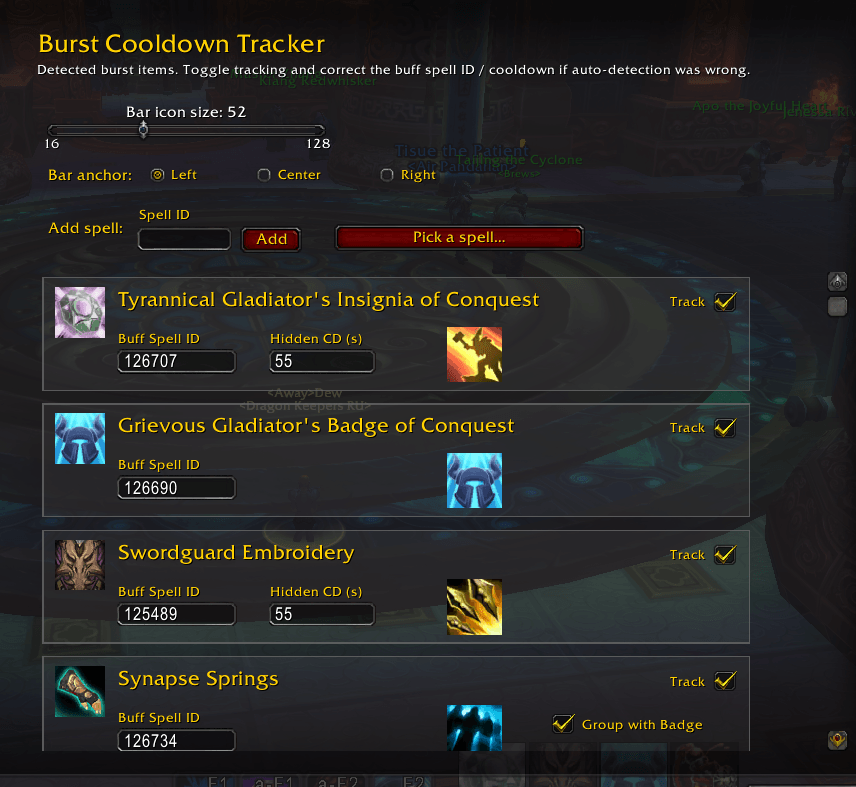
- Trinkets — auto-detected gear; toggle tracking, fix a Buff Spell ID or Hidden CD, show the buff's icon on the bar instead of the gear icon, or group items that share a slot (e.g. on-use trinket + Synapse Springs).
- Spells — add custom spells (type a Spell ID or pick from a scrollable list of your cooldown abilities).
- Buffs — the Buff Watch list: add / remove buffs and edit their Aura IDs.
The Buff Spell ID and Stacks Buff ID fields accept several IDs separated by commas. Use this when the same ability appears under a different spell ID by context — e.g. Tigereye Brew stacks are 1247279 in the world but 125195 on arena, so enter 1247279, 125195. 
Settings are saved per character.
Slash commands
| Command | Action |
|---|---|
/bct |
show / hide the cooldown bar |
/bct config |
open the options panel |
/bct size |
cooldown bar icon size (16–128) |
/bct lock / /bct unlock |
lock / drag the cooldown bar |
/bct reset |
reset this character's settings (reloads UI) |
/bct scan |
print equipped trinkets, enchant IDs and current buffs (diagnostics) |
/bct buff |
show / hide the Buff Watch bar |
/bct buffconfig |
open the options panel on the Buffs tab |
/bct buffsize |
Buff Watch bar icon size (16–128) |
/bct bufflock /bct buffunlock |
lock / drag the Buff Watch bar |
Notes
- Tracks your own cooldowns and buffs only.
- Proc trinkets / embroideries have no cooldown API, so their "hidden CD" is an estimate timed from the proc — correct it in the options if needed.
- Class buff presets are best-effort for 5.5.4; use
/bct scanto read a buff's real aura ID and correct it on the Buffs tab if needed.
Burst Cooldown Tracker Team