Azeroth Mentor Probe
- By
A stand-alone tester that measures memory, CPU, FPS and load times of Azeroth Mentor 4.6 and 5.0.
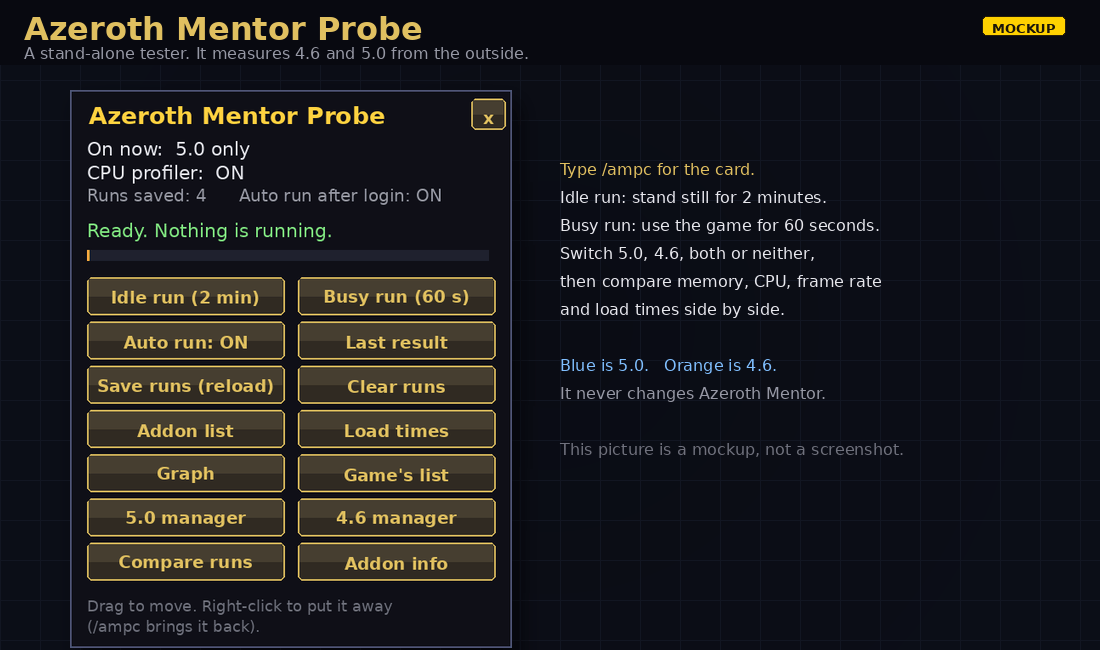
Mockup, not an in-game screenshot. Example numbers only. Type /ampc for the card: idle and busy runs, the addon list, graphs and compare.
Description
Azeroth Mentor Probe
A stand-alone testing tool that measures Azeroth Mentor 4.6 and 5.0 from the outside. It reads the game's own numbers for memory, CPU, frame rate and addon load times, with the same code for both, so the comparison is fair. It never changes Azeroth Mentor itself.
Requirements
Nothing else is required. The Probe works on its own.
It compares best when Azeroth Mentor is also installed, so you can turn 4.6, 5.0, both, or neither on and measure the difference.
This is a testing and developer tool. It is not part of Azeroth Mentor. It does not change Azeroth Mentor's code, settings or behavior. The only thing it can switch is which addons are on or off, so you can run a fair test. Those changes wait for a reload, and a Restore button puts your addon list back.
Supported games
- Classic Forever (game version 1.60.1)
- Not for Retail or Classic Era
Features
- A small status card after login (or type
/ampc). It shows what is on, whether a run is going, and a button for every command. Drag it to move. Right-click puts it away;/ampcbrings it back. - Idle and busy runs. An idle run lasts 2 minutes: stand still and touch nothing. A busy run lasts 60 seconds: use the main window, bags and fight if you can. Each run is named by what was on: 5.0 only, 4.6 only, both on, or neither (a baseline).
- An addon list (
/ampc addons) with an on/off switch for every installed addon. Presets set 5.0 only, 4.6 only, both, or neither. Clean slate also turns every other addon off (Blizzard's stay on). Restore my addons puts the list back the way it was. The Probe itself is never turned off. Changes apply after a reload. - Load times (
/ampc loads), saved about 4 seconds after every login or reload: how long each addon took to load, plus CPU, memory and the gap between addons. - Bar graphs (
/ampc graph) of saved runs and loads: idle CPU, busy CPU, memory, frame rate and load CPU. Blue is 5.0 only, orange is 4.6 only, grey is neither, purple is both. - Compare (
/ampc compare): pick the runs or loads you want (up to 6) and see them side by side as bars and as lines over time. - Addon info (
/ampc info): every installed addon in one table (version, state, load CPU, memory, CPU). Tick up to 4 to compare them side by side, or view a saved run's numbers instead of the live ones. - Runs and loads are saved when you reload or log out (
AzerothMentorProbeDB).
How to install
CurseForge app: install Azeroth Mentor Probe, then restart World of Warcraft the first time.
By hand: unzip the file into World of Warcraft\_classic_forever_\Interface\AddOns (the exact game folder name may differ slightly). You should have a folder named AzerothMentorProbe with the .toc file inside it. Restart the game the first time, then type /ampc.
Slash commands
/ampc— show or hide the status card/ampc runor/ampc idle— start a 2 minute idle run/ampc busy— start a 60 second busy run/ampc label X— name for the next run/ampc auto onor/ampc auto off— an idle run 15 seconds after every login (on by default)/ampc reset— forget every saved run/ampc addons— the addon on/off list and presets/ampc loads— load times, in a window you can copy from/ampc graph— bar graphs of saved runs and loads/ampc compare— pick runs or loads and compare them side by side/ampc info— every installed addon in one table/ampc help— the command list, plus the last saved run
Report a bug
Leave a comment on this CurseForge page and say what you were measuring, which addons were on, and what went wrong. This first release has no in-game bug-report command.
FAQ
Does this change Azeroth Mentor? No. It only reads the game's own memory, CPU, frame rate and load-time numbers. It never edits Azeroth Mentor's files or settings. It can turn addons on or off for a test; that waits for a reload, and Restore puts your list back.
Do I need Azeroth Mentor installed? No. The Probe works on its own. It is most useful when Azeroth Mentor 4.6, 5.0, or both are also installed, so you can compare them.
Why are the CPU numbers 0?
CPU needs the game's script profiler. The Probe switches that on at first install, but it only starts counting after you /reload once. Then run the test again.
The card opened by itself. How do I hide it?
Right-click the card, or press the x. Type /ampc to bring it back. After every login it also starts an idle run 15 seconds later, unless you turn that off with /ampc auto off or the Auto run button.
How do I save a run?
Press Save runs (reload) on the card, or type /reload. Runs are written when you reload or log out.
Does it work on Retail or Classic Era? No. This version is for Classic Forever only (1.60.1).
Azeroth Mentor Probe Team