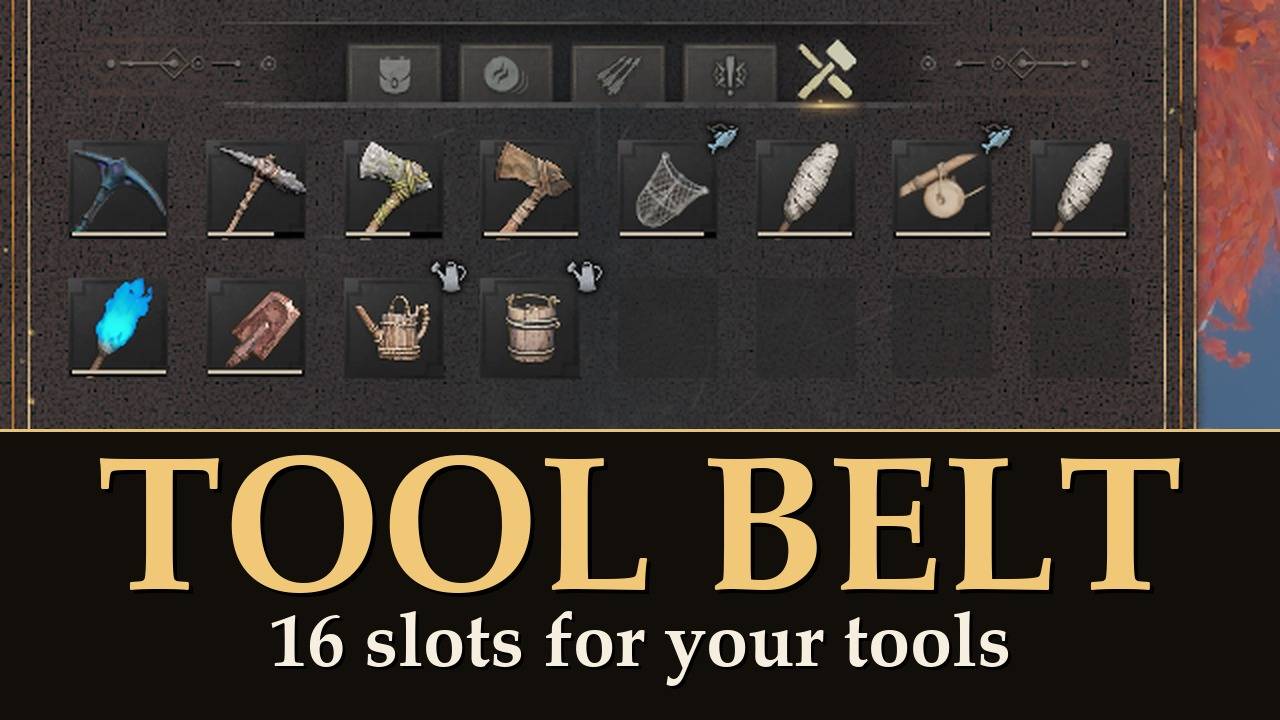
A Tool Belt tab in your inventory: 16 slots for your tools, none of them in your backpack.
RuneScape's tool belt as a new inventory tab, after Items, Runes, Arrows and Quests. Put your pickaxe, axe, spade and the rest on it and they stop taking backpack room.
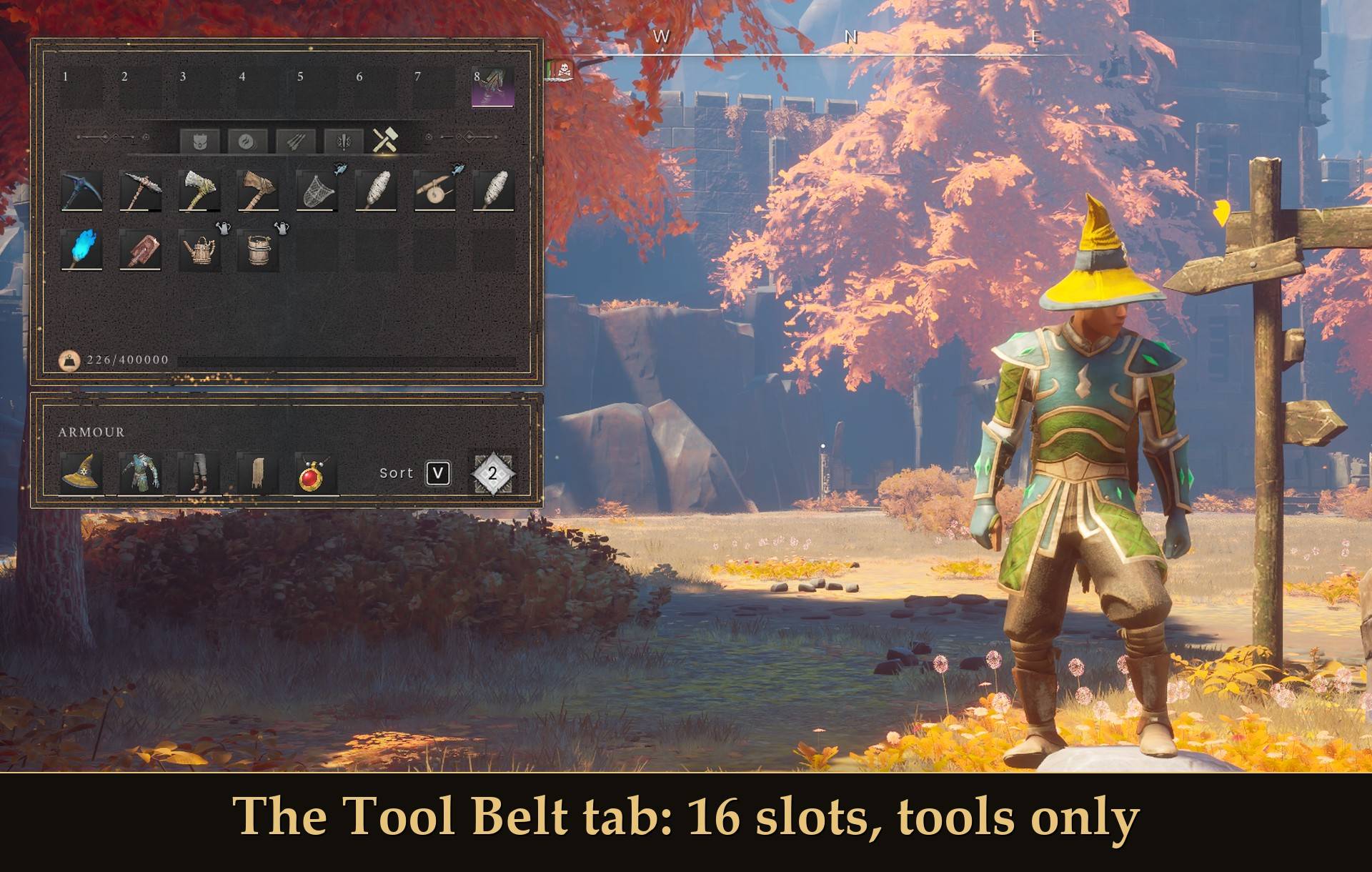
In RuneScape my tools lived on the tool belt and I never thought about them. In Dragonwilds my pickaxe, axe, spade, watering can, compost bucket, rod and net each take a backpack slot. So I gave them their own tab. Every character has it from the start: nothing to craft and nothing to unlock.
What it does
- A new tab, Tool Belt: 16 slots, in your inventory after Items, Runes, Arrows and Quests.
- Only tools go on it: pickaxes, axes, spades, watering cans, the compost bucket, fishing rods, fishing nets and torches. Weapons do not, and that includes warhammers. Press T on anything that is not a tool and nothing happens.
- Anything the game marks as a tool fits: so a tool added by another mod goes on too, as long as that mod uses the game's own tool tag. I have not tried one yet.
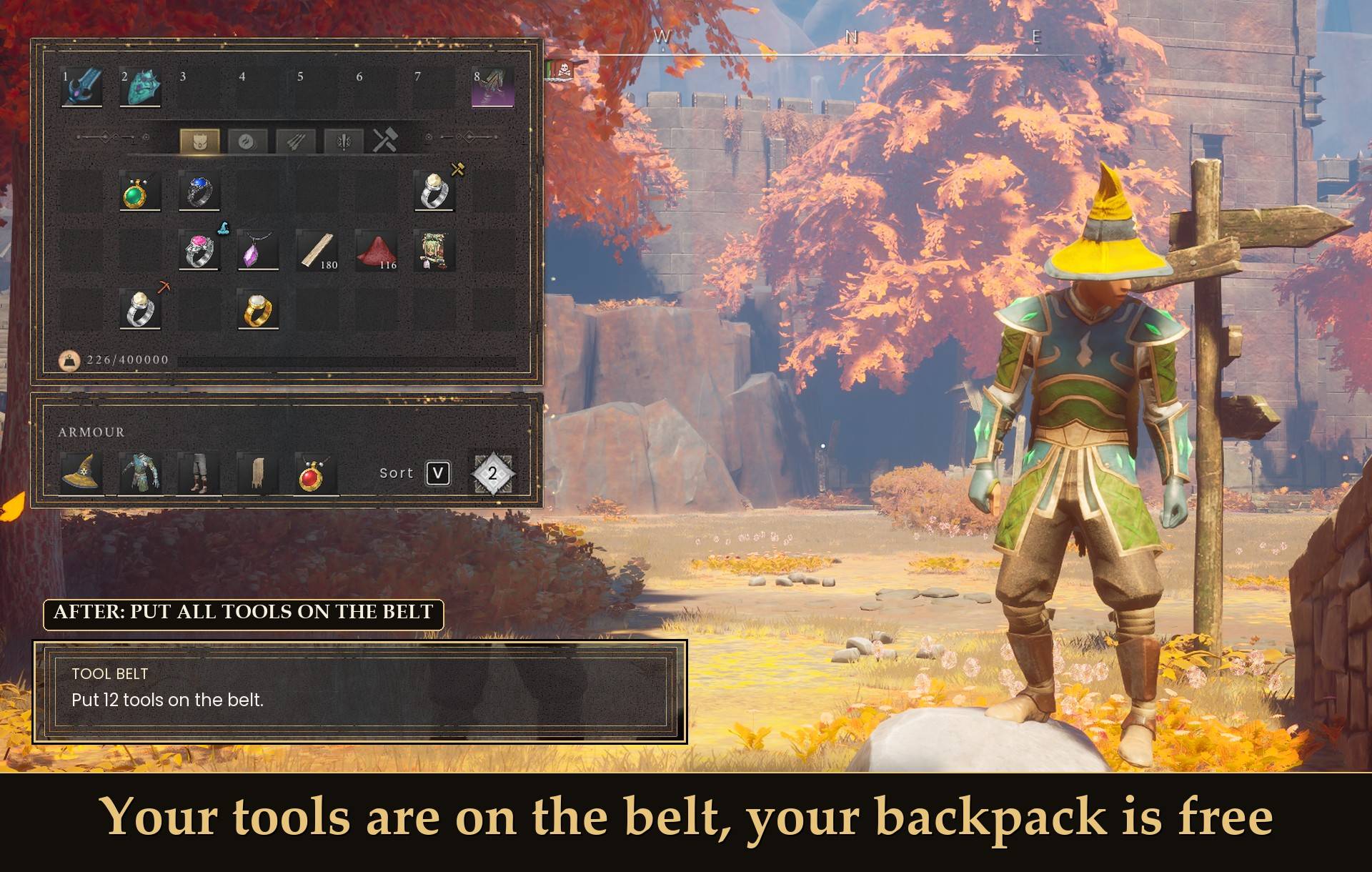
- No backpack room: a tool on the belt takes no backpack slot.
- Still real items: belt tools wear down and need repair as normal, and they keep their normal weight. The mod changes no weights: the belt saves you slots, not weight.
- Every character has the belt: old and new. Nothing to craft, and no RuneSchema needed.
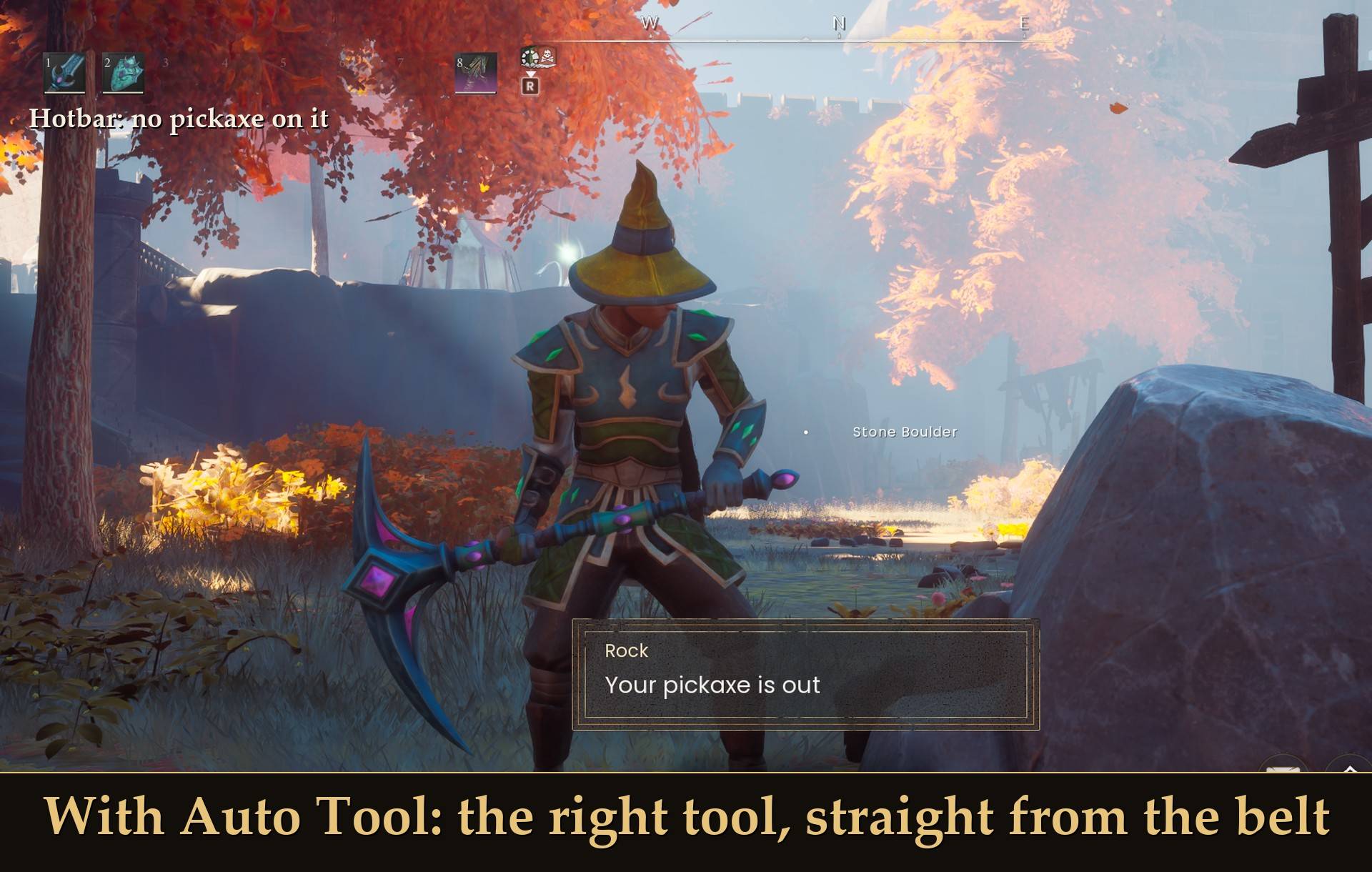
- Works with Auto Tool: Auto Tool finds the tools on your belt and puts the right one in your hand. More on that below.
How to put a tool on the belt
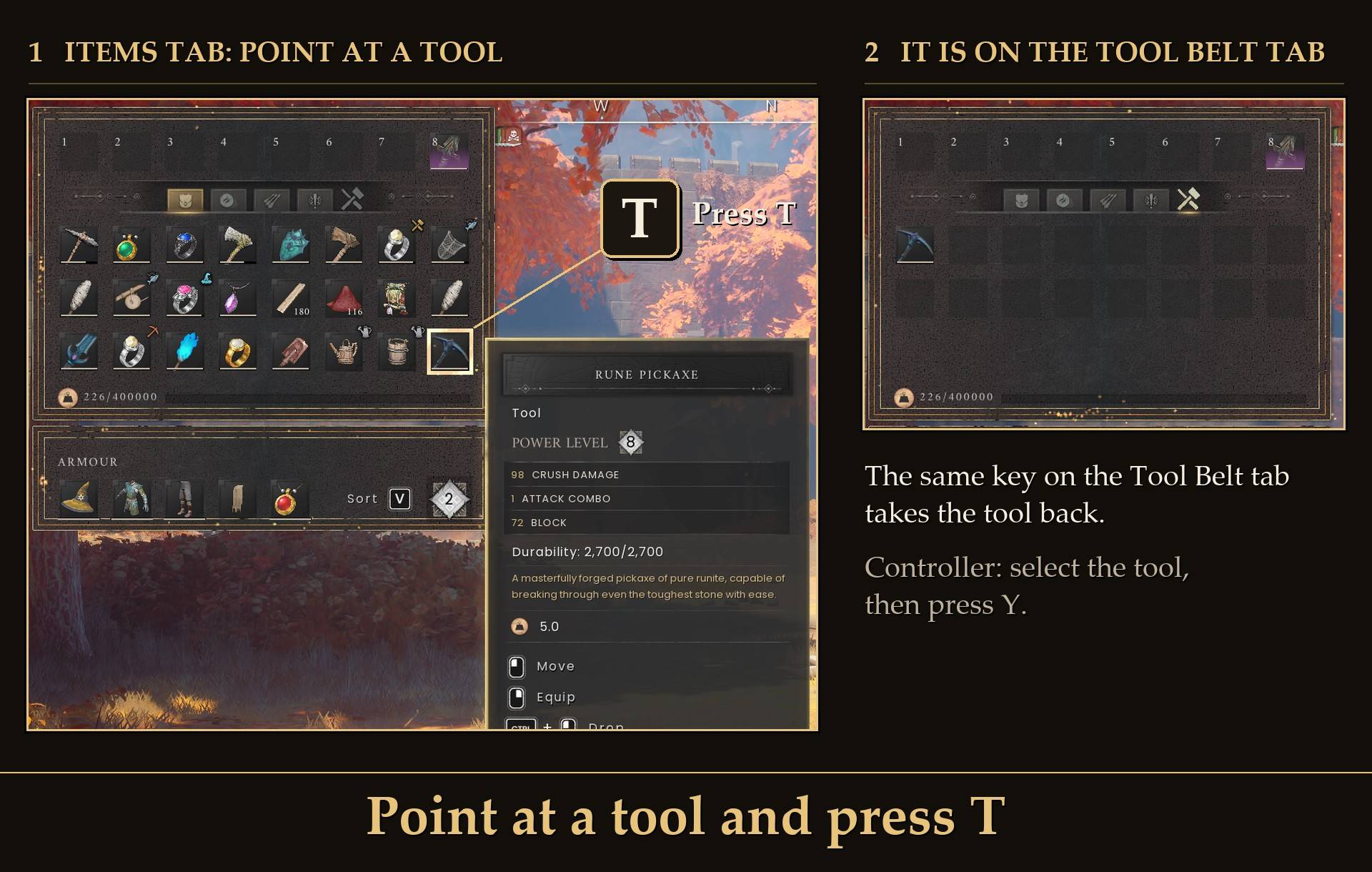
- Open your inventory. On the Items tab, point at a tool and press T. It goes onto the belt. On a controller: select the tool and press Y.
- To take it back, open the Tool Belt tab, point at the tool and press the same key. It goes to your backpack, or to a free hotbar slot when your Items tab is full.
You cannot drag a tool from one tab to the other: the game shows one tab at a time, so there is nowhere to drop it. That is why there is a key.
If a move cannot be done, a short line on screen says why: "Your tool belt is full." when the belt has no free slot, or a "No room in your backpack" line that names the tool when your backpack and hotbar are both full.
Using a tool from the belt
A tool is either on the belt or on your hotbar, not both. On its own, the belt is storage: take a tool back to your backpack when you need it.
With Auto Tool you never have to. Face a rock, tree, farm plot or fishing spot, press its key (U by default) and the right tool comes to your hand straight from the belt. The tool stays in its belt slot while you hold it. That is how I play, and it is why I recommend the two together.
Settings
All live in Mod Menu (Esc > MODS > Tool Belt), or in config.txt in the mod folder (restart the game after editing it):
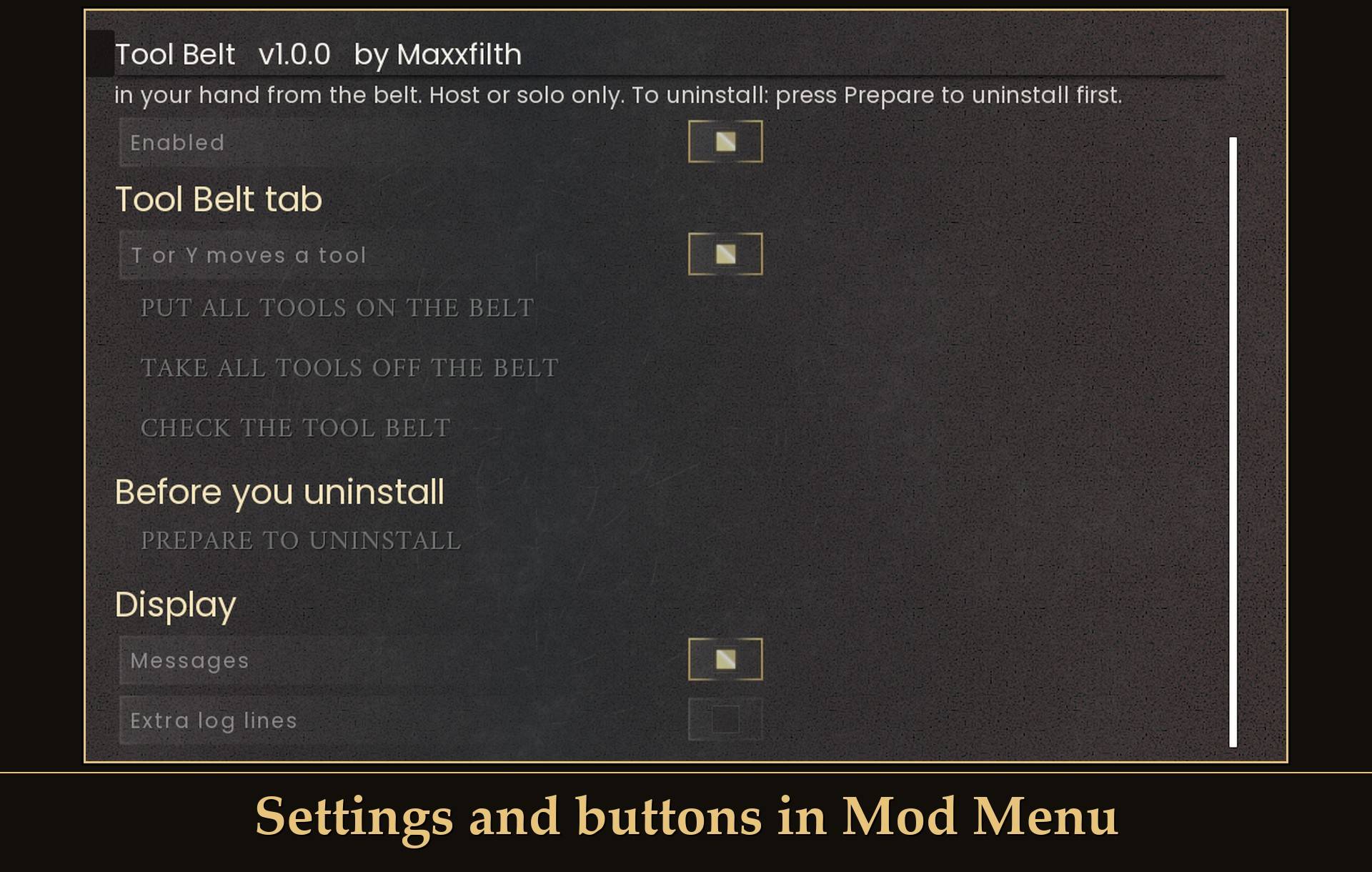
- Enabled: on by default. Off means T and Y do nothing. The Tool Belt tab and what it holds stay.
- T or Y moves a tool: on by default. Turn it off if you only want to move tools with the buttons below.
- Put all tools on the belt (button): every tool on your Items tab goes onto the belt, as many as fit. Your hotbar is left alone.
- Take all tools off the belt (button): every tool on the belt goes to your backpack, then to free hotbar slots, as many as fit.
- Check the tool belt (button): shows what the belt holds once you close the menu.
- Prepare to uninstall (button): see "Before you uninstall" below.
- Messages: on by default. The short line on screen when a tool cannot be moved and after a button.
- Extra log lines: off by default. More lines in UE4SS.log, for bug reports.
One more setting is in config.txt only: ChestRangeMeters, how near a chest has to be for "Prepare to uninstall". 4 by default, 1 to 20.
The key is T (Y on a controller). You can turn it off, but you cannot change it to another key.
Install
- Install UE4SS for RSDragonwilds (free, from the UE4SS for RSDragonwilds page on Nexus Mods).
- Drop the
ToolBelt folder into RSDragonwilds/Binaries/Win64/ue4ss/Mods/
- Optional: install Mod Menu for the settings and the buttons.
- Recommended: install Auto Tool to use tools straight from the belt.
On Game Pass: use the BE version of UE4SS with the SCO signature, the normal build does not load there. Game Pass also installs the game under Binaries/WinGDK/ instead of Binaries/Win64/, so the ToolBelt folder goes in RSDragonwilds/Binaries/WinGDK/ue4ss/Mods/. If you install with Vortex, check that is where it ended up.
Before you uninstall
Empty the belt first. Tools left on the belt are deleted when the game saves without the mod.
- Open Mod Menu > Tool Belt and press Prepare to uninstall. It takes every tool off the belt into your backpack and free hotbar slots. What does not fit goes into a chest within 4 m of you. The tools themselves are moved, so their wear stays as it was. Then it saves the game.
- Wait for the line "You can now quit and remove Tool Belt." If it says some tools are still on the belt, make room or stand next to a chest and press it again.
- Quit the game and delete the
ToolBelt folder.
No Mod Menu? Take every tool back with T on the Tool Belt tab until the belt is empty, then quit.
Good to know
- Host or solo only. The belt works when you host a world or play alone. As a guest in someone else's world you get one line, "Tool Belt works when you host or play solo.", and the belt does nothing there. Co-op is not tested yet, hosting included.
- Belt or hotbar, not both. One tool cannot be on the belt and on your hotbar at the same time.
- RuneScape Bags. Works next to my RuneScape Bags. Bags 1.1.0 adds a Supplies tab after the belt, so with Bags 1.1.0 use Tool Belt 1.0.3 or newer. Nothing on the belt moves: a character saved with 1.0.2 loaded on 1.0.3 with the tools in the same belt slots. Fishing bait stays off the belt and goes into the tackle box.
- Other inventory mods. Pages another mod adds after the belt are fine, like the Supplies tab. If another mod changes the pages before the belt, the belt may refuse to load. It says why in UE4SS.log and then does nothing, so your items are left as they are.
- Your tools are saved with your character. The game saves belt tools like any other item, so they are still on the belt the next time you play.
- Light on performance. It only reads the T and Y keys while your inventory is open.
- Not sure it is running? UE4SS.log shows a line starting with
[ToolBelt] loaded.
Tested on RuneScape: Dragonwilds 1.0 with UE4SS 3.0.1 (Steam), solo as the host, on a test character, with keyboard and controller: the Tool Belt tab and its 16 slots, T and Y putting a tool on and taking it back, a full belt, a full backpack (the tool went to a free hotbar slot), T on a plank doing nothing, the Mod Menu buttons, Prepare to uninstall into a chest with wear unchanged, Auto Tool bringing out a belt pickaxe at a rock and a belt axe at a tree, mining wearing down the belt pickaxe, saving and restarting the game, and leaving to the main menu and coming back. Version 1.0.3 on game patch 1.0.1, run by a test script: a 1.0.2 save loading with the belt tools in place, the belt next to RuneScape Bags 1.1.0, and Tool Belt on its own. Not tested yet: co-op (as host or as guest), Auto Tool with a belt tool at a farm plot or fishing spot, a tool from another mod, Game Pass.
Also on Nexus Mods: Tool Belt on Nexus Mods.