RuneScape's herb sack, gem bag and four more bags, with their own inventory tabs
Carry a bag and its tab opens next to Items, Runes, Arrows and Quests: Bags for herbs and gems, Supplies for seeds, coal, bait and rune essence. What you pick up goes in by itself.
Needs UE4SS, RuneSchema and this mod's RuneSchema items (a separate project here, see Install). Mod Menu is optional. Using Tool Belt too? Use Tool Belt 1.0.3 or newer.
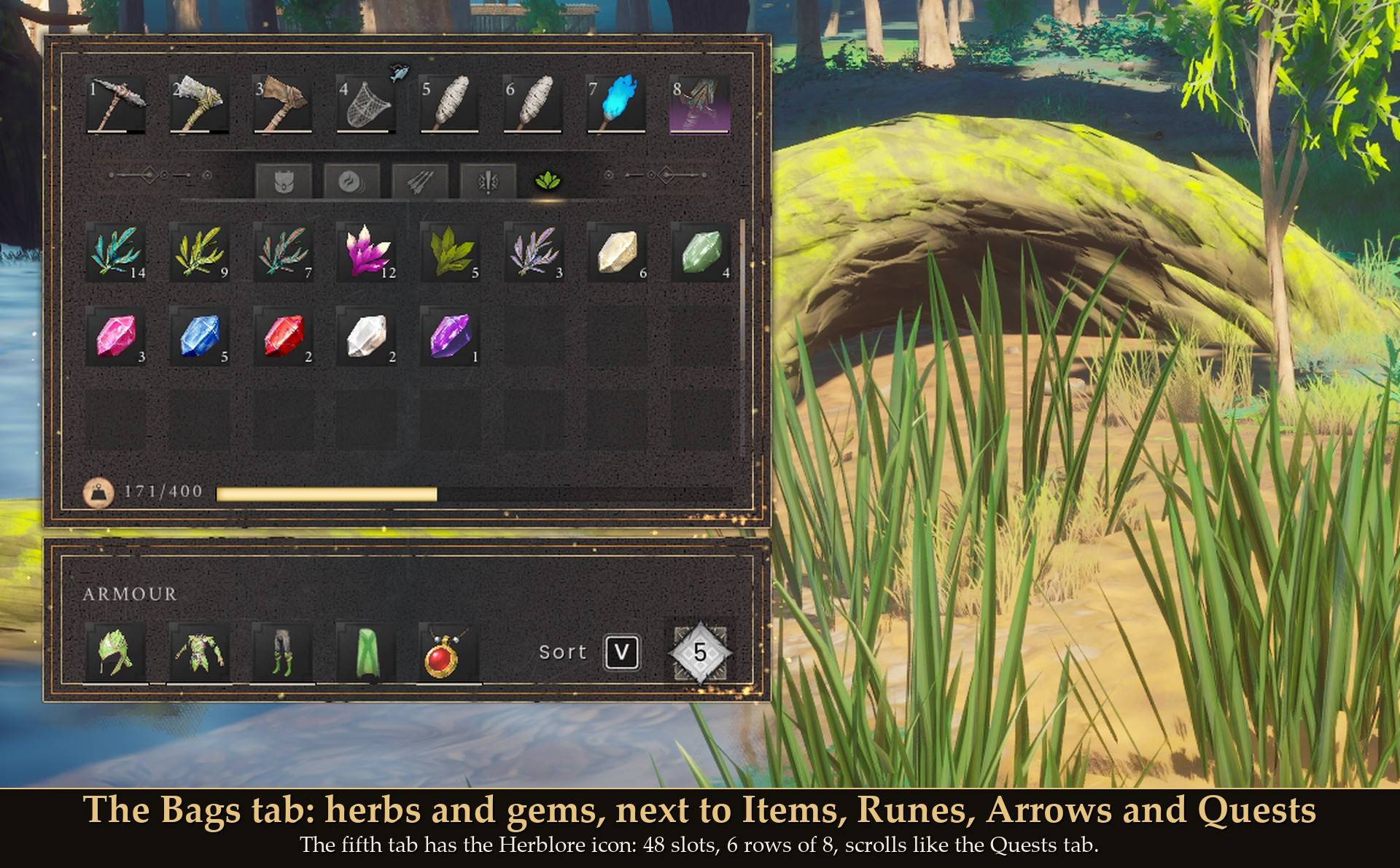
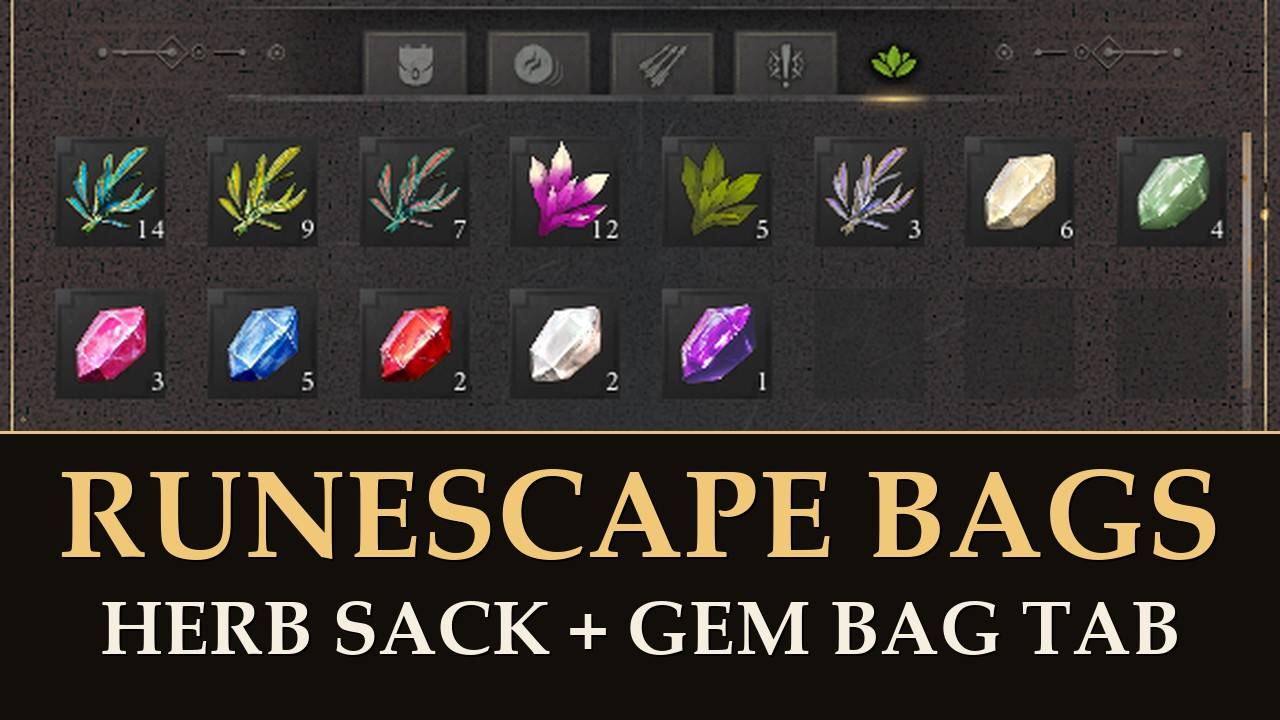
The Bags tab: herbs and gems, next to Items, Runes, Arrows and Quests
In RuneScape the herb sack and the gem bag keep herbs and gems out of your way. In Dragonwilds they sit on the Items tab with your logs, ore and everything else. This mod gives them a tab of their own. It's the game's own kind of tab, so the icons, counts, tooltips and scrolling are the game's.
New in 1.1.0: four more bags, the seed box, coal bag, tackle box and rune essence pouch, and a second tab, Supplies, for what they hold. Nothing you already have moves.
What it does
- Bags tab: "Bags", with the game's Herblore skill icon, after the Quests tab. 48 slots, 6 rows of 8, and it scrolls like the Quests tab. RB from Quests gets you there.
- Supplies tab: a second tab, after Bags, with a watering can icon and 64 slots. With Tool Belt too, it's the seventh tab.
- Six bags: herb sack, gem bag, seed box, coal bag, tackle box and rune essence pouch, all real items in your backpack. Make them at the Crafting Table. Death also sells the herb sack and the gem bag.
- Fills itself: with a bag in your backpack, what you pick up of its kind goes into its tab within about a second. Each bag only handles its own kind.
- Lighter: while a bag is in your backpack, its herbs or gems count 50% of their weight. You pick the share, 0 to 100%. The same setting covers coal and rune essence, but I haven't measured those yet.
- Take out with one key: point at a stack and press T, or press Y on a controller. Mod Menu also has a button that moves everything out. T and Y only take things out: things go in when you pick them up, or with Mod Menu's Move all into the bag tabs.
- Real items: what's in the tabs is part of your inventory and your save. I planted seeds, made steel and fished with bait straight from the Supplies tab.
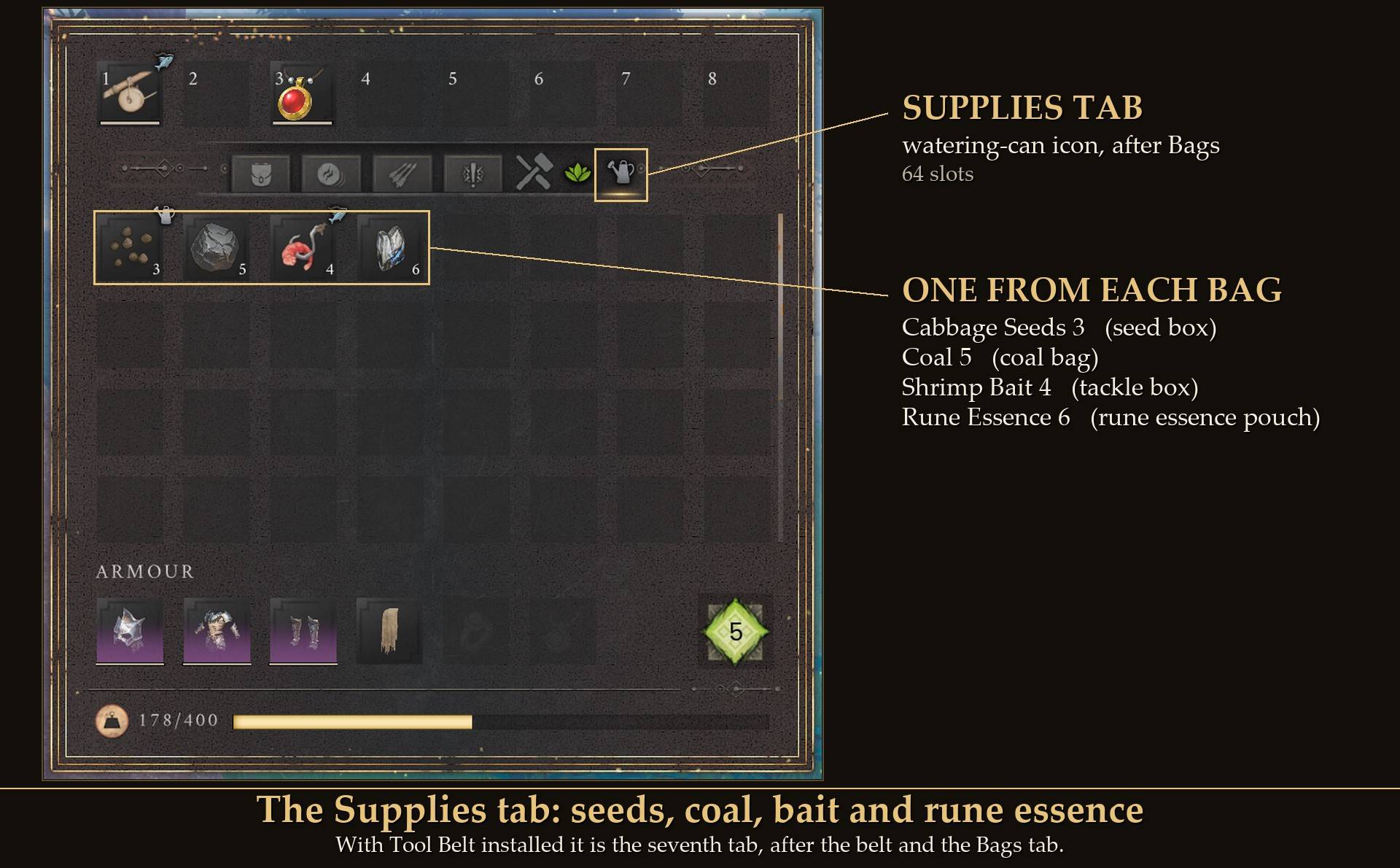
The Supplies tab: seeds, coal, bait and rune essence
What goes in
Bags tab
- Herbs (9): Harralander, Marrentill, Toadflax, Irit, Avantoe, Kwuarm, Snapdragon, Shocking bulb, Poison ichor.
- Gems (7): Opal, Jade, Red topaz, Sapphire, Ruby, Diamond, Dragonstone.
- Nothing else. The tab refused stone, planks and runes when I tried. Tea leaves aren't in: they weigh nothing, so a bag gains you nothing there.
Supplies tab
- **Seed box**: 30 kinds of seeds, 24 crop seeds and the 6 tree seeds (Ash, Oak, Willow, Maple, Yew, Magic). Not the crystal seed from the quest. Seeds weigh nothing in the game, so the seed box saves you slots, not weight.
- Coal bag: coal. Not charcoal: it weighs nothing and stacks to 999,999 already.
- Tackle box: all 10 kinds of fishing bait. Bait goes into the tackle box, never onto the Tool Belt. Rods and nets aren't in: they go on my Tool Belt.
- Rune essence pouch: rune essence only. Runes stay on the game's Runes tab: they have their own tab already and never take backpack room.
Getting the bags
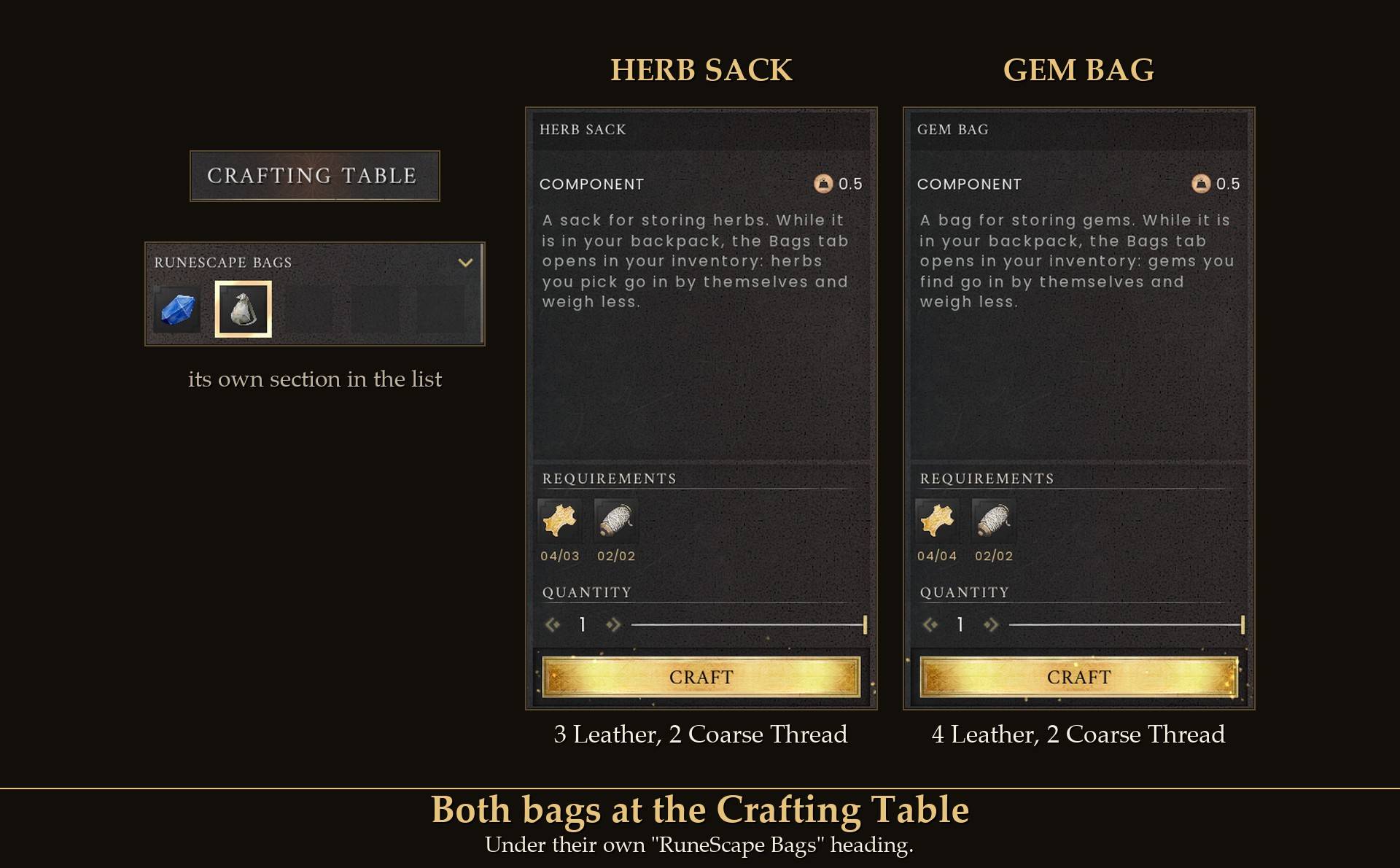
Both bags at the Crafting Table
-
Crafting Table, under its own "RuneScape Bags" heading:
- Herb sack: 3 Leather and 2 Coarse Thread.
- Gem bag: 4 Leather and 2 Coarse Thread.
- Seed box: 3 Leather and 2 Coarse Thread.
- Coal bag: 4 Leather and 2 Coarse Thread.
- Tackle box: 3 Leather and 2 Coarse Thread.
- Rune essence pouch: 2 Leather and 2 Coarse Thread.
-
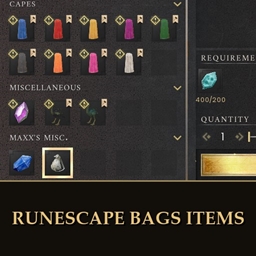
Death in Fellhollow sells the herb sack and the gem bag for 200 Soul Fragments each. The mod adds the four new bags to his shop at the same price, but I haven't checked them there yet. Talk to him, pick "Exchange Soul Fragments", and they're under their own heading, "Maxx's Misc." (the game shows it in capitals), right below the game's Miscellaneous. With 199 fragments the purchase is refused and nothing is taken. If your Items tab has no free slot the BUY button says INVENTORY FULL. That's the game's rule.
- One of each is all you need. A second bag doesn't add room: the tabs belong to your character, not to the bag.
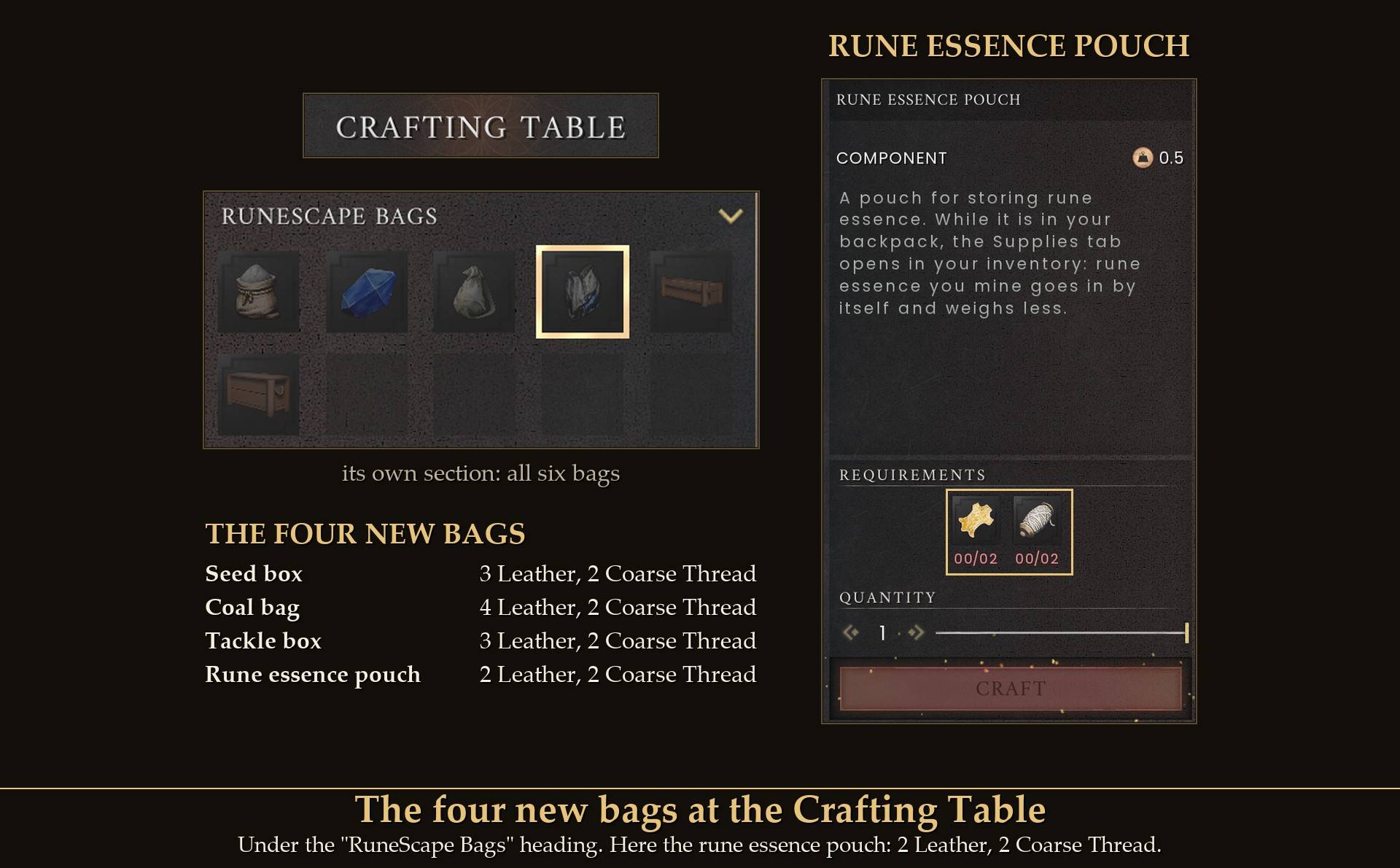
The four new bags at the Crafting Table
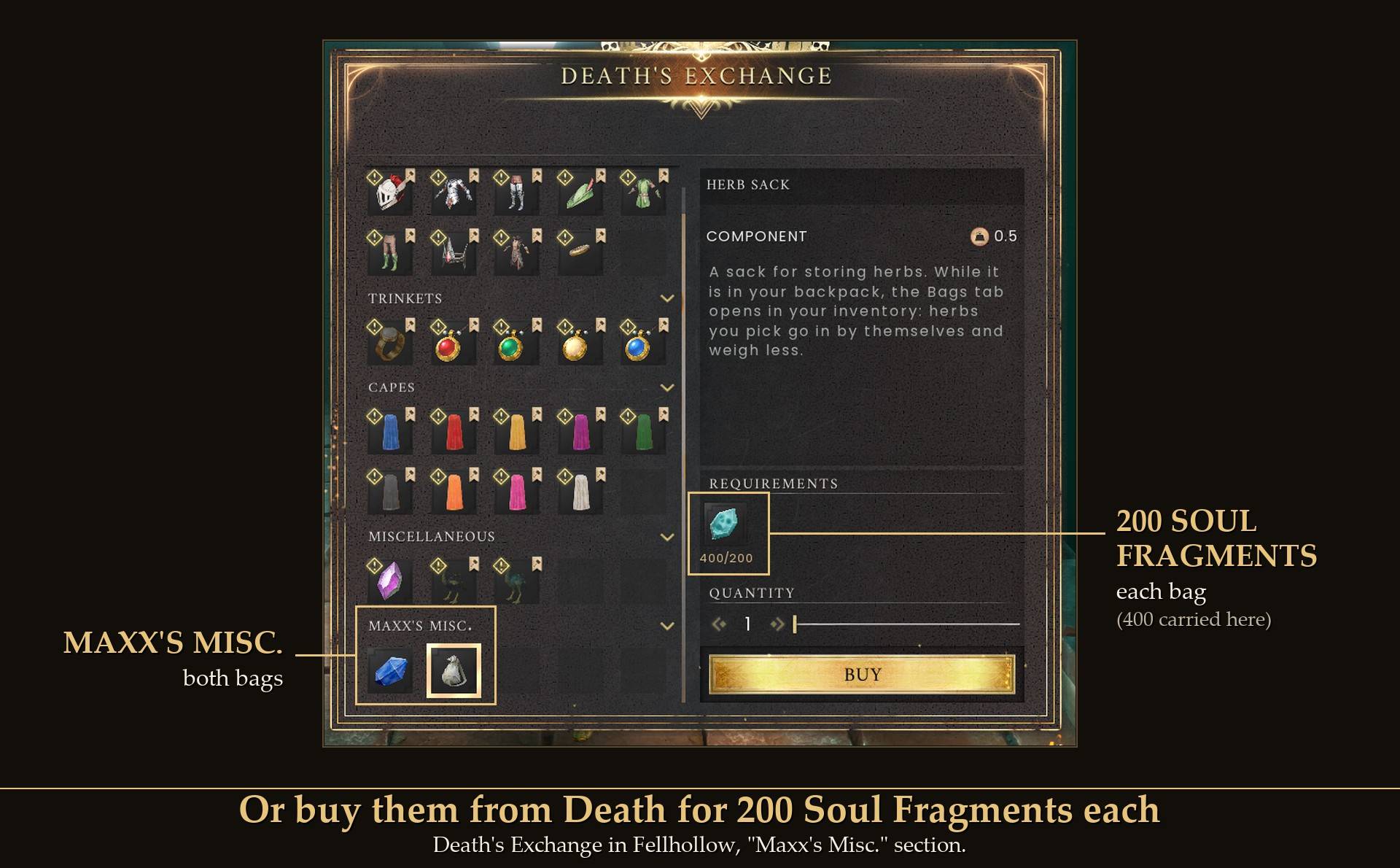
Or buy the herb sack and gem bag from Death for 200 Soul Fragments each
Filling up
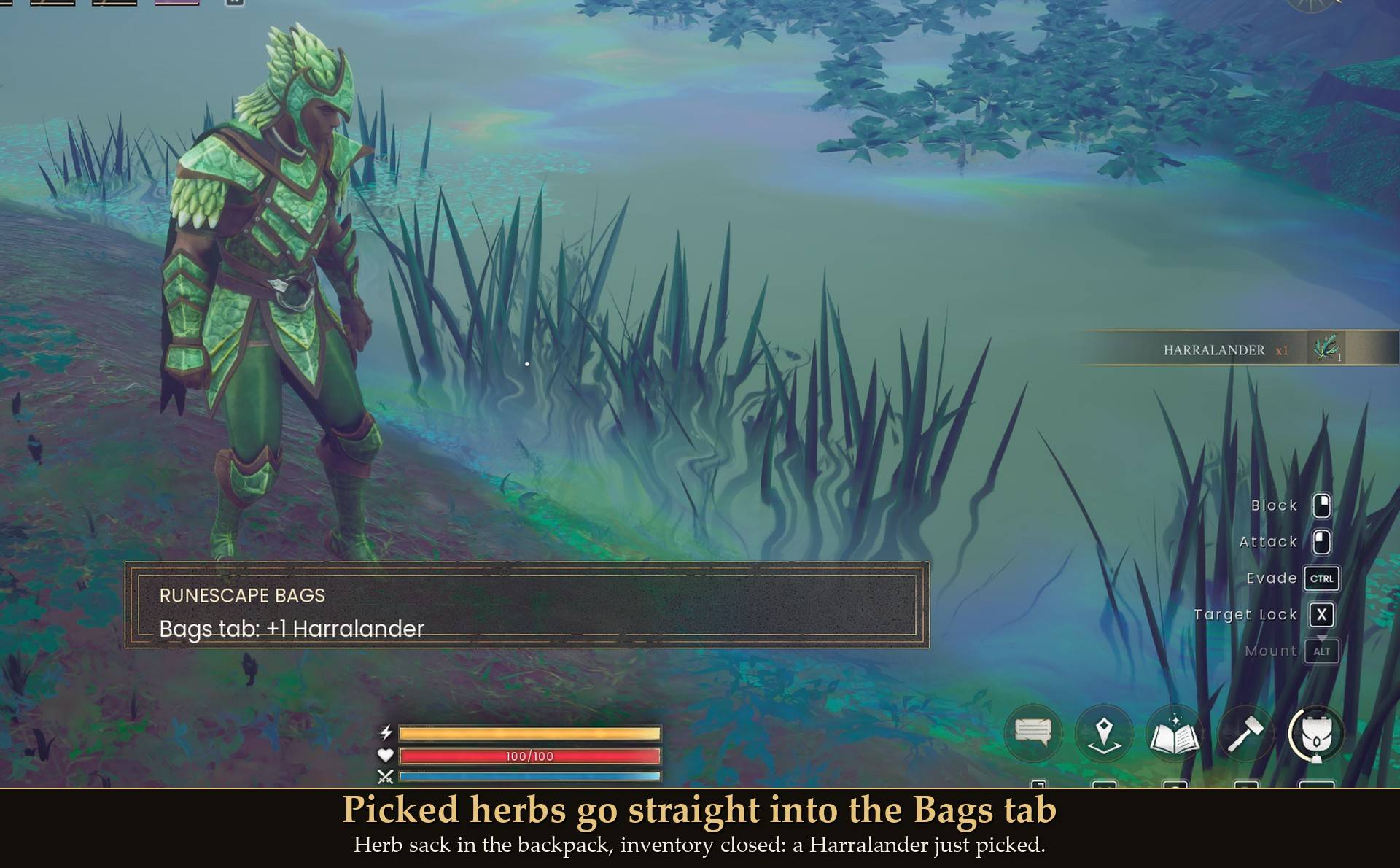
Picked herbs go straight into the Bags tab
- Pick a herb with the herb sack in your backpack and it moves into the Bags tab within about a second. A short line says what went in, like "Bags tab: +2 Harralander". Gems work the same with the gem bag.
- Seeds, coal, bait and rune essence go into the Supplies tab the same way, each with its own bag in your backpack: "Supplies tab: +3 Cabbage Seeds, +5 Coal, +4 Shrimp Bait, +6 Rune Essence".
- Seeds and bait you pick up go into the Supplies tab even when they first land on your hotbar. A stack you put on the hotbar yourself stays there: only new pickups move. In my test the pickups were added with the game's own add-item call, not picked up off the ground.
- Only while your inventory window is closed. What you take out of a chest, or move around with the window open, stays where you put it.
- What you already carry when you get a bag stays in your backpack. Mod Menu's Move all into the bag tabs moves it in.
- A limit per kind: by itself the mod puts up to 100 of each herb, 100 of each gem and 100 of each supply into the tabs. After that new ones stay in your backpack and you get one line about it. Change it with Herbs of each kind, Gems of each kind and Supplies of each kind. The game sometimes adds a pickup straight onto a stack that's already in the tab, so a stack can end up a little over the limit. The Put in button ignores the limit.
- A tab shows while one of its bags is in your backpack. It also stays while it holds anything, so nothing is ever hidden from you.
Taking things out
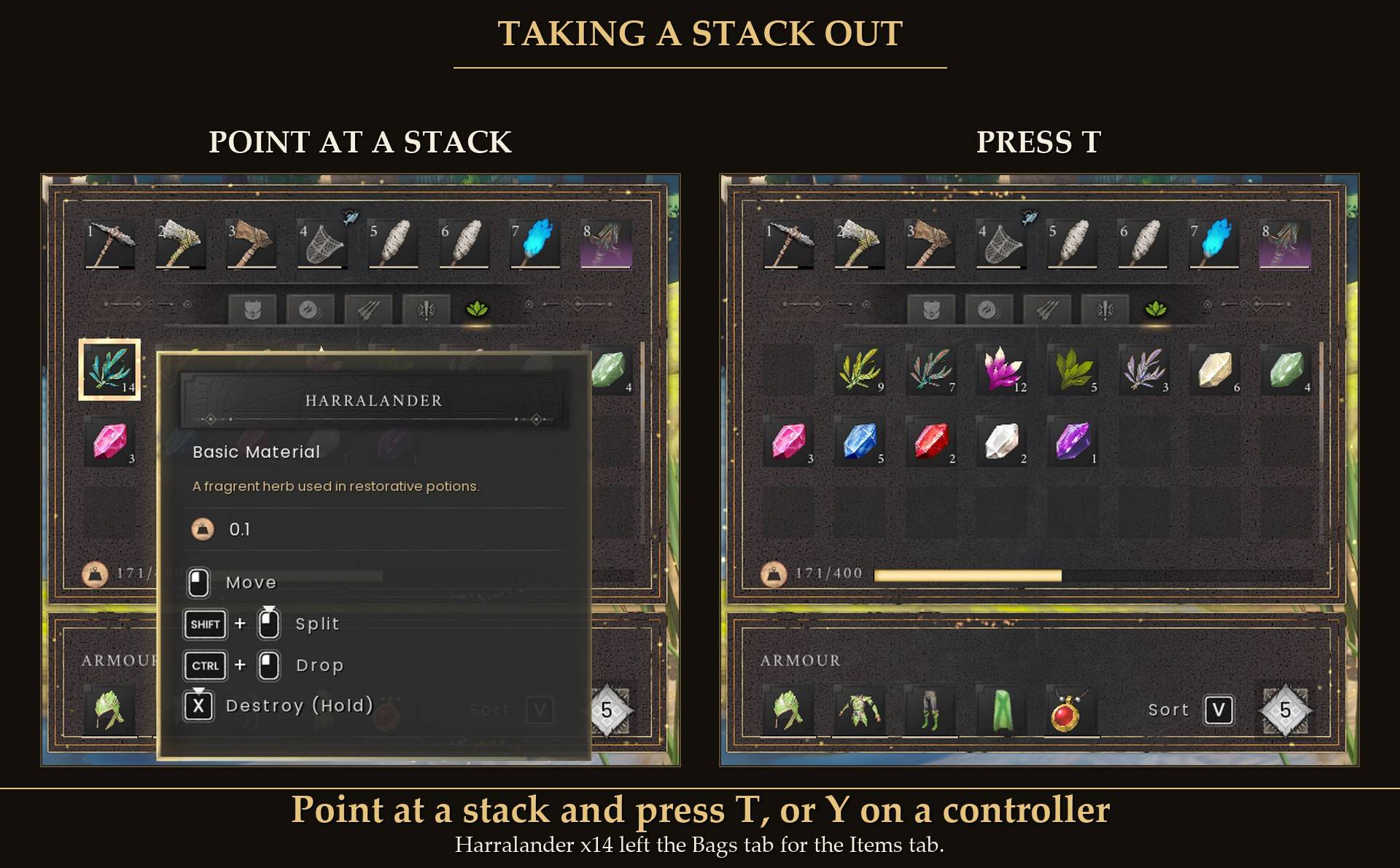
Point at a stack and press T, or Y on a controller
- Mouse and keyboard: open the Bags or Supplies tab, point at a stack and press T. The whole stack goes to your backpack.
- Controller: open your inventory and press RB until you're on the tab. The first slot is picked for you. Move with the D-pad and press Y.
- T and Y only take things out. Y on a seed in your Items tab does nothing: things go in when you pick them up, or with Mod Menu's Move all into the bag tabs.
- Mod Menu: Move all to your backpack empties both tabs.
- If your backpack can't take it all, as much as fits goes and the rest stays in the tab: "No room in your backpack for 6 more."
- Clicking doesn't work in these tabs: the game keeps mouse clicks to itself there, and A is the game's own Move. Dragging to another tab doesn't work either, because the game only shows one tab at a time.
Using what's in the tabs
- Gems: the jewelry bench took 2 opals that were only in the Bags tab.
- Herbs: the Stone Range made a tea with a Harralander that was only in the Bags tab.
- Seeds: I planted a cabbage seed that was only in the Supplies tab.
- Coal: in Dragonwilds coal isn't fuel. It's an ingredient for steel at the Blast Furnace, 1 iron bar and 3 coal for each steel bar. The furnace made steel with coal that was only in the Supplies tab.
- Bait: a fish bite used up bait that was only in the Supplies tab.
- Rune essence: not tested yet.
Weight
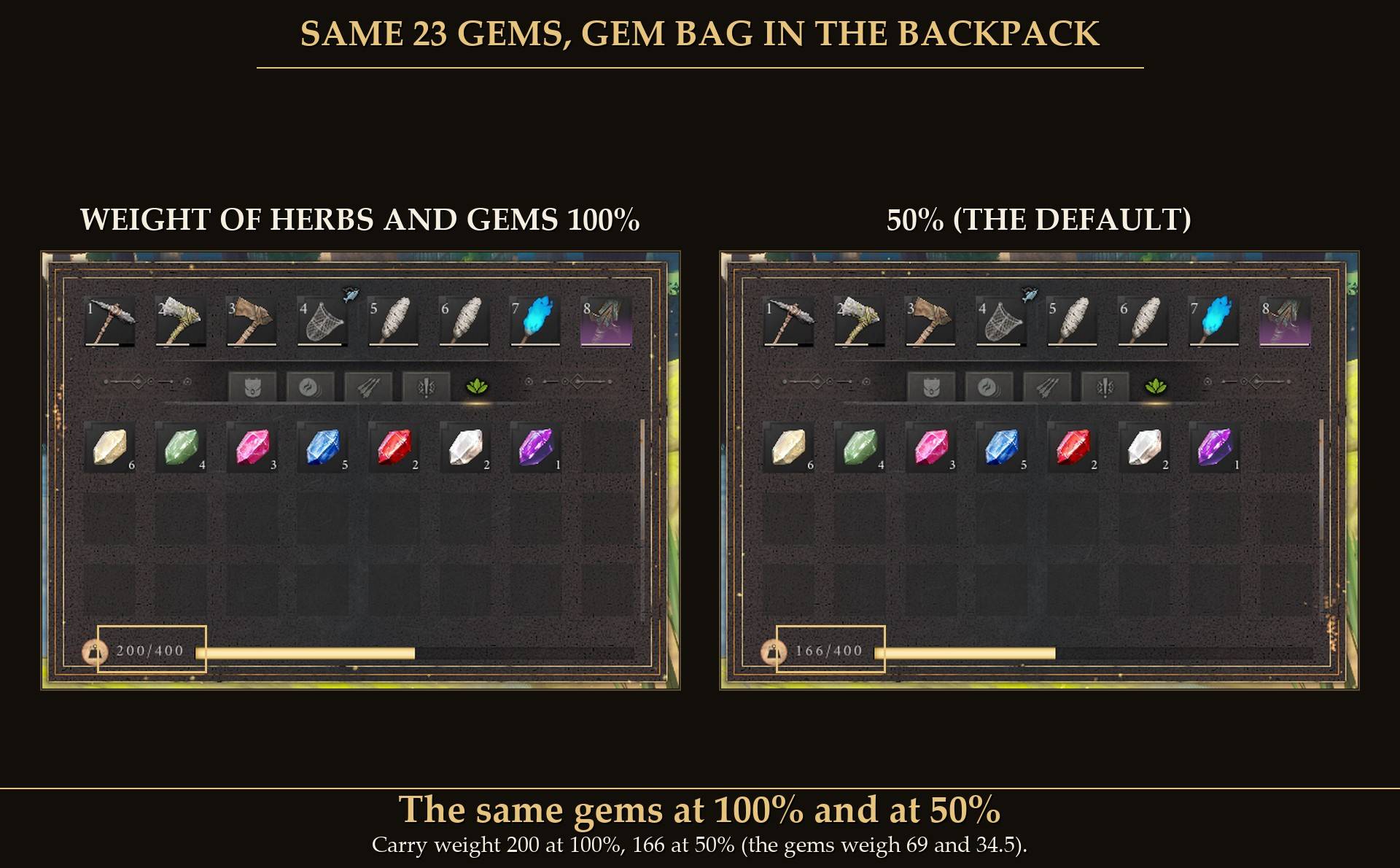
The same gems at 100% and at 50%
- While the herb sack is in your backpack, herbs count only part of their weight, set by Bag weight: 50% by default. Measured: at 50% the herbs counted exactly half, at 0% nothing, and when the sack left my backpack they were back to full weight.
- The gem bag does the same for gems. Measured: 23 gems weighed 69 at 100%, 34.5 at 50% and nothing at 0%.
- The coal bag and the rune essence pouch use the same setting for coal and rune essence. I haven't measured those two yet.
- Seeds and bait weigh nothing in the game, so the seed box and the tackle box are about slots.
- It counts for those items anywhere in your backpack, not only the ones in the tabs. The game weighs by item, not by tab.
- It uses the game's own weight multiplier, the same thing the game already uses to make some items lighter.
If you die
- Retain Inventory off: everything in the Bags tab goes into your gravestone with the rest of your pack. I died with herbs and gems in the tab and Take All gave all of it back. The gems went straight into the Bags tab and the herbs landed on the Items tab. Put in moves them back.
- Retain Inventory on: the Bags tab stays as it was.
- I haven't tested dying with things in the Supplies tab yet.
Settings
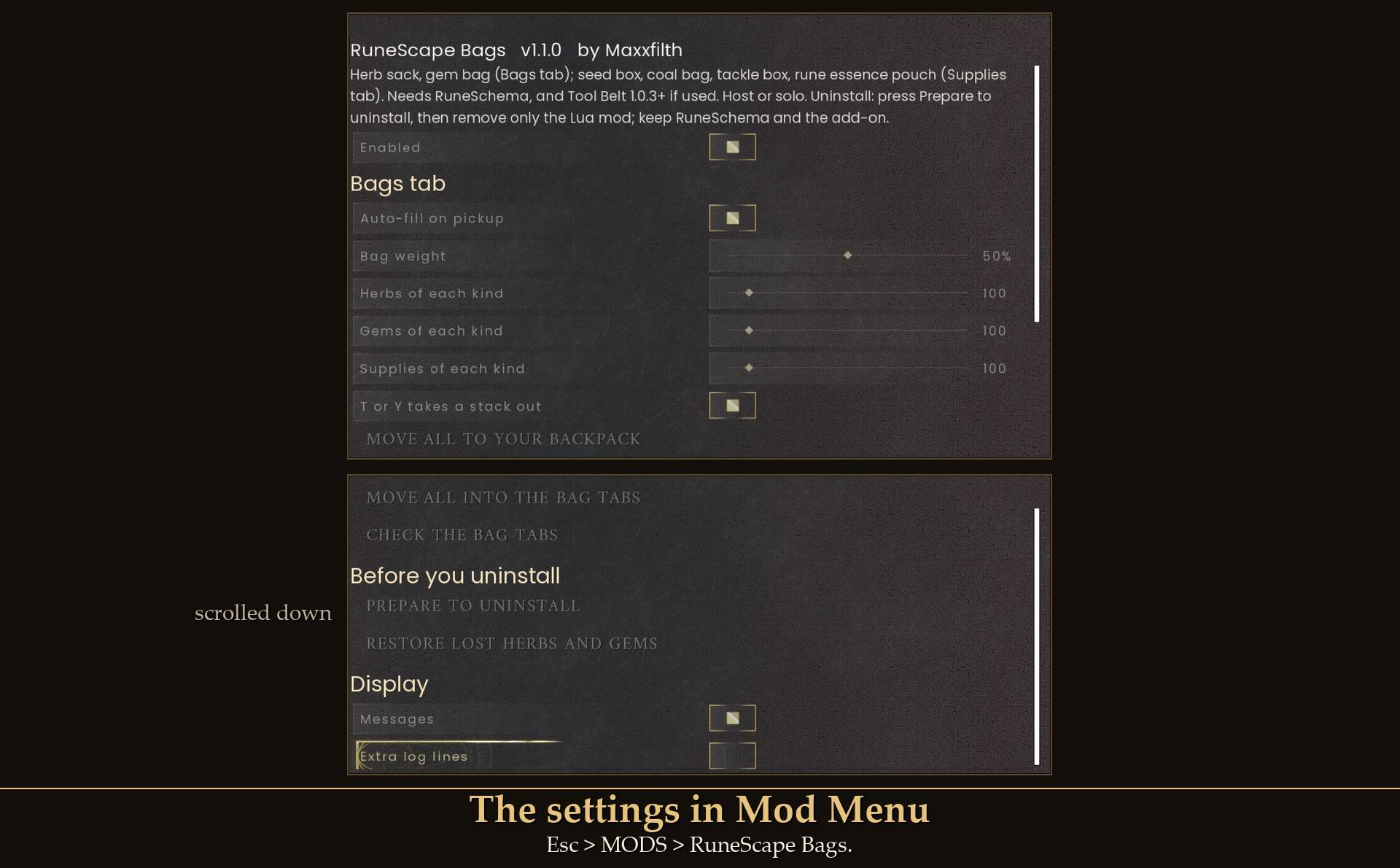
The settings in Mod Menu
All live in Mod Menu (Esc > MODS > RuneScape Bags), or in config.txt in the mod folder. Mod Menu changes apply while you play. Restart the game after editing config.txt.
- Enabled (on): off means nothing goes in by itself and everything weighs its full weight. The tabs and what they hold stay.
- Auto-fill on pickup (on): what your bags hold goes in by itself.
- Bag weight (50%, 0 to 100%, steps of 5): how much of their weight herbs, gems, coal and rune essence count while their bag is in your backpack. 50% is half, 0% is nothing, 100% is full weight.
- Herbs of each kind (100, 10 to 990, steps of 10): the most of one herb the mod puts in by itself. A full stack is 990. config.txt takes 1 to 999.
- Gems of each kind (100, 10 to 990, steps of 10): the same for gems.
- Supplies of each kind (100, 10 to 990, steps of 10): the same for each seed, coal, bait and rune essence.
- T or Y takes a stack out (on).
- Move all to your backpack: a button. Both tabs, as much as fits.
- Move all into the bag tabs: a button. What your bags hold on your Items tab goes into the Bags or Supplies tab, as much as fits. Only the kinds whose bag is in your backpack.
- Check the bag tabs: a button. Shows what the tabs hold once you close the menu.
- Prepare to uninstall and Restore lost herbs and gems: see "Before you uninstall" below.
- Messages (on): the short line on screen when things go in, and after a button.
- Extra log lines (off): more lines in UE4SS.log, for bug reports.
- ChestRangeMeters (4, config.txt only): how far Prepare to uninstall looks for a chest.
Mod Menu's buttons work with a controller: select one and press A. I tested it on Move all into the bag tabs.
Install
The mod comes in two halves. This project is the Lua mod. The bags and their recipes are RuneSchema items, and CurseForge keeps RuneSchema files in their own section, so that half is a separate project: RuneScape Bags (RuneSchema items). You need both, and both at 1.1.0.
- Install UE4SS for RSDragonwilds. I tested with the UE4SS 3.0.1 "latest" build (f6d5f942).
- Install RuneSchema (link at the bottom of this page). Use the current version: I tested 1.1.0 with RuneSchema 0.8.0 (1.0.x with 0.7.7.9m). The bags are RuneSchema items, so the mod does nothing without it.
- Extract this zip into your game folder (the one that has
RSDragonwilds inside). It puts RuneScapeBags into RSDragonwilds/Binaries/Win64/ue4ss/Mods/.
- Install RuneScape Bags (RuneSchema items). It goes into
RSDragonwilds/Binaries/Win64/ue4ss/Mods/RuneSchema/mods/, so you get a RuneScapeBags folder there too.
- Using Tool Belt too? Update it to 1.0.3 or newer. Tool Belt 1.0.2 sees the Supplies tab's extra page, writes "belt page refused" in UE4SS.log and stops part of its work.
- Optional: install Mod Menu for the settings and buttons in game.
- Start the game. If it was running while you installed, close it and start it again. If the bags aren't at the Crafting Table, look in RuneSchema's
runeschema.txt for the line RuneScapeBags : 1 (1 turns an add-on on, 0 turns it off).
On Game Pass: use the BE version of UE4SS with the SCO signature, the normal build does not load there. Game Pass also installs the game under Binaries/WinGDK/ instead of Binaries/Win64/, and the zips are laid out for Steam. So on Game Pass move the RuneScapeBags folder to RSDragonwilds/Binaries/WinGDK/ue4ss/Mods/ by hand. The RuneSchema items have to sit inside your RuneSchema folder, so move those too. I haven't tested Game Pass.
Updating from 1.0.x: update both projects. I loaded a character saved with 1.0.3 and Tool Belt 1.0.2: the herbs and gems in the Bags tab and the tools on the belt were in the same slots, and the Supplies tab was added after them.
Before you uninstall
Read this first. Removing the wrong part deletes your bags for good, or on an older RuneSchema stops a character from loading.
- In game, open Mod Menu > RuneScape Bags and press Prepare to uninstall. It moves everything in the Bags and Supplies tabs to your backpack, puts what doesn't fit into a chest within 4 m, and the game saves. Nothing goes into the tabs again until you leave that world. If something is still in a tab, the message tells you how many and why. Make room and press it again. On 1.1.0 I tested it with room in the backpack (47 items moved out of both tabs). The chest part ran in my 1.0.0 test, not yet with the Supplies tab.
- Quit the game and remove only this project, the Lua mod:
RSDragonwilds/Binaries/Win64/ue4ss/Mods/RuneScapeBags/.
- Keep RuneSchema and RuneScape Bags (RuneSchema items) installed. All six bags are real game items, and your save lists them. With only the Lua mod gone, my character loaded with the herb sack and gem bag and no Bags tab. If you remove the RuneSchema items too, what happens depends on your RuneSchema:
- RuneSchema 0.7.7.4 and newer cleans the save when the game starts. Every bag from this mod is deleted from your character for good, and the character loads. They don't come back if you install the RuneSchema items again. I ran this in game on 0.7.7.9m with the herb sack and gem bag.
- Older than 0.7.7.4 (I tested 0.7.6.8): a character that has ever held a bag doesn't load until the RuneSchema items are back. The game refuses a save that lists an item it doesn't know and sends you back to the menu.
If you only want the mod out of the way, you don't have to uninstall at all: turn Enabled off and nothing goes in by itself anymore.
Forgot to press Prepare? Herbs and gems left in the Bags tab are deleted by the game the next time it saves without the mod. Put the mod back and it notices: Mod Menu gets Restore lost herbs and gems, and it puts them back. In my test 9 herbs were lost and 9 came back, and a second press said "Nothing to restore". It never restores by itself. It works from a small file per character, %LOCALAPPDATA%\RSDragonwilds\Saved\RuneScapeBags-<character>-<id>.ledger.txt, tied to that character's save id. That's meant to keep a different character with the same name from being offered anything. I haven't tested that part. I tested the restore with herbs, not yet with gems. Restore only covers herbs and gems, not the Supplies tab, so always empty the Supplies tab with Prepare to uninstall first.
Good to know
- Your other tabs don't move. The Bags tab is added after Quests. On game 1.0 I compared the first 152 slots of my test character before and after: identical. The Supplies tab is added after the Bags and Tool Belt pages, so nothing before it moves. The tabs are added to every character while the mod is installed, and only show with a bag or when they hold something.
- With or without Tool Belt. Without Tool Belt the mod keeps an empty, hidden page where the belt would be, so the Supplies tab sits in the same place in your save either way. I tested RuneScape Bags 1.1.0 without Tool Belt, and Tool Belt 1.0.3 without RuneScape Bags: both work on their own.
- Saved with your character. What's in the tabs is in the game's own save. It was all still there after I quit and started the game again, in both tabs.
- Not tested yet: brewing potions with herbs from the tab, quest hand-ins, rune essence used from the Supplies tab.
- Host or solo only. In a friend's world, as a guest, the mod does nothing and says once: "RuneScape Bags works when you host or play solo." I haven't tested co-op at all. Empty both tabs before you join someone else's world. RuneSchema's own advice is that every player in a world uses the same mod set when a mod adds items, and this one does.
- A drawing glitch. Twice in one test run, the lower rows of the Bags tab showed the wrong icons. What was stored was right, and closing and opening the inventory drew it correctly. I couldn't make it happen again in later runs.
- Tool Belt. Works together with my Tool Belt mod. With both installed, RuneScape Bags 1.1.0 needs Tool Belt 1.0.3 or newer. Each has its own tab. With both, the Bags tab comes after the Tool Belt tab and Supplies is the seventh tab.
- Other inventory mods. I haven't tested it with other mods that change the size of the inventory tabs. If the layout changes after you've used the Bags tab, the mod is built to say "Your inventory layout changed since last time. Check the Bags tab and your Quests tab."
- Performance. Once a second it reads how many of each herb and gem you carry. Those reads timed well under a millisecond. I haven't timed it with the Supplies kinds added, or timed the whole mod.
- Not sure it's running? UE4SS.log shows
[RuneScapeBags] loaded v1.1.0: Bags tab for herbs and gems, 100 of each herb and 100 of each gem go in by themselves, they weigh 50%; Supplies tab, 100 of each. A little after you enter a world: [RuneScapeBags] herb sack item found (RuneSchema add-on loaded), and the same for each of the other bags. If it says an item was not found, RuneSchema or the add-on is missing.
What I tested
Tested on RuneScape: Dragonwilds 1.0 (Steam) with UE4SS 3.0.1 (build f6d5f942), solo, on one PC. On RuneSchema 0.7.7.9m, run by a test script with no real keyboard or controller: crafting both bags, buying both from Death (and being refused at 199 fragments), the 48-slot tab and its icon, herbs going in, herb weight at 100 and 50%, Mod Menu's move buttons, Prepare to uninstall, a herb used at the Stone Range straight from the tab, removing the Lua mod alone and with the add-on, and running next to Tool Belt. On RuneSchema 0.7.6.8, with a real keyboard, mouse and controller for the take-out keys: herbs going in from a real harvest, gems going in, herb and gem weight at 100, 50 and 0%, T and Y take-out (full stack, part stack, full backpack, setting off), the restore with herbs, dying with and without Retain Inventory, gems used at the jewelry bench, and T on each tab next to Tool Belt. Version 1.0.3 on game patch 1.0.1: the tab appears, herbs and gems go in and are still there after saving and reloading. Version 1.1.0 on game patch 1.0.1 with RuneSchema 0.8.0 and Tool Belt 1.0.3, run by a test script: a character saved with 1.0.3 and Tool Belt 1.0.2 loading with every slot in place, 7 tabs with the 64-slot Supplies tab and its icon, all four supply kinds going in on pickup (and a herb still going to the Bags tab, and bait not going to the belt), planting, steel at the Blast Furnace and a fish bite straight from the Supplies tab, Mod Menu's two move buttons and Prepare to uninstall on both tabs, saving and starting the game again, RuneScape Bags without Tool Belt, and Tool Belt without RuneScape Bags. Crafting all four new bags at the Crafting Table, and with a real controller: RB to the Supplies tab, Y taking coal out to the backpack, and A on Mod Menu's Move all into the bag tabs. With a real mouse and keyboard: T on a Supplies slot moving bait to the backpack. And seeds and bait that landed on the hotbar moving into the Supplies tab, while a stack I put there myself stayed (pickups added by the game's add-item call). Not tested yet: co-op, Game Pass, buying the four new bags from Death, brewing potions with herbs from the tab, quest hand-ins, the restore with gems, rune essence used from the Supplies tab, coal and essence weight, loading a station by clicking from the Supplies tab, Prepare to uninstall into a chest with the Supplies tab, dying with things in the Supplies tab, and mods other than Tool Belt that change the inventory tabs.
Links