Hats and masks from simple data packs
Cosmetic Kit puts hats, masks and other looks on your character from small packs. Install it once, and every mod made as a pack shows on your head.
Needs UE4SS. Mod Menu is optional, for the settings page. RuneSchema is only needed by packs that add new items.
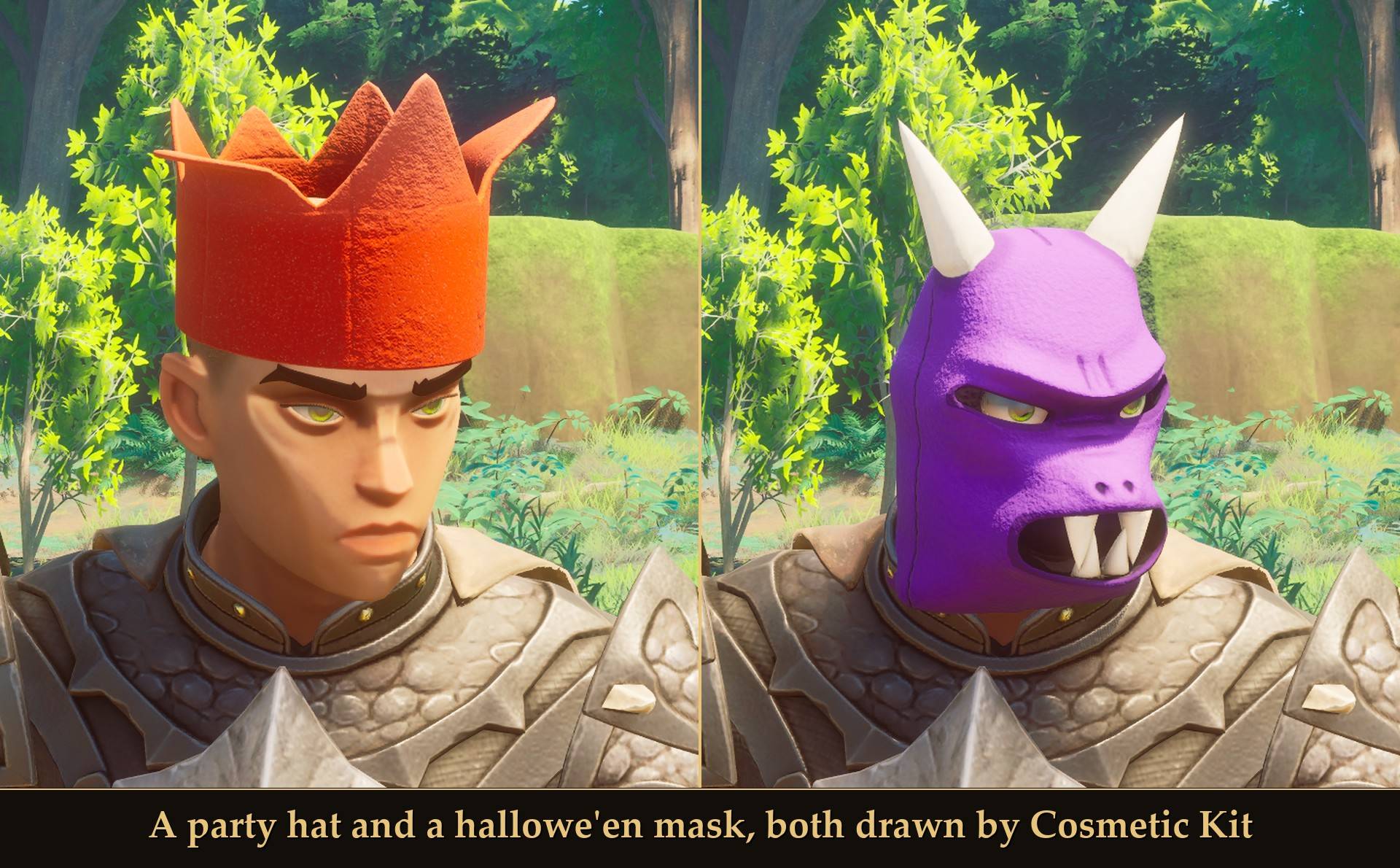
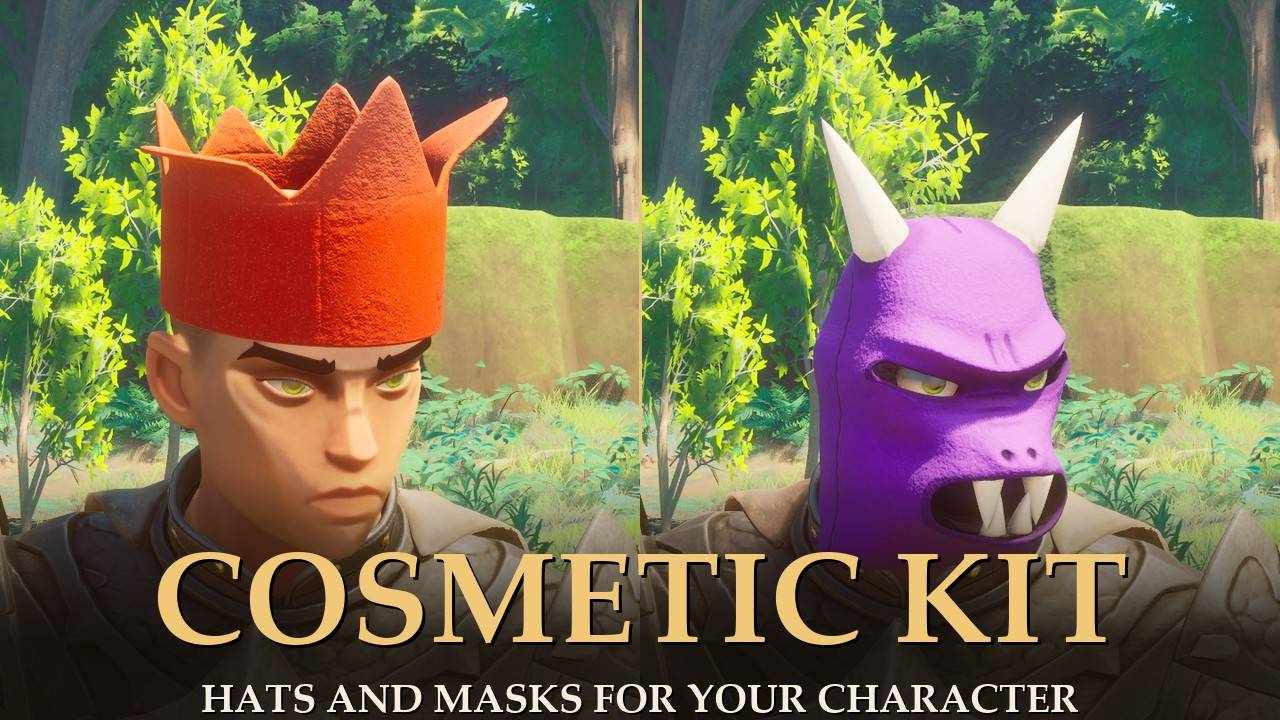
<small>A party hat and a hallowe'en mask, both drawn by Cosmetic Kit</small>
My Party Hats and Hallowe'en Masks each needed a script to put the model on your head. I pulled that script out into one mod, so the hats and masks are now just packs, and anyone can make a pack without writing Lua.
A pack is a mod folder with a cosmetics.json that says: "while item X is worn, show mesh Y on bone Z with material M". Cosmetic Kit reads every pack it finds and does the rest.
What it does
- Finds every pack: at start it looks through your UE4SS Mods folder and loads every mod folder that has a
cosmetics.json. If a pack's mod is switched off, the Kit skips it and says so in report.txt.
- Wear the item, see the look: put on the item and the pack's hat or mask shows on your head. The item's own worn model is hidden, so you see one hat, not two. Take the item off and your normal head comes back.
- Hair and eyebrows: each pack picks what to hide. Party Hats keeps your hair and fits the hat to your hairstyle. Hallowe'en Masks hides your eyebrows so they don't poke through.
- Fit sliders: Up, Forward, Side, Tilt and Size move the hat or mask on your head while you watch, if it sits a bit off on your character.
- One switch for everything: Show cosmetics off takes every cosmetic off, and on puts them back.
- A plain report: every start writes
report.txt in the CosmeticKit folder. It lists each pack, each cosmetic, and every problem with the file, the field and how to fix it.
- Your save is left alone: the Kit never adds or removes items. The items themselves come from the pack mods (through RuneSchema).
Mods that use it
- Party Hats 2.0.0 and newer: nine party hats (link at the bottom of this page).
- Hallowe'en Masks 2.0.0 and newer: six hallowe'en masks.
Both of those need RuneSchema 0.8.0 or newer, and Cosmetic Kit itself doesn't. If you're updating either of them from 1.x, install Cosmetic Kit first, then the update. Their pages say which old folder to delete.
Settings
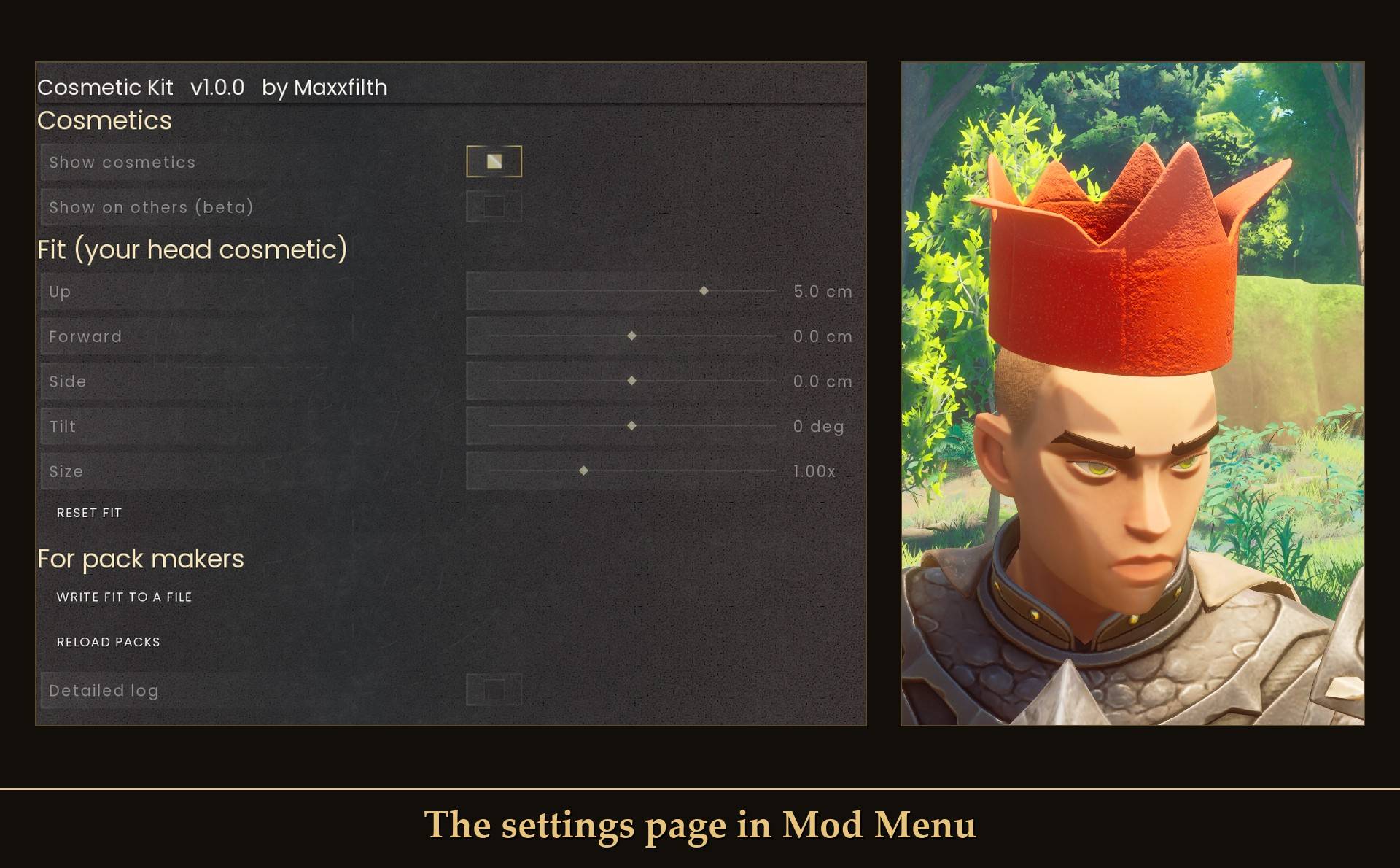
<small>The settings page in Mod Menu</small>
All live in Mod Menu (Esc > MODS > Cosmetic Kit). The switches and sliders are also in config.txt in the CosmeticKit folder. The four buttons are only in Mod Menu.
- Show cosmetics (Enabled): on. Off takes every cosmetic off until you switch it back on.
- Show on others (beta) (ShowOnOthers): off. Experimental, and I haven't tested it in co-op. It draws cosmetics on other players using the packs you have installed.
- Up (FitUp): 0 cm, from -10 to 10 in 0.5 steps. Moves your hat or mask up or down your head.
- Forward (FitForward): 0 cm, from -10 to 10. Moves it toward your face, or back.
- Side (FitSide): 0 cm, from -10 to 10. Moves it left or right.
- Tilt (FitTilt): 0 degrees, from -45 to 45. Leans it back, or forward.
- Size (FitScale): 1.0x, from 0.5 to 2. Makes it bigger or smaller.
- Reset fit (button): puts it back where the pack made it.
- Write fit to a file (button): for pack makers, see below.
- Reload packs (button): reads every pack again and redraws, no restart.
- Detailed log (Verbose): off. On logs every cosmetic put on or taken off in UE4SS.log.
The fit sliders work on whatever you have on your head, and the same numbers apply to every hat and mask you wear. 0 (and 1.0x for Size) means "as the pack made it".
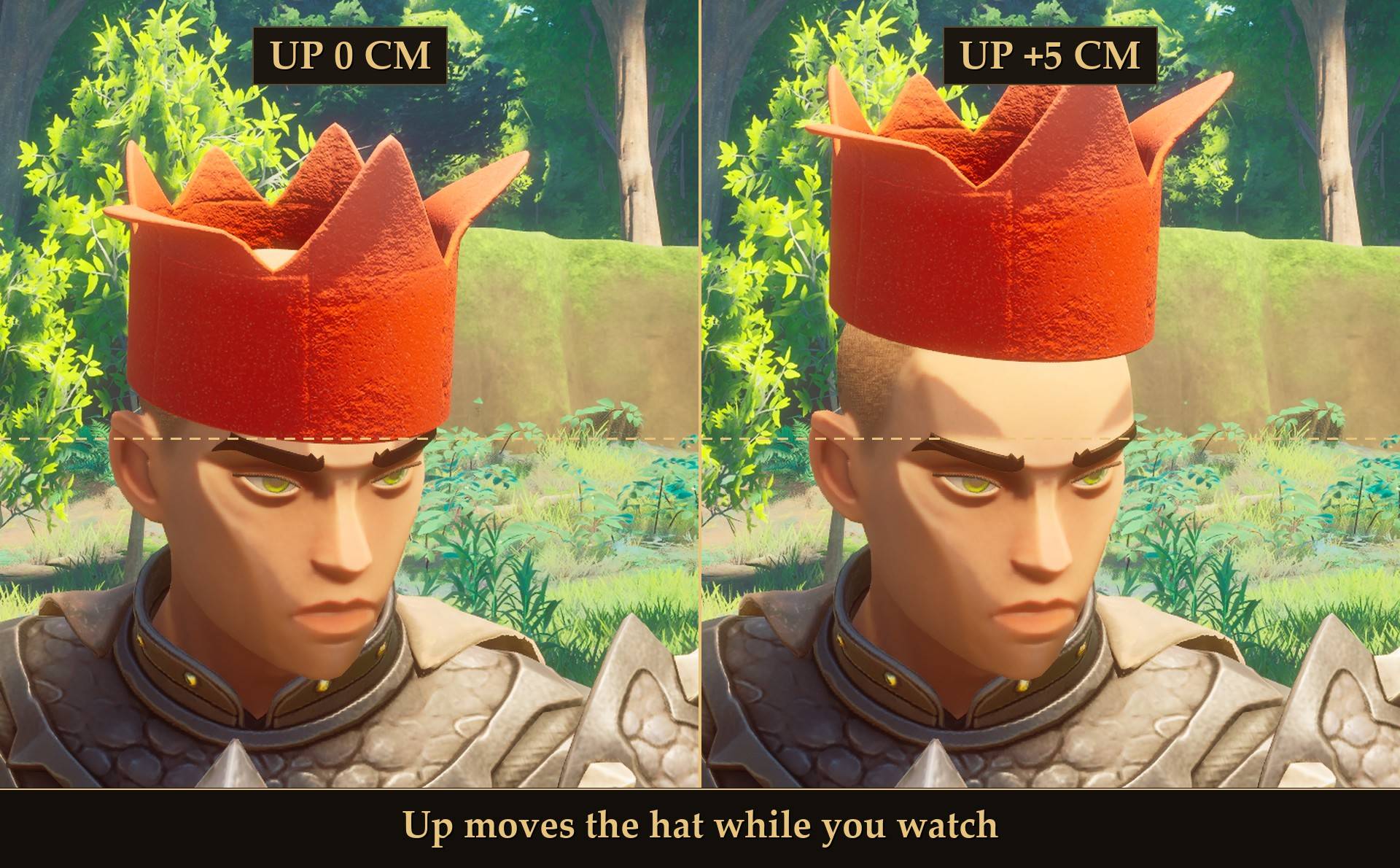
<small>Up moves the hat while you watch</small>
For pack makers
A pack has three parts: your item (made with RuneSchema, link at the bottom of this page), a pak with your mesh and textures, and one cosmetics.json next to your mod. No Lua.
- Fit it in game: wear your item, move the fit sliders until it sits right, then press Write fit to a file. The Kit saves
fit-<pack>-<cosmetic>.json in the CosmeticKit folder with the location, rotation and scale ready to paste into your pack.
- Edit without restarting: change your pack, press Reload packs, and check
report.txt.
- Materials: a material cooked in your own Unreal project shows black in this game, so a pack sets its textures on one of the game's materials. Use
@FeltMaterial (the Chef's Hat's) or @CharacterMaterial (the Steel helmet's). All the game's armor shares one base material, so metal, leather or cloth comes from your ORM texture, not from which one you pick.
- Many colors from one entry: Party Hats makes all nine hats from one entry with variants. Its
cosmetics.json, and the Hallowe'en Masks one, are in their mod folders and make good examples.
- Recolor an item you already have: a pack can also swap textures on an item's own worn model, with no new mesh (type
retexture). In my tests a red Party Hat texture on the Chef's Hat worked, from a fresh launch. No published pack uses it yet. A pack like that doesn't need RuneSchema, because the item already exists.
- Where the files go:
cosmetics.json in your mod's folder under ue4ss/Mods/. If your pack adds items through RuneSchema, put the pak next to them in RuneSchema/mods/<YourMod>/paks/<PakFolder>/, which is what Party Hats and Hallowe'en Masks do from 2.0.0. A pak in Content/Paks/~mods/<YourMod>/ works too: that's what 1.x of both used, and what the Starter Kit's install does.
- The full reference is
README.md in the CosmeticKit folder: every field, the material names, the report messages and a troubleshooting table.
- Want a hat from Blender to the game? The 3D Starter Kit for Cosmetic Kit (link at the bottom of this page) makes the pak and the pack for you. It is a separate download with a Blender add-on, hat and mask templates, and
kit.py (doctor, new, check, build, install, uninstall, zip). You need Unreal Engine 5.6, Blender, retoc and Python for it. MIT license, like the Kit.
- Check before you start the game:
python kit.py check <pack folder> runs the Kit's own reader on your pack and prints the same errors report.txt would.
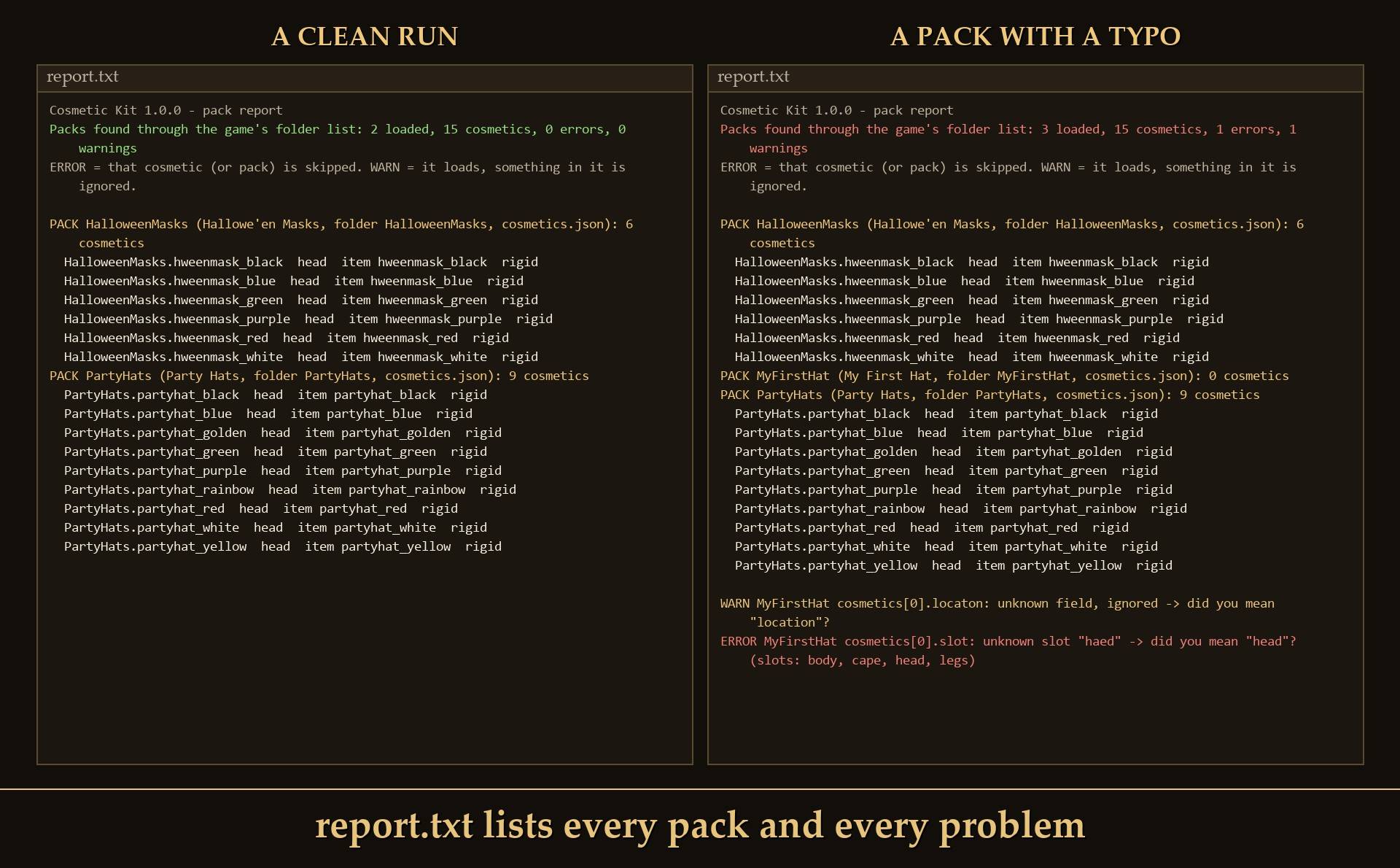
<small>report.txt for a clean run (left) and for a pack with a typo (right)</small>
Install
- Install UE4SS for RSDragonwilds (free, from the UE4SS for RSDragonwilds page on Nexus Mods).
- Drop the
CosmeticKit folder into RSDragonwilds/Binaries/Win64/ue4ss/Mods/
- Optional: install Mod Menu for the settings page.
- Install the packs you want, for example Party Hats or Hallowe'en Masks.
On Game Pass: use the BE version of UE4SS with the SCO signature, the normal build does not load there. Game Pass also installs the game under Binaries/WinGDK/ instead of Binaries/Win64/, so the CosmeticKit folder goes in RSDragonwilds/Binaries/WinGDK/ue4ss/Mods/. If you install with Vortex, check that is where it ended up.
To uninstall, delete the CosmeticKit folder. The pack mods' hats and masks won't show without it.
Good to know
- It doesn't add anything by itself. With no packs installed, nothing changes in game.
- Two hats at once? An old 1.x copy of Party Hats or Hallowe'en Masks is still drawing its own. Update it to 2.0.0.
- Not sure it's running? UE4SS.log shows
[CosmeticKit] v1.0.0 loaded (loop running), and a line like Packs found through the game's folder list: 2 loaded, 15 cosmetics, 0 errors, 0 warnings with both of my packs installed.
- Controller. I tested the settings page with a virtual gamepad: it opens, the switches and Fit sliders work, and so do the three buttons. The buttons were pressed through Mod Menu's own pad selection, because the game ignores the pad's A button on menu buttons while it runs in the background. I haven't tried a physical pad in my hands.
- Two known limits, from reading my own code: while you're mounted, a cosmetic keeps showing, and a gear change you make while mounted shows up when you get off. A UE4SS hot reload (Ctrl+R) can leave a duplicate on some cosmetics that borrow a game mesh.
- Co-op isn't tested. I've only played it in single player so far.
- License: MIT. Build on it, ship packs for it, fork it.
Tested on RuneScape: Dragonwilds 1.0.1 (Steam) with UE4SS 3.0.1 latest (f6d5f942) and RuneSchema 0.8.0.0, single player, on a test character, with Cosmetic Kit 1.0.0 and the Party Hats and Hallowe'en Masks 2.0.0 packs, all three installed from their release zips: both packs loading (15 cosmetics, 0 errors), wearing a party hat (one hat, the worn helmet hidden, hair kept), swapping to a mask (eyebrows hidden), taking it off (everything back), the Fit values moving the hat, Reset fit, Write fit to a file, and Show cosmetics off and on. I set those Fit and Show values through Mod Menu's settings with a test script, not by clicking with a mouse. As a control, with the Kit removed the packs print their "NOT installed" warning and nothing is drawn. Earlier runs, on RuneSchema 0.7.x: Reload packs with a hat on, a pack skipped when its mod is switched off, a retexture of the Chef's Hat, a hat built with the 3D Starter Kit, and the settings page with a virtual gamepad. No Lua errors in any of them. Not tested yet: co-op and Show on others (beta), skinned meshes, a physical controller, Game Pass, installing through Vortex.
Links