Configurable Stacks

Multiplies every item's stack size while keeping the game's own stack tiers in order, with optional weight scaling.
1-bigger-stacks.jpg

1-bigger-stacks.jpg

2-mod-menu.jpg

2-mod-menu.jpg

Description

Bigger stacks without flattening the game to one number.

Scales every item's stack size by a multiplier you choose, so the vanilla tiers keep their order. Optional weight scaling too. One Lua file, no pak, and it will not fight the stack mod you already have.


COMPATIBILITY
✔ Single player  ·  ? Co-op guest
✔ Dedicated server  ·  ✔ Controller
Install on your PC, or on the server for a dedicated server. ? = not tested yet.


Why you will want it

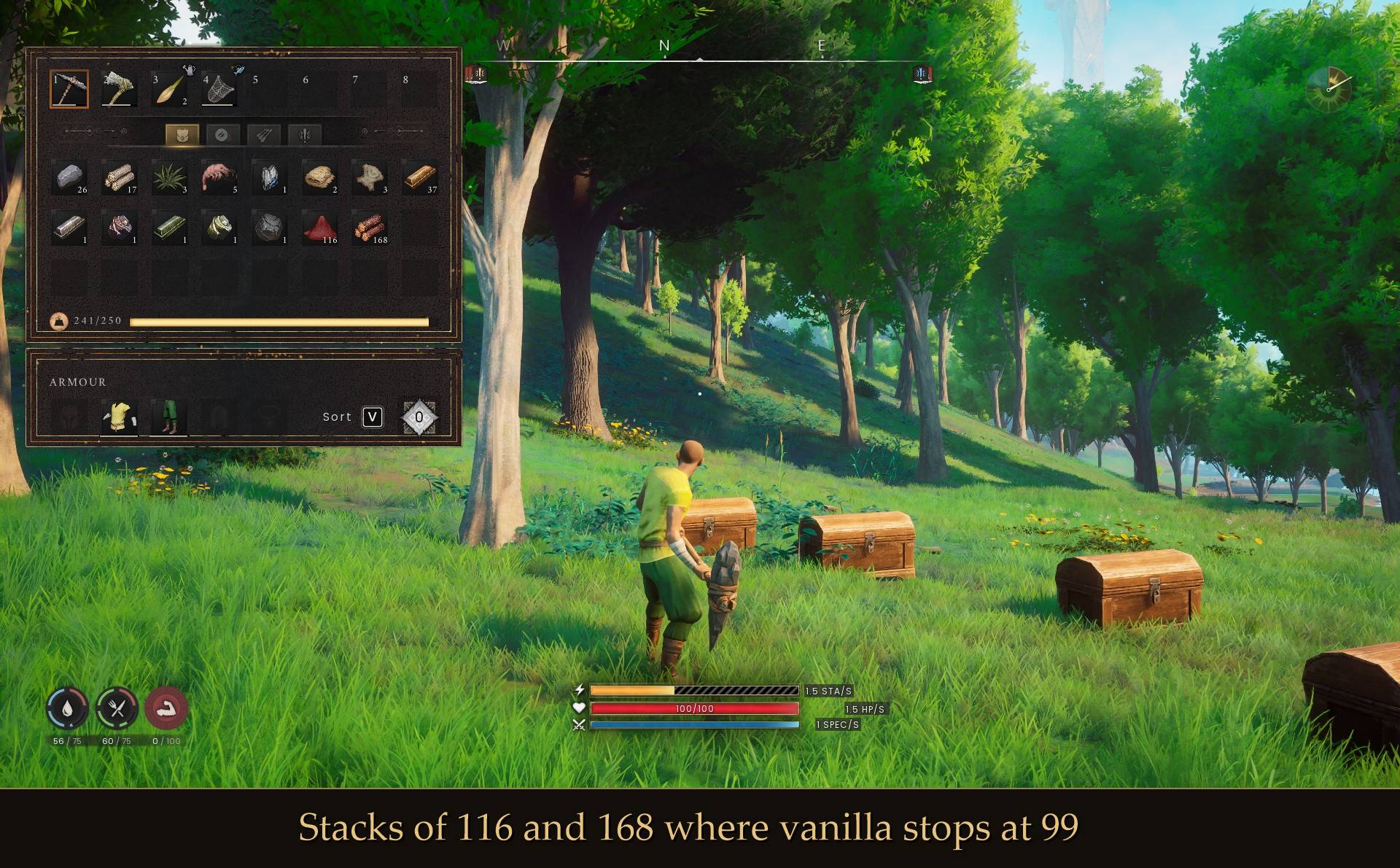
  • Your stacks stay sensible. Most mods set everything to one huge number, so a log and a rune both stack to 999999 and inventory management stops meaning anything. This multiplies instead, so the game's own tiers keep their relationship:
vanilla   1    10    20    25    50    99
x5        1    50   100   125   250   495
x10       1   100   200   250   500   990
x25       1   250   500   625  1250  2475
  • Every item, including the ones other mods miss. 718 items across all seven content mounts. 282 of them live in the game's plugin folders (Umbral Sands, Dowdun Reach, Fishing, Agility, Scorned Wilderness), which a mod that only covers the base game silently skips.
  • Gear stays gear. Tools, weapons and armor are left unstackable by default. Turn that off if you want to stack them.
  • It will not fight your other mods. It only ever raises a stack size, never lowers one. If another stack mod or pak already set an item higher, this leaves it exactly as it found it.
  • Lighter bags, if you want them. A separate weight multiplier from 1x down to 0x. Halving it took a full bag from 241/250 to 129/250.
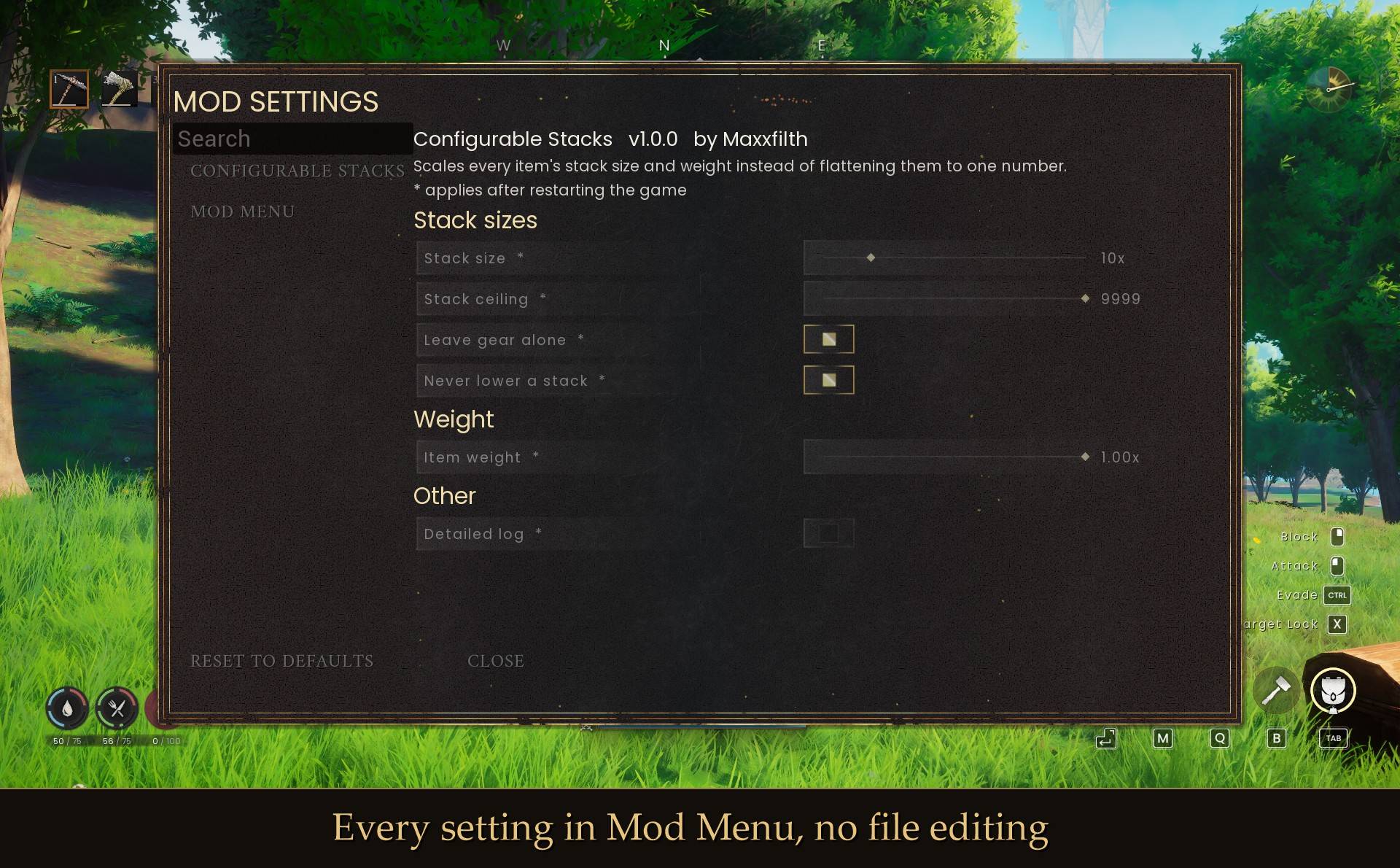
  • Settings in the pause menu. Install Mod Menu and everything is there with sliders and switches. No file editing needed.

Install

  1. Install UE4SS for RSDragonwilds (free, from the UE4SS for RSDragonwilds page on Nexus Mods)
  2. Drop the ConfigurableStacks folder into RSDragonwilds/Binaries/Win64/ue4ss/Mods/
  3. Launch the game and load in. Stacks are applied once, as the world loads.

To uninstall, delete the ConfigurableStacks folder. Stack sizes go back to vanilla on the next launch.

Settings

Install Mod Menu and press Esc, or edit config.txt in the mod folder with the game closed. Either way the change takes effect the next time you launch.

Ten times the stacks, weight untouched (the default):

StackMultiplier = 10
WeightMultiplier = 1.0

Modest stacks, half weight:

StackMultiplier = 3
WeightMultiplier = 0.5

Carry anything, stacks untouched:

StackMultiplier = 1
WeightMultiplier = 0

Stack your spare tools and armor too:
SkipUnstackable = false

Good to know

  • It applies once, as the world loads. Changing a setting takes effect on your next launch, not straight away. Mod Menu marks every setting with a star for that reason.
  • Nothing is written to your save or your game files. The change lives in memory for the session. Remove the mod and everything is vanilla again.
  • Stacks you already made stay made. If you drop the multiplier back down, a stack of 900 you already have is not destroyed, and the game will not let you build new ones past the new limit.
  • The ceiling is there on purpose. After multiplying, nothing goes above StackCap (9999 by default), so a big multiplier cannot produce absurd numbers.
  • Running another stack mod? Fine. This one steps aside wherever the other is already higher, and says how many it left alone in UE4SS.log.
  • Solo or host. It changes item data on your machine. In co-op, the host's copy is the one that decides.
  • Controller: the CONFIGURABLE STACKS pause menu button opens the panel with A, and holding B closes it. To change the settings with a controller, use pause menu > MODS (Mod Menu).
  • Not sure it is running? UE4SS.log has a line starting with done: listing how many items it read and changed.

Configurable Stacks Team

profile avatar
  • 3
    Followers
  • 68
    Projects
  • 26.8K
    Downloads

More from maxxfilthView all

  • First Person POV project image

    First Person POV

    Play from your character's eyes. The camera follows your head and your body turns with it. Bows and spells hit the crosshair, your own head and hats stay out of view, and riding, resting, fishing and death go third person on their own.

    • 64
    • November 13, 2026
  • Collection Log project image

    Collection Log

    OSRS-style collection log: 4,039 items, creatures, recipes, building pieces, spells and journal pages, with an overview, milestones, groups, dates and a message for every new find.

    • 772
    • November 13, 2026
  • Storage Search - Find Take and Store Any Item project image

    Storage Search - Find Take and Store Any Item

    Press Alt+F, type an item and see every chest that holds it, how many, how far and which way. New in 2.0: take 1, 10, a stack or all of it, or store your backpack into chests that already hold each item. Never goes over carry weight. Can be set look-only.

    • 741
    • November 13, 2026
  • Dual Wield project image

    Dual Wield

    Press a second one-handed melee weapon on the hotbar and it goes in your left hand. Your left arm swings it and it adds 50% damage. Solo or host; guests come later.

    • 115
    • November 12, 2026
  • First Person POV project image

    First Person POV

    Play from your character's eyes. The camera follows your head and your body turns with it. Bows and spells hit the crosshair, your own head and hats stay out of view, and riding, resting, fishing and death go third person on their own.

    • 64
    • November 13, 2026
  • Collection Log project image

    Collection Log

    OSRS-style collection log: 4,039 items, creatures, recipes, building pieces, spells and journal pages, with an overview, milestones, groups, dates and a message for every new find.

    • 772
    • November 13, 2026
  • Storage Search - Find Take and Store Any Item project image

    Storage Search - Find Take and Store Any Item

    Press Alt+F, type an item and see every chest that holds it, how many, how far and which way. New in 2.0: take 1, 10, a stack or all of it, or store your backpack into chests that already hold each item. Never goes over carry weight. Can be set look-only.

    • 741
    • November 13, 2026
  • Dual Wield project image

    Dual Wield

    Press a second one-handed melee weapon on the hotbar and it goes in your left hand. Your left arm swings it and it adds 50% damage. Solo or host; guests come later.

    • 115
    • November 12, 2026